Week 10 Laboratory Exercises
Objectives
- practice on linked lists
Activities To Be Completed
This lab is worth a total of 1.4 marks and consists of the following activities:
| Type | Activities | Weight |
|---|---|---|
| One-dot (●◌◌) |
list_increasing |
15% |
| Two-dot (●●◌) |
list_insert_tail list_contains |
15% |
| Three-dot (●●●) |
list_reverse lock_picking |
Not worth marks |
| Additional |
debug_product debug_insert_second_last |
Not worth marks |
| Group presentation |
presentation10 |
70% |
Lab exercises are capped at 15 marks. For more details, see the course outline.
Exercise
(●◌◌)
:
Check whether a Linked List is in Increasing Order
Download list_increasing.c here
Or, copy these file(s) to your CSE account using the following command:
1091 fetch-activity list_increasing
Your task is to add code to this function in list_increasing.c:
int increasing(struct node *head) {

    // PUT YOUR CODE HERE (change the next line!)
    return 42;

}
increasing is given one argument, head which is the pointer to the first
node in a linked list.
Add code to increasing so that its returns 1 if the list is in increasing
order - the value of each list element is larger than the element before.
For example if the linked list contains these 8 elements:
1, 7, 8, 9, 13, 19, 21, 42
increasing should return 1 because it is increasing order
Testing
list_increasing.c also contains a main function which allows you to test
your increasing function.
This main function:
- converts the first set of read integers to a linked list,
- assigns a pointer to the first node in the linked list to
head, - calls
list_increasing(head)and - prints the result.
Do not change this main function. If you want to change it, you have misread
the question.
Your list_increasing function will be called directly in marking. The main
function is only to let you test your list_increasing function
Examples
dcc list_increasing.c -o list_increasing
./list_increasing
How many numbers in initial list?: 9
1 2 4 8 16 32 64 128 256
1
./list_increasing
How many numbers in initial list?: 6
2 4 6 5 8 9
0
./list_increasing
How many numbers in initial list?: 6
13 15 17 17 18 19
0
./list_increasing
How many numbers in initial list?: 2
2 4
1
./list_increasing
How many numbers in initial list?: 1
42
1
./list_increasing
How many numbers in initial list?: 0
1
Assumptions/Restrictions/Clarifications
increasingshould return a single integerincreasingshould not change the linked list it is given. Your function should not change the next or data fields of list nodesincreasingshould not use arraysincreasingshould not callmallocincreasingshould not call scanf (orgetcharorfgets)- You can assume the linked list only contains positive integers
increasingshould not print anything. It should not callprintf- Do not change the supplied
mainfunction. It will not be tested or marked.
1091 style list_increasing.c
When you think your program is working,
you can use autotest
to run some simple automated tests:
1091 autotest list_increasing
When you are finished working on this exercise,
you must
submit your work by running give:
give dp1091 lab10_list_increasing list_increasing.c
You must run give
before Monday 30 March 09:00
to obtain the marks for this lab exercise.
Note that this is an individual exercise,
the work you submit with give must be entirely your own.
Exercise
(●●◌)
:
Insert an element at the end of a Linked List
Download list_insert_tail.c here
Or, copy these file(s) to your CSE account using the following command:
1091 fetch-activity list_insert_tail
Your task is to add code to this function in list_insert_tail.c:
// Insert a new node containing value at the end of the linked list.
// Parameters:
//      `int value`         : The value to insert.
//      `struct list *list` : a struct * containing the head pointer of the
//      linked list.
void insert_tail(int value, struct list *list) {
    // PUT YOUR CODE HERE
}
insert_tail is given two arguments:
valueis an intlistis the pointer to astruct listwhich contains- the
head(a pointer to the first node) of the linked list
Add code to insert_tail so that it creates a new list node (using malloc)
containing value and places it at the end of the list.
insert_tail should return nothing.
For example if value is 12 and the linked list contains these 3 elements:
16, 7, 8
insert_tail should modify the linked list so that it now has these elements:
16, 7, 8, 12
Testing
list_insert_tail.c also contains a main function which allows you to test
your insert_tail function.
This main function:
- Asks for the size of the initial linked list
- converts the first set of scanned inputs to a linked list
- stores the first node of the linked list in a
struct list. - reads a single integer from standard input and assigns it to
value - calls
insert_tail(value, list) - prints the result.
Do not change this main function. If you want to change it, you have misread the question.
Your insert_tail function will be called directly in marking. The main
function is only to let you test your insert_tail function
Examples
dcc list_insert_tail.c -o list_insert_tail
./list_insert_tail
How many numbers in initial list?: 3
16 7 8
Enter value to insert: 12
[16, 7, 8, 12]
./list_insert_tail
How many numbers in initial list?: 1
16
Enter value to insert: 42
[16, 42]
./list_insert_tail
How many numbers in initial list?: 0
Enter value to insert: 2
[2]
Assumptions/Restrictions/Clarifications
insert_tailshould not use arraysinsert_tailshould not call scanf (orgetcharorfgets)insert_tailshould not print anything. It should not callprintf- Do not change the supplied
mainfunction. It will not be tested or marked
1091 style list_insert_tail.c
When you think your program is working,
you can use autotest
to run some simple automated tests:
1091 autotest list_insert_tail
When you are finished working on this exercise,
you must
submit your work by running give:
give dp1091 lab10_list_insert_tail list_insert_tail.c
You must run give
before Monday 30 March 09:00
to obtain the marks for this lab exercise.
Note that this is an individual exercise,
the work you submit with give must be entirely your own.
Exercise
(●●◌)
:
Find an element in a Linked List
Download list_contains.c here
Or, copy these file(s) to your CSE account using the following command:
1091 fetch-activity list_contains
Your task is to add code to this function in list_contains.c:
// Return 1 if value occurs in linked list, 0 otherwise
int contains(char *value, struct node *head) {

    // PUT YOUR CODE HERE (change the next line!)
    return 42;
}
contains is given two arguments, a string value and head which is the
pointer to the first node in a linked list.
Add code to contains so that it returns 1 if value occurs in the linked
list and otherwise it returns 0.
For example if the linked list contains these 7 elements:
"mozzarella" "pepperoni" "basil" "ham" "tomato bacon" "cheesy-crust" "bocconcini"
and contains is called with value of "mozzarella",
contains should return 1.
Testing
list_contains.c also contains a main function which allows you to test your
contains function.
This main function:
- Asks for how many strings will be in our list,
- reads in and converts that n many strings to a linked list,
- assigns a pointer to the first node in the linked list to
head, - reads another single string from standard input and assigns it to
value. - calls
list_contains(value, head)and - prints the result.
Do not change this function. If you want to change it, you have misread the question.
Your list_contains function will be called directly in marking. The main
function is only to let you test your list_contains function
Examples
dcc list_contains.c -o list_contains
./list_contains
How many strings in initial list?: 4
pepperoni
ham
basil
capsicum
Enter word to check contained: basil
1
./list_contains
How many strings in initial list?: 4
pepperoni
ham
basil
capsicum
Enter word to check contained: mozzarella
0
./list_contains
How many strings in initial list?: 4
chicken
mushroom
mushroom
pizza-sauce
Enter word to check contained: mushroom
1
./list_contains
How many strings in initial list?: 4
tomato
bacon
capsicum
mushroom
Enter word to check contained: pepperoni
0
./list_contains
How many strings in initial list?: 0
Enter word to check contained: tomato
0
Assumptions/Restrictions/Clarifications
- String matching is case sensitive.
"Tomato"does not match"tomato". No strings will have thespacecharacter in them containsshould return a single integer.containsshould not change the linked list it is given. Your function should not change the next or data fields of list nodes.containsshould not use arrays.containsshould not call malloc.containsshould not call scanf (or getchar or fgets).containsshould not print anything. It should not call printf.- Do not change the supplied
mainfunction. It will not be tested or marked.
1091 style list_contains.c
When you think your program is working,
you can use autotest
to run some simple automated tests:
1091 autotest list_contains
When you are finished working on this exercise,
you must
submit your work by running give:
give dp1091 lab10_list_contains list_contains.c
You must run give
before Monday 30 March 09:00
to obtain the marks for this lab exercise.
Note that this is an individual exercise,
the work you submit with give must be entirely your own.
Exercise
(●●●)
:
Reverse a Linked List
Download list_reverse.c here
Or, copy these file(s) to your CSE account using the following command:
1091 fetch-activity list_reverse
Your task is to add code to this function in list_reverse.c:
//
// Place the list pointed to by head into reverse order.
// The head of the list is returned.
//
struct node *reverse(struct node *head) {

    // PUT YOUR CODE HERE (change the next line!)
    return NULL;

}
Note list_reverse.c uses the following familiar data type:
struct node {
    struct node *next;
    int          data;
};
list_reverse is given one argument, head which is the pointer to the first
node in the linked list.
Add code to reverse which rearranges the list to be in reverse order.
reverse should return a pointer to the new list.
reverse must rearrange the list by changing the next fields of nodes.
reverse must not change the data fields of nodes.
For example if the linked list contains these 8 elements:
16, 7, 8, 12, 13, 19, 21, 12
reverse should return a pointer to a list with these elements:
12, 21, 19, 13, 12, 8, 7, 16
Testing
list_reverse.c also contains a main function which allows you to test your
list_reverse function.
This main function:
- takes in the size of the linked list,
- converts the input numbers to a linked list,
- assigns a pointer to the first node in the linked list to
head, - calls
reverse(head)and - prints the result.
Do not change this function. If you want to change it, you have misread the question.
Your list_reverse function will be called directly in marking. The main
function is only to let you test your list_reverse function
Examples
dcc list_reverse.c -o list_reverse
./list_reverse
How many numbers in list?: 8
16 7 8 12 13 19 21 12
[12, 21, 19, 13, 12, 8, 7, 16]
./list_reverse
How many numbers in list?: 6
2 4 6 2 4 6
[6, 4, 2, 6, 4, 2]
./list_reverse 42
How many numbers in list?: 1
42
[42]
./list_reverse
How many numbers in list?: 0
[]
Assumptions/Restrictions/Clarifications
list_reverseshould not change the data fields of list nodeslist_reverseshould not use arrayslist_reverseshould not callmalloclist_reverseshould not call scanf (orgetcharorfgets)list_reverseshould not print anything. It should not callprintf- Do not change the supplied
mainfunction. It will not be tested or marked
1091 style list_reverse.c
When you think your program is working,
you can use autotest
to run some simple automated tests:
1091 autotest list_reverse
Exercise
(●●●)
:
Lock Picking
Download lock_picking.c here
Or, copy these file(s) to your CSE account using the following command:
1091 fetch-activity lock_picking
You have been provided with some starter code in lock_picking.c. In this activity you will complete the function pick_lock.
A mathematician has devised a way to break AES-256 encryption. In order to protect this secret they've hidden it in a drawer protected by a lock they believe is so hard to break that only they can solve it. The lock consists of two dials with numbers. To unlock the draw the dials must be rotated so that both dials have the same number at the top. This number at the top will be the solution. However, this must be done in the least number of moves possible otherwise the drawer does not unlock.
If there are multiple ways for the dials to reach the minimum number of moves:
- Dial 1 should have the least moves possible.
- The dial should prioritise rotating right over rotating left.
For example if there are 3 possible solutions including:
- Dial 1 (5 moves) Dial 2 (1 move)
- Dial 1 (4 moves) Dial 2 (2 moves)
- Dial 1 (1 move) Dial 2 (8 moves) The one that should be chosen as the solution is Dial 1 (4 moves) Dial 2 (2 moves). This is as 4 < 5 and even though the third option only has 1 move, the total moves (1 + 8) is greater than option 2 (4 + 2).
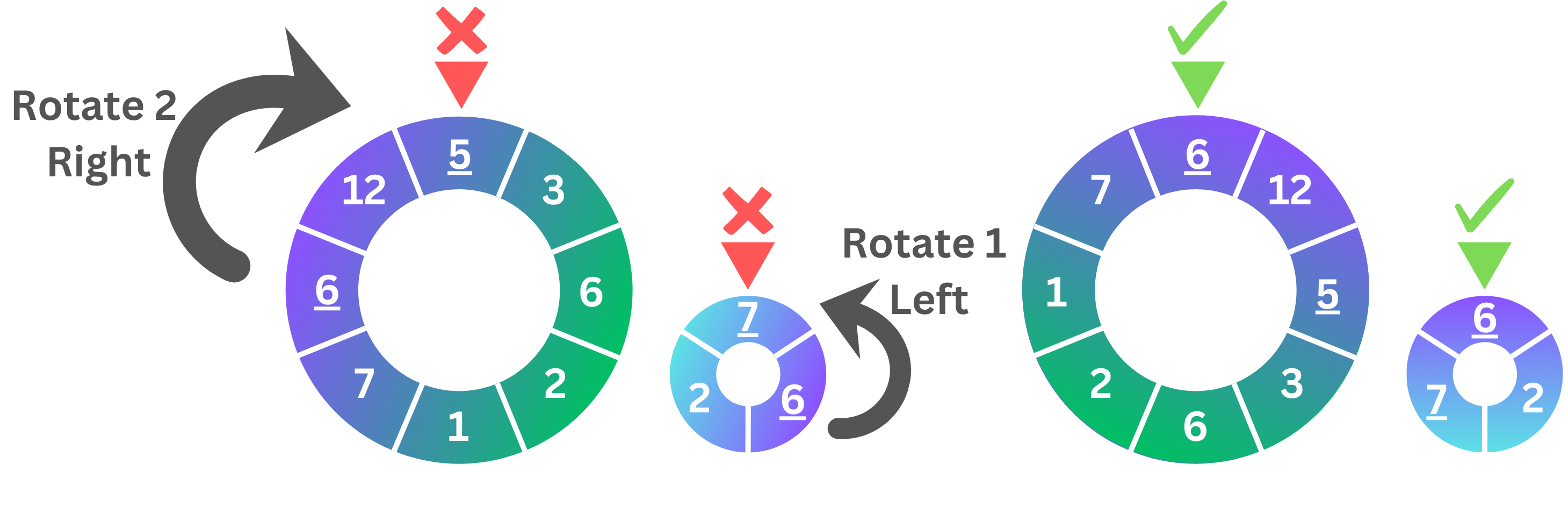
When entering the input for the dial, it starts at the top number and moves around the disk clockwise (moving to the right). For example if the input for the first dial was 5 3 6 2 1 7 6 12 and the second dial was 7 6 2 here is an example of how these disks would look like and how to solve them:
Examples
dcc lock_picking.c -o lock_picking
./lock_picking
How many numbers in the dial: 8
5 3 6 2 1 7 6 12
How many numbers in the dial: 3
7 6 2

Solution = 6
Dial 1: turn 2 step(s) to the right.
Dial 2: turn 1 step(s) to the left.
dcc lock_picking.c -o lock_picking
./lock_picking
How many numbers in the dial: 5
1 2 3 4 5
How many numbers in the dial: 6
5 4 3 2 1 6

Solution = 5
Dial 1: turn 1 step(s) to the right.
Dial 2: don't turn.
dcc lock_picking.c -o lock_picking
./lock_picking
How many numbers in the dial: 1
3
How many numbers in the dial: 1
5

Error: Lock is impossible to solve!
Assumptions/Restrictions/Clarifications
- Dials can have the same number multiple times.
- Both dials will always contain at least one number.
- The dial can be of any length.
1091 style lock_picking.c
When you think your program is working,
you can use autotest
to run some simple automated tests:
1091 autotest lock_picking
Exercise — individual:
(Not For Marks) Debugging - Product
Download debug_product.c here
Or, copy these file(s) to your CSE account using the following command:
1091 fetch-activity debug_product
Note that this exercise is not marked or worth marks!
Debugging Tips!
Some debugging tips for you:
- dcc output - as you run into issues, dcc will point you to where the errors are. Remember that dcc gives you the line number the issue is on, and will give some sort of explanation. Make sure you read everything dcc gives you. Sometimes we get “errors carried forward”, so find your first error, fix that, then recompile.
- print statements - sometimes it can be handy to see if the flow of your code puts you in the spot you expect it to be (ie. inside the right if statement, or going through a loop the correct amount of times). A quick way you can check this is by putting print statements in your code for testing purposes, like
"the value of x is %d and y is %d". This lets you check that you got against what you expected. - DPST1091 debugging guide
The Task
This exercise takes integers as command line arguments and calculates their cumulative product. However, if the number is 0 or not an integer, it is not added to the cumulative product of command line arguments. Currently it has some issues - it is your job to figure them out and fix the code.
Examples
dcc debug_product.c -o debug_product
./debug_product 0 1 2 3 4 5
Product: 120
./debug_product -5 1 -1 -2
Product: -10
./debug_product 100 these are my arguments -2
Product: -200
./debug_product these are my command line arguments
Product: 0
Assumptions/Restrictions/Clarifications
- You may find the
atoi()function in the C standard library (stdlib.h) useful. - You may assume that
argv[0]will always be the program name.
1091 style debug_product.c
When you think your program is working,
you can use autotest
to run some simple automated tests:
1091 autotest debug_product
Exercise — individual:
(Not For Marks) Debugging - List insert second last
Download debug_insert_second_last.c here
Or, copy these file(s) to your CSE account using the following command:
1091 fetch-activity debug_insert_second_last
Debugging Tips!
Some debugging tips for you:
- dcc output - as you run into issues, dcc will point you to where the errors are. Remember that dcc gives you the line number the issue is on, and will give some sort of explanation. Make sure you read everything dcc gives you. Sometimes we get “errors carried forward”, so find your first error, fix that, then recompile.
- print statements - sometimes it can be handy to see if the flow of your code puts you in the spot you expect it to be (ie. inside the right if statement, or going through a loop the correct amount of times). A quick way you can check this is by putting print statements in your code for testing purposes, like
"the value of x is %d and y is %d". This lets you check that you got against what you expected. - DPST1091 debugging guide
The Task
This exercise takes in the length of a linked list, followed by the elements of the list. Then it takes in a single value to be inserted as the second last node of the list previously created.
For example if the existing list is 1 -> 2 -> 3 -> X and a node with value 4 is being inserted, after insertion the list is as follows: 1 -> 2 -> 4 -> 3 -> X.
Note, the node containging the value 4 is inserted before the node containing the value 3 since the node containing the value 3 is at the tail (i.e the last node) of the list since it points at null.
Currently it has some issues when attempting to insert the value as the second last node in the list - it is your job to figure them out and fix the code.
Examples
dcc debug_insert_second_last.c -o debug_insert_second_last
./debug_insert_second_last
How many numbers in initial list?: 3
1 2 3
Enter the value to insert: 4
[1, 2, 4, 3]
./debug_insert_second_last
How many numbers in initial list?: 6
5 2 9 10 4 7
Enter the value to insert: 0
[5, 2, 9, 10, 4, 0, 7]
./debug_insert_second_last
How many numbers in initial list?: 1
23
Enter the value to insert: 5
[5, 23]
./debug_insert_second_last
How many numbers in initial list?: 0
Enter the value to insert: 4
[4]
Assumptions/Restrictions/Clarifications
- You do not need to edit the
main(),array_to_list(),print_list()orget_list_length()functions.
1091 style debug_insert_second_last.c
When you think your program is working,
you can use autotest
to run some simple automated tests:
1091 autotest debug_insert_second_last
In-Class Exercise — group:
Presentation
This week during lab class, you will be divided into small groups and assigned an activity from this week to give a short presentation on (2–5 minutes per group).
There is no give or autotest for the group presentation.
Submission
give.
You can run give multiple times.
Only your last submission will be marked.
Don't submit any exercises you haven't attempted.
If you are working at home, you may find it more convenient to upload your work via give's web interface.
Remember you have until Week 11 Monday 9:00am to submit your work.
You cannot obtain marks by e-mailing your code to tutors or lecturers.
You check the files you have submitted here.
Automarking will be run by the lecturer several days after the submission deadline,
using test cases different to those autotest runs for you.
(Hint: do your own testing as well as running autotest.)
After automarking is run by the lecturer you can view your results here. The resulting mark will also be available via give's web interface.
Lab Marks
When all components of a lab are automarked you should be able to view the the marks via give's web interface or by running this command on a CSE machine:
1091 classrun -sturec
Voice of the Student
✨ Help Us Improve Your Learning Experience ✨
Your feedback helps us understand what’s working well and what might need improvement.
This quick, anonymous check-in has just two questions and takes less than a minute to complete.
Please answer honestly — your input makes a real difference.