Week 06 Laboratory Exercises
Objectives
- working with strings
- simple pointers
Activities To Be Completed
This lab is worth a total of 1.4 marks and consists of the following activities:
| Type | Activities | Weight |
|---|---|---|
| One-dot (●◌◌) |
string_match print_address debug_increment |
15% |
| Two-dot (●●◌) |
array_clamping_max prep_checkerboard |
15% |
| Three-dot (●●●) |
remove_duplicates_function largest_z_sum |
Not worth marks |
| Group presentation |
presentation6 |
70% |
Lab exercises are capped at 15 marks. For more details, see the course outline.
Exercise
(●◌◌)
:
String Match
Your job is to write a program called string_match.c which lets us count the
number of times we see our "search term" in a list of strings.
TASK 1 Scan in the "search term"
TASK 2: Scan in strings from standard input until Ctrl-D is pressed.
TASK 3: Count the number of times the "search term" appear in the input.
Examples
dcc string_match.c -o string_match
./string_match
Enter the search term: same
Enter the list of strings:
same
sand
same
send
shade
same
shadow

There was 3 occurrence(s) of the search term in the input.
./string_match
Enter the search term: An ostrich's eye is bigger than its brain.
Enter the list of strings:
That is a cool fact.
I never knew that!
An ostrich's eye is bigger than its brain.
ostrich?
Why the random facts?

There was 1 occurrence(s) of the search term in the input.
./string_match
Enter the search term: 42 is the meaning of life, the universe, and everything
Enter the list of strings:
The ascii for * is 42
42 is the meaning of life, the universe, and everything!!!
42 = everything

There was 0 occurrence(s) of the search term in the input.
Assumptions/Restrictions/Clarifications
- You can assume that each string will be no longer than 128 characters long
- You may find the
strcmp()function useful
1091 style string_match.c
When you think your program is working,
you can use autotest
to run some simple automated tests:
1091 autotest string_match
When you are finished working on this exercise,
you must
submit your work by running give:
give dp1091 lab06_string_match string_match.c
You must run give
before Monday 02 March 09:00
to obtain the marks for this lab exercise.
Note that this is an individual exercise,
the work you submit with give must be entirely your own.
Exercise
(●◌◌)
:
Print Address
Download print_address.c here
Or, copy these file(s) to your CSE account using the following command:
1091 fetch-activity print_addressIn this activity, you will complete the C program
print_address.c
which attempts to print a memory address and value at that address, using pointers.
In main, you are provided with a variable number of type int and a supposed pointer to number called number_pointer.
Your main should do the following;
- Correctly initialise the pointer
number_pointerto point to the address ofnumber. In the provided code, the pointer is declared incorrectly, you will need to fix this before you can initialise it. - Print the memory address stored in
number_pointer. - Call the function
print_at_addressand pass the memory address stored innumber_pointerto it.
The print_at_address will need to be implemented by you and it should;
- Print the memory address passed to it.
- Print the value at that memory address.
You must not change the function signature of print_at_address.
Examples
dcc print_address.c -o print_address
./print_address
Passing the memory address 0x16b44b028 to the function
The memory address passed to this function is 0x16b44b028
The value at the memory address is 42
Assumptions/Restrictions/Clarifications
- You must not change the function signature of
print_at_address. - You must use the function
print_at_addressto print the second and third lines of the output.
1091 style print_address.c
When you think your program is working,
you can use autotest
to run some simple automated tests:
1091 autotest print_address
When you are finished working on this exercise,
you and your lab partner must both
submit your work by running give:
give dp1091 lab06_print_address print_address.c
Note, even though this is a pair exercise,
you both must run give from your own account
before Monday 02 March 09:00
to obtain the marks for this lab exercise.
Exercise
(●◌◌)
:
Debugging - increment
Download debug_increment.c here
Or, copy these file(s) to your CSE account using the following command:
1091 fetch-activity debug_increment
Debugging Tips!
Some debugging tips for you:
- dcc output - as you run into issues, dcc will point you to where the errors are. Remember that dcc gives you the line number the issue is on, and will give some sort of explanation. Make sure you read everything dcc gives you. Sometimes we get “errors carried forward”, so find your first error, fix that, then recompile.
- print statements - sometimes it can be handy to see if the flow of your code puts you in the spot you expect it to be (ie. inside the right if statement, or going through a loop the correct amount of times). A quick way you can check this is by putting print statements in your code for testing purposes, like
"the value of x is %d and y is %d". This lets you check that you got against what you expected. - DPST1091 debugging guide
The Task
This exercise takes in a number and intends to increment the value of the number using a function increment(), which takes a pointer to an integer as its parameter.
Currently it has some issues - it is your job to figure them out and fix the code.
Examples
dcc debug_increment.c -o debug_increment
./debug_increment
Please enter a number: 1
Before increment: 1
After increment: 2
./debug_increment
Please enter a number: -8
Before increment: -8
After increment: -7
./debug_increment
Please enter a number: 100
Before increment: 100
After increment: 101
1091 style debug_increment.c
When you think your program is working,
you can use autotest
to run some simple automated tests:
1091 autotest debug_increment
When you are finished working on this exercise,
you must
submit your work by running give:
give dp1091 lab06_debug_increment debug_increment.c
You must run give
before Monday 02 March 09:00
to obtain the marks for this lab exercise.
Note that this is an individual exercise,
the work you submit with give must be entirely your own.
Exercise
(●●◌)
:
Clamp a 2D array
Download array_clamping_max.c here
Or, copy these file(s) to your CSE account using the following command:
1091 fetch-activity array_clamping_max
Your task is to add code to this function in array_clamping_max.c:
void clamp_max(int arr[SIZE][SIZE], int size, int max) {
    // TODO: Make sure all values are <= max
    // Change any values that are > max
}
Given a 2D array of integers and a maximium value, you must make sure all values within the 2D array are less than or equal to that maximium value. If a value is greater than the max value, you should change the value to be equal to the max value.
For example if the given array was as follows, and the max value was set to 10
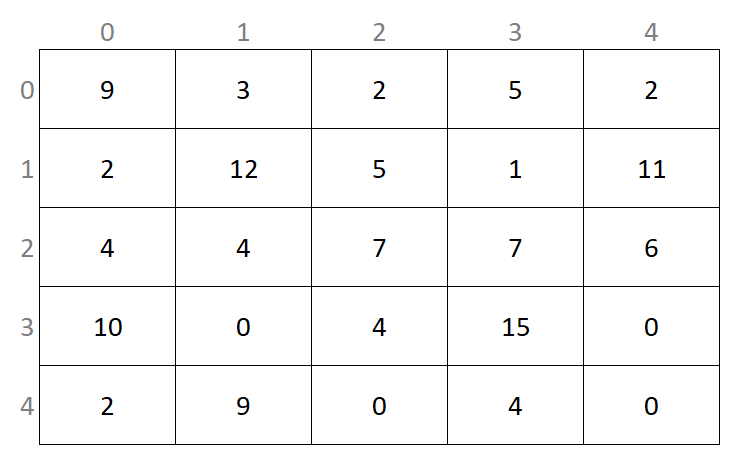
Then the array should be changed to be
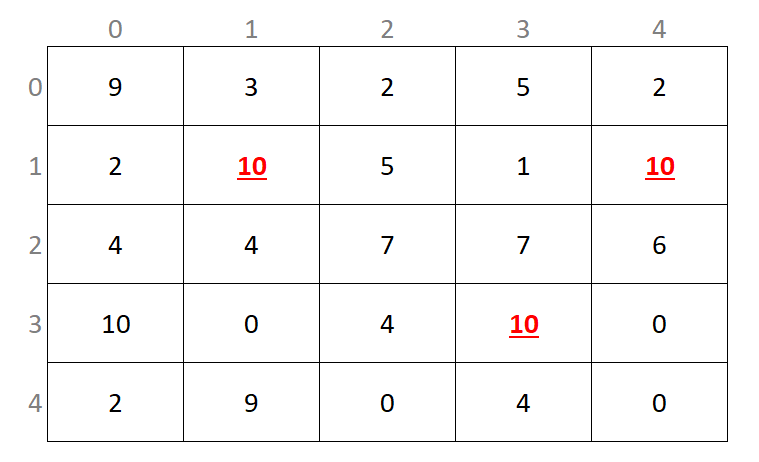
Your function will be called directly in marking, any changes in the main function will not be used. You may use additional functions if you find it helpful.
You can assume the array is always square and the size is always 5.
The array values given can be any valid integer.
You are not required to print the array, this is handled separately.
You are only required to implement the clamp_max function.
Examples
dcc adjacent_distances.c -o adjacent_distances
./adjacent_distances
Before:
  9   3   2   5   2
  2  12   5   1  11
  4   4   7   7   6
 10   0   4  15   0
  2   9   0   4   0
After:
  9   3   2   5   2
  2  10   5   1  10
  4   4   7   7   6
 10   0   4  10   0
  2   9   0   4   0
Your program must produce this output exactly
1091 style array_clamping_max.c
When you think your program is working,
you can use autotest
to run some simple automated tests:
1091 autotest array_clamping_max
When you are finished working on this exercise,
you must
submit your work by running give:
give dp1091 lab06_array_clamping_max array_clamping_max.c
You must run give
before Monday 02 March 09:00
to obtain the marks for this lab exercise.
Note that this is an individual exercise,
the work you submit with give must be entirely your own.
Exercise
(●●◌)
:
Prepare a Checkerboard
Write a C program prep_checkerboard.c which scans in instructions from the user on filling a 2D array representing a checkerboard.
Download prep_checkerboard.c here, or copy it to your CSE account using the following command:
cp -n /import/reed/A/dp1091/public_html/26T1/activities/prep_checkerboard/prep_checkerboard.c .
The goal of this exercise is to give you more experience manipulating 2D arrays of structs. In this exercise, the 2D array of structs is in the form of a grid, representing a checkerboard.
The checkerboard will appear similar to:
        column
          |
         \|/
        +-----+-----+-----+-----+-----+-----+-----+-----+
row --> |     |     |     |     |     |     |     |     |
        +-----+-----+-----+-----+-----+-----+-----+-----+
        |     |     |     |     |     |     |     |     |
        +-----+-----+-----+-----+-----+-----+-----+-----+
		|     |     |     |     |     |     |     |     |
        +-----+-----+-----+-----+-----+-----+-----+-----+
		|     |     |     |     |     |     |     |     |
        +-----+-----+-----+-----+-----+-----+-----+-----+
		|     |     |     |     |     |     |     |     |
        +-----+-----+-----+-----+-----+-----+-----+-----+
		|     |     |     |     |     |     |     |     |
        +-----+-----+-----+-----+-----+-----+-----+-----+
 		|     |     |     |     |     |     |     |     |
        +-----+-----+-----+-----+-----+-----+-----+-----+
        |     |     |     |     |     |     |     |     |
        +-----+-----+-----+-----+-----+-----+-----+-----+
-
Your program must continuously take in 'instructions' on how to fill the checkerboard with pieces.
Each instruction is a line containing 4 inputs separated by whitespace:
- The first input is the row coordinate of the piece on your checkerboard.
- The second input is the column coordinate of the piece on your checkerboard.
- The third input is the color of the piece. This MUST be either 'R' (red) or 'B' (black).
- The fourth and final input is the "type" of the piece. This can be a king (1) or not (0). A sample instruction would be:
0 1 R 0.
This places a red piece ('R') on coordinate (0, 1) of the checkerboard, and the piece is NOT a king (0).
Note:
You do NOT need to write or edit the print_checkerboard() function;
this has been provided in the starter code and only prints a visual representation of the checkerboard in the terminal.
You may want to understand how it works for more information,
but your program should only conclude with calling the print_checkerboard()
function on your checkerboard 2D array.
Your program must follow these examples exactly:
./prep_checkerboard
Please enter pieces:
0 0 R 0
0 1 R 0
0 2 R 0
0 3 R 0
0 4 R 0
0 5 R 0
0 6 R 0
0 7 R 1
7 0 B 0
7 1 B 0
7 2 B 0
7 3 B 0
7 4 B 0
7 5 B 1
7 6 B 0
7 7 B 0

+-----+-----+-----+-----+-----+-----+-----+-----+
|  R  |  R  |  R  |  R  |  R  |  R  |  R  | R-K |
+-----+-----+-----+-----+-----+-----+-----+-----+
|     |     |     |     |     |     |     |     |
+-----+-----+-----+-----+-----+-----+-----+-----+
|     |     |     |     |     |     |     |     |
+-----+-----+-----+-----+-----+-----+-----+-----+
|     |     |     |     |     |     |     |     |
+-----+-----+-----+-----+-----+-----+-----+-----+
|     |     |     |     |     |     |     |     |
+-----+-----+-----+-----+-----+-----+-----+-----+
|     |     |     |     |     |     |     |     |
+-----+-----+-----+-----+-----+-----+-----+-----+
|     |     |     |     |     |     |     |     |
+-----+-----+-----+-----+-----+-----+-----+-----+
|  B  |  B  |  B  |  B  |  B  | B-K |  B  |  B  |
+-----+-----+-----+-----+-----+-----+-----+-----+
./prep_checkerboard
Please enter pieces:
0 0 R 0
7 6 R 1
4 4 B 0
0 7 R 0
2 3 B 1
4 6 B 0
5 1 R 0
7 0 B 0

+-----+-----+-----+-----+-----+-----+-----+-----+
|  R  |     |     |     |     |     |     |  R  |
+-----+-----+-----+-----+-----+-----+-----+-----+
|     |     |     |     |     |     |     |     |
+-----+-----+-----+-----+-----+-----+-----+-----+
|     |     |     | B-K |     |     |     |     |
+-----+-----+-----+-----+-----+-----+-----+-----+
|     |     |     |     |     |     |     |     |
+-----+-----+-----+-----+-----+-----+-----+-----+
|     |     |     |     |  B  |     |  B  |     |
+-----+-----+-----+-----+-----+-----+-----+-----+
|     |  R  |     |     |     |     |     |     |
+-----+-----+-----+-----+-----+-----+-----+-----+
|     |     |     |     |     |     |     |     |
+-----+-----+-----+-----+-----+-----+-----+-----+
|  B  |     |     |     |     |     | R-K |     |
+-----+-----+-----+-----+-----+-----+-----+-----+
Assumptions/Restrictions/Hints
- You can assume that the row, column, piece color and type provided is always valid.
- You can assume that the piece color provided is always in uppercase.
- You can assume that pieces on a square will never be replaced with another color.
- There is no set number of instructions. You must continuously take in instructions until Ctrl+D is entered.
1091 style prep_checkerboard.c
When you think your program is working,
you can use autotest
to run some simple automated tests:
1091 autotest prep_checkerboard
When you are finished working on this exercise,
you must
submit your work by running give:
give dp1091 lab06_prep_checkerboard prep_checkerboard.c
You must run give
before Monday 02 March 09:00
to obtain the marks for this lab exercise.
Note that this is an individual exercise,
the work you submit with give must be entirely your own.
Exercise
(●●●)
:
Remove any duplicate values from an array and write the result into another array
Write a C function that removes duplicate elements from an array, by copying the non-duplicate values to a second array, i.e. only the first occurrence of any value should be copied.
Place your answer in a file named remove_duplicates_function.c
Your function should take three parameters: the length of source array, the source array itself, and the destination array. It must have this prototype:
int remove_duplicates(int length, int source[length], int destination[length]);
Your function should return a single integer: the number of elements copied to the destination array.
For example, if the source array contains these 6 elements:
3, 1, 4, 1, 5, 9
Your function should copy these 5 values to the destination array:
3, 1, 4, 5, 9
Your function should return the integer 5, because there were 5 values copied -- the second occurrence
of the digit 1 was not copied.
Assumptions/Restrictions/Clarifications
- You can assume the source array only contains positive integers.
- You can assume the source array contains at least one integer.
- You can assume that the destination array will always be large enough to fit all of the copied values.
- You cannot assume anything about the number of duplicates, i.e. there may not be any duplicates, or conversely, the entire array may be duplicates.
- Your function should return a single integer.
- Your function should not change the array it is given.
- Your function should not call scanf (or getchar or fgets).
- Your function should not print anything. It should not call printf.
- Your submitted file may contain a main function. It will not be tested or marked.
1091 style remove_duplicates_function.c
When you think your program is working,
you can use autotest
to run some simple automated tests:
1091 autotest remove_duplicates_function
Exercise
(●●●)
:
Find the Largest Sum of Numbers in a Z Shape
Download largest_z_sum.c here
Or, copy these file(s) to your CSE account using the following command:
1091 fetch-activity largest_z_sum
Your task is to add code to this function in largest_z_sum.c:
// Return the largest sum of numbers in a z shape.
int largest_z_sum(int size, int array[MAX_SIZE][MAX_SIZE]) {
    // Put your code here.
    return 42;
}
You are to implement the largest_z_sum function which should return the sum
of values forming the shape of the letter 'Z' in a square 2D array.
A Z shape is made up of three lines of equal length. Two of these lines are horizontal and one is diagonal. The length of the three lines must be equal but can range from 3 up to the size of the array. Only correctly oriented Z shapes are valid - Z shapes with a northwest/southeast diagonal are not valid.
The 2D square array may contain any positive or negative integers.
You can assume that the side length of the 2D square array will always be greater than or equal to 3.
You can assume that the side length of the 2D array will never be greater than 100.
The file largest_z_sum.c contains a main function which reads values into a
square 2D array and calls largest_z_sum.
Examples
dcc largest_z_sum.c -o largest_z_sum
./largest_z_sum
Enter 2D array side length: 3
Enter 2D array values:
1 1 1
1 1 1
1 1 1
The largest z sum is 7.
./largest_z_sum
Enter 2D array side length: 5
Enter 2D array values:
1  2  3  4  5
6  7  8  9  10
11 12 13 14 15
16 17 18 19 20
21 22 23 24 25
The largest z sum is 169.
./largest_z_sum
Enter 2D array side length: 5
Enter 2D array values:
 28 -47 -40  29  49
 26 -42 -37  48  1
-36  50  41 -24 -33
 41  25 -39  39  48
 14 -26 -46 -3  -29
The largest z sum is 153.
./largest_z_sum
Enter 2D array side length: 5
Enter 2D array values:
1  1  1  1  1
1  1  1  1  1
99 99 99 1  1
1  99 1  1  1
99 99 99 1  1
The largest z sum is 693.
In the first example, there is only one possible Z sum of size 3.
The Z in the example input is underlined below for your reference:
1 1 1
1 1 1
1 1 1
In the second example, the Z of size 5 starting from
(0, 0) is used to form the largest sum of:
1 + 2 + 3 + 4 + 5 + 9 + 13 + 17 + 21 + 22 + 23 + 24 + 25 = 169
The Z in the example input is underlined below for your reference:
1  2  3  4  5
6  7  8  9  10
11 12 13 14 15
16 17 18 19 20
21 22 23 24 25
In the third example, the Z of size 4 starting
from (0, 1) is used to form the largest sum of:
-47 - 40 + 29 + 49 + 48 + 41 + 25 - 39 + 39 + 48 = 153
The Z in the example input is underlined below for your reference:
 28 -47 -40  29  49
 26 -42 -37  48  1
-36  50  41 -24 -33
 41  25 -39  39  48
 14 -26 -46 -3  -29
In the fourth example, the Z of size 3 starting
from (2, 0) is used to form the largest sum of:
99 + 99 + 99 + 99 + 99 + 99 + 99 = 693
The Z in the example input is underlined below for your reference:
1  1  1  1  1
1  1  1  1  1
99 99 99 1  1
1  99 1  1  1
99 99 99 1  1
1091 style largest_z_sum.c
When you think your program is working,
you can use autotest
to run some simple automated tests:
1091 autotest largest_z_sum
In-Class Exercise — group:
Presentation
This week during lab class, you will be divided into small groups and assigned an activity from this week to give a short presentation on (2–5 minutes per group).
There is no give or autotest for the group presentation.
Submission
give.
You can run give multiple times.
Only your last submission will be marked.
Don't submit any exercises you haven't attempted.
If you are working at home, you may find it more convenient to upload your work via give's web interface.
Remember you have until Week 7 Monday 9:00am to submit your work.
You cannot obtain marks by e-mailing your code to tutors or lecturers.
You check the files you have submitted here.
Automarking will be run by the lecturer several days after the submission deadline,
using test cases different to those autotest runs for you.
(Hint: do your own testing as well as running autotest.)
After automarking is run by the lecturer you can view your results here. The resulting mark will also be available via give's web interface.
Lab Marks
When all components of a lab are automarked you should be able to view the the marks via give's web interface or by running this command on a CSE machine:
1091 classrun -sturec
Voice of the Student
✨ Help Us Improve Your Learning Experience ✨
Your feedback helps us understand what’s working well and what might need improvement.
This quick, anonymous check-in has just two questions and takes less than a minute to complete.
Please answer honestly — your input makes a real difference.