Programming Fundamentals
Information
- This page contains additional revision exercises for week 01.
- These exercises are not compulsory, nor do they provide any marks in the course.
- You cannot submit any of these exercises, however autotests may be available for some them (Command included at bottom of each exercise if applicable).
Exercise — individual:
Temperature
Write a program temperature.c that scans in the temperature of each day for a week, then prints out the temperature.
Your program should scan in seven integers, storing them in an array. The program should then print out the temperatures for the week using the message Day <num>: <temperature> degrees., where <num> is the day of the week from 1-7, and <temperature> is the temperature that was scanned in for that particular day.
Examples
dcc temperature.c -o temperature
./temperature
Enter the temperatures for the week: 30 29 28 30 30 27 24
Day 1: 30 degrees.
Day 2: 29 degrees.
Day 3: 28 degrees.
Day 4: 30 degrees.
Day 5: 30 degrees.
Day 6: 27 degrees.
Day 7: 24 degrees.
./temperature
Enter the temperatures for the week: 0 -4 120 42 3 -250 12
Day 1: 0 degrees.
Day 2: -4 degrees.
Day 3: 120 degrees.
Day 4: 42 degrees.
Day 5: 3 degrees.
Day 6: -250 degrees.
Day 7: 12 degrees.
Assumptions/Restrictions/Clarifications
- You may assume that the correct number of inputs will be entered.
- You may assume that the input will always be an integer.
When you think your program is working,
you can use autotest
to run some simple automated tests:
1511 autotest temperature
Exercise — individual:
Calculate the average of columns in a 2D array
Download array_col_average.c here
Or, copy these file(s) to your CSE account using the following command:
1511 fetch-activity array_col_average
Your task is to add code to this function in array_col_average.c:
// Calculates the sum of each col of the array and prints it out
void array_col_average(int array[MAX_SIZE][MAX_SIZE], int num_rows, int num_cols) {

    // TODO: Complete this function

}
Write a function array_col_average that calculates the average for each column of the array and prints out the result.
Your function should print out the message Average of col <num> is <average>. for each column, where <num> is the current column, and <average> is the average of that column to two decimal places.
Examples
If the 2D array contains these elements:
{0, 1, 9, 2},
{5, 4, 6, 7},
{7, 6, 3, 9},
{3, 8, 1, 8}
Your function should print the following:
Average of col 0 is 3.75.
Average of col 1 is 4.75.
Average of col 2 is 4.75.
Average of col 3 is 6.50.
Alternatively, if the 2D array contains these elements:
{0, 1, 2},
{3, 4, 5},
{6, 7, 8},
{9, 8, 7}
Your function should print the following:
Average of col 0 is 3.00.
Average of col 1 is 3.75.
Average of col 2 is 4.00.
Average of col 3 is 4.25.
Assumptions/Restrictions/Clarifications
- You may assume that the number of rows and cols will always be greater than 0.
When you think your program is working,
you can use autotest
to run some simple automated tests:
1511 autotest array_col_average
Exercise — individual:
Calculate Weekly Earnings
Gary keeps track of the amount of money he earns per day, per week and stores this information in a 1D array. Your program should calculate the total amount of money Gray has made in a week.
Write a program calculate_weekly_earnings.c that:
- Prompts the user with the message
Enter the amount of money earned in the week:. - Scans in seven integers, storing them in an array.
- Calculates the sum of an array of size 7.
- Print the message
The total money earned this week was <sum>., where<sum>is the total sum of the array.
Examples
dcc calculate_weekly_earnings.c -o calculate_weekly_earnings
./calculate_weekly_earnings
Enter the amount of money earned in the week: 3 9 6 5 1 2 4
The total money earned this week was $30.
./calculate_weekly_earnings
Enter the amount of money earned in the week: 0 63 0 90 34 0 0
The total money earned this week was $187.
Assumptions/Restrictions/Clarifications
- You may assume that all inputs are integers.
- You may assume that there will be the correct number of inputs.
- You may assume that all inputs will be non-negative.
When you think your program is working,
you can use autotest
to run some simple automated tests:
1511 autotest calculate_weekly_earnings
Exercise — individual:
Find the fastest and slowest runners
Download races.c here
Or, copy these file(s) to your CSE account using the following command:
1511 fetch-activity races
Your task is to add code to this function in races.c:
    return;
}
Write a program races that determines the fastest and slowest racers in a running race based on their average time.
The racers are numbered from 1 to n , which correspond to the rows 0 to n - 1 in a 2D array. Each column is a lap in the race. In order to find the fastest and slowest runners, each runners time should be averaged for their laps.
Examples
If the 2D array contains these elements:
{11.12, 12.30, 11.54},
{15.43, 15.67, 15.14},
{12.95, 12.43, 13.02},
{10.04, 10.56, 10.59},
{13.89, 14.05, 13.73}
Your function should print:
Runner 4 was the fastest with an average time of 10.40. and
Runner 2 was the slowest with an average time of 15.41.
Breaking this down, the following runners and times are displayed below
			Lap 1     Lap 2     Lap 3
Runner 1:   11.12     12.30     11.54
Runner 2:   15.43     15.67     15.14
Runner 3:   12.95     12.43     13.02
Runner 4:   10.04     10.56     10.59
Runner 5:   13.89     14.05     13.73
Your function should average these times to two decimal places, which produces:
           Average time
Runner 1:     11.65
Runner 2:     15.41
Runner 3:     12.80
Runner 4:     10.40
Runner 5:     13.89
Based on these values, it can be determined that Runner 4 is the fastest runner and Runner 2 is the slowest runner, and your function should print the following lines:
Runner 4 was the fastest with an average time of 10.40.
Runner 2 was the slowest with an average time of 15.41.
Assumptions/Restrictions/Clarifications
- You can assume that the averages of all rows will never be equal.
- You can assume that rows and cols of arrays will always be greater than 0.
When you think your program is working,
you can use autotest
to run some simple automated tests:
1511 autotest races
Exercise — individual:
Strings Equal
Download strings_equal.c here
Or, copy these file(s) to your CSE account using the following command:
1511 fetch-activity strings_equal
You've probably noticed that
you can't use the comparison operator, ==,
to compare strings.
So, how do we compare two strings?
For this activity,
you'll be writing a function to do exactly that:
string.h in this exercise.
It takes two strings, string1 and string2,
and, if they are element-for-element the same,
it returns 1, and 0 otherwise.
You shouldn't ever read beyond
the null-terminator of either string.
Download strings_equal.c here, or copy it to your CSE account using the following command:
cp -n /import/adams/A/cs1511/public_html/26T2/activities/strings_equal/strings_equal.c .
Your task is to add code to this function in strings_equal.c:
// Takes two strings, and if they are the same,
// returns 1, or 0 otherwise.
int strings_equal(char *string1, char *string2) {
    // Your code goes here!
    // Don't forget to return your result.
    return 0;
}
strings_equal.c also contains a simple main function with some simple assert-based tests
to help you build your solution:
int main(int argc, char *argv[]) {

    // Some simple assert-based tests.
    // You probably want to write some more.

    // Assert will terminate program if evaluated as false
    assert(strings_equal("", "") == 1);
    assert(strings_equal(" ", "") == 0);
    assert(strings_equal("", " ") == 0);
    assert(strings_equal(" ", " ") == 1);
    assert(strings_equal("\n", "\n") == 1);
    assert(strings_equal("This is 17 bytes.", "") == 0);
    assert(strings_equal("", "This is 17 bytes.") == 0);
    assert(strings_equal("This is 17 bytes.", "This is 17 bytes.") == 1);
    assert(strings_equal("Here are 18 bytes!", "This is 17 bytes.") == 0);

    printf("All tests passed.  You are awesome!\n");

    return 0;
}
Your strings_equal function will be called directly in marking. The main function is only to let you test your strings_equal function
You can add more assert tests to main to test your strings_equal function.
When you think your program is working,
you can use autotest
to run some simple automated tests:
1511 autotest strings_equal
Exercise — individual:
String to Upper
Download string_to_upper.c here
Or, copy these file(s) to your CSE account using the following command:
1511 fetch-activity string_to_upper
For this activity,
you'll be writing the function string_to_upper.
It takes a string and converts it to upper case
string_to_upper.c also contains a simple main function to help you test your solution.
int main(int argc, char *argv[]) {

    char str[] = "Seventeen...  SEVENTEEN, I SAY!";
    string_to_upper(str);
    printf("%s\n", str);
    return 0;
}
Your string_to_upper function will be called directly in marking. The main function is only to let you test your string_to_upper function
int main(int argc, char *argv[]) {

    char str[] = "Seventeen...  SEVENTEEN, I SAY!";
    string_to_upper(str);
    printf("%s\n", str);
    return 0;
}
Your string_to_upper function will be called directly in marking. The main function is only to let you test your string_to_upper function
Here is how string_to_upper.c should behave after you add the correct code to the function string_to_upper:
When you think your program is working,
you can use autotest
to run some simple automated tests:
1511 autotest string_to_upper
Exercise — individual:
String to Lower
Download string_to_lower.c here
Or, copy these file(s) to your CSE account using the following command:
1511 fetch-activity string_to_lower
For this activity,
you'll be writing the function string_to_lower.
It takes a string and converts it to lower case.
string_to_lower.c also contains a simple main function
to help you test your solution.
int main(void) {

    char str[MAX_LEN] = "Hi, mY nAmE iS sPonGEbOb sQuArePanTS.";
    string_to_lower(str);
    printf("%s\n", str);

    return 0;
}
Your string_to_lower function will be called directly in marking. The main function is only to let you test your string_to_lower function.
Here is how string_to_lower.c should behave after you add the correct code to the function string_to_lower:
dcc string_to_lower.c -o string_to_lower
./string_to_lower
hi, my name is spongebob squarepants.
When you think your program is working,
you can use autotest
to run some simple automated tests:
1511 autotest string_to_lower
Exercise — individual:
String Manipulation
Download string_manipulation.c here
Or, copy these file(s) to your CSE account using the following command:
1511 fetch-activity string_manipulation
Your task is to add code to this function in string_manipulation.c:
    // TODO: move code sections into functions
}
Implement the different functions listed in the string_manipulation.c file.
No autotests are provided for this question.
Examples
dcc struct_tutorial.c -o struct_tutorial
./struct_tutorial
Hello, World!
Goodbye
Goodbye is before World.
When you think your program is working,
you can use autotest
to run some simple automated tests:
1511 autotest string_manipulation
Exercise — individual:
String Length
Download string_length.c here
Or, copy these file(s) to your CSE account using the following command:
1511 fetch-activity string_length
For this activity,
you'll be writing the function string_length.
It takes a string,
and finds its length,
excluding the null-terminator.
string_length.c also contains a simple main function with some simple assert-based tests
to help you build your solution:
int main(int argc, char *argv[]) {

    // Some simple assert-based tests.
    // You probably want to write some more.

    // Assert will terminate program if evaluated as false
    assert(string_length("") == 0);
    assert(string_length("!") == 1);
    assert(string_length("Hello, world!") == 13);
    assert(string_length("17... seventeen.\n") == 17);

    printf("All tests passed.  You are awesome!\n");

    return 0;
}
Your string_length function will be called directly in marking. The main function is only to let you test your string_length function
You can add more assert tests to main to test your string_length function.
When you think your program is working,
you can use autotest
to run some simple automated tests:
1511 autotest string_length
Exercise — individual:
String Copy
Download string_copy.c here
Or, copy these file(s) to your CSE account using the following command:
1511 fetch-activity string_copy
For this activity,
you'll be writing the function string_copy
It takes a string in the source buffer,
and copies it to the destination buffer,
which is dest_size elements in size.
If there are more characters in source
than there is array space in destination,
you should stop after you have filled the array.
You should always make sure that
your function null-terminates
the destination array.
string_copy.c also contains a simple main function with to help you test your string_copy function
int main(int argc, char *argv[]) {
    // Declare a buffer.  In this case, we're declaring and using a
    // 64-byte buffer, but this could be any length you like, and in
    // our tests you will be required to handle arrays of any length.
    char buffer[BUFFER_LENGTH] = {0};

    // Copy a string into the buffer ...
    string_copy(buffer, "Seventeen bytes.\n", BUFFER_LENGTH);

    // ... and print it out.  The `%s` format code prints a string.
    printf("<%s>\n", buffer);

    return 0;
}
Your string_copy function will be called directly in marking. The main function is only to let you test your string_copy function
When you think your program is working,
you can use autotest
to run some simple automated tests:
1511 autotest string_copy
Exercise — individual:
String Reverse
Download string_reverse.c here
Or, copy these file(s) to your CSE account using the following command:
1511 fetch-activity string_reverse
For this activity,
you'll be writing the function string_reverse.
It takes a string and reverses it in place.
string_reverse.c also contains a simple main function to help you test your function string_reverse
int main(int argc, char *argv[]) {

    char str[] = ".'neetneves' :egassem terces A";
    string_reverse(str);
    printf("%s\n", str);
    return 0;
}
Your string_reverse function will be called directly in marking. The main function is only to let you test your string_reverse function
Here is how string_reverse.c should behave after you add the correct code to the function string_reverse:
dcc string_reverse.c -o string_reverse
./string_reverse
A secret message: 'seventeen'.
When you think your program is working,
you can use autotest
to run some simple automated tests:
1511 autotest string_reverse
Exercise — individual:
String Search
Your job is to write a program called string_search.c which lets us count the
number of times we see any our of "search terms" in a list of words.
The search terms will be provided to our program via command line arguments. For example:
./string_search hello there
would run the program with 2 search terms - hello and there.
TASK 1: Edit the arguments to your main function so that it can take in
command line arguments (aka, the search terms). Try printing out the values of
argc and argv and changing the values you type after ./string_search to
see what they contain!
TASK 2: Scan in words from standard input until Ctrl-D is pressed.
TASK 3: Count the number of times the search terms appear in the input.
Examples
dcc string_search.c -o string_search
./string_search same
Enter list of words:
same
sand
same
send
shade
same
shadow

There were 3 occurrence(s) in the input.
./string_search many search terms
Enter list of words:
terms
many
same
many
shade
search
research

There were 4 occurrence(s) in the input.
Assumptions/Restrictions/Clarifications
- You can assume that each word will be no longer than 128 characters long
- You can assume that there will only be 1 word per line
- You can assume that the search terms will never have repeats in them
When you think your program is working,
you can use autotest
to run some simple automated tests:
1511 autotest string_search
Exercise — individual:
List count even
Download list_count_even.c here
Or, copy these file(s) to your CSE account using the following command:
1511 fetch-activity list_count_even
Your task is to add code to this function in list_count_even.c:
// return the number of even values in a linked list
int count_even(struct node *head) {

    // PUT YOUR CODE HERE (change the next line!)
    return 42;

}
Note list_count_even.c uses the following familiar data type:
struct node {
    struct node *next;
    int          data;
};
count_even is given one argument, head, which is the pointer to the first node in a linked list.
Add code to count_even so that its returns the number of even values in the linked list.
For example if the linked list contains these 8 elements:
16, 7, 8, 12, 13, 19, 21, 12
count_even should return 4, because these 4 elements are even:
16, 8, 12, 12
Testing
list_count_even.c also contains a main function which allows you to test your count_even function.
This main function:
- converts the command-line arguments to a linked list.
- assigns a pointer to the first node in the linked list to
head. - calls
count_even(head). - prints the result.
Do not change this main function. If you want to change it, you have misread the question.
Your count_even function will be called directly in marking. The main function is only to let you test your count_even function
Examples
Here is how you use main function to test count_even:
dcc list_count_even.c -o list_count_even
./list_count_even 16 7 8 12 13 19 21 12
4
./list_count_even 2 4 6 2 4 6
6
./list_count_even 3 5 7 11 13 15 17 19 23 29
0
./list_count_even 2 4 8 16 32 64 128 256
8
./list_count_even
0
Assumptions/Restrictions/Clarifications
-
An even number is divisible by 2.
-
count_evenshould return a single integer. -
count_evenshould not change the linked list it is given. -
Your function should not change the next or data fields of list nodes.
-
count_evenshould not use arrays. -
count_evenshould not call malloc. -
count_evenshould not call scanf (or getchar or fgets). -
You can assume the linked list only contains positive integers.
-
count_evenshould not print anything. It should not call printf.
Do not change the supplied main function. It will not be tested or marked.
When you think your program is working,
you can use autotest
to run some simple automated tests:
1511 autotest list_count_even
Exercise — individual:
List count favourite
Download list_count_favourite.c here
Or, copy these file(s) to your CSE account using the following command:
1511 fetch-activity list_count_favourite
Your task is to add code to this function in list_count_favourite.c:
// Return the number of elements divisible by 17 in the linked list
int count_favourite(struct node *head) {

    // PUT YOUR CODE HERE (change the next line!)
    return 42;

}
count_favourite is given one argument, head, which is the pointer to the
first node in a linked list.
Add code to count_favourite so that its returns the number of elements
divisible by 17 in the list.
For example if the linked list contains these 8 elements:
51, 7, 8, 9, 34, 19, 34, 42
count_favourite should return 3 because 51, 34 and 34 are divisible by 17.
Testing
list_count_favourite.c also contains a main function which allows you to
test your count_favourite function.
This main function:
- converts the command-line arguments to a linked list
- assigns a pointer to the first node in the linked list to
head - calls
list_count_favourite(head) - prints the result.
Do not change this main function. If you want to change it, you have misread the question.
Your list_count_favourite function will be called directly in marking. The
main function is only to let you test your list_count_favourite function
Examples
Here is how you use main function allows you to test list_count_favourite:
dcc list_count_favourite.c -o list_count_favourite
./list_count_favourite 51 7 8 9 34 19 34 42
3
./list_count_favourite 2 4 6 5 8 9
0
./list_count_favourite 17 34 51 68 85 102 119 136 153
9
./list_clist_count_favouriteount_favourite
0
Assumptions/Restrictions/Clarifications
count_favouriteshould return a single integer.count_favouriteshould not change the linked list it is given.- Your function should not change the next or data fields of list nodes.
count_favouriteshould not use arrays.count_favouriteshould not call malloc.count_favouriteshould not callscanf(orgetcharorfgets).count_favouriteshould not print anything. It should not callprintf.- Do not change the supplied
mainfunction. It will not be tested or marked.
When you think your program is working,
you can use autotest
to run some simple automated tests:
1511 autotest list_count_favourite
Exercise — individual:
List count matches
Download list_count_matches.c here
Or, copy these file(s) to your CSE account using the following command:
1511 fetch-activity list_count_matches
Your task is to add code to this function in list_count_matches.c:
// Return the number of matches in the two lists, i.e. the number of
// values which occur at the same position in both linked lists.
int count_matches(struct node *head1, struct node *head2) {

    // PUT YOUR CODE HERE (change the next line!)
    return 42;

}
Note list_count_matches.c uses the following familiar data type:
struct node {
    int          data;
    struct node *next;
};
Your task is to add code to this function count_matches.
count_matches is given two arguments, head1 and head2,
which are pointers to the first node of linked lists.
Add code to count_matches so that returns a count
of how many places the two lists have the same value in the same position.
For example, if the two lists contain these values:
1, 4, 1, 5, 9, 2, 1, 8
1, 1, 8, 2, 9, 5
count_matches should return 2 because both lists have the same
value (1) at position 0 and the same value (9) at position 4.
Note: the lists may be any length and the two lengths may be unequal.
Testing
list_count_matches.c also contains a main function which allows
you to test your count_matches function.
This main function:
- uses a command line argument of "-" to separate the values for two linked lists.
- converts the command-line arguments before the "-" to a linked list.
- assigns a pointer to the first node in the linked list to
head1. - converts the command-line arguments after the "-" to a linked list.
- assigns a pointer to the first node in the linked list to
head2. - calls
count_matches(head1, head2). - prints the result.
Do not change this main function. If you want to change it, you have misread the question.
Your count_matches function will be called directly in marking. The main
function is only to let you test your count_matches function
Examples
Here is how the main function allows you to test count_matches:
dcc -o list_count_matches list_count_matches.c
./list_count_matches 3 1 4 - 2 7 1 8 3
0
./list_count_matches 1 2 3 4 - 2 1 3 8
1
./list_count_matches 5 5 6 5 - 6 5 5 5
2
./list_count_matches 3 5 7 - 3 5 19 7 23 29
2
./list_count_matches 1 2 3 4 5 6 - 3 2 1
1
./list_count_matches - 1 2 3 4
0
./list_count_matches 4 3 2 1 -
0
./list_count_matches -
0
Assumptions/Restrictions/Clarifications
-
count_matchesshould return a single integer. -
The linked lists may be of unequal lengths.
-
The linked lists may be any length.
-
Either or both linked lists may be empty (contain no elements).
-
count_matchesshould not change the linked lists it is given. -
Your function should not change the next or data fields of list nodes.
-
count_matchesshould not use arrays. -
count_matchesshould not call malloc. -
count_matchesshould not call scanf (or getchar or fgets). -
count_matchesshould not print anything. It should not call printf.
Do not change the supplied main function. It will not be tested or marked.
When you think your program is working,
you can use autotest
to run some simple automated tests:
1511 autotest list_count_matches
Exercise — individual:
List sum
Download list_sum.c here
Or, copy these file(s) to your CSE account using the following command:
1511 fetch-activity list_sum
Your task is to add code to this function in list_sum.c:
// Return the sum of the elements in the linked list pointed by head
int sum(struct node *head) {

    // PUT YOUR CODE HERE (change the next line!)
    return 42;

}
sum is given one argument, head, which is the pointer to the first node in
a linked list.
Add code to sum so that its returns the sum of the list.
For example if the linked list contains these 8 elements:
1, 7, 8, 9, 13, 19, 21, 42
sum should return 120 because 1 + 7 + 8 + 9 + 13 + 19 + 21 + 42 = 120
Testing
list_sum.c also contains a main function which allows you to test your
sum function.
This main function:
- converts the command-line arguments to a linked list
- assigns a pointer to the first node in the linked list to
head - calls
list_sum(head) - prints the result.
Do not change this main function. If you want to change it, you have misread the question.
Your list_sum function will be called directly in marking. The main function
is only to let you test your list_sum function
Here is how you use main function allows you to test list_sum:
dcc list_sum.c -o list_sum
./list_sum 1 2 4 8 16 32 64 128 256
511
./list_sum 2 4 6 5 8 9
34
./list_sum 13 15 17 17 18
80
./list_sum 42 4
46
./list_sum
0
Assumptions/Restrictions/Clarifications
sumshould return a single integer.sumshould not change the linked list it is given. Your function should not change the next or data fields of list nodes.sumshould not use arrays.sumshould not call malloc.sumshould not call scanf (or getchar or fgets).sumshould not print anything. It should not call printf. Do not change the suppliedmainfunction. It will not be tested or marked.
When you think your program is working,
you can use autotest
to run some simple automated tests:
1511 autotest list_sum
Exercise — individual:
List Count Consecutive
Download list_count_consecutive.c here
Or, copy these file(s) to your CSE account using the following command:
1511 fetch-activity list_count_consecutive
Your task is to add code to this function in list_count_consecutive.c:
// TODO: FIX THIS FUNCTION
// Counts the number of consecutive items in a list
// e.g. [2, 3, 2, 5, 4] has 3 consecutive occurances
int count_consecutive(struct node *head) {

    int n_consec = 0;

    struct node *curr = head;
    struct node *prev = NULL;
    while (curr != NULL) {
        // checking to see if previous and current and consecutive.
        if (prev - curr == 1 || prev - curr == -1) {
            n_consec++;
        }

        curr = curr->next;
        prev = prev->next;
    }
    return n_consec;
}
Your job is to fix the function count_consecutive(). Currenty it nearly
works, but has some bugs in it
The function should take in a head of a list, and count the number of time two adjacent values in the list are consecutive. In other words, it counts the number of times that a pair of values that are next to each other are 1 value apart
It should return the number of consecutive occurances in the list
When doing this exercise, try to identify what bugs the program had (and how to fix it) instead of just rewriting the program
dcc list_consecutive.c -o list_consecutive
./list_consecutive
How many numbers in initial list?:
3
1 2 3
There is/are 2 consecutive occurances.
./list_consecutive
How many numbers in initial list?:
5
1 2 4 5 4
There is/are 3 consecutive occurances.
./list_consecutive
How many numbers in initial list?:
1
6
There is/are 0 consecutive occurances.
./list_consecutive
How many numbers in initial list?:
0
There is/are 0 consecutive occurances.
Assumptions/Restrictions/Clarifications
print_consecutiveshould not use arrays.print_consecutiveshould not callscanf(orgetcharorfgets).print_consecutiveshould not print anything. It should not callprintf.- Do not change the supplied
mainfunction or any other provided functions. It will not be tested or marked.
When you think your program is working,
you can use autotest
to run some simple automated tests:
1511 autotest list_count_consecutive
Exercise — individual:
List count last
Download list_count_last.c here
Or, copy these file(s) to your CSE account using the following command:
1511 fetch-activity list_count_last
Your task is to add code to this function in list_count_last.c:
// return the number of values in a linked list equal to the
// last value in that linked list.
int count_last(struct node *head) {

    // PUT YOUR CODE HERE (change the next line!)
    return 42;

}
Note list_count_last.c uses the following familiar data type:
struct node {
    struct node *next;
    int          data;
};
count_last is given one argument, head, which is the pointer to the first node in a linked list.
You are guaranteed the list will not be empty.
Add code to count_last so that its returns the number of values which are the same as the last value in the list.
For example if the linked list contains these 8 values:
16, 12, 8, 12, 13, 19, 21, 12
count_last should return 3, because 12 is the last value, and 12 occurs 3 times in the list
(including the last number).
Testing
list_count_last.c also contains a main function which allows you to test your count_last function.
This main function:
- converts the command-line arguments to a linked list.
- assigns a pointer to the first node in the linked list to
head. - calls
count_last(head). - prints the result.
Do not change this main function. If you want to change it, you have misread the question.
Your count_last function will be called directly in marking. The main function is only to let you test your count_last function
Examples
Here is how you use main function allows you to test count_last:
dcc list_count_last.c -o list_count_last
./list_count_last 16 12 8 12 13 19 21 12
3
./list_count_last 2 4 6 2 4 6
2
./list_count_last 3 5 7 11 13 15 17 19 23 29
1
./list_count_last 2 2 2 3 2
4
Assumptions/Restrictions/Clarifications.
count_lastwill never receive a linked list with no nodes. That is, the head will never beNULLcount_lastshould return a single integer.count_lastshould not change the linked list it is given.- Your function should not change the next or data fields of list nodes.
count_lastshould not use arrays.count_lastshould not call malloc.count_lastshould not call scanf (or getchar or fgets).count_lastshould not print anything. It should not call printf.
Do not change the supplied main function. It will not be tested or marked.
When you think your program is working,
you can use autotest
to run some simple automated tests:
1511 autotest list_count_last
Exercise — individual:
List intersection size
Download list_intersection_size.c here
Or, copy these file(s) to your CSE account using the following command:
1511 fetch-activity list_intersection_size
Your task is to add code to this function in list_intersection_size.c:
// return the number of values which occur in both linked lists
// no value is repeated in either list
int intersection_size(struct node *head1, struct node *head2) {

    // PUT YOUR CODE HERE (change the next line!)
    return 42;

}
Note list_intersection_size.c uses the following familiar data type:
struct node {
    struct node *next;
    int          data;
};
intersection_size is given two arguments, head1 and head2, which are pointers to the first node of linked lists.
Add code to intersection_size so that its returns the number of values that occur in both linked list.
Assume no value occurs more than once in either linked list.
For example, if the two lists contain these values:
3, 1, 4
2, 7, 1, 8, 3
intersection_size should return 2, because these 2 elements occur in both lists:
1, 3
Testing
list_intersection_size.c also contains a main function which allows you to test your intersection_size function.
This main function:
- uses a command line argument of "-" to separate the values for two linked lists.
- converts the command-line arguments before the "-" to a linked list.
- assigns a pointer to the first node in the linked list to
head1. - converts the command-line arguments after the "-" to a linked list.
- assigns a pointer to the first node in the linked list to
head2. - calls
intersection_size(head1, head2). - prints the result.
Do not change this main function. If you want to change it, you have misread the question.
Your intersection_size function will be called directly in marking. The main function is only to let you test your intersection_size function
Here is how the main function allows you to test intersection_size:
dcc list_intersection_size.c -o list_intersection_size
./list_intersection_size 3 1 4 - 2 7 1 8 3
2
./list_intersection_size 16 7 8 12 - 13 19 21 12
1
./list_intersection_size 2 4 6 - 2 4 6
3
./list_intersection_size 3 5 7 11 13 - 15 17 19 23 29
0
./list_intersection_size 1 2 3 4 - 3 2 1
3
./list_intersection_size - 1 2 3 4
0
./list_intersection_size 4 3 2 1 -
0
./list_intersection_size -
0
Assumptions/Restrictions/Clarifications.
intersection_sizeshould return a single integer.- No value will occur more than once in either linked list.
intersection_sizeshould not change the linked lists it is given.- Your function should not change the next or data fields of list nodes.
intersection_sizeshould not use arrays.intersection_sizeshould not call malloc.intersection_sizeshould not call scanf (or getchar or fgets).intersection_sizeshould not print anything. It should not call printf.
Do not change the supplied main function. It will not be tested or marked.
When you think your program is working,
you can use autotest
to run some simple automated tests:
1511 autotest list_intersection_size
Exercise — individual:
List is set
Download list_is_set.c here
Or, copy these file(s) to your CSE account using the following command:
1511 fetch-activity list_is_set
Your task is to add code to this function in list_is_set.c:
// return 1 if the list is a set
int is_set(struct node *head) {

    // PUT YOUR CODE HERE (change the next line!)
    return 42;

}
Note list_is_set.c uses the following familiar data type:
struct node {
    struct node *next;
    int          data;
};
is_set is given one argument, head, which is the pointer to the first node in a linked list.
Add code to is_set so that its returns 1 if the list is a set, and 0 otherwise.
A 'set' is defined as a list that does not repeat an element.
For example if the linked list contains these 8 elements:
16, 7, 8, 12, 13, 19, 21, 12
is_set should return 0, because the element 12 occurs twice.
For example if the linked list contains these 4 elements:
16, 8, 12, 13
is_set should return 1, because none of the elements occur more than once.
Testing
list_is_set.c also contains a main function which allows you to test your is_set function.
This main function:
- converts the command-line arguments to a linked list.
- assigns a pointer to the first node in the linked list to
head. - calls
is_set(head). - prints the result.
Do not change this main function. If you want to change it, you have misread the question.
Your is_set function will be called directly in marking. The main function is only to let you test your is_set function
Examples
Here is how you use main function allows you to test is_set:
dcc list_is_set.c -o list_is_set
./list_is_set 16 7 8 12 13 19 21 12
4
./list_is_set 2 4 6 2 4 6
6
./list_is_set 3 5 7 11 13 15 17 19 23 29
0
./list_is_set 2 4 8 16 32 64 128 256
8
./list_is_set
0
Assumptions/Restrictions/Clarifications.
- An even number is divisible by 2.
is_setshould return a single integer.is_setshould not change the linked list it is given.- Your function should not change the next or data fields of list nodes.
is_setshould not use arrays.is_setshould not call malloc.is_setshould not call scanf (or getchar or fgets).- You can assume the linked list only contains positive integers.
is_setshould not print anything. It should not call printf.
Do not change the supplied main function. It will not be tested or marked.
When you think your program is working,
you can use autotest
to run some simple automated tests:
1511 autotest list_is_set
Exercise — individual:
List product
Download list_product.c here
Or, copy these file(s) to your CSE account using the following command:
1511 fetch-activity list_product
Your task is to add code to this function in list_product.c:
// product should return the sum of the elements in list1 multiplied by
// the corresponding element in list2
// if one list is longer than the other, the extra list elements are ignored
int product(struct node *head1, struct node *head2) {

    // PUT YOUR CODE HERE (change the next line!)
    return 42;

}
Note list_product.c uses the following familiar data type:
struct node {
    struct node *next;
    int          data;
};
product is given two arguments, head1 and head2, which are pointers to the first node of linked lists.
product should return the sum of the elements in the first list multiplied by the
corresponding element in the second list.
If one list is longer than the other, the extra elements should be ignored.
For example, if the two lists contain these values:
list1: 3, 1, 4, 1, 5, 9
list2: 2, 7, 9
product should return 49, because 3 * 2 + 1 * 7 + 4 * 9 = 49 .
For example, if the two lists contain these values:
list1: 2, 7
list2: 4, 42, 4242, 4242, 4242424242
product should return 302, because 2 * 4 + 7 * 42 = 302.
Testing
list_product.c also contains a main function which allows you to test your product function.
This main function:
- uses a command line argument of "-" to separate the values for two linked lists.
- converts the command-line arguments before the "-" to a linked list
- assigns a pointer to the first node in the linked list to
head1 - converts the command-line arguments after the "-" to a linked list
- assigns a pointer to the first node in the linked list to
head2 - calls
product(head1, head2) - prints the result.
Do not change this main function. If you want to change it, you have misread the question.
Your product function will be called directly in marking. The main function is only to let you test your product function
Examples
Here is how the main function allows you to test product:
dcc list_product.c -o list_product
./list_product 3 1 4 1 5 9 - 2 7 9 8
57
./list_product 16 7 8 12 - 13 19 21 12
653
./list_product 2 4 6 - 42
84
./list_product - 1 2 3 4
0
./list_product 4 3 2 1 -
0
./list_product -
0
Assumptions/Restrictions/Clarifications.
- The lists may be different lengths.
- The data fields of the lists may contain any integer.
productshould return only a single integer.productshould not change the linked lists it is given.productshould not change the next or data fields of list nodes.productshould not use arrays.productshould not call malloc.productshould not call scanf (or getchar or fgets).productshould not print anything. It should not call printf.
Do not change the definition of struct node.
Do not change the supplied main function. It will not be tested or marked.
When you think your program is working,
you can use autotest
to run some simple automated tests:
1511 autotest list_product
Exercise — individual:
List split
Download list_split.c here
Or, copy these file(s) to your CSE account using the following command:
1511 fetch-activity list_split
Your task is to add code to this function in list_split.c:
// Given a list with at least one node, and exactly one 0,
// split the list into a list with everything before the 0,
// and a list with the 0 and everything after.
// Return a malloced split_list struct with each of these lists.
struct split_list *split(struct node *head) {

    // PUT YOUR CODE HERE (change the next line!)
    return NULL;

}
Note list_split.c uses the following familiar data type:
struct node {
    struct node *next;
    int          data;
};
As well as this new datatype:
struct split_list {
    struct node *before;
    struct node *after;
};
split is given one argument, head. head is the pointer to the first node
in a linked list. That linked list will contain at least one node, and exactly
one of those nodes will have data 0.
Add code to split so that it splits the given list into two smaller lists,
one linked list that contains all the nodes before the 0; and one linked
list that contains the 0, and any following nodes.
split should return a malloced split_list struct.
If the zero is the first node, it should return a split_list struct with
before = NULL.
If the zero is the last node, it should return a split_list struct with after
being a pointer to that zero.
For example if the linked list contains these 8 elements:
16, 7, 8, 19, 0, 19, 2, 12
split should return a pointer to a split_list struct with before pointing to:
16, 7, 8, 19
And after pointing to:
0, 19, 2, 12
Testing
list_split.c also contains a main function which allows you to test your
split function.
This main function:
- converts the command-line arguments to a linked list
- assigns a pointer to the first node in the linked list to
head - calls
split(head) - prints the result.
Do not change this main function. If you want to change it, you have misread the question.
Your split function will be called directly in marking. The main function is
only to let you test your split function
dcc list_split.c -o list_split
./list_split 0 1 2 3
split([0, 1, 2, 3])
before = []
after = [0, 1, 2, 3]
./list_split 5 3 -1 1 0
split([5, 3, -1, 1, 0])
before = [5, 3, -1, 1]
after = [0]
./list_split 1 2 -3 -4 0 -4 3 -2 1
split([1, 2, -3, -4, 0, -4, 3, -2, 1])
before = [1, 2, -3, -4]
after = [0, -4, 3, -2, 1]
Assumptions/Restrictions/Clarifications
splitshould not free any memory.splitshould not change the data fields of list nodes.splitshould not use arrays.splitwill need to call malloc exactly once.splitshould not callscanf(orgetcharorfgets).splitshould not print anything. It should not call printf.- You do not need to change the supplied
mainfunction. It will not be tested or marked.
When you think your program is working,
you can use autotest
to run some simple automated tests:
1511 autotest list_split
Exercise — individual:
List diagonal
Download lists_diagonal.c here
Or, copy these file(s) to your CSE account using the following command:
1511 fetch-activity lists_diagonal
Your task is to add code to this function in lists_diagonal.c:
// Treat the linked lists like they're a 2D array
// and return 1 if the first element is repeated
// diagonally through the lists
int has_diagonal(struct list_node *head) {
    return 0;
}
lists_diagonal.c is written using struct node and struct list_node that
cannot be changed.
struct node is a normal linked list node while struct list_node is used to
make a linked list where each element contains a list of struct nodes.
For this exercise, you will implement the function has_diagonal It should
take a pointer to the head of a struct list_node linked list, and check the
values of the inner struct node linked list.
Imagine each struct node list as extending out from each struct list_node
list (i.e. a 2D linked list). has_diagonal will return 1 if there is a
diagonal pattern, and 0 if there isn't.
A diagonal in this exercise means that the first number in the first list is the same as the second number in the second list and the third number in the third list and so on.
For example if the list of lists looks like this:
list_node 0 contains the list {5, 0, 0}
list_node 1 contains the list {0, 5, 0}
list_node 2 contains the list {0, 0, 5}
has_diagonal should return 1 as the number 5 is repeated diagonally down
the list of lists:
list_node 0 contains the list {5, 0, 0}
list_node 1 contains the list {0, 5, 0}
list_node 2 contains the list {0, 0, 5}
However, if the list of lists looks like this:
list_node 0 contains the list {5, 0, 0, 0}
list_node 1 contains the list {0, 4, 0, 0}
list_node 2 contains the list {0, 0, 5, 0}
list_node 3 contains the list {0, 0, 0, 5}
has_diagonal should return 0, because the 2nd element of the second list
does not equal the value of the first element of the first list:
list_node 0 contains the list {5, 0, 0, 0}
list_node 1 contains the list {0, 4, 0, 0}
list_node 2 contains the list {0, 0, 5, 0}
list_node 3 contains the list {0, 0, 0, 5}
Assumptions/Restrictions/Clarifications
struct nodeandstruct list_nodecannot be edited. They must be used as they are- You may not use arrays in this solution. Arrays are not necessary to complete this task
- You can assume that you'll never receive an empty list of
struct list_nodes - You can assume that all lists of
struct nodes are also not empty - You can assume that there will always be the same number of
struct nodes in each list and that will be the same number ofstruct list_nodes. That is to say, the 2D grid formed by the lists will always be square - Your submitted file may contain a
mainfunction. It will not be tested or marked
When you think your program is working,
you can use autotest
to run some simple automated tests:
1511 autotest lists_diagonal
Exercise — individual:
Most frequent list
Download most_frequent_list.c here
Or, copy these file(s) to your CSE account using the following command:
1511 fetch-activity most_frequent_list
Your task is to add code to this function in most_frequent_list.c:
// return the value which occurs most frequently in a linked list
// if several values are equally most frequent
// the value that occurs earliest in the list is returned
int most_frequent(struct node *head) {

    // PUT YOUR CODE HERE (change the next line!)
    return 42;

}
Note most_frequent_list.c uses the following familiar data type:
struct node {
    struct node *next;
    int          data;
};
most_frequent is given one argument, head, which is the pointer to the first node in a linked list.
Add code to most_frequent so that its returns the most frequently occurring value in the linked list.
For example if the linked list contains these 8 elements:
655 10 204 8192 76 38 204 43912 204
most_frequent should return 204, because it is the
most frequently occurring integer -- it appears 3 times.
For example if the linked list contains these 8 elements:
7 8 12 3 12 3 8
most_frequent should return 8.
There is a tie for most frequently occurring integer - 3, 8 and 12 all occur twice.
8 occurred first in the list so it should be returned.
You are not permitted to use arrays or malloc in your function.
Testing
most_frequent_list.c also contains a main function which allows you to test your most_frequent function.
This main function:
- converts the command-line arguments to a linked list.
- assigns a pointer to the first node in the linked list to
head. - calls
most_frequent(head). - prints the result.
Do not change this main function. If you want to change it, you have misread the question.
Your most_frequent function will be called directly in marking. The main function is only to let you test your most_frequent function
Here is how you the main function allows you to test most_frequent:
dcc most_frequent_list.c -o most_frequent_list
./most_frequent_list 655 10 204 8192 76 38 204 43912 204
204
./most_frequent_list 5 4 6 5 4 6
5
./most_frequent_list 3 5 7 11 13 15 3 17 19 23 29 13 3
3
Assumptions/Restrictions/Clarifications.
most_frequentshould return a single integer.most_frequentshould not change the linked list it is given.- Your function should not change the next or data fields of list nodes.
most_frequentshould not use arrays.most_frequentshould not call malloc.most_frequentshould not call scanf (or getchar or fgets).- You can assume the linked list contains at least one integer.
most_frequentshould not print anything. It should not call printf.
Do not change the supplied main function. It will not be tested or marked.
When you think your program is working,
you can use autotest
to run some simple automated tests:
1511 autotest most_frequent_list
Exercise — individual:
List Insert After Lowest
Download list_insert_after_lowest.c here
Or, copy these file(s) to your CSE account using the following command:
1511 fetch-activity list_insert_after_lowest
Your task is to add code to this function in list_insert_after_lowest.c:
struct node *insert_after_lowest(struct node *head, int data) {

    // TODO: Insert a new node with the value, 'data'
    // after the node with the lowest data.

    return NULL;
}
Given a linked list, your task is to insert a new node, with a specific value, after the node with the lowest values in the linked list.
insert_after_lowest is given a pointer to a linked list and the data values
that is to be added.
insert_after_lowest should return a pointer to the linked list
This program uses the familiar data type below
struct node {
    int          data;
    struct node *next;
};
Only this specific function will be called in marking, the main function is only provided for your testing, however you can create more functions if it is helpful.
insert_after_lowest should find the lowest value in the linked list, and
insert a new node directly after it.
For example, if the linked list had the values
Head => [4, 2, 6]
And the function was asked to add the value 99, the list after modification would look as the following
Head => [4, 2, 99, 6]
The below shows the output when the program is run with the example given in the starter code main function.
dcc insert_after_lowest.c -o insert_after_lowest
./insert_after_lowest
4 -> 2 -> 6 -> X
4 -> 2 -> 99 -> 6 -> X
Assumptions/Restrictions/Clarifications
insert_after_lowestshould still insert the new node if the list is empty.insert_after_lowestshould only ever insert ONE node after the first instance of the lowest value, even if there are multiple nodes with the same lowest value.
When you think your program is working,
you can use autotest
to run some simple automated tests:
1511 autotest list_insert_after_lowest
Exercise — individual:
List Insert Alternating
Download list_insert_alternating.c here
Or, copy these file(s) to your CSE account using the following command:
1511 fetch-activity list_insert_alternating
Your task is to write a program which will read values until EOF, and insert these values into a linked list in an alternating order.
Specifically, your program should read integers from the terminal, until EOF, and insert the first value to the head of the list, then the second value is to the tail of the list, then the third value is added to the head of the list etc.
A minimal starter program is given to you, this program should use the familiar data type
struct node {
    int data;
    struct node *next;
};
You may also find the given create_node function helpful in you implementation.
Your program should use the provided print_list function to print the list after EOF is received.
For example, if your program was given the following inputs
1 2 3 4 5
The resultant linked list should be as follows
Head => [5, 3, 1, 2, 4]
This is because;
- 1 was added to the head of an empty list
- 2 was added to the tail of the list
- 3 was added to the head of the list
- 4 was added to the tail of the list
- 5 was added to the head of the list
Examples
dcc insert_alternating.c -o insert_alternating
./insert_alternating
1
2
3
4
5

5 -> 3 -> 1 -> 2 -> 4 -> X
./insert_alternating
1
1
1
2
2
3
3

3 -> 2 -> 1 -> 1 -> 1 -> 2 -> 3 -> X
./insert_alternating

X
Your program should be able to accept an unlimited number of values
Your program should print an empty list if no values were inputted
When you think your program is working,
you can use autotest
to run some simple automated tests:
1511 autotest list_insert_alternating
Exercise — individual:
Filter List
Download filter_list.c here
Or, copy these file(s) to your CSE account using the following command:
1511 fetch-activity filter_list
Your task is to write a program to find the number of bags from people over a specified height.
More specifically, your program should do the following.
- Scan in 5 pairs of height and number of bags, and store these pairs in an array of structs
- Ask the user for a minimum height to filter by
- Find the number of bags, from people who were greater than or equal to that height
This program has some starter code which includes the following struct.
struct passenger {
    double height;
    int num_bags;
};
The starter code also creates an array for you to store data in.
struct passenger my_array[SIZE];
Examples
dcc filter_list.c -o filter_list
./filter_list
Enter height & number of bags: 150.0 1
Enter height & number of bags: 160.0 2
Enter height & number of bags: 170.0 3
Enter height & number of bags: 180.0 1
Enter height & number of bags: 190.0 2
Select height: 170.0
Total of 6 bags from people over 170.000000
./filter_list
Enter height & number of bags: 150.0 1
Enter height & number of bags: 160.0 1
Enter height & number of bags: 170.0 1
Enter height & number of bags: 180.0 1
Enter height & number of bags: 190.0 1
Select height: 200.0
Total of 0 bags from people over 200.000000
Assumptions/Restrictions/Clarifications
- Your program should match the output shown above exactly.
- You can assume you will always be given the correct data type during input.
- You can assume a height is always a positive and non-zero number.
- You can assume the number of bags is non-negative.
- Your program should still work when a person has no baggage.
When you think your program is working,
you can use autotest
to run some simple automated tests:
1511 autotest filter_list
Exercise — individual:
Find Totals
Download find_totals.c here
Or, copy these file(s) to your CSE account using the following command:
1511 fetch-activity find_totals
Your task is to add code to this function in find_totals.c:
int find_totals(int arr[SIZE][SIZE], int size) {

    // TODO: Find the number of rows with a
    // sum equal to exactly 10

    return 0;
}
Given a 2d arrays of integers, your task is to find the number of rows where the sum of the integers equates to exactly 10.
You can assume the given array is always of size 5
You can assume the array always has the same number of rows and columns (The array is always square)
Only this specific function will be called in marking, the main function is only provided for your testing, however you can create more functions it is helpful.
For example, if the following 2D array was given
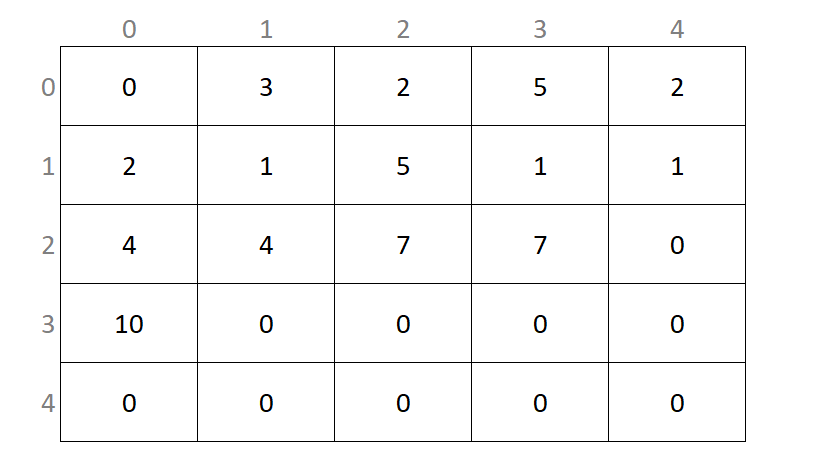
The output should be exactly
dcc find_totals.c -o find_totals
./find_totals
2 rows had a sum of 10
This output is becasue rows 2 and 3 each have a sum of exactly 10.
Your function should work when there are arrays with no rows equal to 10.
When you think your program is working,
you can use autotest
to run some simple automated tests:
1511 autotest find_totals
Exercise — individual:
List Delete Negatives
Download list_delete_negatives.c here
Or, copy these file(s) to your CSE account using the following command:
1511 fetch-activity list_delete_negatives
Your task is to add code to this function in list_delete_negatives.c:
struct node *delete_negatives(struct node *head) {

    // TODO: Delete any nodes in the linked list
    // with a data value < 0

    return NULL;
}
Given a linked list, your task is to delete any nodes which have a value strictly less than 0. Any nodes which are deleted must be properly free'd.
This program uses the familiar data type below
struct node {
    int data;
    struct node *next;
};
list_delete_negatives is given a pointer to a linked list.
list_delete_negatives should return a pointer to the head of the linked list.
Only this specific function will be called in marking, the main function is only provided for your testing, however you can create more functions if it is helpful.
Your function should operate normally with an empty linked list.
Your function should not change the list if there are no negative numbers within the list.
You function should not call malloc.
Your function should not have any memory leaks and should pass a leak-check.
For example, if the linked list had the values
Head => [3, 4, -5, 10, -10]
Your function should return a pointer to a linked list with the following values
Head => [3, 4, 10]
Additionally, if the linked list had the values
Head => [-2, -2, 6]
Your function should return a pointer to a linked list with the following values
Head => [6]
Examples
dcc list_delete_negatives.c -o list_delete_negatives
./list_delete_negatives
4 -> -2 -> 6 -> X
4 -> 6 -> X
When you think your program is working,
you can use autotest
to run some simple automated tests:
1511 autotest list_delete_negatives
Exercise — individual:
List Delete Duplicates
Download list_delete_duplicates.c here
Or, copy these file(s) to your CSE account using the following command:
1511 fetch-activity list_delete_duplicates
Your task is to add code to this function in list_delete_duplicates.c:
struct node *delete_duplicates(struct node *head) {

    // TODO: delete any adjacent duplicate values

    return NULL;
}
Given a linked list, delete any values which are adjacent duplicates in the linked list.
This program uses the familiar data type below
struct node {
    int data;
    struct node *next;
};
delete_duplicates is given a pointer to a linked list.
delete_duplicates should return a pointer to the head of the linked list.
delete_duplicates should only remove duplicate values which are next to each
other in the list (adjacent).
delete_duplicates can delete more than 1 successive duplicate value.
delete_duplicates should remove all but the first instance of the value in a
set of duplicates, such that the value only appears once in that part of the
list.
The same value can appear multiple times in the linked list, provided they are not adjacent.
delete_duplicates can remove the same value multiple times in the list.
See the examples for more details
Example 1
For example, if the linked list had the values
Head => [2, 3, 3, 5, 6]
After removing duplicates, the list would become
Head => [2, 3, 5, 6]
Example 2
For example, if the linked list had the values
Head => [10, 11, 11, 11, 11, 12]
After removing duplicates, the list would become
Head => [10, 11, 12]
Example 3
For example, if the linked list had the values
Head => [10, 11, 11, 25, 11, 11]
After removing duplicates, the list would become
Head => [10, 11, 25, 11]
Only this specific function will be called in marking, the main function is only provided for your testing, however you can create more functions if it is helpful.
Your function should operate normally with an empty linked list.
Your function should not change the list if there are no duplicate numbers within the list.
You function should not call malloc.
Your function should not have any memory leaks and should pass a leak-check.
Examples
dcc list_delete_duplicates.c -o list_delete_duplicates
./list_delete_duplicates
2 -> 4 -> 4 -> 6 -> X
2 -> 4 -> 6 -> X
When you think your program is working,
you can use autotest
to run some simple automated tests:
1511 autotest list_delete_duplicates
Exercise — individual:
Adjacent Distances
Download adjacent_distances.c here
Or, copy these file(s) to your CSE account using the following command:
1511 fetch-activity adjacent_distances
Your task is to add code to this function in adjacent_distances.c:
void adjacent_distances(struct coordinate arr[SIZE], int size) {
    // TODO: Print the distances between adjacent coordinates

    // Your function should NOT return anything
    // Your function SHOULD print the distances
}
Your task is to print the Euclidean distance between adjacent coordinates in an array of coordinates.
Specifically, given a 1D array of structs, where each struct contains an x and y coordinate, you need to calculate and print the distance between coordinates stored next to each other in the array.
This program uses the following struct to store coordinates
struct coordinate {
    int x;
    int y;
};
Coordinates are stored in an array of struct coordinates, always of size 5. This can be seen in the starter program. Note; Some example values are given to the array of structs for your testing
struct coordinate array1[SIZE];
For this array of size 5, you must calculate and print the Euclidean distance between coordinates in
- Index 0 & Index 1
- Index 1 & Index 2
- Index 2 & Index 3
- Index 3 & Index 4
The euclidean distance can be calculated using the provided e_dist
function in the starter code. This function takes in two struct coordinate
and returns the distance between them as a double.
You must implement the function given to you, the function will be called directly in marking and the main function will be ignored. You may create extra function if you find that helpful.
For example, the output of the test input given in the main function, would be
dcc adjacent_distances.c -o adjacent_distances
./adjacent_distances
Dist: 1.414214
Dist: 7.000000
Dist: 9.899495
Dist: 9.219544
Your program must produce this output exactly
When you think your program is working,
you can use autotest
to run some simple automated tests:
1511 autotest adjacent_distances
Exercise — individual:
Array Clamping Max
Download array_clamping_max.c here
Or, copy these file(s) to your CSE account using the following command:
1511 fetch-activity array_clamping_max
Your task is to add code to this function in array_clamping_max.c:
void clamp_max(int arr[SIZE][SIZE], int size, int max) {
    // TODO: Make sure all values are <= max
    // Change any values that are > max
}
Given a 2D array of integers and a maximium value, you must make sure all values within the 2D array are less than or equal to that maximium value. If a value is greater than the max value, you should change the value to be equal to the max value.
For example if the given array was as follows, and the max value was set to 10
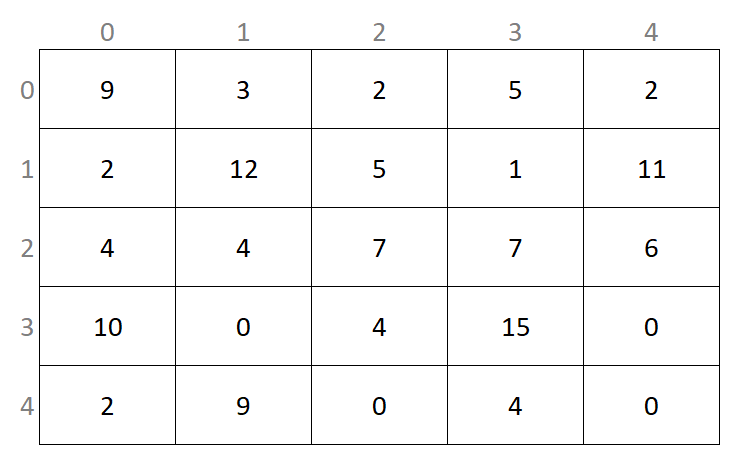
Then the array should be changed to be
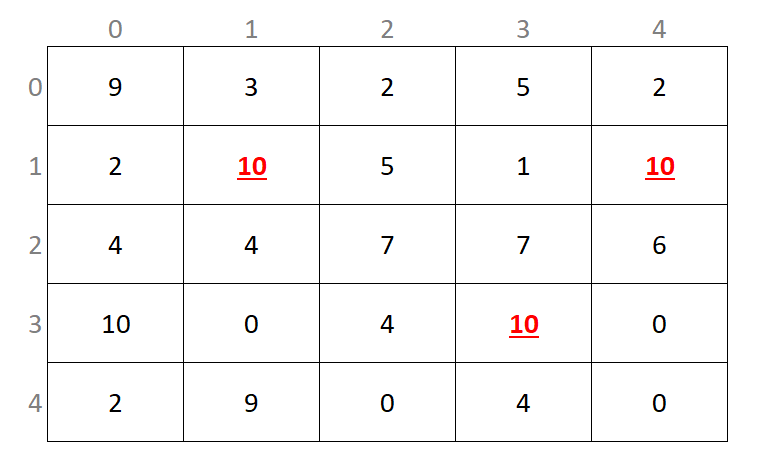
Your function will be called directly in marking, any changes in the main function will not be used. You may use additional functions if you find it helpful.
You can assume the array is always square and the size is always 5.
The array values given can be any valid integer.
You are not required to print the array, this is handled separately.
You are only required to implement the clamp_max function.
Examples
dcc adjacent_distances.c -o adjacent_distances
./adjacent_distances
Before:
  9   3   2   5   2
  2  12   5   1  11
  4   4   7   7   6
 10   0   4  15   0
  2   9   0   4   0
After:
  9   3   2   5   2
  2  10   5   1  10
  4   4   7   7   6
 10   0   4  10   0
  2   9   0   4   0
Your program must produce this output exactly
When you think your program is working,
you can use autotest
to run some simple automated tests:
1511 autotest array_clamping_max
Exercise — individual:
reverse_array
Write a C program, reverse_array.c, which reads integers line by line, and
when it reaches the end of input, prints those integers in reverse order, line
by line.
You will never be given more than 100 integers to print out.
Examples
dcc reverse_array.c -o reverse_array
./reverse_array
Enter numbers forwards:
10
50
20
40

Reversed:
40
20
50
10
./reverse_array
Enter numbers forwards:
-5
-4
-3
-2
-1

Reversed:
-1
-2
-3
-4
-5
When you think your program is working,
you can use autotest
to run some simple automated tests:
1511 autotest reverse_array
Exercise — individual:
going_electric
You are in charge of planning a route for an electric car across a long road.
Your electric car takes exactly one unit of charge to travel one kilometer. It has infinite battery capacity, but starts off empty
Conveniently, every kilometer along this road, there is a charging station, where you can stop to charge your car. These charging stations may have a limited of supply of charge you can use to charge your car. A charging station may have no charge available
Your job is to determine if it is possible to drive your car to the last charging station on the road, and if so, what the minimum number of stops is to get your car there
Input Format
You should write a C program, going_electric.c
This program will be provided a series of numbers. Each number represents the charge available from a given charging station. The first number given is the charge of the first station (where your car begins its journey). The second number given is the charge at the second station, and so on
Output Format
Your program should print a single integer, the minimum number of charging stops required to cross the road. This should include the initial charging stop
If it is not possible to drive all the way along the road, you should print
the integer 0.
Examples
dcc going_electric.c -o going_electric
./going_electric
2 0 0

1
In the above example, the car had to charge at the first station. It then had
2 units of charge, which let it reach the final station. Note that even
though that final charging station had no charge to give, the car successfully
reached it (just), so this journey is possible.
./going_electric
2 0 0 3 0

0
In the above example, the car could not make it to the last charging station -- the two units of charge at the first station aren't enough to drive to the next charging station with more charge.
./going_electric
1 1 1 1 0

4
In the above example, the car charges at each of the four stations it can. In this way, it just makes it to the final charging station.
./going_electric
3 3 2 1 0

2
In the above example, the car must charge twice, but there are three possible ways it could do so -- it must charge at the first station, but then it could charge at any of the others (excluding the last).
Assumptions/Restrictions/Clarifications
- The road will have no more than
10000charging stations - The road is longer than
1kilometer (that is, it has at least two charging stations) - A charging station always has a non-negative amount of charge (that is, either a charging station has a positive amount of charge, or no charge at all)
When you think your program is working,
you can use autotest
to run some simple automated tests:
1511 autotest going_electric
Exercise — individual:
array_sum_prod
Download array_sum_prod.c here
Or, copy these file(s) to your CSE account using the following command:
1511 fetch-activity array_sum_prod
Your task is to add code to this function in array_sum_prod.c:
// Calculates the sum and product of the array nums.
// Actually modifies the  variables that *sum and *product are pointing to
void array_sum_prod(int length, int nums[length], int *sum, int *product) {
    // TODO: Complete this function
}
The above file array_sum_prod.c contains a function
array_sum_prod, which should find the sum and the product of the
values stored in the array. It should write these values into the integers
referenced by the pointers in the input to the function.
Unfortunately, the provided function doesn't actually work. For this lab exercise, your task is to complete this function.
The file also contains a main function which you can use to help test
your array_sum_prod function. It has two simple test cases.
This main function will not be marked -- you must write all of your code
in the array_sum_prod function.
You may modify the main function if you wish (e.g. to add further tests),
but only the array_sum_prod function will be marked.
Examples
dcc -o array_sum_prod array_sum_prod.c
./array_sum_prod
Sum: 20, Product: 360
Sum: 10, Product: 24
Assumptions/Restrictions/Clarifications
- You will not be given an empty array as input, you can assume that you have at least 1 value.
When you think your program is working,
you can use autotest
to run some simple automated tests:
1511 autotest array_sum_prod
Exercise — individual:
advanced_addition
Download advanced_addition.c here
Or, copy these file(s) to your CSE account using the following command:
1511 fetch-activity advanced_addition
Your task is to add code to this function in advanced_addition.c:
// Put the sum of the lines in the array into the last line
// accounting for carrying. Return anything you did not carry.
//
// NOTE: num_lines is the number of lines you are adding together. The
// array has an extra line for you to put the result.
int sum(int num_lines, int num_digits, int array[MAX_SIZE][MAX_SIZE]) {
    // Put your code here.
    return 0;
}
You will implement the sum function, which will be given a two-dimensional
array with a variable number of rows ("lines") and columns ("digits"), like
the following:
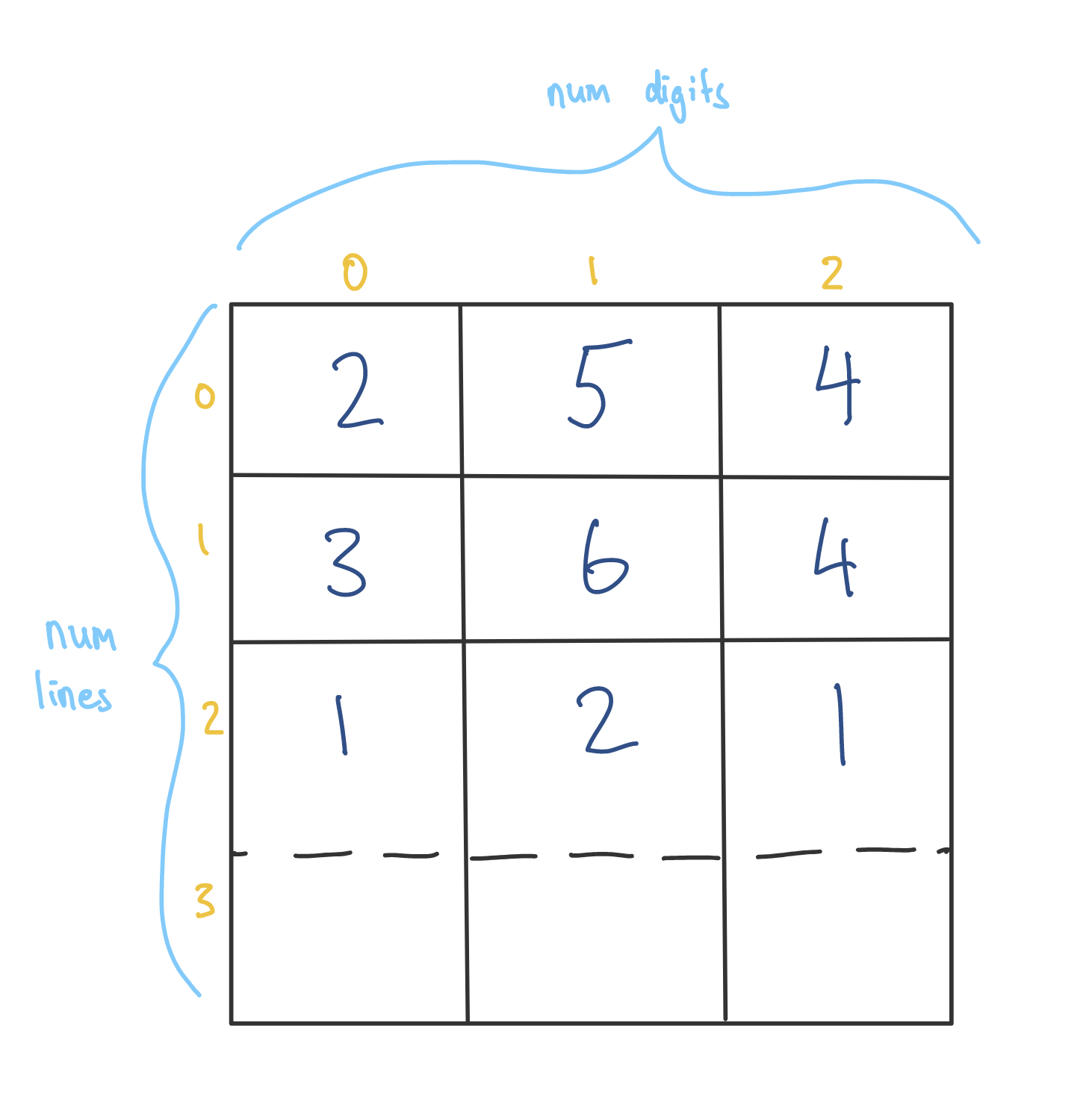
When you receive this array, you are guaranteed the last row will be all zeroes. For each column, starting from the right-most digit, you should add every digit in that column, and put the result of that addition into the last row.
An example of the first column is shown below
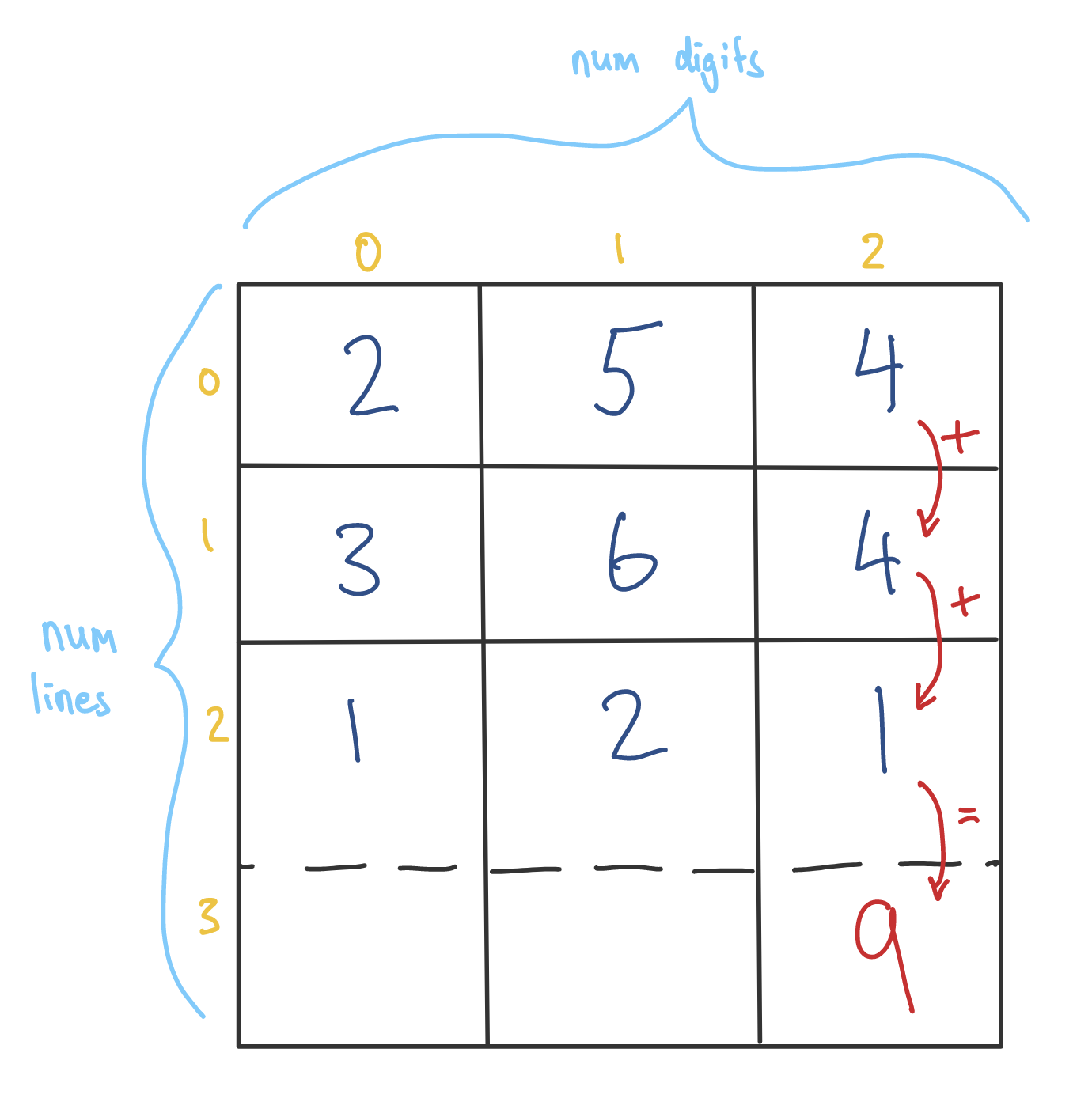
To simulate real addition, however, none of the values in the array may exceed
9, so you will need to implement "carrying", just like in normal addition.
"Carrying" is when all the numbers in a column sum to greater than 9, and
you add extra to the next column to keep the current column below 10. For
example, the following array:
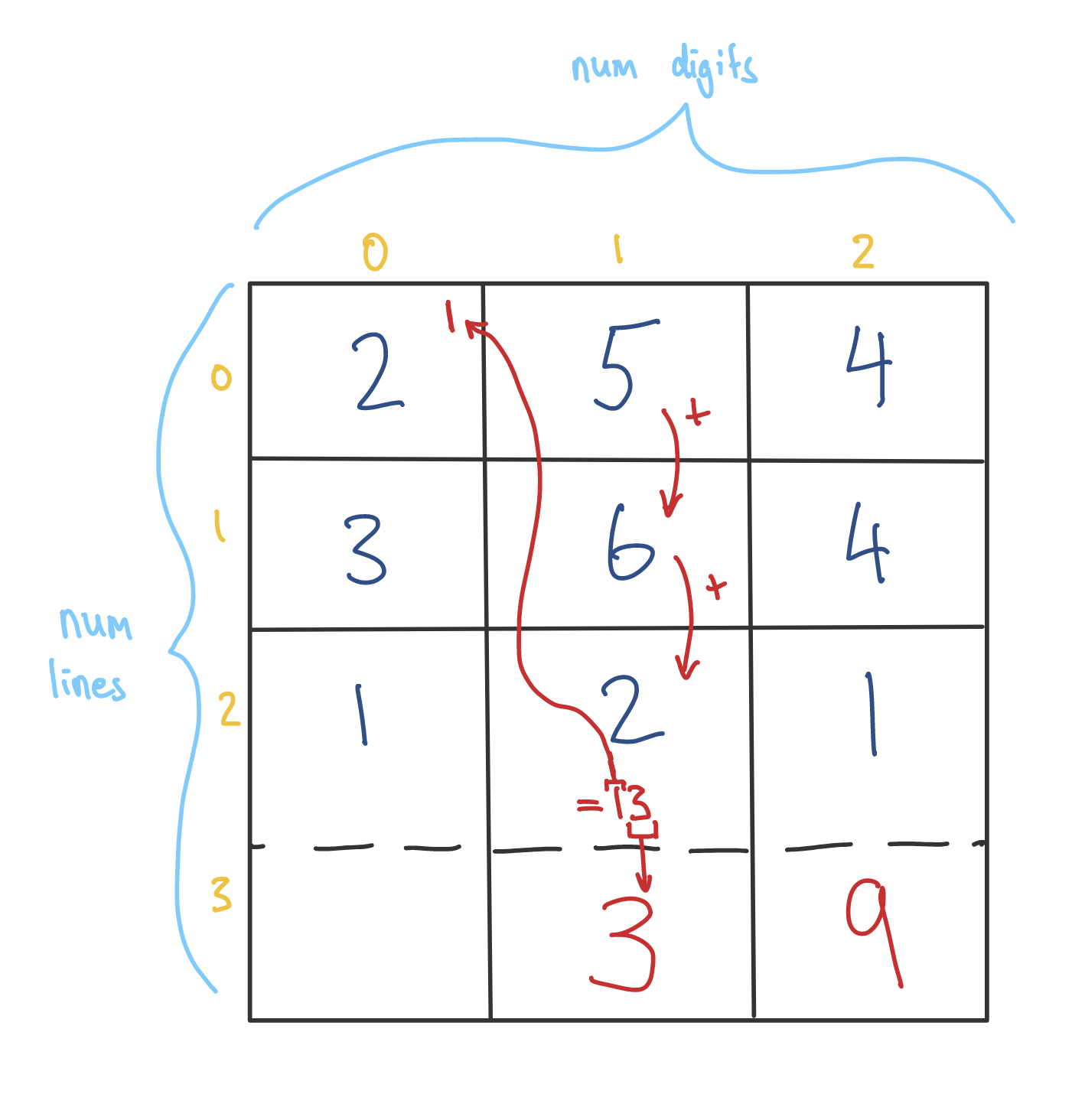
And then
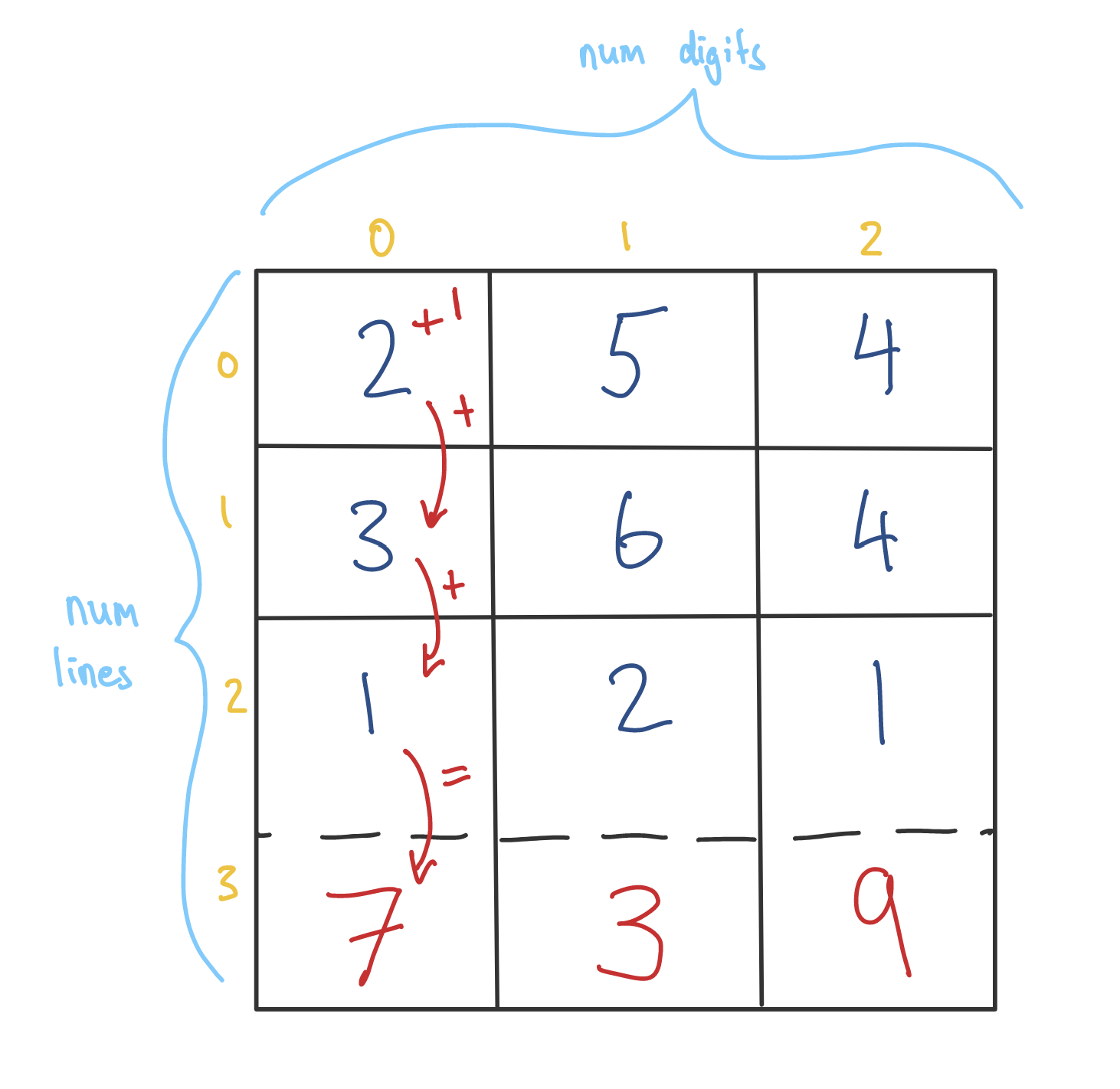
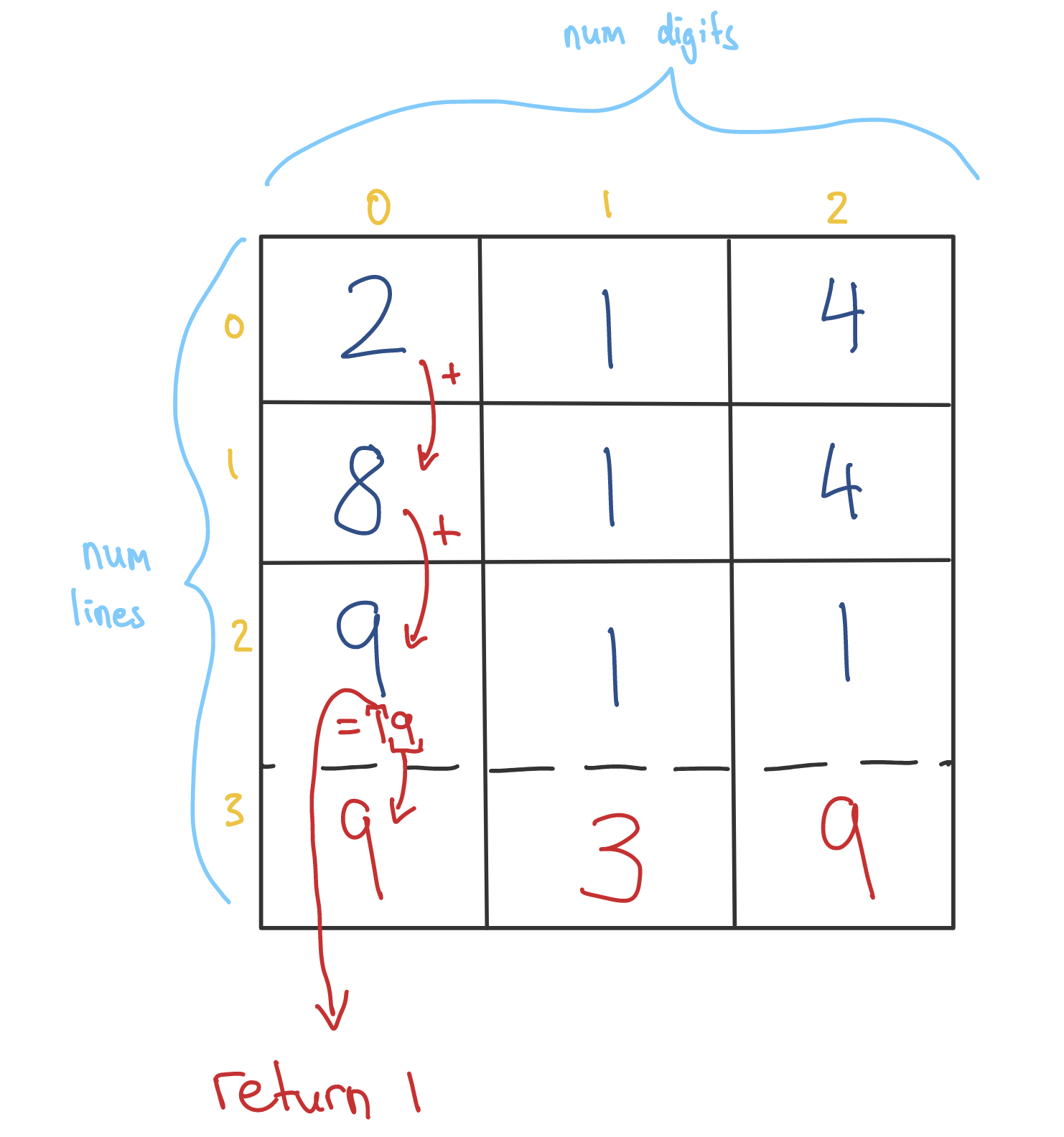
The sum In addition, the function will normally return 0. However, if your
addition cannot be represented in the array because the last column you add
still carries something over, your function should return the amount carried.
For example:
More formally, you should:
- Start at the rightmost column of the array.
- Add together the integers in that column, as well as anything "carried across".
- If the result of that addition would be less than ten, write the result of that addition into the last number in that row. Nothing is carried across.
- Otherwise, find the result of the addition modulo 10, and write that into the last value in the column.
- Then, divide the result of the addition by 10, and "carry that accross" to the next column.
- Repeat on the next column to the next, from step two.
- If you reach the leftmost column of the array, and there is still a value "carried across", return it. Otherwise, return zero.
The file advanced_addition.c contains a main function which reads values into
a 2D array and calls sum.
Examples
dcc advanced_addition.c -o advanced_addition
./advanced_addition
Enter the number of rows (excluding the last): 3
Enter the number of digits on each row: 3
Enter 2D array values:
1 2 3
4 5 6
0 1 0
5 8 9
./advanced_addition
Enter the number of rows (excluding the last): 4
Enter the number of digits on each row: 2
Enter 2D array values:
1 3
1 3
1 3
1 3
5 2
./advanced_addition
Enter the number of rows (excluding the last): 2
Enter the number of digits on each row: 1
Enter 2D array values:
9
9
8
Carried over: 1
When you think your program is working,
you can use autotest
to run some simple automated tests:
1511 autotest advanced_addition
Exercise — individual:
largest_z_sum
Download largest_z_sum.c here
Or, copy these file(s) to your CSE account using the following command:
1511 fetch-activity largest_z_sum
Your task is to add code to this function in largest_z_sum.c:
// Return the largest sum of numbers in a z shape.
int largest_z_sum(int size, int array[MAX_SIZE][MAX_SIZE]) {
    // Put your code here.
    return 42;
}
You are to implement the largest_z_sum function which should return the sum
of values forming the shape of the letter 'Z' in a square 2D array.
A Z shape is made up of three lines of equal length. Two of these lines are horizontal and one is diagonal. The length of the three lines must be equal but can range from 3 up to the size of the array. Only correctly oriented Z shapes are valid - Z shapes with a northwest/southeast diagonal are not valid.
The 2D square array may contain any positive or negative integers.
You can assume that the side length of the 2D square array will always be greater than or equal to 3.
You can assume that the side length of the 2D array will never be greater than 100.
The file largest_z_sum.c contains a main function which reads values into a
square 2D array and calls largest_z_sum.
Examples
dcc largest_z_sum.c -o largest_z_sum
./largest_z_sum
Enter 2D array side length: 3
Enter 2D array values:
1 1 1
1 1 1
1 1 1
The largest z sum is 7.
./largest_z_sum
Enter 2D array side length: 5
Enter 2D array values:
1  2  3  4  5
6  7  8  9  10
11 12 13 14 15
16 17 18 19 20
21 22 23 24 25
The largest z sum is 169.
./largest_z_sum
Enter 2D array side length: 5
Enter 2D array values:
 28 -47 -40  29  49
 26 -42 -37  48  1
-36  50  41 -24 -33
 41  25 -39  39  48
 14 -26 -46 -3  -29
The largest z sum is 153.
./largest_z_sum
Enter 2D array side length: 5
Enter 2D array values:
1  1  1  1  1
1  1  1  1  1
99 99 99 1  1
1  99 1  1  1
99 99 99 1  1
The largest z sum is 693.
In the first example, there is only one possible Z sum of size 3.
The Z in the example input is underlined below for your reference:
1 1 1
1 1 1
1 1 1
In the second example, the Z of size 5 starting from
(0, 0) is used to form the largest sum of:
1 + 2 + 3 + 4 + 5 + 9 + 13 + 17 + 21 + 22 + 23 + 24 + 25 = 169
The Z in the example input is underlined below for your reference:
1  2  3  4  5
6  7  8  9  10
11 12 13 14 15
16 17 18 19 20
21 22 23 24 25
In the third example, the Z of size 4 starting
from (0, 1) is used to form the largest sum of:
-47 - 40 + 29 + 49 + 48 + 41 + 25 - 39 + 39 + 48 = 153
The Z in the example input is underlined below for your reference:
 28 -47 -40  29  49
 26 -42 -37  48  1
-36  50  41 -24 -33
 41  25 -39  39  48
 14 -26 -46 -3  -29
In the fourth example, the Z of size 3 starting
from (2, 0) is used to form the largest sum of:
99 + 99 + 99 + 99 + 99 + 99 + 99 = 693
The Z in the example input is underlined below for your reference:
1  1  1  1  1
1  1  1  1  1
99 99 99 1  1
1  99 1  1  1
99 99 99 1  1
When you think your program is working,
you can use autotest
to run some simple automated tests:
1511 autotest largest_z_sum
Exercise — individual:
list_contains
Download list_contains.c here
Or, copy these file(s) to your CSE account using the following command:
1511 fetch-activity list_contains
Your task is to add code to this function in list_contains.c:
// Return 1 if value occurs in linked list, 0 otherwise
int contains(char *value, struct node *head) {

    // PUT YOUR CODE HERE (change the next line!)
    return 42;
}
contains is given two arguments, a string value and head which is the
pointer to the first node in a linked list.
Add code to contains so that it returns 1 if value occurs in the linked
list and otherwise it returns 0.
For example if the linked list contains these 7 elements:
"mozzarella" "pepperoni" "basil" "ham" "tomato bacon" "cheesy-crust" "bocconcini"
and contains is called with value of "mozzarella",
contains should return 1.
Testing
list_contains.c also contains a main function which allows you to test your
contains function.
This main function:
- Asks for how many strings will be in our list,
- reads in and converts that n many strings to a linked list,
- assigns a pointer to the first node in the linked list to
head, - reads another single string from standard input and assigns it to
value. - calls
contains(value, head)and - prints the result.
Do not change this function. If you want to change it, you have misread the question.
Your contains function will be called directly in marking. The main
function is only to let you test your contains function.
Examples
dcc list_contains.c -o list_contains
./list_contains
How many strings in initial list?: 4
pepperoni
ham
basil
capsicum
Enter word to check contained: basil
1
./list_contains
How many strings in initial list?: 4
pepperoni
ham
basil
capsicum
Enter word to check contained: mozzarella
0
./list_contains
How many strings in initial list?: 4
chicken
mushroom
mushroom
pizza-sauce
Enter word to check contained: mushroom
1
./list_contains
How many strings in initial list?: 4
tomato
bacon
capsicum
mushroom
Enter word to check contained: pepperoni
0
./list_contains
How many strings in initial list?: 0
Enter word to check contained: tomato
0
Assumptions/Restrictions/Clarifications
- String matching is case sensitive.
"Tomato"does not match"tomato". No strings will have thespacecharacter in them containsshould return a single integer.containsshould not change the linked list it is given. Your function should not change the next or data fields of list nodes.containsshould not use arrays.containsshould not call malloc.containsshould not call scanf (or getchar or fgets).containsshould not print anything. It should not call printf.- Do not change the supplied
mainfunction. It will not be tested or marked.
When you think your program is working,
you can use autotest
to run some simple automated tests:
1511 autotest list_contains
Exercise — individual:
list_insert_nth
Download list_insert_nth.c here
Or, copy these file(s) to your CSE account using the following command:
1511 fetch-activity list_insert_nth
Your task is to add code to this function in list_insert_nth.c:
// Insert a new node containing value at position n of the linked list.
// if n == 0, node is inserted at start of list
// if n >= length of list, node is appended at end of list
// The head of the new list is returned.
struct node *insert_nth(int n, int value, struct node *head) {
    // PUT YOUR CODE HERE! CHANGE THE NEXT LINES!
    return NULL;
}
insert_nth is given three arguments, n value and head
nis an int.valueis an int.headis the pointer to the first node in a linked list.
Add code to insert_nth so that it creates a new list node (using malloc)
containing value and places it before position n of the list.
The elements are counted in the same manner as array elements (zero-based), so the first element in the list is regarded as at position 0, the second element position 1 and so on.
If there are less than n elements in the list, the new list node should be
appended to the end of the list.
insert_nth should return a pointer to the new list.
For example if n is 1 and value is 12 and the linked list contains
these 3 elements:
16, 7, 8
insert_nth should return a pointer to a list with these elements:
16, 12, 7, 8
Testing
list_insert_nth.c also contains a main function which allows you to test
your insert_nth function.
This main function:
- Asks for the size of the linked list,
- asks for standard input to convert to a linked list,
- assigns a pointer to the first node in the linked list to
head, - reads an integer from standard input and assigns it to
n, - reads a second integer from standard input and assigns it to
value - calls
insert_nth(n, value, head)and - prints the result.
Do not change this function. If you want to change it, you have misread the question.
Your insert_nth function will be called directly in marking. The main
function is only to let you test your insert_nth function
dcc list_insert_nth.c -o list_insert_nth
./list_insert_nth
How many numbers in initial list?: 3
16 7 8
Enter position and value to insert: 0 12
[12, 16, 7, 8]
./list_insert_nth
How many numbers in initial list?: 3
16 7 8
Enter position and value to insert: 1 12
[16, 12, 7, 8]
./list_insert_nth
How many numbers in initial list?: 3
16 7 8
Enter position and value to insert: 2 12
[16, 7, 12, 8]
./list_insert_nth
How many numbers in initial list?: 3
16 7 8
Enter position and value to insert: 3 12
[16, 7, 8, 12]
./list_insert_nth
How many numbers in initial list?: 3
16 7 8
Enter position and value to insert: 42 12
[16, 7, 8, 12]
./list_insert_nth
How many numbers in initial list?: 1
42
Enter position and value to insert: 0 16
[16, 42]
./list_insert_nth
How many numbers in initial list?: 0
Enter position and value to insert: 0 2
[2]
./list_insert_nth
How many numbers in initial list?: 0
Enter position and value to insert: 10 2
[2]
Assumptions/Restrictions/Clarifications
insert_nthshould not use arrays.insert_nthshould not call scanf (orgetcharorfgets).insert_nthshould not print anything. It should not callprintf.- The
nprovided will always be non-negative - Do not change the supplied
mainfunction. It will not be tested or marked.
When you think your program is working,
you can use autotest
to run some simple automated tests:
1511 autotest list_insert_nth
Exercise — individual:
list_insert_tail
Download list_insert_tail.c here
Or, copy these file(s) to your CSE account using the following command:
1511 fetch-activity list_insert_tail
Your task is to add code to this function in list_insert_tail.c:
// Insert a new node containing value at the end of the linked list.
// Parameters:
//      `int value`         : The value to insert.
//      `struct list *list` : a struct * containing the head pointer of the
//      linked list.
void insert_tail(int value, struct list *list) {
    // PUT YOUR CODE HERE
}
insert_tail is given two arguments:
valueis an intlistis the pointer to astruct listwhich contains- the
head(a pointer to the first node) of the linked list
Add code to insert_tail so that it creates a new list node (using malloc)
containing value and places it at the end of the list.
insert_tail should return nothing.
For example if value is 12 and the linked list contains these 3 elements:
16, 7, 8
insert_tail should modify the linked list so that it now has these elements:
16, 7, 8, 12
Testing
list_insert_tail.c also contains a main function which allows you to test
your insert_tail function.
This main function:
- Asks for the size of the initial linked list
- converts the first set of scanned inputs to a linked list
- stores the first node of the linked list in a
struct list. - reads a single integer from standard input and assigns it to
value - calls
insert_tail(value, list) - prints the result.
Do not change this main function. If you want to change it, you have misread the question.
Your insert_tail function will be called directly in marking. The main
function is only to let you test your insert_tail function
Examples
dcc list_insert_tail.c -o list_insert_tail
./list_insert_tail
How many numbers in initial list?: 3
16 7 8
Enter value to insert: 12
[16, 7, 8, 12]
./list_insert_tail
How many numbers in initial list?: 1
16
Enter value to insert: 42
[16, 42]
./list_insert_tail
How many numbers in initial list?: 0
Enter value to insert: 2
[2]
Assumptions/Restrictions/Clarifications
insert_tailshould not use arraysinsert_tailshould not call scanf (orgetcharorfgets)insert_tailshould not print anything. It should not callprintf- Do not change the supplied
mainfunction. It will not be tested or marked
When you think your program is working,
you can use autotest
to run some simple automated tests:
1511 autotest list_insert_tail
Exercise — individual:
list_reverse
Download list_reverse.c here
Or, copy these file(s) to your CSE account using the following command:
1511 fetch-activity list_reverse
Your task is to add code to this function in list_reverse.c:
//
// Place the list pointed to by head into reverse order.
// The head of the list is returned.
//
struct node *reverse(struct node *head) {

    // PUT YOUR CODE HERE (change the next line!)
    return NULL;

}
Note list_reverse.c uses the following familiar data type:
struct node {
    struct node *next;
    int          data;
};
list_reverse is given one argument, head which is the pointer to the first
node in the linked list.
Add code to reverse which rearranges the list to be in reverse order.
reverse should return a pointer to the new list.
reverse must rearrange the list by changing the next fields of nodes.
reverse must not change the data fields of nodes.
For example if the linked list contains these 8 elements:
16, 7, 8, 12, 13, 19, 21, 12
reverse should return a pointer to a list with these elements:
12, 21, 19, 13, 12, 8, 7, 16
Testing
list_reverse.c also contains a main function which allows you to test your
list_reverse function.
This main function:
- takes in the size of the linked list,
- converts the input numbers to a linked list,
- assigns a pointer to the first node in the linked list to
head, - calls
reverse(head)and - prints the result.
Do not change this function. If you want to change it, you have misread the question.
Your list_reverse function will be called directly in marking. The main
function is only to let you test your list_reverse function
Examples
dcc list_reverse.c -o list_reverse
./list_reverse
How many numbers in list?: 8
16 7 8 12 13 19 21 12
[12, 21, 19, 13, 12, 8, 7, 16]
./list_reverse
How many numbers in list?: 6
2 4 6 2 4 6
[6, 4, 2, 6, 4, 2]
./list_reverse 42
How many numbers in list?: 1
42
[42]
./list_reverse
How many numbers in list?: 0
[]
Assumptions/Restrictions/Clarifications
list_reverseshould not change the data fields of list nodeslist_reverseshould not use arrayslist_reverseshould not callmalloclist_reverseshould not call scanf (orgetcharorfgets)list_reverseshould not print anything. It should not callprintf- Do not change the supplied
mainfunction. It will not be tested or marked
When you think your program is working,
you can use autotest
to run some simple automated tests:
1511 autotest list_reverse
Exercise — individual:
list_increasing
Download list_increasing.c here
Or, copy these file(s) to your CSE account using the following command:
1511 fetch-activity list_increasing
Your task is to add code to this function in list_increasing.c:
int increasing(struct node *head) {

    // PUT YOUR CODE HERE (change the next line!)
    return 42;

}
increasing is given one argument, head which is the pointer to the first
node in a linked list.
Add code to increasing so that its returns 1 if the list is in increasing
order - the value of each list element is larger than the element before.
For example if the linked list contains these 8 elements:
1, 7, 8, 9, 13, 19, 21, 42
increasing should return 1 because it is increasing order
Testing
list_increasing.c also contains a main function which allows you to test
your increasing function.
This main function:
- converts the first set of read integers to a linked list,
- assigns a pointer to the first node in the linked list to
head, - calls
list_increasing(head)and - prints the result.
Do not change this main function. If you want to change it, you have misread
the question.
Your list_increasing function will be called directly in marking. The main
function is only to let you test your list_increasing function
Examples
dcc list_increasing.c -o list_increasing
./list_increasing
How many numbers in initial list?: 9
1 2 4 8 16 32 64 128 256
1
./list_increasing
How many numbers in initial list?: 6
2 4 6 5 8 9
0
./list_increasing
How many numbers in initial list?: 6
13 15 17 17 18 19
0
./list_increasing
How many numbers in initial list?: 2
2 4
1
./list_increasing
How many numbers in initial list?: 1
42
1
./list_increasing
How many numbers in initial list?: 0
1
Assumptions/Restrictions/Clarifications
increasingshould return a single integerincreasingshould not change the linked list it is given. Your function should not change the next or data fields of list nodesincreasingshould not use arraysincreasingshould not callmallocincreasingshould not call scanf (orgetcharorfgets)- You can assume the linked list only contains positive integers
increasingshould not print anything. It should not callprintf- Do not change the supplied
mainfunction. It will not be tested or marked.
When you think your program is working,
you can use autotest
to run some simple automated tests:
1511 autotest list_increasing
Exercise — individual:
list_delete_first
Download list_delete_first.c here
Or, copy these file(s) to your CSE account using the following command:
1511 fetch-activity list_delete_first
Your task is to add code to this function in list_delete_first.c:
//
// Delete the first node in list.
// The deleted node is freed.
// The head of the list is returned.
//
struct node *delete_first(struct node *head) {

    // PUT YOUR CODE HERE (change the next line!)
    return NULL;
}
Note list_delete_first.c uses the following familiar data type:
struct node {
    struct node *next;
    int          data;
};
delete_first is given one argument, head which is the pointer to the first
node in the linked list
Add code to delete_first so that it deletes the first node from list
delete_first should return a pointer to the new first node in the list
If the list is now empty, delete_first should return NULL
delete_first should call free to free the memory of the node it deletes
For example if the linked list contains these 8 elements:
16, 7, 8, 12, 13, 19, 21, 12
delete_first should return a pointer to a list with these elements:
7, 8, 12, 13, 19, 21, 12
Hint: This task should only require a few lines of code
Testing
list_delete_first.c also contains a main function which allows you to test
your delete_first function. It converts the inputs to a linked list,
calls delete_first and then prints the result.
Do not change this main function. If you want to change it, you have misread
the question.
Your delete_first function will be called directly in marking. The main
function is only to let you test your delete_first function
Examples
dcc list_delete_first.c -o list_delete_first
./list_delete_first
Total numbers: 8
16 7 8 12 13 19 21 12
[7, 8, 12, 13, 19, 21, 12]
./list_delete_first
Total numbers: 6
2 4 6 2 4 6
[4, 6, 2, 4, 6]
./list_delete_first
Total numbers: 1
42
[]
./list_delete_first
Total numbers: 0
[]
Assumptions/Restrictions/Clarifications
delete_firstshould callfreeto free the memory for the node it deletesdelete_firstshould not change the data fields of list nodesdelete_firstshould not use arraysdelete_firstshould not callmallocdelete_firstshould not call scanf (orgetcharorfgets)delete_firstshould not print anything. It should not callprintf- Do not change the supplied
mainfunction. It will not be tested or marked
When you think your program is working,
you can use autotest
to run some simple automated tests:
1511 autotest list_delete_first
Exercise — individual:
count_bigger
Download count_bigger.c here
Or, copy these file(s) to your CSE account using the following command:
1511 fetch-activity count_bigger
Your task is to add code to this function in count_bigger.c:
// return the number of "bigger" values in an array (i.e. larger than 99
// or smaller than -99).
int count_bigger(int length, int array[]) {
    // PUT YOUR CODE HERE (you must change the next line!)
    return 42;
}
count_bigger should return a single integer: the number of values in the
array which are larger than 99 or smaller than -99.
For example if the array contains these 8 elements:
141, 5, 92, 6, 535, -89, -752, -3
Your function should return 3, because these 3 elements are
bigger than 99 or smaller than -99:
141, 535, -752
Assumptions/Restrictions/Clarifications
count_biggershould return a single integercount_biggershould not change the array it is givencount_biggershould not callscanf(orgetcharorfgets)- You can assume the array contains at least one integer
count_biggershould not print anything. It should not callprintf- Your submitted file may contain a main function. It will not be tested or marked
When you think your program is working,
you can use autotest
to run some simple automated tests:
1511 autotest count_bigger
Exercise — individual:
secret_code
TOP SECRET // COMP1511 ONLY
Write a file secret_code.c which allows you to scan in messages encrypted with Tom's Secret Code,
and then print them out (ending in a newline).
Tom's Secret Code works two letters at a time. Given some ciphertext (text that has been encrypted with Tom's Secret Code), take the first two letters. The first letter of the plaintext (unencrypted text) is the letter with the smaller ascii value of those two encrypted letters. For example, if the first two letters of ciphertext were "GD", the first letter of the plaintext would be "D".
To explain the code, the following diagram demonstrates how the code "CZuOMUPP1i5fg112" is decrypted as "COMP1511". In each pair of letters, the one with the lower ascii value was the one that was part of the plaintext.
| Cipher Text | C | Z | u | O | M | U | P | P | 1 | i | 5 | f | g | 1 | 1 | 2 |
| ASCII Values | 67 | 90 | 117 | 79 | 77 | 85 | 80 | 80 | 49 | 105 | 53 | 102 | 103 | 49 | 49 | 50 |
| Correct Answer | C | O | M | P | 1 | 5 | 1 | 1 | ||||||||
Your program should behave exactly as these examples do:
dcc secret_code.c -o secret_code
./secret_code
abbccddeeffggh
abcdefg
./secret_code
CZuOMUPP1i5fg112
COMP1511
Assumptions/Restrictions/Clarifications
- You should not assume that there will be an even number of inputs. If there is an odd number of characters, you should ignore the last character.
- You could be given any printable ascii character as input (lowercase letters, uppercase letters, newlines, symbols, etc.)
- Your program should always print a newline at the end of it's output
- This exercise is very difficult to solve using
fgets. You should solve this usingscanf("%c", ...)
When you think your program is working,
you can use autotest
to run some simple automated tests:
1511 autotest secret_code
Exercise — individual:
list_length
Download list_length.c here
Or, copy these file(s) to your CSE account using the following command:
1511 fetch-activity list_length
Your task is to add code to this function in list_length.c:
// Return the length of the linked list pointed by head
int length(struct node *head) {

    // PUT YOUR CODE HERE (change the next line!)
    return 42;

}
For this exercise, you will be given a linked list nodes containing integers, shown below.
struct node {
    struct node *next;
    int          data;
};
Your job is to complete the length function.
length is given one argument, head, which is the pointer to the first node
in a linked list.
Add code to length so that its returns the length of the list.
For example if the linked list contains these 8 elements:
1, 7, 8, 9, 13, 19, 21, 42
length should return 8.
Testing
list_length.c also contains a main function which allows you to test your
length function.
This main function:
- scans in number of items in the list, and its values; to create a linked list,
- assigns a pointer to the first node in the linked list to
head, - calls
list_length(head), then - prints the result.
Do not change this function. If you want to change it, you have misread the question.
Your list_length function will be called directly in marking. The main
function is only to let you test your list_length function
Examples
dcc list_length.c -o list_length
./list_length
How many numbers in initial list?: 9
1 2 3 6 5 4 9 9 0
Counted 9 elements in linked list.
./list_length
How many numbers in initial list?: 6
1 2 3 6 5 4
Counted 6 elements in linked list.
./list_length
How many numbers in initial list?: 5
1 2 3 4 5
Counted 5 elements in linked list.
./list_length
How many numbers in initial list?: 2
42 4
Counted 2 elements in linked list.
./list_length
How many numbers in initial list?: 0
Counted 0 elements in linked list.
Assumptions/Restrictions/Clarifications
lengthshould return a single integerlengthshould not change the linked list it is given- Your function should not change the next or data fields of list nodes
lengthshould not use arrayslengthshould not callmalloclengthshould not call scanf (orgetcharorfgets)lengthshould not print anything. It should not callprintf- Do not change the supplied
mainfunction. It will not be tested or marked
When you think your program is working,
you can use autotest
to run some simple automated tests:
1511 autotest list_length
Exercise — individual:
list_delete_second_last
Download list_delete_second_last.c here
Or, copy these file(s) to your CSE account using the following command:
1511 fetch-activity list_delete_second_last
Your task is to add code to this function in list_delete_second_last.c:
//
// Delete the second last node in the list.
// The deleted node is freed.
// The head of the list is returned.
//
struct node *delete_second_last(struct node *head) {

    // PUT YOUR CODE HERE (change the next line!)
    return NULL;
}
Note list_delete_second_last.c uses the following familiar data type:
struct node {
    struct node *next;
    int          data;
};
delete_second_last is given one argument, head, which is the pointer to the
first node in a linked list.
Add code to delete_second_last so that it deletes the second last node from
list.
delete_second_last should return a pointer to the new list.
If the list is empty, delete_second_last should return NULL.
If the list has exactly one element, delete_second_last should return that
one element unchanged.
delete_second_last should call free to free the memory of the node it
deletes.
For example if the linked list contains these 8 elements:
16, 7, 8, 12, 13, 19, 21, 12
delete_second_last should return a pointer to a list with these elements:
16, 7, 8, 12, 13, 19, 12
Testing
list_delete_second_last.c also contains a main function which allows you to
test your delete_second_last function.
This main function:
- converts the command-line arguments to a linked list
- assigns a pointer to the first node in the linked list to
head - calls
delete_second_last(head) - prints the result.
Do not change this main function. If you want to change it, you have misread the question.
Your delete_second_last function will be called directly in marking.
The main function is only to let you test your delete_second_last function
Examples
dcc list_delete_second_last.c -o list_delete_second_last
./list_delete_second_last 16 7 8 12 13 19 21 12
[16, 7, 8, 12, 13, 19, 12]
./list_delete_second_last 2 4 6 2 4 6
[2, 4, 6, 2, 6]
./list_delete_second_last 42
[42]
./list_delete_second_last
[]
Assumptions/Restrictions/Clarifications
delete_second_lastshould callfreeto free the memory for the node it deletesdelete_second_lastshould not change the data fields of list nodes.delete_second_lastshould not use arrays.delete_second_lastshould not call malloc.delete_second_lastshould not callscanf(orgetcharorfgets).delete_second_lastshould not print anything. It should not callprintf.- Do not change the supplied
mainfunction. It will not be tested or marked.
When you think your program is working,
you can use autotest
to run some simple automated tests:
1511 autotest list_delete_second_last
Exercise — individual:
list_delete_ordered
Download list_delete_ordered.c here
Or, copy these file(s) to your CSE account using the following command:
1511 fetch-activity list_delete_ordered
Your task is to add code to this function in list_delete_ordered.c:
// Remove any nodes in a list that are higher
// than the node directly after them.
// Return the head of the list.
// The returned list must have no disorder in it!
struct node *remove_disorder(struct node *head) {
    // WRITE YOUR CODE HERE (you may need to change the line below)
    return head;
}
remove_disorder is written using the following struct that cannot be changed:
struct node {
    int data;
    struct node *next;
};
The node struct is a normal linked list node containing an integer.
remove_disorder should take a pointer to the head of a node list
and return the head of the node list after it has removed any disorder
in the list. A list is considered to have disorder if there are any nodes in it
that are higher in value (using the integer data) than the node directly after
them.
remove_disorder should remove nodes from the list, making sure to reconnect
the list back together if for example a node from the middle of the list is
removed for being disordered.
For example if the list of nodes looks like this:
{1, 3, 2}
remove_disorder should return the head of the list, with 3 now removed
{1, 2}
However, if the list looks like this:
{2, 4, 5, 1}
remove_disorder should return the head of the list
{1}
The 5 is definitely removed for being higher than the 1. After that, the 4 is then disordered because it is now next to the 1 and higher than it. Then, the 2 must be removed because it will be next to the 1 and higher than it.
Assumptions/Restrictions/Clarifications
- struct node cannot be edited. It must be used as it is.
- You may not use arrays in this solution. Arrays are not necessary to complete this task.
- You can assume that you'll never receive an empty list of
nodes.
When you think your program is working,
you can use autotest
to run some simple automated tests:
1511 autotest list_delete_ordered
Exercise — individual:
list_count_favourite
Download list_count_favourite.c here
Or, copy these file(s) to your CSE account using the following command:
1511 fetch-activity list_count_favourite
Your task is to add code to this function in list_count_favourite.c:
// Return the number of elements divisible by 17 in the linked list
int count_favourite(struct node *head) {

    // PUT YOUR CODE HERE (change the next line!)
    return 42;

}
count_favourite is given one argument, head, which is the pointer to the
first node in a linked list.
Add code to count_favourite so that its returns the number of elements
divisible by 17 in the list.
For example if the linked list contains these 8 elements:
51, 7, 8, 9, 34, 19, 34, 42
count_favourite should return 3 because 51, 34 and 34 are divisible by 17.
Testing
list_count_favourite.c also contains a main function which allows you to
test your count_favourite function.
This main function:
- converts the command-line arguments to a linked list
- assigns a pointer to the first node in the linked list to
head - calls
list_count_favourite(head) - prints the result.
Do not change this main function. If you want to change it, you have misread the question.
Your list_count_favourite function will be called directly in marking. The
main function is only to let you test your list_count_favourite function
Examples
Here is how you use main function allows you to test list_count_favourite:
dcc list_count_favourite.c -o list_count_favourite
./list_count_favourite 51 7 8 9 34 19 34 42
3
./list_count_favourite 2 4 6 5 8 9
0
./list_count_favourite 17 34 51 68 85 102 119 136 153
9
./list_clist_count_favouriteount_favourite
0
Assumptions/Restrictions/Clarifications
count_favouriteshould return a single integer.count_favouriteshould not change the linked list it is given.- Your function should not change the next or data fields of list nodes.
count_favouriteshould not use arrays.count_favouriteshould not call malloc.count_favouriteshould not callscanf(orgetcharorfgets).count_favouriteshould not print anything. It should not callprintf.- Do not change the supplied
mainfunction. It will not be tested or marked.
When you think your program is working,
you can use autotest
to run some simple automated tests:
1511 autotest list_count_favourite
Exercise — individual:
valid_c_brackets
Download valid_c_brackets.c here
Or, copy these file(s) to your CSE account using the following command:
1511 fetch-activity valid_c_brackets
Your task is to add code to these functions in valid_c_brackets.c:
// Given a string containing the contents of a C file, print out whether it has
// correct matching brackets. If it does not, print out which line that didn't
// have a correct matching bracket.
void valid_c_brackets(char *file_contents) {
    // TODO: COMPLETE THIS FUNCTION AND REMOVE THE PRINTF BELOW
    printf("valid_c_brackets() has not been implemented yet.\n");
}
In this program you will provide the name of a C file in the command line arguments and the program will print whether it has valid matching brackets.
When we compile our code, the compiler (dcc in our case) will check if your code is correct before it does so and prints errors if it cannot compile. One thing a compiler will check for is if all your brackets match properly.
This can get quite complex when you have brackets nested in other brackets (such as putting a while loop inside an if statement where we print out an array)
In this program, we have handled all file input and you have the write the provided function to test bracket matching. In the function, you will be provided the file contents as a string so that you do not need to worry about the file aspect
Some example files are provided for you below which you can download to use.
Make sure they are in the same directory as valid_c_brackets.c when you are
testing
Example files
Download basic_valid.c here, or copy it to your CSE account using the following command:
cp -n /import/adams/A/cs1511/public_html/26T2/activities/valid_c_brackets/files/basic_valid.c .
Download basic_invalid.c here, or copy it to your CSE account using the following command:
cp -n /import/adams/A/cs1511/public_html/26T2/activities/valid_c_brackets/files/basic_invalid.c .
Download medium_valid.c here, or copy it to your CSE account using the following command:
cp -n /import/adams/A/cs1511/public_html/26T2/activities/valid_c_brackets/files/medium_valid.c .
Download medium_invalid.c here, or copy it to your CSE account using the following command:
cp -n /import/adams/A/cs1511/public_html/26T2/activities/valid_c_brackets/files/medium_invalid.c .
Download complex_valid.c here, or copy it to your CSE account using the following command:
cp -n /import/adams/A/cs1511/public_html/26T2/activities/valid_c_brackets/files/complex_valid.c .
Download complex_invalid.c here, or copy it to your CSE account using the following command:
cp -n /import/adams/A/cs1511/public_html/26T2/activities/valid_c_brackets/files/complex_invalid.c .
Examples
./valid_c_brackets basic_valid.c
File has valid matching brackets!
./valid_c_brackets basic_invalid.c
Non-matching bracket found on line 5. Was expecting a ')' but got a '}'
./valid_c_brackets medium_valid.c
File has valid matching brackets!
./valid_c_brackets medium_invalid.c
There was a missing '}' bracket in this program
There are essentially 3 cases here:
- File is valid - Print as such
- Non-matching brackets - When searching for a match to an opening bracket, a non-matching closing bracket was found first
- Not enough brackets - The end of the file was reached and the last seen, non-matched opening bracket was never matched
The key idea with this exercise is that you need to consider the most recent opening bracket and try to match it before matching other un-matched opening brackets before it.
Assumptions/Clarifications/Restrictions
- How could you use a stack to model this problem?
- You can assume that the only bracket pairs you need to match are:
- ()
- {}
- []
- You can assume these brackets will only appear in actual code, meaning they can't appear in comments or strings (such as printing the bracket)
- You will need to keep track of the current line. This can simply be done by looking for each new line character in the given string
- As a note from the above, there can still appear new line characters in the file such as in printfs, but this will appear as 2 characters in the string so you do not need to worry about it (since actual new lines are 1 character)
When you think your program is working,
you can use autotest
to run some simple automated tests:
1511 autotest valid_c_brackets
Exercise — individual:
sudoku
Recursion
Warning: This challenge is very hard. The provided solution uses a technique called recursion, that is covered early in COMP2521. Students looking for a challenge have lots to gain from completing this challenge. Recursion occurs when a function calls itself in order to solve smaller sub problems of an overall problem, until it reaches a base case that does not require recursion to calculate.
Below is an example program that finds the Nth fibonacci number using recursion. If you are unfamiliar with the Fibonacci sequence please see here
#includeint fib(int n) { if (n == 0 || n == 1) { // Base case return n; } // Recursive case return fib(n - 1) + fib(n - 2); } int main (void) { int n = 0; scanf("%d", &n); printf("The %d(th|nd|st) Fibonacci number is %d\n", n, fib(n)); return 0; }
If we consider the case where n = 4, we can build out what is called a recursion tree.
In this tree, the numbers on the edges signify the order in which the functions are called. These functions are resolved in reverse order, returning the their base values (0 or 1) back up to the functions that called them, until fib(4) is resolve to equal 3.
Another representation of this is:
fib(4) = fib(3) + fib(2)
       = (fib(2) + fib(1)) + fib(2)
       = ((fib(1) + fib(0)) + fib(1)) + fib(2)
       = ((fib(1) + fib(0)) + 1) + fib(2)
       = ((1 + 0) + 1) + fib(2)
       = ((1 + 0) + 1) + (fib(1) + fib(0))
       = ((1 + 0) + 1) + (1 + 0)
       = 3
Note: If you do not have a correct/reliable base case, your recursion will continue indefinitely, using up all the memory allocated to the program. This will cause an error called a stack overflow. For more info see here
For the curious student: Another cool use for recursion is to run operations on linked lists. Just beware of causing a stack overflow when your linked list is too big!
Challenge
Write a program that finds attempts to find a solution to a Sudoku puzzle. If there is no solution the program should return "No solution found!".
Examples:
Solution found:
dcc sudoku.c -o sudoku
./sudoku
Enter values: 5 3 0 0 7 0 0 0 0 6 0 0 1 9 5 0 0 0 0 9 8 0 0 0 0 6 0 8 0 0 0 6 0 0 0 3 4 0 0 8 0 3 0 0 1 7 0 0 0 2 0 0 0 6 0 6 0 0 0 0 2 8 0 0 0 0 4 1 9 0 0 5 0 0 0 0 8 0 0 7 9
Solution found!
5 3 4 6 7 8 9 1 2
6 7 2 1 9 5 3 4 8
1 9 8 3 4 2 5 6 7
8 5 9 7 6 1 4 2 3
4 2 6 8 5 3 7 9 1
7 1 3 9 2 4 8 5 6
9 6 1 5 3 7 2 8 4
2 8 7 4 1 9 6 3 5
3 4 5 2 8 6 1 7 9
No solution found:
dcc sudoku.c -o sudoku
./sudoku
Enter values: 0 0 0 0 0 0 0 0 0 0 1 6 0 3 0 0 5 0 0 9 0 0 0 2 0 0 8 0 0 7 0 0 8 0 0 0 0 6 0 0 1 0 3 4 5 0 0 0 0 0 0 0 0 0 0 0 0 0 0 0 0 8 0 0 4 0 0 2 1 6 7 0 0 5 0 0 4 3 0 0 0
No solution found!
When you think your program is working,
you can use autotest
to run some simple automated tests:
1511 autotest sudoku
Exercise — individual:
command_line_words
Write a program called command_line_words.c that takes in comand line
arguments and prints out the total number of words that appear in them.
A word is defined as any collection of characters that do not contain a space. For example, "Today I Slept" contains 3 words by that definition.
However, the twist with this exercise is that we are going to input command line arguments in a special way such that a single argument can contain spaces.
So far, we have seen the use of command line arguments as such:
./program Here are my arguments
We know that argc in this case is 5. We can also visualise the layout of
argv like so:

However, there is actually a way to group words together into a single argument! This can be done by surrounding these words in double quotes. If we adjust the above example to instead be:
./program Here "are my" arguments
Then argc will now be 4. We can also visualise the new layout of argv
like so:

It is important to see here that the number of command line arguments changes,
but the number of words stays the same (4, excluding ./program)!
Here are some examples for how your program should work (Note that we ignore
./command_line_words in all outputs):
dcc command_line_words.c -o command_line_words
./command_line_words Here "are my" arguments
There are 3 command line arguments (Excluding program)!
There were 4 total words!
./command_line_words "All words in one argument"
There are 1 command line arguments (Excluding program)!
There were 5 total words!
./command_line_words "Mixture of" "words" in "Command line arguments"
There are 4 command line arguments (Excluding program)!
There were 7 total words!
./command_line_words "Empty Arguments" " " " " "End"
There are 4 command line arguments (Excluding program)!
There were 3 total words!
Assumptions/Restrictions/Clarifications
- You will only be given letters, quotes and spaces as input
- Autotests will use single quotes to group arguments. There is no fundamental difference in this exercise between using single and double quotes
When you think your program is working,
you can use autotest
to run some simple automated tests:
1511 autotest command_line_words