version: 1.6 last updated: 2026-08-05 23:00
Assignment 2 - CS Duck Life
Overview
Welcome to CS Duck Life! 🦆
In assignment 2, your task is to implement the CS Duck Life game, inspired by Duck Life (all trademarks are the property of their respective owners). In this game, players can train up their ducks to compete in races against other racing ducks, in order to become the ultimate duck racing champion!
This assignment will test your ability to create, use, manipulate, and solve problems using linked lists. You will represent players, levels and ducks using linked lists within a central duck life game structure.
COMP1511 Students
If you are a COMP1511 student, you will be assessed on your performance in Stages 1, 2, 3, and 4, which will make up the performance component of your grade. Style will be marked as usual and will make up the remaining 20% of the marks for this assignment.
COMP1911 Students
If you are a COMP1911 student, you will be assessed on your performance in up to and including Stage 3.3 ONLY for this assignment, which will make up the performance component of your grade. Style will be marked as usual and will make up the remaining 20% of the marks for this assignment. You are not required to attempt Stages 3.4 and beyond. You may attempt the later stages if you wish, but you will not be awarded any marks for work beyond Stage 3.3.
Getting Started
There are a few steps to getting started with CS Duck Life.
- Create a new folder for your assignment work and move into it.
mkdir ass2
cd ass2
- Use this command on your CSE account to copy the file into your current directory:
1511 fetch-activity cs_duck_life
- Run
1511 autotest cs_duck_lifeto make sure you have correctly downloaded the file.
1511 autotest cs_duck_life
-
Read through this introduction and Stage 1.
-
Spend a few minutes playing with the reference solution.
1511 cs_duck_life
-
Think about your solution, draw some diagrams to help you get started.
-
Start coding!
Assignment Structure & Starter Code
This assignment utilises a multi-file system. There are three files we use in CS Duck Life:
- Main File (
main.c): This file contains the main function, which serves as an entry point for the program. It is responsible for printing a welcome banner, setting the name of the game, creating the game, and initiating a command loop so users can interact with the game.
A main() function has been provided in main.c to get you started.
int main(void) {
    print_welcome_banner();

    printf("Enter the name of your game: ");
    char game_name[MAX_SIZE];
    scan_name(game_name);
    struct game *my_game = create_game(game_name);

    command_loop(my_game);

    printf("\nThank you for playing CS Duck Life!\n");
    return 0;
}
Printing a Welcome Banner
The first statement in main() calls the provided print_welcome_banner() function to print a welcome banner:
void print_welcome_banner() {

    printf(""
    "          Welcome to the Duck Life Game!\n"
    "   _          _          _          _          _\n"
    " >(')____,  >(')____,  >(')____,  >(')____,  >(') ___,\n"
    "   (` =~~/    (` =~~/    (` =~~/    (` =~~/    (` =~~/\n"
    "~^~^`---'~^~^~^`---'~^~^~^`---'~^~^~^`---'~^~^~^`---'~^~^~\n"
    );

}
Scanning the Game Name
In this section, the program receives input from the user for the name of the Duck Life Game.
It declares game_name, a character array of size MAX_SIZE to store the name of the game.
It then uses the provided scan_name() function, which reads user input and stores it in the game_name string.
printf("Enter the name of your game: ");
char game_name[MAX_SIZE];
scan_name(game_name);
Creating the Game
Next, the program creates the game itself. It:
- Declares a pointer
my_gameto astruct game. - Calls
create_game(), passinggame_nameas an argument. - Stores the pointer returned by
create_game()inmy_game.
struct game *my_game = create_game(game_name);
The create_game() function is currently incomplete. You will need to implement this in Stage 1.1. It is responsible for setting up the initial state of the game, including allocating memory and setting default values.
Starting the Command Loop
After creating the game, the program starts a command loop by calling the command_loop() function which you will need to implement in Stage 1.2. This function allows users to interact with the app to add players, ducks, levels, and more!
command_loop(my_game);
Exiting the Program
The last statement in main() prints a thank you message:
printf("\nThank you for playing CS Duck Life!\n");
-
Header File (
cs_duck_life.h): This file declares constants, enums, structs, and function prototypes for the program. You will need to add prototypes for any functions you create in this file. You should also add any of your own constants and/or enums to this file. -
Implementation File (
cs_duck_life.c): This file is where most of the assignment work will be done, as you will implement the logic and functionality required by the assignment here. This file also contains stubs of Stage 1 functions for you to implement. It does not contain amainfunction, so you will need to compile it alongsidemain.c. You will need to define any additional functions you may need for later stages in this file.
The implementation file cs_duck_life.c contains some "Provided Function Definitions" to help simplify some stages of this assignment. These functions have been implemented and should not need to be modified to complete this assignment.
These provided functions will be explained in the relevant stages of this assignment. Please read the function comments and the specification as we will suggest certain provided functions for you to use.
We have defined some structs in cs_duck_life.h to get you started. You may add fields to any of the structs if you wish.
The Game
struct game {
    char name[MAX_SIZE];

    struct player *players;
    struct level *levels;
};
Purpose: To store all the information about the game. It contains:
- The name of the game.
- A list of players in the game.
- A list of levels in the game.
Players
struct player {
    char name[MAX_SIZE];
    int current_level;

    struct duck *ducks;
    struct player *next;
};
Purpose: To represent a player in the game. It contains:
- The player's name.
- The player's current level as an integer.
- A pointer to the list of the player's ducks.
- A pointer to the next player in the game.
Ducks
struct duck {
    char name[MAX_SIZE];
    char owner_name[MAX_SIZE];
    int energy;
    struct skills skills;
    enum duck_stage stage;

    struct duck *next;
};
Purpose: To represent a duck in the game. It contains:
- The name of the duck.
- The name of the duck's owner (a player).
- The total amount of energy that this duck has as an integer.
- A
struct skills, which contains the duck's amount of skill in each area:running,swimming,climbingandflying. - The current evolution stage of this duck (either Beginner, Amateur or Expert).
- A pointer to the next duck in the list.
Levels
struct level {
    char name[MAX_SIZE];
    enum level_type type;
    enum duck_stage required_stage;
    enum level_status status;

    struct tile *tiles;
    struct duck *ducks;
    struct level *next;
};
Purpose: To represent a level in the game. It contains:
- The level's name.
- The level's type (either Running, Swimming, Climbing, Flying or Combined).
- The required evolution stage for this level (either Beginner, Amateur or Expert).
- The current status of the level (either Not Started, In Progress or Completed).
- A pointer to the list of tiles in this level.
- A pointer to the list of ducks in this level.
- A pointer to the next level in the game.
Tiles
struct tile {
    enum tile_type type;

    struct duck *ducks;
    struct tile *next;
};
Purpose: To represent a tile, which makes up the race track of the level. It contains:
- The tile's type (either Grass, Lake, Cliff or Sky).
- A pointer to the list of ducks on this tile.
- A pointer to the next tile in the level.
Skills
struct skills {
    double running;
    double swimming;
    double climbing;
    double flying;
};
Purpose: To store information about each of a duck's four skills. It contains:
- An amount of running skill, stored as a double.
- An amount of swimming skill, stored as a double.
- An amount of climbing skill, stored as a double.
- An amount of flying skill, stored as a double.
The following enum definitions are provided for you in cs_duck_life.h. You can create your own enums if you would like, but you should not need to modify the provided enums.
Level Type
enum level_type {
    RUNNING,
    SWIMMING,
    CLIMBING,
    FLYING,
    COMBINED,
    INVALID_LEVEL
};
Tile Type
enum tile_type {
    GRASS,
    LAKE,
    CLIFF,
    SKY,
    INVALID_TILE
};
Duck Stage
enum duck_stage {
    BEGINNER,
    AMATEUR,
    EXPERT,
    INVALID_STAGE
};
Level Status
enum level_status {
    NOT_STARTED,
    IN_PROGRESS
};
Reference Implementation
To help you understand the expected behaviour of CS Duck Life, we have provided a reference implementation. If you have any questions about the behaviour of your assignment, you can compare its output to the reference implementation.
To run the reference implementation, use the following command:
1511 cs_duck_life
Input:
CS_Duck_Life
?
[CTRL + D]
Input and Output:
1511 cs_duck_life
          Welcome to the Duck Life Game!
   _          _          _          _          _
 >(')____,  >(')____,  >(')____,  >(')____,  >(') ___,
   (` =~~/    (` =~~/    (` =~~/    (` =~~/    (` =~~/
~^~^`---'~^~^~^`---'~^~^~^`---'~^~^~^`---'~^~^~^`---'~^~^~
Enter the name of your game: CS_Duck_Life
Enter command: ?
===========================[ Usage Info ]==========================

  ?
    Show this help information.
  a p [player_name]
    Add a new player with the given name.
  a d [duck_name] [owner_name]
    Add a new duck to the given player's list.
  a l [level_name] [level_type] [required_stage]
    Add a new level with the given type and duck stage.
  *
    Print the duck life game.
  t [duck_name] [running] [swimming] [climbing] [flying]
    Train the given duck in each skill by a specified amount.
  s r [duck_name]
    Feed the given duck 1 pile of regular seeds.
  s s [duck_name]
    Feed the given duck 1 pile of special seeds.
  v [duck_name]
    Evolve the given duck to the next stage.
  g
    Print the best duck in the game.
  a t [level_number] [tile_type]
    Add a single tile to a level.
  f n [level_number] [num_tiles]
    Fill a level with the given number of tiles.
  e [duck_name] [level_number]
    Enter the given duck into the given level.
  q
    Quits the duck life game.
  r d [duck_name]
    Retires the given duck from the game.
  r p [player_name]
    Removes the player and redistributes their ducks.
  b [level_number]
    Begins the given level.
  p [level_number]
    Plays one timestep of the given level.
  c [level_number]
    Automatically runs turns until the level finishes.
  f c n [level_number] [num_tiles] (tile types)
    Fills a combined level normally.
  f c p [level_number] [num_tiles] [pattern_length] (tile types)
    Fills a combined level with a pattern.
  l [level_number] [duck_name]
    Skews the level for the given duck.

===================================================================
Enter command:
Thank you for playing CS Duck Life!
Allowed C Features
This assignment must be implemented exclusively using linked lists for all core data structures and logic.
Other than arrays, there are no restrictions on C features in this assignment, except for those outlined in the Style Guide. If you choose to use features beyond what has been taught in COMP1511, be aware that course staff may not be able to assist you.
FAQ
Q: Can I edit the provided code?
Yes! Feel free to modify, replace, or discard any of the provided code.
For example: you may wish to add fields to the provided struct duck definition.
You are also encouraged to create your own constants, enums, structs, and helper functions.
Q: What C features can I use?
For everything not taught in the course, check the Style Guide:
- If the guide says "avoid", it may incur a style mark penalty if not used correctly.
- If the guide says "illegal" or "do not use", it will result in a style mark penalty (see the Style Marking Rubric).
These rules exist to ensure that everyone develops the required foundational knowledge and to maintain a level playing field for all students.
Q: Can I use arrays?
A: No, you cannot use arrays in any part of this assignment. The only exception is when using strings. Using arrays for any part of this assignment will result in a performance mark of zero. Whilst the provided structs contain strings (char arrays), you cannot use arrays for anything else.
Stages
The assignment has been divided into incremental stages.
Stage 1
- Stage 1.1 - Create and Initialise Structs.
- Stage 1.2 - Command Loop and Help.
- Stage 1.3 - Adding Players, Ducks and Levels.
- Stage 1.4 - Printing the Game.
- Stage 1.5 - Handling Errors.
Stage 2
- Stage 2.1 - Train and Feed Ducks.
- Stage 2.2 - Duck Evolution.
- Stage 2.3 - Print the Best Duck.
- Stage 2.4 - Fill Level.
- Stage 2.5 - Enter Level.
Stage 3
- Stage 3.1 - Quit Game.
- Stage 3.2 - Retire a Duck.
- Stage 3.3 - Duck Inheritance.
- Stage 3.4 - Play One Timestep.
- Stage 3.5 - End Level.
Stage 4
- Stage 4.1 - Combined Levels.
- Stage 4.2 - Skewing Races.
Extension (not for marks)
- SplashKit - Create and Share a Graphical User Interface.
Video Overview
A video explanation to help you get started with the assignment can be found here:
Your Tasks
This assignment consists of four stages. Each stage builds on the work of the previous stage, and each stage has a higher complexity than its predecessor. You should complete the stages in order.
Stage 1
In Stage 1, you will implement some basic commands to turn the starter code into the foundation of our CS Duck Life Game!
This milestone has been divided into four substages:
- Stage 1.1 - Create and Initialise Structs.
- Stage 1.2 - Command Loop and Help.
- Stage 1.3 - Adding Players, Ducks and Levels.
- Stage 1.4 - Printing the Game.
- Stage 1.5 - Handling Errors.
Stage 1.1 - Create and Initialise Structs
In this stage, we’re going to set up the core data structures that make up our duck life game!
Your first task is to implement the following functions:
create_game()create_player()create_duck()create_level()create_tile()
Each of these functions takes in a list of parameters detailed in cs_duck_life.h, and returns a pointer to a struct.
You will find unimplemented function stubs for these functions in cs_duck_life.c.
// Stage 1.1
// Function to create the Duck Life Game
// Params:
//      name - the name of the game
// Returns: a pointer to the game
struct game *create_game(char name[MAX_SIZE]) {

    // TODO: Implement this function
    printf("create_game() not implemented yet!\n");

    return NULL;
}
// Stage 1.1
// Function to create a player
// Params:
//      name - the name of the player
// Returns: a pointer to the player
struct player *create_player(char name[MAX_SIZE]) {

    // TODO: Implement this function
    printf("create_player() not implemented yet!\n");

    return NULL;
}
// Stage 1.1
// Function to create a duck
// Params:
//      name - the name of the duck
//      owner_name - the name of this duck's owner
// Returns: a pointer to the duck
struct duck *create_duck(char name[MAX_SIZE], char owner_name[MAX_SIZE]) {

    // TODO: Implement this function
    printf("create_duck() not implemented yet!\n");

    return NULL;
}
// Stage 1.1
// Function to create a level
// Params:
//      name - the name of the level
//      type - the level_type of the level
//      required_stage - the minimum duck stage for ducks to enter that level
// Returns: a pointer to the level
struct level *create_level(
    char name[MAX_SIZE],
    enum level_type type,
    enum duck_stage required_stage
) {

    // TODO: Implement this function
    printf("create_level() not implemented yet!\n");

    return NULL;
}
// Stage 1.1
// Function to create a tile (one segment of a level)
// Params:
//      type - the type of tile
// Returns: a pointer to the tile
struct tile *create_tile(enum tile_type type) {

    // TODO: Implement this function
    printf("create_tile() not implemented yet!\n");

    return NULL;
}
To implement these functions:
- Find the function stubs in
cs_duck_life.cand read the provided comments. - Malloc the space required for the struct.
- Assign the provided parameters to the struct’s fields.
- Initialise all remaining struct fields to some reasonable values.
- Return a pointer to the newly-created struct.
Assumptions / Restrictions / Clarifications
- No error handling is required for this stage.
- All players should have an initial
current_levelof 1. - All ducks should have an initial
duck_stageofBEGINNER. - All ducks should have initial
skillsandenergyof 0. - All levels should have an initial
level_statusofNOT_STARTED.
Testing
There are no autotests for Stage 1.1.
You will need to test your work by:
- Compiling your code with
dccto ensure there are no warnings or errors. - Writing temporary testing code to confirm that your functions behave as expected.
You can copy the following testing code into your main() function in main.c.
#include <string.h>
#include <stdio.h>

#include "cs_duck_life.h"

int main(void) {
    // Initialise the ducklife game
    char game_name[MAX_SIZE];
    strcpy(game_name, "CS_Ducklife");

    struct game *my_game = create_game(game_name);

    // Print game details
    printf("Duck Life Game created:\n");
    printf("    Name: %s\n", my_game->name);
    printf("    Players: ");
    if (my_game->players == NULL) {
        printf("NULL\n");
    } else {
        printf("not set to NULL\n");
    }
    printf("    Levels: ");
    if (my_game->levels == NULL) {
        printf("NULL\n\n");
    } else {
        printf("not set to NULL\n\n");
    }

    // Create a player
    char player_name[MAX_SIZE];
    strcpy(player_name, "Henry");
    struct player *player = create_player(player_name);

    printf("Player created: \n");
    printf("    Name: %s\n", player->name);
    printf("    Current Level: %d\n", player->current_level);
    printf("    Ducks: ");
    if (player->ducks == NULL) {
        printf("NULL\n");
    } else {
        printf("not set to NULL\n");
    }
    printf("    Next Player: ");
    if (player->next == NULL) {
        printf("NULL\n\n");
    } else {
        printf("not set to NULL\n\n");
    }

    // Create a duck
    char duck_name[MAX_SIZE];
    strcpy(duck_name, "Daphne");
    char owner_name[MAX_SIZE];
    strcpy(owner_name, "Henry");
    struct duck *duck = create_duck(duck_name, owner_name);

    printf("Duck created: \n");
    printf("    Name: %s\n", duck->name);
    printf("    Owner name: %s\n", duck->owner_name);
    printf("    Energy: %d\n", duck->energy);
    printf("    Skills:\n");
    printf("        Running: %.2lf\n", duck->skills.running);
    printf("        Swimming: %.2lf\n", duck->skills.swimming);
    printf("        Climbing: %.2lf\n", duck->skills.climbing);
    printf("        Flying: %.2lf\n", duck->skills.flying);
    printf("    Stage: %s\n", duck_stage_to_string(duck->stage));
    printf("    Next duck: ");
    if (duck->next == NULL) {
        printf("NULL\n\n");
    } else {
        printf("not set to NULL\n\n");
    }

    // Create a level
    char level_name[MAX_SIZE];
    strcpy(level_name, "Lemonade_Stand");
    struct level *level = create_level(level_name, SWIMMING, AMATEUR);

    printf("Level created: \n");
    printf("    Name: %s\n", level->name);
    printf("    Level Type: %s\n", level_type_to_string(level->type));
    printf("    Required Stage: %s\n", duck_stage_to_string(level->required_stage));

    printf("    Tiles: ");
    if (level->tiles == NULL) {
        printf("NULL\n");
    } else {
        printf("not set to NULL\n");
    }
    printf("    Ducks: ");
    if (level->ducks == NULL) {
        printf("NULL\n");
    } else {
        printf("not set to NULL\n");
    }
    printf("    Next level: ");
    if (level->next == NULL) {
        printf("NULL\n\n");
    } else {
        printf("not set to NULL\n\n");
    }

    // Create a tile
    struct tile *tile = create_tile(LAKE);
    printf("tile created: \n");
    printf("    Type: %s\n", tile_type_to_string(tile->type));
    printf("    Ducks: ");
    if (tile->ducks == NULL) {
        printf("NULL\n");
    } else {
        printf("not set to NULL\n");
    }
    printf("    Next tile: ");
    if (tile->next == NULL) {
        printf("NULL\n\n");
    } else {
        printf("not set to NULL\n\n");
    }

    return 0;
}
This code calls create_game(), create_player(), create_duck(), create_level() and create_tile(), then prints the values stored in the fields of the returned structs.
You can compile and run your program with the following command:
dcc cs_duck_life.c main.c -o cs_duck_life
./cs_duck_life
When you run it, it should print the following:
Duck Life Game created:
    Name: CS_Duck_Life
    Players: NULL
    Levels: NULL

Player created:
    Name: Henry
    Current Level: 1
    Ducks: NULL
    Next Player: NULL

Duck created:
    Name: Daphne
    Owner name: Henry
    Energy: 0
    Skills:
        Running: 0.00
        Swimming: 0.00
        Climbing: 0.00
        Flying: 0.00
    Stage: BEGINNER
    Next duck: NULL

Level created:
    Name: Lemonade_Stand
    Level Type: SWIMMING
    Required Stage: AMATEUR
    Tiles: NULL
    Ducks: NULL
    Next level: NULL

tile created:
    Type: LAKE
    Ducks: NULL
    Next tile: NULL
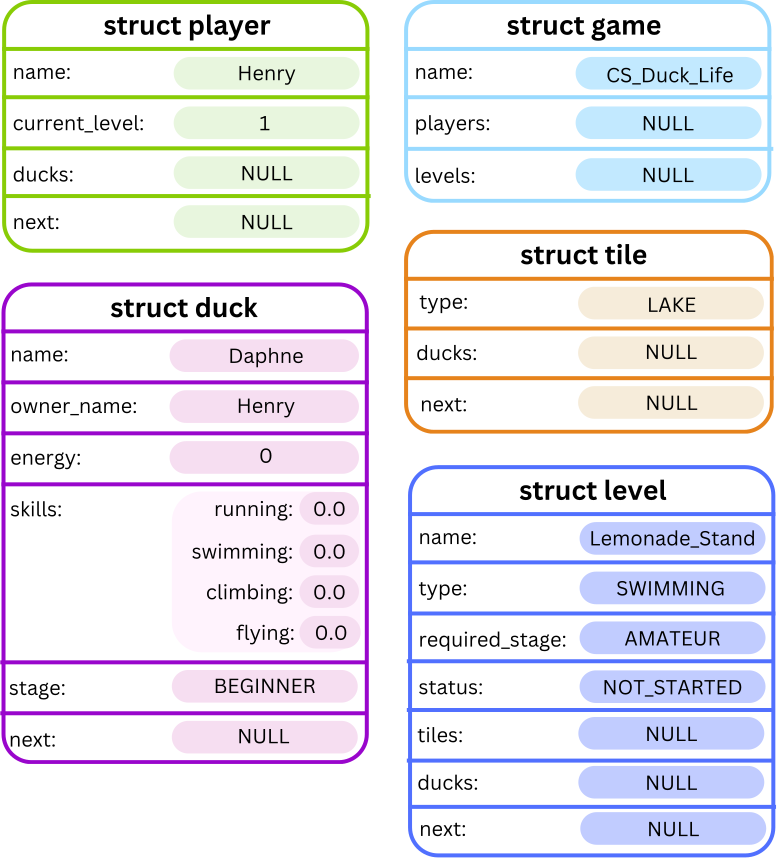
Visually, this can be represented as below:
Stage 1.2 - Command Loop and Help
In this stage, we will implement a command loop, allowing your program to take in commands and perform tasks for our CS Duck Life game!
To do this, we will begin implementing the command_loop() function. This function is called by the main() function in main.c after the game is created.
A function stub has been provided in the cs_duck_life.c starter code.
// Stage 1.2
// Function to run the main command loop for the program
// Params:
//      game - a pointer to the duck life game
// Returns: None
void command_loop(struct game *game) {

    // TODO: Implement this function
    printf("command_loop() not yet implemented!\n");

    return;
}
Your program should continually scan in commands from the user and perform the respective task until [CTRL + D] is entered. To do so, your command_loop() function should:
- Print
"Enter command: "to prompt the user to enter a command. - Scan in a command.
- Execute the task associated with the command.
- Repeat steps 1 to 3 until
[CTRL + D]is entered.
When [CTRL + D] is entered, the function should end and immediately return to the main() function. The program will then print the goodbye message, as included in the starter code in main.c and end.
The command loop will be extended with new commands as you progress through each stage of the assignment.
The first command you will implement is the Help command, which is described below.
Command
The Help command is called as follows:
?
Description
When the character '?' is entered into your program, it should run the Help command. This doesn't read in any arguments following the initial command and should display a message which lists the different commands and their arguments.
The purpose of this command is to allow anyone using our program to easily look up the different commands. It does not require any further input to be entered after ?.
A helper function: print_usage() in cs_duck_life.c has been provided to help you print and format this message.
// Function to print the program usage information
// Params: None
// Returns: None
void print_usage() {

    printf(
       "===========================[ Usage Info ]==========================\n"
       "                                                                   \n"
       "  ?                                                                \n"
       "    Show this help information.                                    \n"

       "  a p [player_name]                                                \n"
       "    Add a new player with the given name.                          \n"
       "  a d [duck_name] [owner_name]                                     \n"
       "    Add a new duck to the given player's list.                     \n"
       "  a l [level_name] [level_type] [required_stage]                   \n"
       "    Add a new level with the given type and duck stage.            \n"

       "  *                                                                \n"
       "    Print the duck life game.                                      \n"


       "  t [duck_name] [running] [swimming] [climbing] [flying]           \n"
       "    Train the given duck in each skill by a specified amount.      \n"
       "  s r [duck_name]                                                  \n"
       "    Feed the given duck 1 pile of regular seeds.                   \n"
       "  s s [duck_name]                                                  \n"
       "    Feed the given duck 1 pile of special seeds.                   \n"

       "  v [duck_name]                                                    \n"
       "    Evolve the given duck to the next stage.                       \n"

       "  g                                                                \n"
       "    Print the best duck in the game.                               \n"

       "  a t [level_number] [tile_type]                                   \n"
       "    Add a single tile to a level.                                  \n"
       "  f n [level_number] [num_tiles]                                   \n"
       "    Fill a level with the given number of tiles.                   \n"

       "  e [duck_name] [level_number]                                     \n"
       "    Enter the given duck into the given level.                     \n"


       "  q                                                                \n"
       "    Quits the duck life game.                                      \n"

       "  r d [duck_name]                                                  \n"
       "    Retires the given duck from the game.                          \n"

       "  r p [player_name]                                                \n"
       "    Removes the player and redistributes their ducks.              \n"

       "  b [level_number]                                                 \n"
       "    Begins the given level.                                        \n"
       "  p [level_number]                                                 \n"
       "    Plays one timestep of the given level.                         \n"

       "  c [level_number]                                                 \n"
       "    Automatically runs turns until the level finishes.             \n"


       "  f c n [level_number] [num_tiles] (tile types)                    \n"
       "    Fills a combined level normally.                               \n"
       "  f c p [level_number] [num_tiles] [pattern_length] (tile types)   \n"
       "    Fills a combined level with a pattern.                         \n"

       "  l [level_number] [duck_name]                                     \n"
       "    Skews the level for the given duck.                            \n"
       "                                                                   \n"
       "===================================================================\n"
    );

}
Once the Help command finishes, the program should continue prompting the user for a command until [CTRL + D] is entered as outlined in steps 1 to 3 above.
If an invalid command is entered, your program should print
ERROR: Invalid command.\n.
Examples
Input:
CS_Duck_Life
[CTRL+D]
Input and Output:
dcc main.c cs_duck_life.c -o cs_duck_life
./cs_duck_life
          Welcome to the Duck Life Game!
   _          _          _          _          _
 >(')____,  >(')____,  >(')____,  >(')____,  >(') ___,
   (` =~~/    (` =~~/    (` =~~/    (` =~~/    (` =~~/
~^~^`---'~^~^~^`---'~^~^~^`---'~^~^~^`---'~^~^~^`---'~^~^~
Enter the name of your game: CS_Duck_Life
Enter command: [CTRL+D]
Thank you for playing CS Duck Life!
Input:
Duck_Life_Game
?
[CTRL+D]
Input and Output:
dcc main.c cs_duck_life.c -o cs_duck_life
./cs_duck_life
          Welcome to the Duck Life Game!
   _          _          _          _          _
 >(')____,  >(')____,  >(')____,  >(')____,  >(') ___,
   (` =~~/    (` =~~/    (` =~~/    (` =~~/    (` =~~/
~^~^`---'~^~^~^`---'~^~^~^`---'~^~^~^`---'~^~^~^`---'~^~^~
Enter the name of your game: Duck_Life_Game
Enter command: ?
===========================[ Usage Info ]==========================

  ?
    Show this help information.
  a p [player_name]
    Add a new player with the given name.
  a d [duck_name] [owner_name]
    Add a new duck to the given player's list.
  a l [level_name] [level_type] [required_stage]
    Add a new level with the given type and duck stage.
  *
    Print the duck life game.
  t [duck_name] [running] [swimming] [climbing] [flying]
    Train the given duck in each skill by a specified amount.
  s r [duck_name]
    Feed the given duck 1 pile of regular seeds.
  s s [duck_name]
    Feed the given duck 1 pile of special seeds.
  v [duck_name]
    Evolve the given duck to the next stage.
  g
    Print the best duck in the game.
  a t [level_number] [tile_type]
    Add a single tile to a level.
  f n [level_number] [num_tiles]
    Fill a level with the given number of tiles.
  e [duck_name] [level_number]
    Enter the given duck into the given level.
  q
    Quits the duck life game.
  r d [duck_name]
    Retires the given duck from the game.
  r p [player_name]
    Removes the player and redistributes their ducks.
  b [level_number]
    Begins the given level.
  p [level_number]
    Plays one timestep of the given level.
  c [level_number]
    Automatically runs turns until the level finishes.
  f c n [level_number] [num_tiles] (tile types)
    Fills a combined level normally.
  f c p [level_number] [num_tiles] [pattern_length] (tile types)
    Fills a combined level with a pattern.
  l [level_number] [duck_name]
    Skews the level for the given duck.

===================================================================
Enter command: [CTRL+D]
Thank you for playing CS Duck Life!
Input:
CS_Duck_Life
z
[CTRL+D]
Input and Output:
dcc main.c cs_duck_life.c -o cs_duck_life
./cs_duck_life
          Welcome to the Duck Life Game!
   _          _          _          _          _
 >(')____,  >(')____,  >(')____,  >(')____,  >(') ___,
   (` =~~/    (` =~~/    (` =~~/    (` =~~/    (` =~~/
~^~^`---'~^~^~^`---'~^~^~^`---'~^~^~^`---'~^~^~^`---'~^~^~
Enter the name of your game: CS_Duck_Life
Enter command: z
ERROR: Invalid command.
Enter command: [CTRL+D]
Thank you for playing CS Duck Life!
Assumptions / Restrictions / Clarifications
You may assume that:
- All commands begin with a single
charand may be followed by additional arguments. The number of arguments will depend on each command. - Commands will always be given the correct number of arguments.
- Commands will always be given arguments of the correct type.
Stage 1.3 - Adding Players, Ducks and Levels
At the moment, when CS Duck Life first runs, a new game is created by calling create_game() from the provided main.c file.
The created empty game should look something like this:

In order to get our duck races under way, we first need to add three key components: the players, ducks and levels!
Your task is to complete the following function stubs in cs_duck_life.c. These functions should then be called inside the command loop depending on which Add command has been entered.
// Stage 1.3
// Function to add a player
// Params:
//      game - a pointer to the duck life game
// Returns: None
void add_player(struct game *game) {

    // TODO: Implement this function
    printf("add_player() not yet implemented!\n");

    return;
}
// Stage 1.3
// Function to add a duck
// Params:
//      game - a pointer to the duck life game
// Returns: None
void add_duck(struct game *game) {

    // TODO: Implement this function
    printf("add_duck() not yet implemented!\n");

    return;
}
// Stage 1.3
// Function to add a level
// Params:
//      game - a pointer to the duck life game
// Returns: None
void add_level(struct game *game) {

    // TODO: Implement this function
    printf("add_level() not yet implemented!\n");

    return;
}
Command 1: Add Player
The Add Player command is called as follows:
a p [player_name]
For example, the command a p Henry will add a player called Henry to the game.
Description
When an Add Player command is entered, your program should:
-
Scan in the player name using the provided
scan_name()function. -
Create a new player.
-
Insert the player at the head of the game’s player list.
-
Print a message to confirm that the command was successful:
"Player: '[name]' added!\n", where[name]is the name of the new player.
After adding one player, the game might look something like this:

Command 2: Add Duck
The Add Duck command is called as follows:
a d [duck_name] [player_name]
For example, the command a d Donald Henry will add a duck called Donald to the player Henry.
Description
When an Add Duck command is entered, your program should:
-
Scan in the duck name using the provided
scan_name()function. -
Scan in the player name using the provided
scan_name()function. -
Create the duck.
-
Find the player with the given player name and insert the duck at the head of this player’s list of ducks.
-
Print a message to confirm that the command was successful:
"Duck: '[duck_name]' added to '[player_name]'!\n",
where [duck_name] is the name of the new duck, and [player_name] is the name of its owner.
After adding one player and one duck, the game might look something like this:

Command 3: Add Level
The Add Level command is called as follows:
a l [level_name] [level_type] [required_stage]
For example, the command a l Lemonade_Stand RUNNING AMATEUR will add a level called Lemonade_Stand with a level type of RUNNING and a minimum required duck stage of AMATEUR.
Description
When an Add Level command is entered, your program should:
- Scan in the
level_nameusing the providedscan_name()function. - Scan in the
level_typeusing the providedscan_level_type()function. - Scan in the
required_stageusing the providedscan_duck_stage()function. - Create the level.
- Insert the level at the tail of the game’s level list.
- Print a message to confirm that the command was successful:
"Level: '[name]' added!\n", where[name]is the name of the new level.
After adding one level, duck and player, the game might look something like this:

After adding an additional player, duck and level, the game might then look something like this:

Examples
Input:
CS_Duck_Life
a p Henry
[CTRL+D]
Input and Output:
dcc main.c cs_duck_life.c -o cs_duck_life
./cs_duck_life
          Welcome to the Duck Life Game!
   _          _          _          _          _
 >(')____,  >(')____,  >(')____,  >(')____,  >(') ___,
   (` =~~/    (` =~~/    (` =~~/    (` =~~/    (` =~~/
~^~^`---'~^~^~^`---'~^~^~^`---'~^~^~^`---'~^~^~^`---'~^~^~
Enter the name of your game: CS_Duck_Life
Enter command: a p Henry
Player: 'Henry' added!
Enter command: [CTRL+D]
Thank you for playing CS Duck Life!
Input:
CS_Duck_Life
a p Henry
a d Daphne Henry
[CTRL+D]
Input and Output:
dcc main.c cs_duck_life.c -o cs_duck_life
./cs_duck_life
          Welcome to the Duck Life Game!
   _          _          _          _          _
 >(')____,  >(')____,  >(')____,  >(')____,  >(') ___,
   (` =~~/    (` =~~/    (` =~~/    (` =~~/    (` =~~/
~^~^`---'~^~^~^`---'~^~^~^`---'~^~^~^`---'~^~^~^`---'~^~^~
Enter the name of your game: CS_Duck_Life
Enter command: a p Henry
Player: 'Henry' added!
Enter command: a d Daphne Henry
Duck: 'Daphne' added to 'Henry'!
Enter command: [CTRL+D]
Thank you for playing CS Duck Life!
Input:
CS_Duck_Life
a l Lemonade_Stand RUNNING BEGINNER
[CTRL+D]
Input and Output:
dcc main.c cs_duck_life.c -o cs_duck_life
./cs_duck_life
          Welcome to the Duck Life Game!
   _          _          _          _          _
 >(')____,  >(')____,  >(')____,  >(')____,  >(') ___,
   (` =~~/    (` =~~/    (` =~~/    (` =~~/    (` =~~/
~^~^`---'~^~^~^`---'~^~^~^`---'~^~^~^`---'~^~^~^`---'~^~^~
Enter the name of your game: CS_Duck_Life
Enter command: a l Lemonade_Stand RUNNING BEGINNER
Level: 'Lemonade_Stand' added!
Enter command: [CTRL+D]
Thank you for playing CS Duck Life!
Input:
CS_Duck_Life
a p Henry
a p Sasha
a l Lemonade_Stand RUNNING BEGINNER
a d Donald Sasha
a l Swamp SWIMMING AMATEUR
a d Daphne Henry
[CTRL+D]
Input and Output:
dcc main.c cs_duck_life.c -o cs_duck_life
./cs_duck_life
          Welcome to the Duck Life Game!
   _          _          _          _          _
 >(')____,  >(')____,  >(')____,  >(')____,  >(') ___,
   (` =~~/    (` =~~/    (` =~~/    (` =~~/    (` =~~/
~^~^`---'~^~^~^`---'~^~^~^`---'~^~^~^`---'~^~^~^`---'~^~^~
Enter the name of your game: CS_Duck_Life
Enter command: a p Henry
Player: 'Henry' added!
Enter command: a p Sasha
Player: 'Sasha' added!
Enter command: a l Lemonade_Stand RUNNING BEGINNER
Level: 'Lemonade_Stand' added!
Enter command: a d Donald Sasha
Duck: 'Donald' added to 'Sasha'!
Enter command: a l Swamp SWIMMING AMATEUR
Level: 'Swamp' added!
Enter command: a d Daphne Henry
Duck: 'Daphne' added to 'Henry'!
Enter command: [CTRL+D]
Thank you for playing CS Duck Life!
Assumptions / Restrictions / Clarifications
- No error handling is required in this stage.
[player_name],[duck_name]and[level_name]are all strings with no spaces or punctuation, and will always have length less thanMAX_SIZE. This applies for all future stages.level_typewill be entered as an uppercase string and converted to the correctenum level_typeby thescan_level_typefunction.required_stagewill be entered as an uppercase string and converted to the correctenum duck_stageby thescan_duck_stagefunction.- Until Stage 1.5, you can assume that the returned
enum level_typeandenum duck_stagewill never beINVALID_LEVELorINVALID_STAGE.
Stage 1.4 - Printing the Game
In this stage, you will implement a function to print out our CS Duck Life Game!
Command
The Print command is called as follows:
*
Description
When the Print command is entered, your program should print out the contents of the game in the following format:
=-=-=-=-=-=-=-=-=-=[Game: [game_name]]=-=-=-=-=-=-=-=-=-=
Players:
    [List of players]

Levels:
    [List of levels]
Where [game_name] is the name of the game, and [List of players] and [List of levels] are replaced with the list of players and list of levels in the game respectively. The exact format is as follows:
Under the Players: heading, your program should:
- Print the names of all players in the game's player list from head to tail, along with each player's list of ducks.
- If there are no players, just print
No players yet!\n.
Under the Levels: heading, your program should:
- Print a numbered list (1-indexed) with the names of all levels in the game's level list from head to tail, along with each level's list of tiles.
- If there are no levels, just print
No levels yet!\n.
To see how this should be displayed when printing, see the 1.4 examples below.
To implement this, a function stub has been provided in the cs_duck_life.c starter code.
// Stage 1.4
// Function to print out the racing game
// Params:
//      game - a pointer to the duck life game
// Returns: None
void print_game(struct game *game) {

    // TODO: Implement this function
    printf("print_game() not yet implemented!\n");

    return;
}
// Helper function to print out a player's list of ducks
// PARAMS:
//      duck - a pointer to the head of a list of ducks
// RETURNS: None
void print_duck_list(struct duck *duck) {
    if (duck == NULL) {
        printf("    No ducks at the moment!\n\n");
        return;
    }
    while (duck != NULL) {
        printf("    %s (%s) [Energy: %d]\n", duck->name,
            duck_stage_to_string(duck->stage), duck->energy);
        printf("      Running: %.2lf\n", duck->skills.running);
        printf("      Swimming: %.2lf\n", duck->skills.swimming);
        printf("      Climbing: %.2lf\n", duck->skills.climbing);
        printf("      Flying: %.2lf\n\n", duck->skills.flying);
        duck = duck->next;
    }
}
// Helper function to print out the level information (including the level's
// tiles, as well as any ducks in the level's list or on a tile)
// PARAMS:
//      level - a pointer to a single level
// RETURNS: None
void print_level(struct level *level, int index) {
    printf("  %d. |%s| - %s [%s]\n", index, level->name,
        level_type_to_string(level->type), status_to_string(level->status));

    printf("  Ducks waiting:\n");
    if (level->ducks == NULL) {
        printf("    No ducks at the moment!\n");
    } else {
        struct duck *duck = level->ducks;
        while (duck != NULL) {
            printf("    %s (%s)\n", duck->name, duck->owner_name);
            duck = duck->next;
        }
    }

    printf("\n  ==================================================\n");
    if (level->tiles == NULL) {
        printf("    No tiles yet\n");
    } else {
        struct tile *tile = level->tiles;
        while (tile != NULL) {
            // You might not have seen something like %5s before: this pads
            // the string with spaces if it is less than 5 characters long,
            // making our tiles appear right-aligned when printed!
            printf("    %5s ::::: ", tile_type_to_string(tile->type));
            print_ducks_horizontally(tile->ducks);
            printf("\n");
            tile = tile->next;
        }
    }

    printf("  ==================================================\n\n");

}
Examples
Input:
CS_Duck_Life
*
[CTRL+D]
Input and Output:
dcc main.c cs_duck_life.c -o cs_duck_life
./cs_duck_life
          Welcome to the Duck Life Game!
   _          _          _          _          _
 >(')____,  >(')____,  >(')____,  >(')____,  >(') ___,
   (` =~~/    (` =~~/    (` =~~/    (` =~~/    (` =~~/
~^~^`---'~^~^~^`---'~^~^~^`---'~^~^~^`---'~^~^~^`---'~^~^~
Enter the name of your game: CS_Duck_Life
Enter command: *
=-=-=-=-=-=-=-=-=-=[Game: CS_Duck_Life]=-=-=-=-=-=-=-=-=-=
Players:
  No players yet!

Levels:
  No levels yet!

Enter command: [CTRL+D]
Thank you for playing CS Duck Life!
Input:
CS_Duck_Life
a l Lemonade_Stand RUNNING BEGINNER
*
a l Swamp SWIMMING EXPERT
*
[CTRL+D]
Input and Output:
dcc main.c cs_duck_life.c -o cs_duck_life
./cs_duck_life
          Welcome to the Duck Life Game!
   _          _          _          _          _
 >(')____,  >(')____,  >(')____,  >(')____,  >(') ___,
   (` =~~/    (` =~~/    (` =~~/    (` =~~/    (` =~~/
~^~^`---'~^~^~^`---'~^~^~^`---'~^~^~^`---'~^~^~^`---'~^~^~
Enter the name of your game: CS_Duck_Life
Enter command: a l Lemonade_Stand RUNNING BEGINNER
Level: 'Lemonade_Stand' added!
Enter command: *
=-=-=-=-=-=-=-=-=-=[Game: CS_Duck_Life]=-=-=-=-=-=-=-=-=-=
Players:
  No players yet!

Levels:
  1. |Lemonade_Stand| - RUNNING [NOT_STARTED]
  Ducks waiting:
    No ducks at the moment!

  ==================================================
    No tiles yet
  ==================================================


Enter command: a l Swamp SWIMMING EXPERT
Level: 'Swamp' added!
Enter command: *
=-=-=-=-=-=-=-=-=-=[Game: CS_Duck_Life]=-=-=-=-=-=-=-=-=-=
Players:
  No players yet!

Levels:
  1. |Lemonade_Stand| - RUNNING [NOT_STARTED]
  Ducks waiting:
    No ducks at the moment!

  ==================================================
    No tiles yet
  ==================================================

  2. |Swamp| - SWIMMING [NOT_STARTED]
  Ducks waiting:
    No ducks at the moment!

  ==================================================
    No tiles yet
  ==================================================


Enter command: [CTRL+D]
Thank you for playing CS Duck Life!
Input:
CS_Duck_Life
a p Henry
*
a p Sofia
*
[CTRL+D]
Input and Output:
dcc main.c cs_duck_life.c -o cs_duck_life
./cs_duck_life
          Welcome to the Duck Life Game!
   _          _          _          _          _
 >(')____,  >(')____,  >(')____,  >(')____,  >(') ___,
   (` =~~/    (` =~~/    (` =~~/    (` =~~/    (` =~~/
~^~^`---'~^~^~^`---'~^~^~^`---'~^~^~^`---'~^~^~^`---'~^~^~
Enter the name of your game: CS_Duck_Life
Enter command: a p Henry
Player: 'Henry' added!
Enter command: *
=-=-=-=-=-=-=-=-=-=[Game: CS_Duck_Life]=-=-=-=-=-=-=-=-=-=
Players:
  Henry - Level 1
    No ducks at the moment!


Levels:
  No levels yet!

Enter command: a p Sofia
Player: 'Sofia' added!
Enter command: *
=-=-=-=-=-=-=-=-=-=[Game: CS_Duck_Life]=-=-=-=-=-=-=-=-=-=
Players:
  Sofia - Level 1
    No ducks at the moment!

  Henry - Level 1
    No ducks at the moment!


Levels:
  No levels yet!

Enter command: [CTRL+D]
Thank you for playing CS Duck Life!
Input:
CS_Duck_Life
a p Henry
a p Sofia
a d Donald Henry
*
a d Ducky Henry
*
a d Dotty Henry
*
a d Daphne Sofia
*
[CTRL+D]
Input and Output:
dcc main.c cs_duck_life.c -o cs_duck_life
./cs_duck_life
          Welcome to the Duck Life Game!
   _          _          _          _          _
 >(')____,  >(')____,  >(')____,  >(')____,  >(') ___,
   (` =~~/    (` =~~/    (` =~~/    (` =~~/    (` =~~/
~^~^`---'~^~^~^`---'~^~^~^`---'~^~^~^`---'~^~^~^`---'~^~^~
Enter the name of your game: CS_Duck_Life
Enter command: a p Henry
Player: 'Henry' added!
Enter command: a p Sofia
Player: 'Sofia' added!
Enter command: a d Donald Henry
Duck: 'Donald' added to 'Henry'!
Enter command: *
=-=-=-=-=-=-=-=-=-=[Game: CS_Duck_Life]=-=-=-=-=-=-=-=-=-=
Players:
  Sofia - Level 1
    No ducks at the moment!

  Henry - Level 1
    Donald (BEGINNER) [Energy: 0]
      Running: 0.00
      Swimming: 0.00
      Climbing: 0.00
      Flying: 0.00


Levels:
  No levels yet!

Enter command: a d Ducky Henry
Duck: 'Ducky' added to 'Henry'!
Enter command: *
=-=-=-=-=-=-=-=-=-=[Game: CS_Duck_Life]=-=-=-=-=-=-=-=-=-=
Players:
  Sofia - Level 1
    No ducks at the moment!

  Henry - Level 1
    Ducky (BEGINNER) [Energy: 0]
      Running: 0.00
      Swimming: 0.00
      Climbing: 0.00
      Flying: 0.00

    Donald (BEGINNER) [Energy: 0]
      Running: 0.00
      Swimming: 0.00
      Climbing: 0.00
      Flying: 0.00


Levels:
  No levels yet!

Enter command: a d Dotty Henry
Duck: 'Dotty' added to 'Henry'!
Enter command: *
=-=-=-=-=-=-=-=-=-=[Game: CS_Duck_Life]=-=-=-=-=-=-=-=-=-=
Players:
  Sofia - Level 1
    No ducks at the moment!

  Henry - Level 1
    Dotty (BEGINNER) [Energy: 0]
      Running: 0.00
      Swimming: 0.00
      Climbing: 0.00
      Flying: 0.00

    Ducky (BEGINNER) [Energy: 0]
      Running: 0.00
      Swimming: 0.00
      Climbing: 0.00
      Flying: 0.00

    Donald (BEGINNER) [Energy: 0]
      Running: 0.00
      Swimming: 0.00
      Climbing: 0.00
      Flying: 0.00


Levels:
  No levels yet!

Enter command: a d Daphne Sofia
Duck: 'Daphne' added to 'Sofia'!
Enter command: *
=-=-=-=-=-=-=-=-=-=[Game: CS_Duck_Life]=-=-=-=-=-=-=-=-=-=
Players:
  Sofia - Level 1
    Daphne (BEGINNER) [Energy: 0]
      Running: 0.00
      Swimming: 0.00
      Climbing: 0.00
      Flying: 0.00

  Henry - Level 1
    Dotty (BEGINNER) [Energy: 0]
      Running: 0.00
      Swimming: 0.00
      Climbing: 0.00
      Flying: 0.00

    Ducky (BEGINNER) [Energy: 0]
      Running: 0.00
      Swimming: 0.00
      Climbing: 0.00
      Flying: 0.00

    Donald (BEGINNER) [Energy: 0]
      Running: 0.00
      Swimming: 0.00
      Climbing: 0.00
      Flying: 0.00


Levels:
  No levels yet!

Enter command: [CTRL+D]
Thank you for playing CS Duck Life!
Assumptions / Restrictions / Clarifications
- All of a duck's skills should be printed to two decimal places.
Stage 1.5 - Handling Errors
In this stage, you will modify your Stage 1.3 code to add some restrictions.
Error conditions
If any of the following errors occur, the command should not be executed and the corresponding error message should be printed.
When adding a player:
- If there is already an existing player with the name
player_name, the following error should be printed:
Error: Player [player_name] already exists.\n. - If there are already 6 or more players in the game, the following error should be printed:
Error: Maximum of 6 players in the game.\n.
When adding a duck:
- If there is no existing player with the name
player_name, the following error should be printed:
Error: No player with name [player_name].\n. - If there is already an existing duck in any player's list of ducks with the name
duck_name, the following error should be printed:
Error: Duck [duck_name] already exists.\n.
When adding a level:
- If the
level_typereturned by thescan_level_typefunction isINVALID_LEVEL, the following error should be printed:
Error: Invalid level type.\n. - If the
required_stagereturned by thescan_duck_stagefunction isINVALID_STAGE, the following error should be printed:
Error: Invalid required duck stage.\n.
Examples
Input:
CS_Duck_Life
a p Henry
a p Henry
*
[CTRL+D]
Input and Output:
dcc main.c cs_duck_life.c -o cs_duck_life
./cs_duck_life
          Welcome to the Duck Life Game!
   _          _          _          _          _
 >(')____,  >(')____,  >(')____,  >(')____,  >(') ___,
   (` =~~/    (` =~~/    (` =~~/    (` =~~/    (` =~~/
~^~^`---'~^~^~^`---'~^~^~^`---'~^~^~^`---'~^~^~^`---'~^~^~
Enter the name of your game: CS_Duck_Life
Enter command: a p Henry
Player: 'Henry' added!
Enter command: a p Henry
Error: Player Henry already exists.
Enter command: *
=-=-=-=-=-=-=-=-=-=[Game: CS_Duck_Life]=-=-=-=-=-=-=-=-=-=
Players:
  Henry - Level 1
    No ducks at the moment!


Levels:
  No levels yet!

Enter command: [CTRL+D]
Thank you for playing CS Duck Life!
Input:
CS_Duck_Life
a p Henry
a p Sasha
a p Angela
a p Jake
a p Sofia
a p Grace
a p Holly
*
[CTRL+D]
Input and Output:
dcc main.c cs_duck_life.c -o cs_duck_life
./cs_duck_life
          Welcome to the Duck Life Game!
   _          _          _          _          _
 >(')____,  >(')____,  >(')____,  >(')____,  >(') ___,
   (` =~~/    (` =~~/    (` =~~/    (` =~~/    (` =~~/
~^~^`---'~^~^~^`---'~^~^~^`---'~^~^~^`---'~^~^~^`---'~^~^~
Enter the name of your game: CS_Duck_Life
Enter command: a p Henry
Player: 'Henry' added!
Enter command: a p Sasha
Player: 'Sasha' added!
Enter command: a p Angela
Player: 'Angela' added!
Enter command: a p Jake
Player: 'Jake' added!
Enter command: a p Sofia
Player: 'Sofia' added!
Enter command: a p Grace
Player: 'Grace' added!
Enter command: a p Holly
Error: Maximum of 6 players in the game.
Enter command: *
=-=-=-=-=-=-=-=-=-=[Game: CS_Duck_Life]=-=-=-=-=-=-=-=-=-=
Players:
  Grace - Level 1
    No ducks at the moment!

  Sofia - Level 1
    No ducks at the moment!

  Jake - Level 1
    No ducks at the moment!

  Angela - Level 1
    No ducks at the moment!

  Sasha - Level 1
    No ducks at the moment!

  Henry - Level 1
    No ducks at the moment!


Levels:
  No levels yet!

Enter command: [CTRL+D]
Thank you for playing CS Duck Life!
Input:
CS_Duck_Life
a p Henry
a d Donald Sofia
*
[CTRL+D]
Input and Output:
dcc main.c cs_duck_life.c -o cs_duck_life
./cs_duck_life
          Welcome to the Duck Life Game!
   _          _          _          _          _
 >(')____,  >(')____,  >(')____,  >(')____,  >(') ___,
   (` =~~/    (` =~~/    (` =~~/    (` =~~/    (` =~~/
~^~^`---'~^~^~^`---'~^~^~^`---'~^~^~^`---'~^~^~^`---'~^~^~
Enter the name of your game: CS_Duck_Life
Enter command: a p Henry
Player: 'Henry' added!
Enter command: a d Donald Sofia
Error: No player with name Sofia.
Enter command: *
=-=-=-=-=-=-=-=-=-=[Game: CS_Duck_Life]=-=-=-=-=-=-=-=-=-=
Players:
  Henry - Level 1
    No ducks at the moment!


Levels:
  No levels yet!

Enter command: [CTRL+D]
Thank you for playing CS Duck Life!
Assumptions / Restrictions / Clarifications
- If more than one error occurs, only the first error in the order specified above should be addressed by printing an error message. This is the same for all future commands.
- When checking if a player or duck name already exists in the game, the comparison is case-sensitive. For example, if a duck called
Donaldis already in the game, trying to add a duck calleddonaldwill not be treated as a duplicate, and no error will be raised. This is the same for all future commands. - You may assume all level names will be unique. Adding a level with the same name as an existing level will not be tested.
Testing and Submission
Remember to do your own testing! Are you finished with this stage? If so, you should make sure to do the following:- Run
1511 styleand clean up any issues a human may have reading your code. Don't forget -- 20% of your mark in the assignment is based on style and readability! - Autotest for this stage of the assignment by running the
autotest-stagecommand as shown below. - Remember -- give early and give often. Only your last submission counts, but why not be safe and submit right now?
1511 style cs_duck_life.c
1511 style cs_duck_life.h
1511 style main.c
1511 autotest-stage 01 cs_duck_life
give cs1511 ass2_cs_duck_life cs_duck_life.c cs_duck_life.h main.c
Stage 2
This milestone has been divided into five substages:
- Stage 2.1 - Train and Feed Ducks.
- Stage 2.2 - Duck Evolution.
- Stage 2.3 - Print the Best Duck.
- Stage 2.4 - Fill Level.
- Stage 2.5 - Enter Level.
Stage 2.1 - Train and Feed Ducks
Now that we’ve set up the basics of our Duck Life Game, we need a way to train up our ducks to become champions!
In Stage 3.4 you will implement the logic for ducks to compete in levels, but for now we will focus on preparing the ducks to start racing! There are two things that a duck needs to win a race:
- Skill: A duck's amount of skill in a given area will determine how fast the duck can move through a race of the corresponding type. There are four different skill areas:
- Running
- Swimming
- Climbing
- Flying
- Energy: determines how far a duck can get through a race before getting too tired to continue.
In this stage, you will be implementing two aspects of the Duck Life Game:
- Training ducks to improve skill.
- Feeding ducks to improve energy.
Command 1: Train Duck
The Train Duck command is called as follows:
t [duck_name] [running] [swimming] [climbing] [flying]
The Train Duck command consists of t and then the name of the duck to train, followed by four doubles specifying the amount of training in each of the duck's four skill areas.
For example if the command t Donald 0.5 0.5 0.5 0.5 is entered, the duck called Donald should have its running, swimming, climbing and flying skills all increased by 0.5.
Description
When the Train Duck command is entered, the given duck should increase each of their skill areas by the given amount.
The skill level of a duck can never exceed 10, so if training this duck would result in a higher skill level than 10 in any skill area, the duck's skill level should be capped at 10.
- For example, if a duck had a running skill level of 9.5, and a command is entered to train this duck in running by an amount of 4, the duck’s final running skill level should be 10 after this command is completed.
Errors
- If the duck with name
duck_namecannot be found in any player's list of ducks, the following error message should be printed:
Error: No duck with name [duck_name].\n. - If the given amount of training for any skill is less than 0, the following error message should be printed:
Error: Training amount must be positive.\n. - If the given amount of training for any skill of training in a single command is greater than 5, the following error message should be printed:
Error: Training amount must not exceed 5.\n.
Commands 2 and 3: Feed Duck
There are two ways to feed a duck in order to give it energy: regular and special seed.
- The Regular Seed command is called as follows:
s r [duck_name]
For example, the command s r Donald will feed the duck called Donald one pile of regular seed, increasing its energy as outlined below.
- The Special Seed command is called as follows:
s s [duck_name]
For example, the command s s Donald will feed the duck called Donald one pile of special seed, increasing its energy and skills as outlined below.
Description
When a duck is fed a pile of regular seed, its energy should increase by 3.
When a duck is fed a pile of special seed, its energy should increase by 5, and each of its four skills should increase by 0.5.
The energy of a duck can never exceed 100, so if feeding this duck would result in a higher energy level than 100, then the energy level should be capped at 100.
Additionally, if feeding a duck special seed would cause its skill level in any area to exceed 10, the duck's skill level should be capped at 10.
Errors
- If the duck with name
duck_namecannot be found in any player's list of ducks, the following error message should be printed:
Error: No duck with name [duck_name].\n.
Assumptions / Restrictions / Clarifications
- The seed type will always be valid, meaning that the character following
swill always be eithersorr.
Examples
Input:
CS_Duck_Life
a p henry
a d donald henry
t donald 2.5 2.5 2.5 2.5
*
[CTRL+D]
Input and Output:
dcc main.c cs_duck_life.c -o cs_duck_life
./cs_duck_life
          Welcome to the Duck Life Game!
   _          _          _          _          _
 >(')____,  >(')____,  >(')____,  >(')____,  >(') ___,
   (` =~~/    (` =~~/    (` =~~/    (` =~~/    (` =~~/
~^~^`---'~^~^~^`---'~^~^~^`---'~^~^~^`---'~^~^~^`---'~^~^~
Enter the name of your game: CS_Duck_Life
Enter command: a p henry
Player: 'henry' added!
Enter command: a d donald henry
Duck: 'donald' added to 'henry'!
Enter command: t donald 2.5 2.5 2.5 2.5
Enter command: *
=-=-=-=-=-=-=-=-=-=[Game: CS_Duck_Life]=-=-=-=-=-=-=-=-=-=
Players:
  henry - Level 1
    donald (BEGINNER) [Energy: 0]
      Running: 2.50
      Swimming: 2.50
      Climbing: 2.50
      Flying: 2.50


Levels:
  No levels yet!

Enter command: [CTRL+D]
Thank you for playing CS Duck Life!
Input:
CS_Duck_Life
a p sofia
a d dotty sofia
a d donald sofia
t daphne 3.5 3.5 3.5 3.5
*
[CTRL+D]
Input and Output:
dcc main.c cs_duck_life.c -o cs_duck_life
./cs_duck_life
          Welcome to the Duck Life Game!
   _          _          _          _          _
 >(')____,  >(')____,  >(')____,  >(')____,  >(') ___,
   (` =~~/    (` =~~/    (` =~~/    (` =~~/    (` =~~/
~^~^`---'~^~^~^`---'~^~^~^`---'~^~^~^`---'~^~^~^`---'~^~^~
Enter the name of your game: CS_Duck_Life
Enter command: a p sofia
Player: 'sofia' added!
Enter command: a d dotty sofia
Duck: 'dotty' added to 'sofia'!
Enter command: a d donald sofia
Duck: 'donald' added to 'sofia'!
Enter command: t daphne 3.5 3.5 3.5 3.5
Error: No duck with name daphne.
Enter command: *
=-=-=-=-=-=-=-=-=-=[Game: CS_Duck_Life]=-=-=-=-=-=-=-=-=-=
Players:
  sofia - Level 1
    donald (BEGINNER) [Energy: 0]
      Running: 0.00
      Swimming: 0.00
      Climbing: 0.00
      Flying: 0.00

    dotty (BEGINNER) [Energy: 0]
      Running: 0.00
      Swimming: 0.00
      Climbing: 0.00
      Flying: 0.00


Levels:
  No levels yet!

Enter command: [CTRL+D]
Thank you for playing CS Duck Life!
Input:
CS_Duck_Life
a p henry
a d donald henry
s r donald
*
[CTRL+D]
Input and Output:
dcc main.c cs_duck_life.c -o cs_duck_life
./cs_duck_life
          Welcome to the Duck Life Game!
   _          _          _          _          _
 >(')____,  >(')____,  >(')____,  >(')____,  >(') ___,
   (` =~~/    (` =~~/    (` =~~/    (` =~~/    (` =~~/
~^~^`---'~^~^~^`---'~^~^~^`---'~^~^~^`---'~^~^~^`---'~^~^~
Enter the name of your game: CS_Duck_Life
Enter command: a p henry
Player: 'henry' added!
Enter command: a d donald henry
Duck: 'donald' added to 'henry'!
Enter command: s r donald
Enter command: *
=-=-=-=-=-=-=-=-=-=[Game: CS_Duck_Life]=-=-=-=-=-=-=-=-=-=
Players:
  henry - Level 1
    donald (BEGINNER) [Energy: 3]
      Running: 0.00
      Swimming: 0.00
      Climbing: 0.00
      Flying: 0.00


Levels:
  No levels yet!

Enter command: [CTRL+D]
Thank you for playing CS Duck Life!
Input:
CS_Duck_Life
a p henry
a d dotty henry
a d daphne henry
a d donald henry
s s daphne
*
[CTRL+D]
Input and Output:
dcc main.c cs_duck_life.c -o cs_duck_life
./cs_duck_life
          Welcome to the Duck Life Game!
   _          _          _          _          _
 >(')____,  >(')____,  >(')____,  >(')____,  >(') ___,
   (` =~~/    (` =~~/    (` =~~/    (` =~~/    (` =~~/
~^~^`---'~^~^~^`---'~^~^~^`---'~^~^~^`---'~^~^~^`---'~^~^~
Enter the name of your game: CS_Duck_Life
Enter command: a p henry
Player: 'henry' added!
Enter command: a d dotty henry
Duck: 'dotty' added to 'henry'!
Enter command: a d daphne henry
Duck: 'daphne' added to 'henry'!
Enter command: a d donald henry
Duck: 'donald' added to 'henry'!
Enter command: s s daphne
Enter command: *
=-=-=-=-=-=-=-=-=-=[Game: CS_Duck_Life]=-=-=-=-=-=-=-=-=-=
Players:
  henry - Level 1
    donald (BEGINNER) [Energy: 0]
      Running: 0.00
      Swimming: 0.00
      Climbing: 0.00
      Flying: 0.00

    daphne (BEGINNER) [Energy: 5]
      Running: 0.50
      Swimming: 0.50
      Climbing: 0.50
      Flying: 0.50

    dotty (BEGINNER) [Energy: 0]
      Running: 0.00
      Swimming: 0.00
      Climbing: 0.00
      Flying: 0.00


Levels:
  No levels yet!

Enter command: [CTRL+D]
Thank you for playing CS Duck Life!
Stage 2.2 - Duck Evolution
In this stage, our ducks get to grow up!! (Check out Duck Life 3 for some funny evolved duck images).
Command
The Evolve Duck command is called as follows:
v [duck_name]
For example, the command v Donald would evolve the duck Donald to the next stage, as long as Donald has enough skill and energy.
Description
This command will evolve the duck with the given duck_name if they have the required energy and skills.
There are three levels of evolution: BEGINNER, AMATEUR and EXPERT. The requirements for a successful evolution using the Evolve Duck command are as follows:
-
If a duck is at the
BEGINNERstage, it can move toAMATEURif it satisfies all of the following criteria:- It has an energy of 5 or more.
- All of its skills (
running,swimming,climbingandflying) are of value 3 or higher. - At least one skill is of value 5 or higher.
-
If a duck is at the
AMATEURstage, it can move toEXPERTif it satisfies all of the following criteria:- It has an energy of 10 or more.
- All of its skills (
running,swimming,climbingandflying) are of value 5 or higher. - At least one skill is of value 10.
Errors
The following errors should be checked in order:
- If the duck with name
duck_namecannot be found in any player's list of ducks, the following error message should be printed:
Error: No duck with name [duck_name].\n. - If the given duck is already at the
EXPERTduck stage, it cannot be levelled up further so the following error message should be printed:
Error: Duck [duck_name] is already at the highest stage.\n. - If the given duck cannot move up to the next stage because they don’t have the required energy or skills, the following error message should be printed:
Error: Duck [duck_name] cannot move to the next stage.\n.
Examples
Input:
CS_Duck_Life
a p Henry
a d donald Henry
t donald 3 3 3 5
s s donald
*
v donald
*
[CTRL+D]
Input and Output:
dcc main.c cs_duck_life.c -o cs_duck_life
./cs_duck_life
          Welcome to the Duck Life Game!
   _          _          _          _          _
 >(')____,  >(')____,  >(')____,  >(')____,  >(') ___,
   (` =~~/    (` =~~/    (` =~~/    (` =~~/    (` =~~/
~^~^`---'~^~^~^`---'~^~^~^`---'~^~^~^`---'~^~^~^`---'~^~^~
Enter the name of your game: CS_Duck_Life
Enter command: a p Henry
Player: 'Henry' added!
Enter command: a d donald Henry
Duck: 'donald' added to 'Henry'!
Enter command: t donald 3 3 3 5
Enter command: s s donald
Enter command: *
=-=-=-=-=-=-=-=-=-=[Game: CS_Duck_Life]=-=-=-=-=-=-=-=-=-=
Players:
  Henry - Level 1
    donald (BEGINNER) [Energy: 5]
      Running: 3.50
      Swimming: 3.50
      Climbing: 3.50
      Flying: 5.50


Levels:
  No levels yet!

Enter command: v donald
Enter command: *
=-=-=-=-=-=-=-=-=-=[Game: CS_Duck_Life]=-=-=-=-=-=-=-=-=-=
Players:
  Henry - Level 1
    donald (AMATEUR) [Energy: 5]
      Running: 3.50
      Swimming: 3.50
      Climbing: 3.50
      Flying: 5.50


Levels:
  No levels yet!

Enter command: [CTRL+D]
Thank you for playing CS Duck Life!
Input:
CS_Duck_Life
a p Henry
a d donald Henry
t donald 3 3 3 5
s s donald
*
v donald
*
t donald 2 5 2 5
s r donald
s r donald
*
v donald
*
[CTRL+D]
Input and Output:
dcc main.c cs_duck_life.c -o cs_duck_life
./cs_duck_life
          Welcome to the Duck Life Game!
   _          _          _          _          _
 >(')____,  >(')____,  >(')____,  >(')____,  >(') ___,
   (` =~~/    (` =~~/    (` =~~/    (` =~~/    (` =~~/
~^~^`---'~^~^~^`---'~^~^~^`---'~^~^~^`---'~^~^~^`---'~^~^~
Enter the name of your game: CS_Duck_Life
Enter command: a p Henry
Player: 'Henry' added!
Enter command: a d donald Henry
Duck: 'donald' added to 'Henry'!
Enter command: t donald 3 3 3 5
Enter command: s s donald
Enter command: *
=-=-=-=-=-=-=-=-=-=[Game: CS_Duck_Life]=-=-=-=-=-=-=-=-=-=
Players:
  Henry - Level 1
    donald (BEGINNER) [Energy: 5]
      Running: 3.50
      Swimming: 3.50
      Climbing: 3.50
      Flying: 5.50


Levels:
  No levels yet!

Enter command: v donald
Enter command: *
=-=-=-=-=-=-=-=-=-=[Game: CS_Duck_Life]=-=-=-=-=-=-=-=-=-=
Players:
  Henry - Level 1
    donald (AMATEUR) [Energy: 5]
      Running: 3.50
      Swimming: 3.50
      Climbing: 3.50
      Flying: 5.50


Levels:
  No levels yet!

Enter command: t donald 2 5 2 5
Enter command: s r donald
Enter command: s r donald
Enter command: *
=-=-=-=-=-=-=-=-=-=[Game: CS_Duck_Life]=-=-=-=-=-=-=-=-=-=
Players:
  Henry - Level 1
    donald (AMATEUR) [Energy: 11]
      Running: 5.50
      Swimming: 8.50
      Climbing: 5.50
      Flying: 10.00


Levels:
  No levels yet!

Enter command: v donald
Enter command: *
=-=-=-=-=-=-=-=-=-=[Game: CS_Duck_Life]=-=-=-=-=-=-=-=-=-=
Players:
  Henry - Level 1
    donald (EXPERT) [Energy: 11]
      Running: 5.50
      Swimming: 8.50
      Climbing: 5.50
      Flying: 10.00


Levels:
  No levels yet!

Enter command: [CTRL+D]
Thank you for playing CS Duck Life!
Input:
CS_Duck_Life
a p Henry
a d donald Henry
v donald
*
[CTRL+D]
Input and Output:
dcc main.c cs_duck_life.c -o cs_duck_life
./cs_duck_life
          Welcome to the Duck Life Game!
   _          _          _          _          _
 >(')____,  >(')____,  >(')____,  >(')____,  >(') ___,
   (` =~~/    (` =~~/    (` =~~/    (` =~~/    (` =~~/
~^~^`---'~^~^~^`---'~^~^~^`---'~^~^~^`---'~^~^~^`---'~^~^~
Enter the name of your game: CS_Duck_Life
Enter command: a p Henry
Player: 'Henry' added!
Enter command: a d donald Henry
Duck: 'donald' added to 'Henry'!
Enter command: v donald
Error: Duck donald cannot move to the next stage.
Enter command: *
=-=-=-=-=-=-=-=-=-=[Game: CS_Duck_Life]=-=-=-=-=-=-=-=-=-=
Players:
  Henry - Level 1
    donald (BEGINNER) [Energy: 0]
      Running: 0.00
      Swimming: 0.00
      Climbing: 0.00
      Flying: 0.00


Levels:
  No levels yet!

Enter command: [CTRL+D]
Thank you for playing CS Duck Life!
Assumptions / Restrictions / Clarifications
- Ducks can only evolve one stage at a time for each Evolve Duck command. For example, if the given duck is currently at the
BEGINNERstage, they can only be evolved to theAMATEURstage, even if meets the skill and energy requirements to become anEXPERT.
Stage 2.3 - Print the Best Duck
In this stage, you will implement a command to print out information about the best duck in the game.
Command
The Print Best Duck command is called as follows:
g
Description
The best duck is the duck with the highest duck score in any player's list of ducks, and this score is calculated based on a duck's energy and skills as follows:
duck_score = [energy] * ([running] + [swimming] + [climbing] + [flying]).
In this stage, you will need to find the best duck among the ducks in players' lists of ducks, and then print its information out in this format, using the provided helper function print_stats_for_best_duck():
=-=-=-=-=-=-=-=-=-=-=-=-=-=-=-=-=-=-=-=-=-=-=-=-=-=-=-=-=
Daphne (AMATEUR) [Energy: 4]
  Running: 1.2
  Swimming: 2.34
  Climbing: 1.34
  Flying: 0.55

Duck score: 21.72
=-=-=-=-=-=-=-=-=-=-=-=-=-=-=-=-=-=-=-=-=-=-=-=-=-=-=-=-=
Errors
- If there are no ducks in any player's list of ducks, the following error message should be printed:
Error: No ducks in the game.\n. - If multiple ducks have the highest duck score, the following error message should be printed:
Error: No single duck is the best duck.\n.
Examples
Input:
CS_Duck_Life
a p henry
a d donald henry
a d daphne henry
t donald 2.5 2.5 2.5 2.5
s r donald
t daphne 2 2 2 2
s r daphne
*
g
*
[CTRL+D]
Input and Output:
dcc main.c cs_duck_life.c -o cs_duck_life
./cs_duck_life
          Welcome to the Duck Life Game!
   _          _          _          _          _
 >(')____,  >(')____,  >(')____,  >(')____,  >(') ___,
   (` =~~/    (` =~~/    (` =~~/    (` =~~/    (` =~~/
~^~^`---'~^~^~^`---'~^~^~^`---'~^~^~^`---'~^~^~^`---'~^~^~
Enter the name of your game: CS_Duck_Life
Enter command: a p henry
Player: 'henry' added!
Enter command: a d donald henry
Duck: 'donald' added to 'henry'!
Enter command: a d daphne henry
Duck: 'daphne' added to 'henry'!
Enter command: t donald 2.5 2.5 2.5 2.5
Enter command: s r donald
Enter command: t daphne 2 2 2 2
Enter command: s r daphne
Enter command: *
=-=-=-=-=-=-=-=-=-=[Game: CS_Duck_Life]=-=-=-=-=-=-=-=-=-=
Players:
  henry - Level 1
    daphne (BEGINNER) [Energy: 3]
      Running: 2.00
      Swimming: 2.00
      Climbing: 2.00
      Flying: 2.00

    donald (BEGINNER) [Energy: 3]
      Running: 2.50
      Swimming: 2.50
      Climbing: 2.50
      Flying: 2.50


Levels:
  No levels yet!

Enter command: g
=-=-=-=-=-=-=-=-=-=-=-=-=-=-=-=-=-=-=-=-=-=-=-=-=-=-=-=-=
donald (BEGINNER) [Energy: 3]
  Running: 2.50
  Swimming: 2.50
  Climbing: 2.50
  Flying: 2.50

Duck score: 30.00
=-=-=-=-=-=-=-=-=-=-=-=-=-=-=-=-=-=-=-=-=-=-=-=-=-=-=-=-=
Enter command: *
=-=-=-=-=-=-=-=-=-=[Game: CS_Duck_Life]=-=-=-=-=-=-=-=-=-=
Players:
  henry - Level 1
    daphne (BEGINNER) [Energy: 3]
      Running: 2.00
      Swimming: 2.00
      Climbing: 2.00
      Flying: 2.00

    donald (BEGINNER) [Energy: 3]
      Running: 2.50
      Swimming: 2.50
      Climbing: 2.50
      Flying: 2.50


Levels:
  No levels yet!

Enter command: [CTRL+D]
Thank you for playing CS Duck Life!
Input:
CS_Duck_Life
g
*
[CTRL+D]
Input and Output:
dcc main.c cs_duck_life.c -o cs_duck_life
./cs_duck_life
          Welcome to the Duck Life Game!
   _          _          _          _          _
 >(')____,  >(')____,  >(')____,  >(')____,  >(') ___,
   (` =~~/    (` =~~/    (` =~~/    (` =~~/    (` =~~/
~^~^`---'~^~^~^`---'~^~^~^`---'~^~^~^`---'~^~^~^`---'~^~^~
Enter the name of your game: CS_Duck_Life
Enter command: g
Error: No ducks in the game.
Enter command: *
=-=-=-=-=-=-=-=-=-=[Game: CS_Duck_Life]=-=-=-=-=-=-=-=-=-=
Players:
  No players yet!

Levels:
  No levels yet!

Enter command: [CTRL+D]
Thank you for playing CS Duck Life!
Input:
CS_Duck_Life
a p henry
a d dotty henry
a d daphne henry
t dotty 2 2 2 2
t daphne 1 3 1 3
s r dotty
s r daphne
*
g
*
[CTRL+D]
Input and Output:
dcc main.c cs_duck_life.c -o cs_duck_life
./cs_duck_life
          Welcome to the Duck Life Game!
   _          _          _          _          _
 >(')____,  >(')____,  >(')____,  >(')____,  >(') ___,
   (` =~~/    (` =~~/    (` =~~/    (` =~~/    (` =~~/
~^~^`---'~^~^~^`---'~^~^~^`---'~^~^~^`---'~^~^~^`---'~^~^~
Enter the name of your game: CS_Duck_Life
Enter command: a p henry
Player: 'henry' added!
Enter command: a d dotty henry
Duck: 'dotty' added to 'henry'!
Enter command: a d daphne henry
Duck: 'daphne' added to 'henry'!
Enter command: t dotty 2 2 2 2
Enter command: t daphne 1 3 1 3
Enter command: s r dotty
Enter command: s r daphne
Enter command: *
=-=-=-=-=-=-=-=-=-=[Game: CS_Duck_Life]=-=-=-=-=-=-=-=-=-=
Players:
  henry - Level 1
    daphne (BEGINNER) [Energy: 3]
      Running: 1.00
      Swimming: 3.00
      Climbing: 1.00
      Flying: 3.00

    dotty (BEGINNER) [Energy: 3]
      Running: 2.00
      Swimming: 2.00
      Climbing: 2.00
      Flying: 2.00


Levels:
  No levels yet!

Enter command: g
Error: No single duck is the best duck.
Enter command: *
=-=-=-=-=-=-=-=-=-=[Game: CS_Duck_Life]=-=-=-=-=-=-=-=-=-=
Players:
  henry - Level 1
    daphne (BEGINNER) [Energy: 3]
      Running: 1.00
      Swimming: 3.00
      Climbing: 1.00
      Flying: 3.00

    dotty (BEGINNER) [Energy: 3]
      Running: 2.00
      Swimming: 2.00
      Climbing: 2.00
      Flying: 2.00


Levels:
  No levels yet!

Enter command: [CTRL+D]
Thank you for playing CS Duck Life!
Assumptions / Restrictions / Clarifications
- The Print Best Duck command should only find the best duck among players' lists of ducks. There is no need to search any other lists where ducks may be stored in later stages.
- Duck score, as well as all of a duck's skills, should be printed to two decimal places.
Stage 2.4 - Fill Level
In this stage, we need to set up the levels for our ducks to race in, by adding tiles!
There are 2 different commands and methods to add tiles in Stage 2.4: by adding a single tile, or by filling a level with multiple tiles.
Command 1: Add Tile
The Add Tile command is called as follows:
a t [level_number] [tile_type]
The Add Tile command consists of a t and then the number of the level to which the tile should be appended, followed by the type of the tile to append.
For example if the command a t 2 CLIFF is entered, a CLIFF tile should be appended to the second level.
Description
The a command adds a new tile of type tile_type to the level at the given position level_number. The new tile should be appended to the level's tile list.
However, tiles will only be added if the given tile type corresponds to the level type, as outlined below:
- A
RUNNINGlevel corresponds only toGRASStiles. - A
SWIMMINGlevel corresponds only toLAKEtiles. - A
CLIMBINGlevel corresponds only toCLIFFtiles. - A
FLYINGlevel corresponds only toSKYtiles. - A
COMBINEDlevel corresponds to all tile types:GRASS,LAKE,CLIFFandSKY.
Lets imagine we have a simple game with just one SWIMMING level, which looks something like this:

If the command a t 1 LAKE is entered, the game will then look something like this:
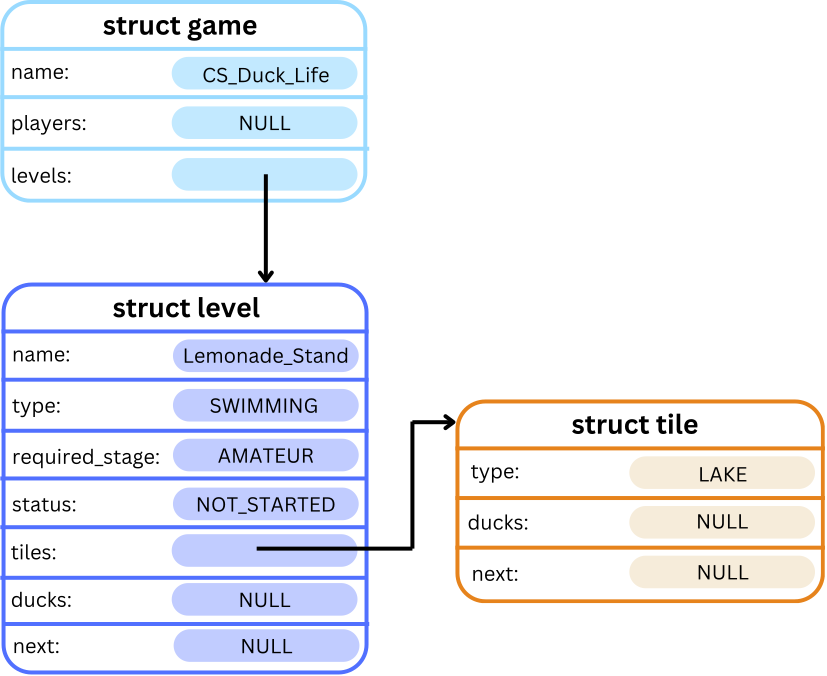
Errors
When the Add Tile command is entered, the following errors should be checked in order, and only the first error should be printed:
- If the
level_numberis less than or equal to zero, or greater than the list’s length, the following error message should be printed:
Error: Level [level_number] does not exist.\n. - If the
level_statusof the given level is anything butNOT_STARTED, the following error message should be printed:
Error: Tiles can only be added to a level before starting.\n. - If the
tile_typegiven does not correspond to the type of the level, the following error message should be printed:
Error: Incorrect tile type for this level.\n.
Command 2: Fill Normal Level
The Fill Normal Level command is called as follows:
f n [level_number] [num_tiles]
The Fill Normal Level command consists of f n and then the number of the level to which the tiles should be appended, followed by the number of tiles to append.
For example if the command f n 2 5 is entered, five tiles should be added to the 2nd level. Assuming that the type of this level is CLIMBING, all added tiles should have type CLIFF.
Description
The Fill Normal Level command adds multiple tiles to the level at the given position level_number. The num_tiles provided is the number of tiles that should be added to the given level. These tiles should be appended to the level's tile list.
Unlike adding a single tile, where the tile type is specified, all tiles added using the Fill Normal Level command should automatically have the tile type that corresponds to the level type. This should follow the same list as given under the Add Tile command, with the exception that COMBINED levels cannot be filled with the Fill Normal Level command.
Taking the example from the above section with one level and one tile, if the command f n 1 3 is entered, the game will then look something like this:

Errors
When the Fill Normal Level command is entered, the following errors should be checked in order, and only the first error should be printed:
- If the
level_numberis less than or equal to zero, or greater than the list’s length, the following error message should be printed:
Error: Level [level_number] does not exist.\n. - If the
level_statusof the given level is anything butNOT_STARTED, the following error message should be printed:
Error: Tiles can only be added to a level before starting.\n. - If the
level_typeof the given level isCOMBINED, the following error message should be printed:
Error: Level type must not be COMBINED.\n. - If the provided
num_tilesis less than or equal to zero, the following error message should be printed:
Error: Must add a positive number of tiles.\n.
Examples
Input:
CS_Duck_Life
a l Lemonade_Stand RUNNING BEGINNER
*
a t 1 GRASS
*
[CTRL+D]
Input and Output:
dcc main.c cs_duck_life.c -o cs_duck_life
./cs_duck_life
          Welcome to the Duck Life Game!
   _          _          _          _          _
 >(')____,  >(')____,  >(')____,  >(')____,  >(') ___,
   (` =~~/    (` =~~/    (` =~~/    (` =~~/    (` =~~/
~^~^`---'~^~^~^`---'~^~^~^`---'~^~^~^`---'~^~^~^`---'~^~^~
Enter the name of your game: CS_Duck_Life
Enter command: a l Lemonade_Stand RUNNING BEGINNER
Level: 'Lemonade_Stand' added!
Enter command: *
=-=-=-=-=-=-=-=-=-=[Game: CS_Duck_Life]=-=-=-=-=-=-=-=-=-=
Players:
  No players yet!

Levels:
  1. |Lemonade_Stand| - RUNNING [NOT_STARTED]
  Ducks waiting:
    No ducks at the moment!

  ==================================================
    No tiles yet
  ==================================================


Enter command: a t 1 GRASS
Enter command: *
=-=-=-=-=-=-=-=-=-=[Game: CS_Duck_Life]=-=-=-=-=-=-=-=-=-=
Players:
  No players yet!

Levels:
  1. |Lemonade_Stand| - RUNNING [NOT_STARTED]
  Ducks waiting:
    No ducks at the moment!

  ==================================================
    GRASS :::::
  ==================================================


Enter command: [CTRL+D]
Thank you for playing CS Duck Life!
Input:
CS_Duck_Life
a l Lemonade_Stand RUNNING BEGINNER
a t 2 GRASS
a t 1 LAKE
a t 1 FAKE_TILE_TYPE
*
[CTRL+D]
Input and Output:
dcc main.c cs_duck_life.c -o cs_duck_life
./cs_duck_life
          Welcome to the Duck Life Game!
   _          _          _          _          _
 >(')____,  >(')____,  >(')____,  >(')____,  >(') ___,
   (` =~~/    (` =~~/    (` =~~/    (` =~~/    (` =~~/
~^~^`---'~^~^~^`---'~^~^~^`---'~^~^~^`---'~^~^~^`---'~^~^~
Enter the name of your game: CS_Duck_Life
Enter command: a l Lemonade_Stand RUNNING BEGINNER
Level: 'Lemonade_Stand' added!
Enter command: a t 2 GRASS
Error: Level 2 does not exist.
Enter command: a t 1 LAKE
Error: Incorrect tile type for this level.
Enter command: a t 1 FAKE_TILE_TYPE
Error: Incorrect tile type for this level.
Enter command: *
=-=-=-=-=-=-=-=-=-=[Game: CS_Duck_Life]=-=-=-=-=-=-=-=-=-=
Players:
  No players yet!

Levels:
  1. |Lemonade_Stand| - RUNNING [NOT_STARTED]
  Ducks waiting:
    No ducks at the moment!

  ==================================================
    No tiles yet
  ==================================================


Enter command: [CTRL+D]
Thank you for playing CS Duck Life!
Input:
CS_Duck_Life
a l Lemonade_Stand RUNNING BEGINNER
*
f n 1 5
*
[CTRL+D]
Input and Output:
dcc main.c cs_duck_life.c -o cs_duck_life
./cs_duck_life
          Welcome to the Duck Life Game!
   _          _          _          _          _
 >(')____,  >(')____,  >(')____,  >(')____,  >(') ___,
   (` =~~/    (` =~~/    (` =~~/    (` =~~/    (` =~~/
~^~^`---'~^~^~^`---'~^~^~^`---'~^~^~^`---'~^~^~^`---'~^~^~
Enter the name of your game: CS_Duck_Life
Enter command: a l Lemonade_Stand RUNNING BEGINNER
Level: 'Lemonade_Stand' added!
Enter command: *
=-=-=-=-=-=-=-=-=-=[Game: CS_Duck_Life]=-=-=-=-=-=-=-=-=-=
Players:
  No players yet!

Levels:
  1. |Lemonade_Stand| - RUNNING [NOT_STARTED]
  Ducks waiting:
    No ducks at the moment!

  ==================================================
    No tiles yet
  ==================================================


Enter command: f n 1 5
Enter command: *
=-=-=-=-=-=-=-=-=-=[Game: CS_Duck_Life]=-=-=-=-=-=-=-=-=-=
Players:
  No players yet!

Levels:
  1. |Lemonade_Stand| - RUNNING [NOT_STARTED]
  Ducks waiting:
    No ducks at the moment!

  ==================================================
    GRASS :::::
    GRASS :::::
    GRASS :::::
    GRASS :::::
    GRASS :::::
  ==================================================


Enter command: [CTRL+D]
Thank you for playing CS Duck Life!
Input:
CS_Duck_Life
a l Lemonade_Stand RUNNING BEGINNER
a l Swamp SWIMMING AMATEUR
a l Mountain CLIMBING EXPERT
a l Clouds FLYING BEGINNER
*
f n 1 5
f n 2 4
f n 3 3
f n 4 2
*
[CTRL+D]
Input and Output:
dcc main.c cs_duck_life.c -o cs_duck_life
./cs_duck_life
          Welcome to the Duck Life Game!
   _          _          _          _          _
 >(')____,  >(')____,  >(')____,  >(')____,  >(') ___,
   (` =~~/    (` =~~/    (` =~~/    (` =~~/    (` =~~/
~^~^`---'~^~^~^`---'~^~^~^`---'~^~^~^`---'~^~^~^`---'~^~^~
Enter the name of your game: CS_Duck_Life
Enter command: a l Lemonade_Stand RUNNING BEGINNER
Level: 'Lemonade_Stand' added!
Enter command: a l Swamp SWIMMING AMATEUR
Level: 'Swamp' added!
Enter command: a l Mountain CLIMBING EXPERT
Level: 'Mountain' added!
Enter command: a l Clouds FLYING BEGINNER
Level: 'Clouds' added!
Enter command: *
=-=-=-=-=-=-=-=-=-=[Game: CS_Duck_Life]=-=-=-=-=-=-=-=-=-=
Players:
  No players yet!

Levels:
  1. |Lemonade_Stand| - RUNNING [NOT_STARTED]
  Ducks waiting:
    No ducks at the moment!

  ==================================================
    No tiles yet
  ==================================================

  2. |Swamp| - SWIMMING [NOT_STARTED]
  Ducks waiting:
    No ducks at the moment!

  ==================================================
    No tiles yet
  ==================================================

  3. |Mountain| - CLIMBING [NOT_STARTED]
  Ducks waiting:
    No ducks at the moment!

  ==================================================
    No tiles yet
  ==================================================

  4. |Clouds| - FLYING [NOT_STARTED]
  Ducks waiting:
    No ducks at the moment!

  ==================================================
    No tiles yet
  ==================================================


Enter command: f n 1 5
Enter command: f n 2 4
Enter command: f n 3 3
Enter command: f n 4 2
Enter command: *
=-=-=-=-=-=-=-=-=-=[Game: CS_Duck_Life]=-=-=-=-=-=-=-=-=-=
Players:
  No players yet!

Levels:
  1. |Lemonade_Stand| - RUNNING [NOT_STARTED]
  Ducks waiting:
    No ducks at the moment!

  ==================================================
    GRASS :::::
    GRASS :::::
    GRASS :::::
    GRASS :::::
    GRASS :::::
  ==================================================

  2. |Swamp| - SWIMMING [NOT_STARTED]
  Ducks waiting:
    No ducks at the moment!

  ==================================================
     LAKE :::::
     LAKE :::::
     LAKE :::::
     LAKE :::::
  ==================================================

  3. |Mountain| - CLIMBING [NOT_STARTED]
  Ducks waiting:
    No ducks at the moment!

  ==================================================
    CLIFF :::::
    CLIFF :::::
    CLIFF :::::
  ==================================================

  4. |Clouds| - FLYING [NOT_STARTED]
  Ducks waiting:
    No ducks at the moment!

  ==================================================
      SKY :::::
      SKY :::::
  ==================================================


Enter command: [CTRL+D]
Thank you for playing CS Duck Life!
Assumptions / Restrictions / Clarifications
- The levels are 1-indexed, so if
level_numberis 1, this means we should add the tiles to the first level in the list. This applies for both commands. - Tiles of any type can be added to a
COMBINEDlevel with thea tcommand, but thef ncommand cannot be used forCOMBINEDlevels. - You can assume that the tile type given in the Add Tile command will always be a valid tile type.
- In Stage 4.1, we will implement commands to fill
COMBINEDlevels, but for now all tiles in a level must correspond to the type of the level.
Stage 2.5 - Enter Level
Our ducks and levels are finally ready, so now it’s time to let the ducks sign up to compete!
Command
The Enter Level command is called as follows:
e [duck_name] [level_number]
The Enter Level command consists of e, and then the name of the duck which should be added to a level, followed by the number of the level to which the duck should be added.
For example, if the command e Donald 2 is entered, the duck called Donald should be added to the second level.
Description
When the e command is entered, the given duck will be added to the list of ducks in the given level, and removed from their player’s list of ducks. The ducks should be added in order of their duck_score (from Stage 2.3).
If a duck is added into a level that already has another duck (or multiple ducks) with the same duck_score, this duck should be inserted after all ducks with that duck_score.
For example, say we had a game with 1 player, 1 level, 3 tiles and the following 3 ducks belonging to the single player:
- Daphne:
duck_score = 20.00 - Donald:
duck_score = 3.00 - Danielle:
duck_score = 12.00,
then the game would look something like this:

If the three ducks are all entered into level 1 in any order, then Donald should be at the head of the list, with Daphne at the tail, and Danielle in between, and the level should look something like this:

Errors
The following errors should be checked in order:
- If the duck with name
duck_namehas already been added to a level, the following error message should be printed:
Error: Duck [duck_name] is already in a level.\n. - If the duck with name
duck_namecannot be found in any player's list of ducks, the following error message should be printed:
Error: No duck with name [duck_name].\n. - If the
level_numberis less than or equal to zero, or greater than the list’s length, the following error message should be printed:
Error: Level [level_number] does not exist.\n. - If the
level_statusof the given level is anything butNOT_STARTED, the following error message should be printed:
Error: Ducks can only be entered into a level before starting.\n. - If the given level has less than 3 tiles, the following error message should be printed:
Error: Level must have 3 or more tiles.\n. - If given duck's player has a
current_levelless than thelevel_numberto which this duck would be added, the following error message should be printed:
Error: Player [player_name] is not up to this level.\n. - If the given duck is not of a stage higher than or equal to the
required_stagefor the given level, the following error message should be printed:
Error: Duck [duck_name] is not at a high enough stage for this level.\n.
Additionally, if a duck is currently in a level and there is a command to train, feed, or evolve this duck (Stage 2.1 and Stage 2.2), the following error message should be printed:
Error: Duck [duck_name] is currently in a level.\n.
This error condition should be checked before all error conditions from Stage 2.1 or Stage 2.2.
Examples
Input:
CS_Duck_Life
a p Henry
a d Donald Henry
a l Lemonade_Stand RUNNING BEGINNER
f n 1 5
e Donald 1
*
[CTRL+D]
Input and Output:
dcc main.c cs_duck_life.c -o cs_duck_life
./cs_duck_life
          Welcome to the Duck Life Game!
   _          _          _          _          _
 >(')____,  >(')____,  >(')____,  >(')____,  >(') ___,
   (` =~~/    (` =~~/    (` =~~/    (` =~~/    (` =~~/
~^~^`---'~^~^~^`---'~^~^~^`---'~^~^~^`---'~^~^~^`---'~^~^~
Enter the name of your game: CS_Duck_Life
Enter command: a p Henry
Player: 'Henry' added!
Enter command: a d Donald Henry
Duck: 'Donald' added to 'Henry'!
Enter command: a l Lemonade_Stand RUNNING BEGINNER
Level: 'Lemonade_Stand' added!
Enter command: f n 1 5
Enter command: e Donald 1
Enter command: *
=-=-=-=-=-=-=-=-=-=[Game: CS_Duck_Life]=-=-=-=-=-=-=-=-=-=
Players:
  Henry - Level 1
    No ducks at the moment!


Levels:
  1. |Lemonade_Stand| - RUNNING [NOT_STARTED]
  Ducks waiting:
    Donald (Henry)

  ==================================================
    GRASS :::::
    GRASS :::::
    GRASS :::::
    GRASS :::::
    GRASS :::::
  ==================================================


Enter command: [CTRL+D]
Thank you for playing CS Duck Life!
Input:
CS_Duck_Life
a p Henry
a p Sofia
a d Donald Henry
a d Daphne Sofia
a d Dotty Sofia
a d Daniel Henry
a l Lemonade_Stand RUNNING BEGINNER
f n 1 5
t Daniel 1 1 1 1
t Dotty 2 2 2 2
t Daphne 3 3 3 3
t Donald 4 4 4 4
s r Daniel
s r Dotty
s r Daphne
s r Donald
*
e Daphne 1
e Daniel 1
e Donald 1
e Dotty 1
*
[CTRL+D]
Input and Output:
dcc main.c cs_duck_life.c -o cs_duck_life
./cs_duck_life
          Welcome to the Duck Life Game!
   _          _          _          _          _
 >(')____,  >(')____,  >(')____,  >(')____,  >(') ___,
   (` =~~/    (` =~~/    (` =~~/    (` =~~/    (` =~~/
~^~^`---'~^~^~^`---'~^~^~^`---'~^~^~^`---'~^~^~^`---'~^~^~
Enter the name of your game: CS_Duck_Life
Enter command: a p Henry
Player: 'Henry' added!
Enter command: a p Sofia
Player: 'Sofia' added!
Enter command: a d Donald Henry
Duck: 'Donald' added to 'Henry'!
Enter command: a d Daphne Sofia
Duck: 'Daphne' added to 'Sofia'!
Enter command: a d Dotty Sofia
Duck: 'Dotty' added to 'Sofia'!
Enter command: a d Daniel Henry
Duck: 'Daniel' added to 'Henry'!
Enter command: a l Lemonade_Stand RUNNING BEGINNER
Level: 'Lemonade_Stand' added!
Enter command: f n 1 5
Enter command: t Daniel 1 1 1 1
Enter command: t Dotty 2 2 2 2
Enter command: t Daphne 3 3 3 3
Enter command: t Donald 4 4 4 4
Enter command: s r Daniel
Enter command: s r Dotty
Enter command: s r Daphne
Enter command: s r Donald
Enter command: *
=-=-=-=-=-=-=-=-=-=[Game: CS_Duck_Life]=-=-=-=-=-=-=-=-=-=
Players:
  Sofia - Level 1
    Dotty (BEGINNER) [Energy: 3]
      Running: 2.00
      Swimming: 2.00
      Climbing: 2.00
      Flying: 2.00

    Daphne (BEGINNER) [Energy: 3]
      Running: 3.00
      Swimming: 3.00
      Climbing: 3.00
      Flying: 3.00

  Henry - Level 1
    Daniel (BEGINNER) [Energy: 3]
      Running: 1.00
      Swimming: 1.00
      Climbing: 1.00
      Flying: 1.00

    Donald (BEGINNER) [Energy: 3]
      Running: 4.00
      Swimming: 4.00
      Climbing: 4.00
      Flying: 4.00


Levels:
  1. |Lemonade_Stand| - RUNNING [NOT_STARTED]
  Ducks waiting:
    No ducks at the moment!

  ==================================================
    GRASS :::::
    GRASS :::::
    GRASS :::::
    GRASS :::::
    GRASS :::::
  ==================================================


Enter command: e Daphne 1
Enter command: e Daniel 1
Enter command: e Donald 1
Enter command: e Dotty 1
Enter command: *
=-=-=-=-=-=-=-=-=-=[Game: CS_Duck_Life]=-=-=-=-=-=-=-=-=-=
Players:
  Sofia - Level 1
    No ducks at the moment!

  Henry - Level 1
    No ducks at the moment!


Levels:
  1. |Lemonade_Stand| - RUNNING [NOT_STARTED]
  Ducks waiting:
    Daniel (Henry)
    Dotty (Sofia)
    Daphne (Sofia)
    Donald (Henry)

  ==================================================
    GRASS :::::
    GRASS :::::
    GRASS :::::
    GRASS :::::
    GRASS :::::
  ==================================================


Enter command: [CTRL+D]
Thank you for playing CS Duck Life!
Input:
CS_Duck_Life
a p Henry
a d Donald Henry
a l Lemonade_Stand RUNNING BEGINNER
f n 1 5
e Donald 1
*
t Donald 5 5 5 5
*
s r Donald
s s Donald
*
v Donald
*
[CTRL+D]
Input and Output:
dcc main.c cs_duck_life.c -o cs_duck_life
./cs_duck_life
          Welcome to the Duck Life Game!
   _          _          _          _          _
 >(')____,  >(')____,  >(')____,  >(')____,  >(') ___,
   (` =~~/    (` =~~/    (` =~~/    (` =~~/    (` =~~/
~^~^`---'~^~^~^`---'~^~^~^`---'~^~^~^`---'~^~^~^`---'~^~^~
Enter the name of your game: CS_Duck_Life
Enter command: a p Henry
Player: 'Henry' added!
Enter command: a d Donald Henry
Duck: 'Donald' added to 'Henry'!
Enter command: a l Lemonade_Stand RUNNING BEGINNER
Level: 'Lemonade_Stand' added!
Enter command: f n 1 5
Enter command: e Donald 1
Enter command: *
=-=-=-=-=-=-=-=-=-=[Game: CS_Duck_Life]=-=-=-=-=-=-=-=-=-=
Players:
  Henry - Level 1
    No ducks at the moment!


Levels:
  1. |Lemonade_Stand| - RUNNING [NOT_STARTED]
  Ducks waiting:
    Donald (Henry)

  ==================================================
    GRASS :::::
    GRASS :::::
    GRASS :::::
    GRASS :::::
    GRASS :::::
  ==================================================


Enter command: t Donald 5 5 5 5
Error: Duck Donald is currently in a level.
Enter command: *
=-=-=-=-=-=-=-=-=-=[Game: CS_Duck_Life]=-=-=-=-=-=-=-=-=-=
Players:
  Henry - Level 1
    No ducks at the moment!


Levels:
  1. |Lemonade_Stand| - RUNNING [NOT_STARTED]
  Ducks waiting:
    Donald (Henry)

  ==================================================
    GRASS :::::
    GRASS :::::
    GRASS :::::
    GRASS :::::
    GRASS :::::
  ==================================================


Enter command: s r Donald
Error: Duck Donald is currently in a level.
Enter command: s s Donald
Error: Duck Donald is currently in a level.
Enter command: *
=-=-=-=-=-=-=-=-=-=[Game: CS_Duck_Life]=-=-=-=-=-=-=-=-=-=
Players:
  Henry - Level 1
    No ducks at the moment!


Levels:
  1. |Lemonade_Stand| - RUNNING [NOT_STARTED]
  Ducks waiting:
    Donald (Henry)

  ==================================================
    GRASS :::::
    GRASS :::::
    GRASS :::::
    GRASS :::::
    GRASS :::::
  ==================================================


Enter command: v Donald
Error: Duck Donald is currently in a level.
Enter command: *
=-=-=-=-=-=-=-=-=-=[Game: CS_Duck_Life]=-=-=-=-=-=-=-=-=-=
Players:
  Henry - Level 1
    No ducks at the moment!


Levels:
  1. |Lemonade_Stand| - RUNNING [NOT_STARTED]
  Ducks waiting:
    Donald (Henry)

  ==================================================
    GRASS :::::
    GRASS :::::
    GRASS :::::
    GRASS :::::
    GRASS :::::
  ==================================================


Enter command: [CTRL+D]
Thank you for playing CS Duck Life!
Input:
CS_Duck_Life
a p Henry
a d Donald Henry
e donald_duck 1
*
e Donald 1
*
a l Lemonade_Stand RUNNING BEGINNER
e Donald 1
*
a l Swamp SWIMMING BEGINNER
f n 2 3
e Donald 2
*
[CTRL+D]
Input and Output:
dcc main.c cs_duck_life.c -o cs_duck_life
./cs_duck_life
          Welcome to the Duck Life Game!
   _          _          _          _          _
 >(')____,  >(')____,  >(')____,  >(')____,  >(') ___,
   (` =~~/    (` =~~/    (` =~~/    (` =~~/    (` =~~/
~^~^`---'~^~^~^`---'~^~^~^`---'~^~^~^`---'~^~^~^`---'~^~^~
Enter the name of your game: CS_Duck_Life
Enter command: a p Henry
Player: 'Henry' added!
Enter command: a d Donald Henry
Duck: 'Donald' added to 'Henry'!
Enter command: e donald_duck 1
Error: No duck with name donald_duck.
Enter command: *
=-=-=-=-=-=-=-=-=-=[Game: CS_Duck_Life]=-=-=-=-=-=-=-=-=-=
Players:
  Henry - Level 1
    Donald (BEGINNER) [Energy: 0]
      Running: 0.00
      Swimming: 0.00
      Climbing: 0.00
      Flying: 0.00


Levels:
  No levels yet!

Enter command: e Donald 1
Error: Level 1 does not exist.
Enter command: *
=-=-=-=-=-=-=-=-=-=[Game: CS_Duck_Life]=-=-=-=-=-=-=-=-=-=
Players:
  Henry - Level 1
    Donald (BEGINNER) [Energy: 0]
      Running: 0.00
      Swimming: 0.00
      Climbing: 0.00
      Flying: 0.00


Levels:
  No levels yet!

Enter command: a l Lemonade_Stand RUNNING BEGINNER
Level: 'Lemonade_Stand' added!
Enter command: e Donald 1
Error: Level must have 3 or more tiles.
Enter command: *
=-=-=-=-=-=-=-=-=-=[Game: CS_Duck_Life]=-=-=-=-=-=-=-=-=-=
Players:
  Henry - Level 1
    Donald (BEGINNER) [Energy: 0]
      Running: 0.00
      Swimming: 0.00
      Climbing: 0.00
      Flying: 0.00


Levels:
  1. |Lemonade_Stand| - RUNNING [NOT_STARTED]
  Ducks waiting:
    No ducks at the moment!

  ==================================================
    No tiles yet
  ==================================================


Enter command: a l Swamp SWIMMING BEGINNER
Level: 'Swamp' added!
Enter command: f n 2 3
Enter command: e Donald 2
Error: Player Henry is not up to this level.
Enter command: *
=-=-=-=-=-=-=-=-=-=[Game: CS_Duck_Life]=-=-=-=-=-=-=-=-=-=
Players:
  Henry - Level 1
    Donald (BEGINNER) [Energy: 0]
      Running: 0.00
      Swimming: 0.00
      Climbing: 0.00
      Flying: 0.00


Levels:
  1. |Lemonade_Stand| - RUNNING [NOT_STARTED]
  Ducks waiting:
    No ducks at the moment!

  ==================================================
    No tiles yet
  ==================================================

  2. |Swamp| - SWIMMING [NOT_STARTED]
  Ducks waiting:
    No ducks at the moment!

  ==================================================
     LAKE :::::
     LAKE :::::
     LAKE :::::
  ==================================================


Enter command: [CTRL+D]
Thank you for playing CS Duck Life!
Assumptions / Restrictions / Clarifications
current_levelis an integer representing what level the player has already reached in the game.- A player can enter their ducks into either their current level, or any of the levels they have previously won.
- You should not have to modify your
print_gamefunction to include ducks that are in a level's list of ducks, because the providedprint_level()function does this for you. - After the
ecommand, ducks should be moved into the list of ducks in a level, not into any of the tiles of that level - Adding a duck with the same name as another duck in a level will not be tested.
Testing and Submission
Remember to do your own testing! Are you finished with this stage? If so, you should make sure to do the following:- Run
1511 styleand clean up any issues a human may have reading your code. Don't forget -- 20% of your mark in the assignment is based on style and readability! - Autotest for this stage of the assignment by running the
autotest-stagecommand as shown below. - Remember -- give early and give often. Only your last submission counts, but why not be safe and submit right now?
1511 style cs_duck_life.c
1511 style cs_duck_life.h
1511 style main.c
1511 autotest-stage 02 cs_duck_life
give cs1511 ass2_cs_duck_life cs_duck_life.c cs_duck_life.h main.c
Stage 3
Stage 3 will focus on deleting nodes and memory management. This milestone has been divided into five substages:
- Stage 3.1 - Quit Game.
- Stage 3.2 - Retire a Duck.
- Stage 3.3 - Duck Inheritance.
- Stage 3.4 - Play One Timestep.
- Stage 3.5 - Complete Level.
Stage 3.1 - Quit Game
The racing ducks have all decided to go on strike! Since there are no more ducks to compete, we’ll have to cancel the entire game!
When the game is cancelled, all ducks, players, tiles and levels should be deleted and have their memory freed.
Command
The Quit command is called as follows:
q
Description
When the q command is entered, or when [CTRL + D] is pressed, all malloc'd memory should be freed and the command loop should end.
Once complete, it should print out the final message at the end of the provided main() function before terminating:
Thank you for playing CS Duck Life!.
Examples
Input:
CS_Duck_Life
*
q
Input and Output:
dcc main.c cs_duck_life.c -o cs_duck_life --leak-check
./cs_duck_life
          Welcome to the Duck Life Game!
   _          _          _          _          _
 >(')____,  >(')____,  >(')____,  >(')____,  >(') ___,
   (` =~~/    (` =~~/    (` =~~/    (` =~~/    (` =~~/
~^~^`---'~^~^~^`---'~^~^~^`---'~^~^~^`---'~^~^~^`---'~^~^~
Enter the name of your game: CS_Duck_Life
Enter command: *
=-=-=-=-=-=-=-=-=-=[Game: CS_Duck_Life]=-=-=-=-=-=-=-=-=-=
Players:
  No players yet!

Levels:
  No levels yet!

Enter command: q

Thank you for playing CS Duck Life!
Input:
CS_Duck_Life
a p Henry
a d Donald Henry
a l Lemonade_Stand RUNNING BEGINNER
*
q
Input and Output:
dcc main.c cs_duck_life.c -o cs_duck_life --leak-check
./cs_duck_life
          Welcome to the Duck Life Game!
   _          _          _          _          _
 >(')____,  >(')____,  >(')____,  >(')____,  >(') ___,
   (` =~~/    (` =~~/    (` =~~/    (` =~~/    (` =~~/
~^~^`---'~^~^~^`---'~^~^~^`---'~^~^~^`---'~^~^~^`---'~^~^~
Enter the name of your game: CS_Duck_Life
Enter command: a p Henry
Player: 'Henry' added!
Enter command: a d Donald Henry
Duck: 'Donald' added to 'Henry'!
Enter command: a l Lemonade_Stand RUNNING BEGINNER
Level: 'Lemonade_Stand' added!
Enter command: *
=-=-=-=-=-=-=-=-=-=[Game: CS_Duck_Life]=-=-=-=-=-=-=-=-=-=
Players:
  Henry - Level 1
    Donald (BEGINNER) [Energy: 0]
      Running: 0.00
      Swimming: 0.00
      Climbing: 0.00
      Flying: 0.00


Levels:
  1. |Lemonade_Stand| - RUNNING [NOT_STARTED]
  Ducks waiting:
    No ducks at the moment!

  ==================================================
    No tiles yet
  ==================================================


Enter command: q

Thank you for playing CS Duck Life!
Input:
CS_Duck_Life
a p Henry
a d Donald Henry
a l Lemonade_Stand RUNNING BEGINNER
f n 1 5
*
e Donald 1
*
q
Input and Output:
dcc main.c cs_duck_life.c -o cs_duck_life --leak-check
./cs_duck_life
          Welcome to the Duck Life Game!
   _          _          _          _          _
 >(')____,  >(')____,  >(')____,  >(')____,  >(') ___,
   (` =~~/    (` =~~/    (` =~~/    (` =~~/    (` =~~/
~^~^`---'~^~^~^`---'~^~^~^`---'~^~^~^`---'~^~^~^`---'~^~^~
Enter the name of your game: CS_Duck_Life
Enter command: a p Henry
Player: 'Henry' added!
Enter command: a d Donald Henry
Duck: 'Donald' added to 'Henry'!
Enter command: a l Lemonade_Stand RUNNING BEGINNER
Level: 'Lemonade_Stand' added!
Enter command: f n 1 5
Enter command: *
=-=-=-=-=-=-=-=-=-=[Game: CS_Duck_Life]=-=-=-=-=-=-=-=-=-=
Players:
  Henry - Level 1
    Donald (BEGINNER) [Energy: 0]
      Running: 0.00
      Swimming: 0.00
      Climbing: 0.00
      Flying: 0.00


Levels:
  1. |Lemonade_Stand| - RUNNING [NOT_STARTED]
  Ducks waiting:
    No ducks at the moment!

  ==================================================
    GRASS :::::
    GRASS :::::
    GRASS :::::
    GRASS :::::
    GRASS :::::
  ==================================================


Enter command: e Donald 1
Enter command: *
=-=-=-=-=-=-=-=-=-=[Game: CS_Duck_Life]=-=-=-=-=-=-=-=-=-=
Players:
  Henry - Level 1
    No ducks at the moment!


Levels:
  1. |Lemonade_Stand| - RUNNING [NOT_STARTED]
  Ducks waiting:
    Donald (Henry)

  ==================================================
    GRASS :::::
    GRASS :::::
    GRASS :::::
    GRASS :::::
    GRASS :::::
  ==================================================


Enter command: q

Thank you for playing CS Duck Life!
Assumptions / Restrictions / Clarifications
- The
qcommand does not take any arguments. - From Stage 3.1 onwards, you should check for memory leaks by compiling with
-leak-check, as seen in the examples below. - Autotests and marking tests from this stage onwards will check for memory leaks.
Stage 3.2 - Retire a Duck
Ducks may become too tired to continue racing forever, so they should be able to retire and enjoy their old age, eating tons of grapes and no lemonade whatsoever. In this stage, we will add a command to retire a duck, and remove them entirely from the game.
“And he waddled away waddle-waddle-waddle”
Command
The Retire Duck command is called as follows:
r d [duck_name]
For example, if the command r d Donald is entered, the duck called Donald should be removed from the game.
Description
The r d command retires the duck with the given name, and should free all allocated memory associated with that duck.
If retiring this duck means that its owner now has no more ducks remaining (either in its list of ducks or in levels), this player should also retire because they can no longer compete, and all of that player’s memory should be freed.
Errors
- If the duck with name
duck_nameis currently in a level, the following error message should be printed:
Error: Duck [duck_name] is currently in a level.\n. - If the duck with name
duck_namecannot be found in any player's list of ducks, the following error message should be printed:
Error: No duck with name [duck_name].\n.
Examples
Input:
CS_Duck_Life
a p Henry
a d Donald Henry
a d Daphne Henry
*
r d Donald
*
q
Input and Output:
dcc main.c cs_duck_life.c -o cs_duck_life --leak-check
./cs_duck_life
          Welcome to the Duck Life Game!
   _          _          _          _          _
 >(')____,  >(')____,  >(')____,  >(')____,  >(') ___,
   (` =~~/    (` =~~/    (` =~~/    (` =~~/    (` =~~/
~^~^`---'~^~^~^`---'~^~^~^`---'~^~^~^`---'~^~^~^`---'~^~^~
Enter the name of your game: CS_Duck_Life
Enter command: a p Henry
Player: 'Henry' added!
Enter command: a d Donald Henry
Duck: 'Donald' added to 'Henry'!
Enter command: a d Daphne Henry
Duck: 'Daphne' added to 'Henry'!
Enter command: *
=-=-=-=-=-=-=-=-=-=[Game: CS_Duck_Life]=-=-=-=-=-=-=-=-=-=
Players:
  Henry - Level 1
    Daphne (BEGINNER) [Energy: 0]
      Running: 0.00
      Swimming: 0.00
      Climbing: 0.00
      Flying: 0.00

    Donald (BEGINNER) [Energy: 0]
      Running: 0.00
      Swimming: 0.00
      Climbing: 0.00
      Flying: 0.00


Levels:
  No levels yet!

Enter command: r d Donald
Enter command: *
=-=-=-=-=-=-=-=-=-=[Game: CS_Duck_Life]=-=-=-=-=-=-=-=-=-=
Players:
  Henry - Level 1
    Daphne (BEGINNER) [Energy: 0]
      Running: 0.00
      Swimming: 0.00
      Climbing: 0.00
      Flying: 0.00


Levels:
  No levels yet!

Enter command: q

Thank you for playing CS Duck Life!
Input:
CS_Duck_Life
a p Henry
a d Donald Henry
*
r d Donald
*
q
Input and Output:
dcc main.c cs_duck_life.c -o cs_duck_life --leak-check
./cs_duck_life
          Welcome to the Duck Life Game!
   _          _          _          _          _
 >(')____,  >(')____,  >(')____,  >(')____,  >(') ___,
   (` =~~/    (` =~~/    (` =~~/    (` =~~/    (` =~~/
~^~^`---'~^~^~^`---'~^~^~^`---'~^~^~^`---'~^~^~^`---'~^~^~
Enter the name of your game: CS_Duck_Life
Enter command: a p Henry
Player: 'Henry' added!
Enter command: a d Donald Henry
Duck: 'Donald' added to 'Henry'!
Enter command: *
=-=-=-=-=-=-=-=-=-=[Game: CS_Duck_Life]=-=-=-=-=-=-=-=-=-=
Players:
  Henry - Level 1
    Donald (BEGINNER) [Energy: 0]
      Running: 0.00
      Swimming: 0.00
      Climbing: 0.00
      Flying: 0.00


Levels:
  No levels yet!

Enter command: r d Donald
Enter command: *
=-=-=-=-=-=-=-=-=-=[Game: CS_Duck_Life]=-=-=-=-=-=-=-=-=-=
Players:
  No players yet!

Levels:
  No levels yet!

Enter command: q

Thank you for playing CS Duck Life!
Input:
CS_Duck_Life
a p Henry
a d Donald Henry
*
r d Not_Donald
*
a l Lemonade_Stand RUNNING BEGINNER
f n 1 5
e Donald 1
*
r d Donald
*
q
Input and Output:
dcc main.c cs_duck_life.c -o cs_duck_life --leak-check
./cs_duck_life
          Welcome to the Duck Life Game!
   _          _          _          _          _
 >(')____,  >(')____,  >(')____,  >(')____,  >(') ___,
   (` =~~/    (` =~~/    (` =~~/    (` =~~/    (` =~~/
~^~^`---'~^~^~^`---'~^~^~^`---'~^~^~^`---'~^~^~^`---'~^~^~
Enter the name of your game: CS_Duck_Life
Enter command: a p Henry
Player: 'Henry' added!
Enter command: a d Donald Henry
Duck: 'Donald' added to 'Henry'!
Enter command: *
=-=-=-=-=-=-=-=-=-=[Game: CS_Duck_Life]=-=-=-=-=-=-=-=-=-=
Players:
  Henry - Level 1
    Donald (BEGINNER) [Energy: 0]
      Running: 0.00
      Swimming: 0.00
      Climbing: 0.00
      Flying: 0.00


Levels:
  No levels yet!

Enter command: r d Not_Donald
Error: No duck with name Not_Donald.
Enter command: *
=-=-=-=-=-=-=-=-=-=[Game: CS_Duck_Life]=-=-=-=-=-=-=-=-=-=
Players:
  Henry - Level 1
    Donald (BEGINNER) [Energy: 0]
      Running: 0.00
      Swimming: 0.00
      Climbing: 0.00
      Flying: 0.00


Levels:
  No levels yet!

Enter command: a l Lemonade_Stand RUNNING BEGINNER
Level: 'Lemonade_Stand' added!
Enter command: f n 1 5
Enter command: e Donald 1
Enter command: *
=-=-=-=-=-=-=-=-=-=[Game: CS_Duck_Life]=-=-=-=-=-=-=-=-=-=
Players:
  Henry - Level 1
    No ducks at the moment!


Levels:
  1. |Lemonade_Stand| - RUNNING [NOT_STARTED]
  Ducks waiting:
    Donald (Henry)

  ==================================================
    GRASS :::::
    GRASS :::::
    GRASS :::::
    GRASS :::::
    GRASS :::::
  ==================================================


Enter command: r d Donald
Error: Duck Donald is currently in a level.
Enter command: *
=-=-=-=-=-=-=-=-=-=[Game: CS_Duck_Life]=-=-=-=-=-=-=-=-=-=
Players:
  Henry - Level 1
    No ducks at the moment!


Levels:
  1. |Lemonade_Stand| - RUNNING [NOT_STARTED]
  Ducks waiting:
    Donald (Henry)

  ==================================================
    GRASS :::::
    GRASS :::::
    GRASS :::::
    GRASS :::::
    GRASS :::::
  ==================================================


Enter command: q

Thank you for playing CS Duck Life!
Assumptions / Restrictions / Clarifications
- Ducks can only be removed if they are in their player's list of ducks. This means they cannot be removed if they are in a level's list of ducks.
- Additionally, from Stage 3.4 onwards, they cannot be removed if they are on a tile within a level.
- After a duck has retired, their name can be used again without conflict if a new duck is created with that name.
Stage 3.3 - Duck Inheritance
One of the players has decided to quit racing ducks and open a lemonade stand! Their ducks want no part in this nonsense, so they all need to be rehomed with other players.
Command
The Retire Player command is called as follows:
r p [player_name]
For example, if the command r p Henry is entered, the player called Henry should be removed from the game.
Description
When the r p command is entered, the retiring player’s ducks will be redistributed to the other players as follows:
- Find a new owner for a duck. The new owner is the player with the lowest number of ducks in their duck list.
- If multiple players have the lowest number of ducks, the new owner will be the player closer to the head of the list.
- Move the duck that is at the head of the retiring player's list of ducks to the tail of the new owner's list of ducks.
- The duck that was moved should have it's
owner_namechanged to the new owner.
- The duck that was moved should have it's
- Repeat steps 1-2 until all of the retiring player’s ducks have been redistributed.
Once all of the player’s ducks have new owners, the player should be removed from the game, and all of the memory associated with that player should be freed.
For example, say we had the following players and ducks in our game:

After the command r p Henry, the player Henry would be retired, and their ducks would be redistributed to the other players, so the game would look something like this:

Errors
- If the player with name
player_namecannot be found in the game, the following error message should be printed:
Error: No player with name [player_name].\n. - If any of the ducks belonging to the given player are currently in a level, the following error message should be printed:
Error: [player_name] has a duck currently in a level.\n. - If the retiring player has ducks to redistribute, but is the only player in the game, the following error message should be printed:
Error: Ducks could not be redistributed to other players.\n.
Examples
Input:
CS_Duck_Life
a p Henry
*
r p Henry
*
q
Input and Output:
dcc main.c cs_duck_life.c -o cs_duck_life --leak-check
./cs_duck_life
          Welcome to the Duck Life Game!
   _          _          _          _          _
 >(')____,  >(')____,  >(')____,  >(')____,  >(') ___,
   (` =~~/    (` =~~/    (` =~~/    (` =~~/    (` =~~/
~^~^`---'~^~^~^`---'~^~^~^`---'~^~^~^`---'~^~^~^`---'~^~^~
Enter the name of your game: CS_Duck_Life
Enter command: a p Henry
Player: 'Henry' added!
Enter command: *
=-=-=-=-=-=-=-=-=-=[Game: CS_Duck_Life]=-=-=-=-=-=-=-=-=-=
Players:
  Henry - Level 1
    No ducks at the moment!


Levels:
  No levels yet!

Enter command: r p Henry
Enter command: *
=-=-=-=-=-=-=-=-=-=[Game: CS_Duck_Life]=-=-=-=-=-=-=-=-=-=
Players:
  No players yet!

Levels:
  No levels yet!

Enter command: q

Thank you for playing CS Duck Life!
Input:
CS_Duck_Life
a p Henry
a p Sofia
a d Donald Henry
*
r p Henry
*
q
Input and Output:
dcc main.c cs_duck_life.c -o cs_duck_life --leak-check
./cs_duck_life
          Welcome to the Duck Life Game!
   _          _          _          _          _
 >(')____,  >(')____,  >(')____,  >(')____,  >(') ___,
   (` =~~/    (` =~~/    (` =~~/    (` =~~/    (` =~~/
~^~^`---'~^~^~^`---'~^~^~^`---'~^~^~^`---'~^~^~^`---'~^~^~
Enter the name of your game: CS_Duck_Life
Enter command: a p Henry
Player: 'Henry' added!
Enter command: a p Sofia
Player: 'Sofia' added!
Enter command: a d Donald Henry
Duck: 'Donald' added to 'Henry'!
Enter command: *
=-=-=-=-=-=-=-=-=-=[Game: CS_Duck_Life]=-=-=-=-=-=-=-=-=-=
Players:
  Sofia - Level 1
    No ducks at the moment!

  Henry - Level 1
    Donald (BEGINNER) [Energy: 0]
      Running: 0.00
      Swimming: 0.00
      Climbing: 0.00
      Flying: 0.00


Levels:
  No levels yet!

Enter command: r p Henry
Enter command: *
=-=-=-=-=-=-=-=-=-=[Game: CS_Duck_Life]=-=-=-=-=-=-=-=-=-=
Players:
  Sofia - Level 1
    Donald (BEGINNER) [Energy: 0]
      Running: 0.00
      Swimming: 0.00
      Climbing: 0.00
      Flying: 0.00


Levels:
  No levels yet!

Enter command: q

Thank you for playing CS Duck Life!
Input:
CS_Duck_Life
a p Henry
a p Sofia
a p Grace
a d Donald Henry
a d Daniel Henry
a d Dotty Henry
a d Daphne Grace
a d Ducky Grace
*
r p Henry
*
q
Input and Output:
dcc main.c cs_duck_life.c -o cs_duck_life --leak-check
./cs_duck_life
          Welcome to the Duck Life Game!
   _          _          _          _          _
 >(')____,  >(')____,  >(')____,  >(')____,  >(') ___,
   (` =~~/    (` =~~/    (` =~~/    (` =~~/    (` =~~/
~^~^`---'~^~^~^`---'~^~^~^`---'~^~^~^`---'~^~^~^`---'~^~^~
Enter the name of your game: CS_Duck_Life
Enter command: a p Henry
Player: 'Henry' added!
Enter command: a p Sofia
Player: 'Sofia' added!
Enter command: a p Grace
Player: 'Grace' added!
Enter command: a d Donald Henry
Duck: 'Donald' added to 'Henry'!
Enter command: a d Daniel Henry
Duck: 'Daniel' added to 'Henry'!
Enter command: a d Dotty Henry
Duck: 'Dotty' added to 'Henry'!
Enter command: a d Daphne Grace
Duck: 'Daphne' added to 'Grace'!
Enter command: a d Ducky Grace
Duck: 'Ducky' added to 'Grace'!
Enter command: *
=-=-=-=-=-=-=-=-=-=[Game: CS_Duck_Life]=-=-=-=-=-=-=-=-=-=
Players:
  Grace - Level 1
    Ducky (BEGINNER) [Energy: 0]
      Running: 0.00
      Swimming: 0.00
      Climbing: 0.00
      Flying: 0.00

    Daphne (BEGINNER) [Energy: 0]
      Running: 0.00
      Swimming: 0.00
      Climbing: 0.00
      Flying: 0.00

  Sofia - Level 1
    No ducks at the moment!

  Henry - Level 1
    Dotty (BEGINNER) [Energy: 0]
      Running: 0.00
      Swimming: 0.00
      Climbing: 0.00
      Flying: 0.00

    Daniel (BEGINNER) [Energy: 0]
      Running: 0.00
      Swimming: 0.00
      Climbing: 0.00
      Flying: 0.00

    Donald (BEGINNER) [Energy: 0]
      Running: 0.00
      Swimming: 0.00
      Climbing: 0.00
      Flying: 0.00


Levels:
  No levels yet!

Enter command: r p Henry
Enter command: *
=-=-=-=-=-=-=-=-=-=[Game: CS_Duck_Life]=-=-=-=-=-=-=-=-=-=
Players:
  Grace - Level 1
    Ducky (BEGINNER) [Energy: 0]
      Running: 0.00
      Swimming: 0.00
      Climbing: 0.00
      Flying: 0.00

    Daphne (BEGINNER) [Energy: 0]
      Running: 0.00
      Swimming: 0.00
      Climbing: 0.00
      Flying: 0.00

    Donald (BEGINNER) [Energy: 0]
      Running: 0.00
      Swimming: 0.00
      Climbing: 0.00
      Flying: 0.00

  Sofia - Level 1
    Dotty (BEGINNER) [Energy: 0]
      Running: 0.00
      Swimming: 0.00
      Climbing: 0.00
      Flying: 0.00

    Daniel (BEGINNER) [Energy: 0]
      Running: 0.00
      Swimming: 0.00
      Climbing: 0.00
      Flying: 0.00


Levels:
  No levels yet!

Enter command: q

Thank you for playing CS Duck Life!
Assumptions / Restrictions / Clarifications
- When redistributing ducks, there is no limit on how many ducks a player can have.
- If the player has no ducks, no ducks need to be redistributed so they can be removed immediately.
- The new owner should be the player with the fewest ducks in their duck list. Ducks currently in a level do not count towards this total.
Stage 3.4 – Play one Timestep
It’s time for the ducks to start racing! In this stage you will implement commands which allow the level to begin, and then for the ducks to progress one time step through the level.
Command 1: Begin Level
The Begin Level command is called as follows:
b [level_number]
For example, if the command b 2 is entered, the second level should be started.
Description
When the b command is entered, the given level should begin, and the following events should occur:
- All ducks from the level’s list of ducks should be moved onto the first tile in the level, maintaining the same order.
- The level status should be set to
IN_PROGRESS.
Once the level has started, no more changes can be made to the level, meaning that no more ducks or tiles can be added.
Errors
- If the
level_numberis less than or equal to zero, or greater than the list’s length, the following error message should be printed:
Error: Level [level_number] does not exist.\n. - If the given level's status is not
NOT_STARTED, the following error message should be printed:
Error: Level has already started.\n. - If the level has less than two ducks, the following error message should be printed:
Error: Not enough ducks in this level.\n.
Command 2: Play Timestep
The Play Timestep command is called as follows:
p [level_number]
For example, if the command p 2 is entered, the second level should advance by one timestep.
Description
When the p command is entered, the ducks in the given level should be moved across a certain number of tiles within the level, based on their skills and energy.
Ducks should be moved in the order corresponding to their position in the level, starting from the last tile and moving through the list backwards.
- For each tile, the duck at the head of the tile’s list of ducks should be moved first, followed by all other ducks in that tile.
- When a duck is being added to their new position on another tile, they should be appended to the tail of the list of ducks on this new tile.
In each timestep, ducks will progress by the number of tiles equal to their amount of skill in the corresponding area, rounded down to the nearest integer.
- For example, if a duck in a
RUNNINGlevel has a running skill of 3.5, then they can move along 3GRASStiles in a single turn.
However, the total number of tiles a duck can cross within a level will also be capped by their amount of energy.
- For example, if a duck has an energy of 5, then they can only move across a maximum of 5 tiles in a level in total.
- In other words, a duck's energy decreases cumulatively across all timesteps within a level.
Say we had a game that looked something like the following:

When the command b 1 is entered, the level will be started, and the game will look something like this:

After one timestep is completed with the p 1 command, the following will occur:
- Daphne will cross 2 tiles, since they have a
runningskill of 2.5. - Donald remain on the first tile, since they have a
runningskill of 0. - Danielle will cross 3 tiles, since they have a
runningskill of 3.
The game will then look something like this:

After a second timestep is completed with the p 1 command, the following will occur:
- Daphne will cross 2 more tiles, since they have a
runningskill of 2.5. - Donald remain on the first tile, since they have a
runningskill of 0. - Danielle will remain on the fourth tile, since they have 0 remaining
energyfor this level.
The game will then look something like this:

Errors
- If the
level_numberis less than or equal to zero, or greater than the list’s length, the following error message should be printed:
Error: Level [level_number] does not exist.\n. - If the level status is not
IN_PROGRESS, the following error message should be printed:
Error: Level is not in progress.\n.
Examples
Input:
CS_Duck_Life
a l Lemonade_Stand RUNNING BEGINNER
f n 1 8
a p Henry
a d Donald Henry
a d Daphne Henry
*
t Donald 4 4 4 0
t Daphne 2 2 2 0
s r Donald
s r Donald
s r Daphne
s r Daphne
*
e Donald 1
e Daphne 1
*
b 1
*
p 1
*
q
Input and Output:
dcc main.c cs_duck_life.c -o cs_duck_life --leak-check
./cs_duck_life
          Welcome to the Duck Life Game!
   _          _          _          _          _
 >(')____,  >(')____,  >(')____,  >(')____,  >(') ___,
   (` =~~/    (` =~~/    (` =~~/    (` =~~/    (` =~~/
~^~^`---'~^~^~^`---'~^~^~^`---'~^~^~^`---'~^~^~^`---'~^~^~
Enter the name of your game: CS_Duck_Life
Enter command: a l Lemonade_Stand RUNNING BEGINNER
Level: 'Lemonade_Stand' added!
Enter command: f n 1 8
Enter command: a p Henry
Player: 'Henry' added!
Enter command: a d Donald Henry
Duck: 'Donald' added to 'Henry'!
Enter command: a d Daphne Henry
Duck: 'Daphne' added to 'Henry'!
Enter command: *
=-=-=-=-=-=-=-=-=-=[Game: CS_Duck_Life]=-=-=-=-=-=-=-=-=-=
Players:
  Henry - Level 1
    Daphne (BEGINNER) [Energy: 0]
      Running: 0.00
      Swimming: 0.00
      Climbing: 0.00
      Flying: 0.00

    Donald (BEGINNER) [Energy: 0]
      Running: 0.00
      Swimming: 0.00
      Climbing: 0.00
      Flying: 0.00


Levels:
  1. |Lemonade_Stand| - RUNNING [NOT_STARTED]
  Ducks waiting:
    No ducks at the moment!

  ==================================================
    GRASS :::::
    GRASS :::::
    GRASS :::::
    GRASS :::::
    GRASS :::::
    GRASS :::::
    GRASS :::::
    GRASS :::::
  ==================================================


Enter command: t Donald 4 4 4 0
Enter command: t Daphne 2 2 2 0
Enter command: s r Donald
Enter command: s r Donald
Enter command: s r Daphne
Enter command: s r Daphne
Enter command: *
=-=-=-=-=-=-=-=-=-=[Game: CS_Duck_Life]=-=-=-=-=-=-=-=-=-=
Players:
  Henry - Level 1
    Daphne (BEGINNER) [Energy: 6]
      Running: 2.00
      Swimming: 2.00
      Climbing: 2.00
      Flying: 0.00

    Donald (BEGINNER) [Energy: 6]
      Running: 4.00
      Swimming: 4.00
      Climbing: 4.00
      Flying: 0.00


Levels:
  1. |Lemonade_Stand| - RUNNING [NOT_STARTED]
  Ducks waiting:
    No ducks at the moment!

  ==================================================
    GRASS :::::
    GRASS :::::
    GRASS :::::
    GRASS :::::
    GRASS :::::
    GRASS :::::
    GRASS :::::
    GRASS :::::
  ==================================================


Enter command: e Donald 1
Enter command: e Daphne 1
Enter command: *
=-=-=-=-=-=-=-=-=-=[Game: CS_Duck_Life]=-=-=-=-=-=-=-=-=-=
Players:
  Henry - Level 1
    No ducks at the moment!


Levels:
  1. |Lemonade_Stand| - RUNNING [NOT_STARTED]
  Ducks waiting:
    Daphne (Henry)
    Donald (Henry)

  ==================================================
    GRASS :::::
    GRASS :::::
    GRASS :::::
    GRASS :::::
    GRASS :::::
    GRASS :::::
    GRASS :::::
    GRASS :::::
  ==================================================


Enter command: b 1
Enter command: *
=-=-=-=-=-=-=-=-=-=[Game: CS_Duck_Life]=-=-=-=-=-=-=-=-=-=
Players:
  Henry - Level 1
    No ducks at the moment!


Levels:
  1. |Lemonade_Stand| - RUNNING [IN_PROGRESS]
  Ducks waiting:
    No ducks at the moment!

  ==================================================
    GRASS ::::: Daphne, Donald
    GRASS :::::
    GRASS :::::
    GRASS :::::
    GRASS :::::
    GRASS :::::
    GRASS :::::
    GRASS :::::
  ==================================================


Enter command: p 1
Enter command: *
=-=-=-=-=-=-=-=-=-=[Game: CS_Duck_Life]=-=-=-=-=-=-=-=-=-=
Players:
  Henry - Level 1
    No ducks at the moment!


Levels:
  1. |Lemonade_Stand| - RUNNING [IN_PROGRESS]
  Ducks waiting:
    No ducks at the moment!

  ==================================================
    GRASS :::::
    GRASS :::::
    GRASS ::::: Daphne
    GRASS :::::
    GRASS ::::: Donald
    GRASS :::::
    GRASS :::::
    GRASS :::::
  ==================================================


Enter command: q

Thank you for playing CS Duck Life!
Input:
CS_Duck_Life
a l Swamp SWIMMING BEGINNER
f n 1 8
a p Henry
a d Donald Henry
a d Daphne Henry
*
t Donald 1 4 1 0
t Daphne 1 2 1 0
s r Donald
s r Daphne
*
e Donald 1
e Daphne 1
*
b 1
*
p 1
*
p 1
*
q
Input and Output:
dcc main.c cs_duck_life.c -o cs_duck_life --leak-check
./cs_duck_life
          Welcome to the Duck Life Game!
   _          _          _          _          _
 >(')____,  >(')____,  >(')____,  >(')____,  >(') ___,
   (` =~~/    (` =~~/    (` =~~/    (` =~~/    (` =~~/
~^~^`---'~^~^~^`---'~^~^~^`---'~^~^~^`---'~^~^~^`---'~^~^~
Enter the name of your game: CS_Duck_Life
Enter command: a l Swamp SWIMMING BEGINNER
Level: 'Swamp' added!
Enter command: f n 1 8
Enter command: a p Henry
Player: 'Henry' added!
Enter command: a d Donald Henry
Duck: 'Donald' added to 'Henry'!
Enter command: a d Daphne Henry
Duck: 'Daphne' added to 'Henry'!
Enter command: *
=-=-=-=-=-=-=-=-=-=[Game: CS_Duck_Life]=-=-=-=-=-=-=-=-=-=
Players:
  Henry - Level 1
    Daphne (BEGINNER) [Energy: 0]
      Running: 0.00
      Swimming: 0.00
      Climbing: 0.00
      Flying: 0.00

    Donald (BEGINNER) [Energy: 0]
      Running: 0.00
      Swimming: 0.00
      Climbing: 0.00
      Flying: 0.00


Levels:
  1. |Swamp| - SWIMMING [NOT_STARTED]
  Ducks waiting:
    No ducks at the moment!

  ==================================================
     LAKE :::::
     LAKE :::::
     LAKE :::::
     LAKE :::::
     LAKE :::::
     LAKE :::::
     LAKE :::::
     LAKE :::::
  ==================================================


Enter command: t Donald 1 4 1 0
Enter command: t Daphne 1 2 1 0
Enter command: s r Donald
Enter command: s r Daphne
Enter command: *
=-=-=-=-=-=-=-=-=-=[Game: CS_Duck_Life]=-=-=-=-=-=-=-=-=-=
Players:
  Henry - Level 1
    Daphne (BEGINNER) [Energy: 3]
      Running: 1.00
      Swimming: 2.00
      Climbing: 1.00
      Flying: 0.00

    Donald (BEGINNER) [Energy: 3]
      Running: 1.00
      Swimming: 4.00
      Climbing: 1.00
      Flying: 0.00


Levels:
  1. |Swamp| - SWIMMING [NOT_STARTED]
  Ducks waiting:
    No ducks at the moment!

  ==================================================
     LAKE :::::
     LAKE :::::
     LAKE :::::
     LAKE :::::
     LAKE :::::
     LAKE :::::
     LAKE :::::
     LAKE :::::
  ==================================================


Enter command: e Donald 1
Enter command: e Daphne 1
Enter command: *
=-=-=-=-=-=-=-=-=-=[Game: CS_Duck_Life]=-=-=-=-=-=-=-=-=-=
Players:
  Henry - Level 1
    No ducks at the moment!


Levels:
  1. |Swamp| - SWIMMING [NOT_STARTED]
  Ducks waiting:
    Daphne (Henry)
    Donald (Henry)

  ==================================================
     LAKE :::::
     LAKE :::::
     LAKE :::::
     LAKE :::::
     LAKE :::::
     LAKE :::::
     LAKE :::::
     LAKE :::::
  ==================================================


Enter command: b 1
Enter command: *
=-=-=-=-=-=-=-=-=-=[Game: CS_Duck_Life]=-=-=-=-=-=-=-=-=-=
Players:
  Henry - Level 1
    No ducks at the moment!


Levels:
  1. |Swamp| - SWIMMING [IN_PROGRESS]
  Ducks waiting:
    No ducks at the moment!

  ==================================================
     LAKE ::::: Daphne, Donald
     LAKE :::::
     LAKE :::::
     LAKE :::::
     LAKE :::::
     LAKE :::::
     LAKE :::::
     LAKE :::::
  ==================================================


Enter command: p 1
Enter command: *
=-=-=-=-=-=-=-=-=-=[Game: CS_Duck_Life]=-=-=-=-=-=-=-=-=-=
Players:
  Henry - Level 1
    No ducks at the moment!


Levels:
  1. |Swamp| - SWIMMING [IN_PROGRESS]
  Ducks waiting:
    No ducks at the moment!

  ==================================================
     LAKE :::::
     LAKE :::::
     LAKE ::::: Daphne
     LAKE ::::: Donald
     LAKE :::::
     LAKE :::::
     LAKE :::::
     LAKE :::::
  ==================================================


Enter command: p 1
Enter command: *
=-=-=-=-=-=-=-=-=-=[Game: CS_Duck_Life]=-=-=-=-=-=-=-=-=-=
Players:
  Henry - Level 1
    No ducks at the moment!


Levels:
  1. |Swamp| - SWIMMING [IN_PROGRESS]
  Ducks waiting:
    No ducks at the moment!

  ==================================================
     LAKE :::::
     LAKE :::::
     LAKE :::::
     LAKE ::::: Donald, Daphne
     LAKE :::::
     LAKE :::::
     LAKE :::::
     LAKE :::::
  ==================================================


Enter command: q

Thank you for playing CS Duck Life!
Input:
CS_Duck_Life
a l Lemonade_Stand RUNNING BEGINNER
f n 1 8
a p Henry
a d Donald Henry
a d Daphne Henry
*
t Donald 4 4 4 0
t Daphne 2 2 2 0
s r Donald
s r Donald
s r Daphne
s r Daphne
*
e Donald 1
e Daphne 1
*
b 1
*
p 1
*
s r Donald
t Donald 1 1 1 1
v Donald
r d Donald
*
q
Input and Output:
dcc main.c cs_duck_life.c -o cs_duck_life --leak-check
./cs_duck_life
          Welcome to the Duck Life Game!
   _          _          _          _          _
 >(')____,  >(')____,  >(')____,  >(')____,  >(') ___,
   (` =~~/    (` =~~/    (` =~~/    (` =~~/    (` =~~/
~^~^`---'~^~^~^`---'~^~^~^`---'~^~^~^`---'~^~^~^`---'~^~^~
Enter the name of your game: CS_Duck_Life
Enter command: a l Lemonade_Stand RUNNING BEGINNER
Level: 'Lemonade_Stand' added!
Enter command: f n 1 8
Enter command: a p Henry
Player: 'Henry' added!
Enter command: a d Donald Henry
Duck: 'Donald' added to 'Henry'!
Enter command: a d Daphne Henry
Duck: 'Daphne' added to 'Henry'!
Enter command: *
=-=-=-=-=-=-=-=-=-=[Game: CS_Duck_Life]=-=-=-=-=-=-=-=-=-=
Players:
  Henry - Level 1
    Daphne (BEGINNER) [Energy: 0]
      Running: 0.00
      Swimming: 0.00
      Climbing: 0.00
      Flying: 0.00

    Donald (BEGINNER) [Energy: 0]
      Running: 0.00
      Swimming: 0.00
      Climbing: 0.00
      Flying: 0.00


Levels:
  1. |Lemonade_Stand| - RUNNING [NOT_STARTED]
  Ducks waiting:
    No ducks at the moment!

  ==================================================
    GRASS :::::
    GRASS :::::
    GRASS :::::
    GRASS :::::
    GRASS :::::
    GRASS :::::
    GRASS :::::
    GRASS :::::
  ==================================================


Enter command: t Donald 4 4 4 0
Enter command: t Daphne 2 2 2 0
Enter command: s r Donald
Enter command: s r Donald
Enter command: s r Daphne
Enter command: s r Daphne
Enter command: *
=-=-=-=-=-=-=-=-=-=[Game: CS_Duck_Life]=-=-=-=-=-=-=-=-=-=
Players:
  Henry - Level 1
    Daphne (BEGINNER) [Energy: 6]
      Running: 2.00
      Swimming: 2.00
      Climbing: 2.00
      Flying: 0.00

    Donald (BEGINNER) [Energy: 6]
      Running: 4.00
      Swimming: 4.00
      Climbing: 4.00
      Flying: 0.00


Levels:
  1. |Lemonade_Stand| - RUNNING [NOT_STARTED]
  Ducks waiting:
    No ducks at the moment!

  ==================================================
    GRASS :::::
    GRASS :::::
    GRASS :::::
    GRASS :::::
    GRASS :::::
    GRASS :::::
    GRASS :::::
    GRASS :::::
  ==================================================


Enter command: e Donald 1
Enter command: e Daphne 1
Enter command: *
=-=-=-=-=-=-=-=-=-=[Game: CS_Duck_Life]=-=-=-=-=-=-=-=-=-=
Players:
  Henry - Level 1
    No ducks at the moment!


Levels:
  1. |Lemonade_Stand| - RUNNING [NOT_STARTED]
  Ducks waiting:
    Daphne (Henry)
    Donald (Henry)

  ==================================================
    GRASS :::::
    GRASS :::::
    GRASS :::::
    GRASS :::::
    GRASS :::::
    GRASS :::::
    GRASS :::::
    GRASS :::::
  ==================================================


Enter command: b 1
Enter command: *
=-=-=-=-=-=-=-=-=-=[Game: CS_Duck_Life]=-=-=-=-=-=-=-=-=-=
Players:
  Henry - Level 1
    No ducks at the moment!


Levels:
  1. |Lemonade_Stand| - RUNNING [IN_PROGRESS]
  Ducks waiting:
    No ducks at the moment!

  ==================================================
    GRASS ::::: Daphne, Donald
    GRASS :::::
    GRASS :::::
    GRASS :::::
    GRASS :::::
    GRASS :::::
    GRASS :::::
    GRASS :::::
  ==================================================


Enter command: p 1
Enter command: *
=-=-=-=-=-=-=-=-=-=[Game: CS_Duck_Life]=-=-=-=-=-=-=-=-=-=
Players:
  Henry - Level 1
    No ducks at the moment!


Levels:
  1. |Lemonade_Stand| - RUNNING [IN_PROGRESS]
  Ducks waiting:
    No ducks at the moment!

  ==================================================
    GRASS :::::
    GRASS :::::
    GRASS ::::: Daphne
    GRASS :::::
    GRASS ::::: Donald
    GRASS :::::
    GRASS :::::
    GRASS :::::
  ==================================================


Enter command: s r Donald
Error: Duck Donald is currently in a level.
Enter command: t Donald 1 1 1 1
Error: Duck Donald is currently in a level.
Enter command: v Donald
Error: Duck Donald is currently in a level.
Enter command: r d Donald
Error: Duck Donald is currently in a level.
Enter command: *
=-=-=-=-=-=-=-=-=-=[Game: CS_Duck_Life]=-=-=-=-=-=-=-=-=-=
Players:
  Henry - Level 1
    No ducks at the moment!


Levels:
  1. |Lemonade_Stand| - RUNNING [IN_PROGRESS]
  Ducks waiting:
    No ducks at the moment!

  ==================================================
    GRASS :::::
    GRASS :::::
    GRASS ::::: Daphne
    GRASS :::::
    GRASS ::::: Donald
    GRASS :::::
    GRASS :::::
    GRASS :::::
  ==================================================


Enter command: q

Thank you for playing CS Duck Life!
Assumptions / Restrictions / Clarifications
- In the testing for this stage, you can assume that no command will cause a duck to reach the end of a level. This logic will be introduced in Stage 3.5.
- If a duck has a skill level of 0 in any skill, then they cannot move past a tile of that type. They will be placed on the first tile when the level starts, and then remain there until the level is over.
- In Stage 4.1, with the introduction of flying abilities, this restriction will no longer apply.
- Until Stage 4.1 you can assume that no cases will be tested where a duck has
flyingskill in aRUNNING,SWIMMING, orCLIMBINGlevel. - A duck is "in a level" if they are in the level's list of ducks, or on any of the tiles in a level. You may have to change some of your code to make sure that the appropriate error messages are shown when attempting to feed, train, evolve or retire a duck that is on a tile within a level.
- If a duck runs out of energy in a level, this means they cannot progress further within that level. If they are later entered into another level (or the same level again), their energy will be replenished to its original amount.
- For example, if a duck has an energy amount of 5, they will cross over 5 tiles in a level before stopping, and if they are then entered into another level, they will be able to cross over 5 tiles within this level as well.
Stage 3.5 – Complete Level
In this stage, you will implement the logic that occurs when a level is completed, as well as adding a new command to complete the level.
Command
The Complete Level command is called as follows:
c [level_number]
For example, if the command c 2 is entered, the second level should advance by one timestep at a time until the level is completed.
Description
Once a duck reaches the last tile of a level, they should remain there until the level is complete, which occurs when either:
- All ducks have reached the last tile.
- A timestep occurs during which no ducks move: at this point we can assume that all ducks which have not yet completed the level lack the energy or skill to continue.
The Play Timestep command from Stage 3.4 can now also allow a level to be completed, if either of the above requirements are met during a single timestep.
When a level is complete, the following things should occur:
- The placement of ducks in the level should be printed out, with their owner’s name in brackets, in this format:
Level complete!

Winners:
    1. [First duck to complete the level]
    2. [Second duck to complete the level]
    3. [Third duck to complete the level]

Participation Awards:
    [List of any other ducks that completed the level]

Incomplete Attempts:
    [List of any ducks that were unable to complete the level]
The list of ducks under "Participation Awards" and "Incomplete Attempts" should be printed in the same order as they were moved in Stage 3.4. This means the relevant ducks should be printed in the order that they appear on each tile, and the tiles should be moved through in reverse order.
If there are less than three ducks that completed the race, the position numbers should be printed but no duck name should follow it. If there are no participation awards, or no incomplete attempts, these sections should be left blank, but the headings should still be printed.
- If the owner of the duck who came first had not yet completed this level (the level number is equal to their current level), then their current level should be increased.
- The level should be reset so that it can be played again later in the game, which means that:
- All ducks should be returned to their owners, and appended to their owner’s list of ducks.
- The status of the level should be set to
NOT_STARTED.
Printing the results of a level might look something like this:
Level complete!

Winners:
    1. Daphne (Henry)
    2. Daffodil (Grace)
    3. Duncan (Sofia)

Participation Awards:
    Donald (Holly)

Incomplete Attempts:
    Daisy (Henry)
In the above example, Henry’s duck Daphne came first, followed by Grace’s and Sofia’s ducks Daffodil and Duncan. Holly’s duck Donald also completed the level, but did not place because it was 4th to finish. Daisy was unable to complete the level, either due to a lack of skill or energy.
If there were only two ducks, and both managed to reach the last tile, the printed results should look something like this:
Level complete!

Winners:
    1. Daphne (Henry)
    2. Daffodil (Grace)
    3.

Participation Awards:

Incomplete Attempts:
Errors
The following errors should be handled by the Complete Level command in the order they appear:
- If the
level_numberis less than or equal to zero, or greater than the list’s length, the following error message should be printed:
Error: Level [level_number] does not exist.\n. - If the level status is not
IN_PROGRESS, the following error message should be printed:
Error: Level is not in progress.\n.
Examples
Input:
CS_Duck_Life
a l Lemonade_Stand RUNNING BEGINNER
f n 1 8
a p Henry
a d Donald Henry
a d Daphne Henry
*
t Donald 4 4 4 0
t Daphne 2 2 2 0
s r Donald
s r Donald
s r Daphne
s r Daphne
*
e Donald 1
e Daphne 1
*
b 1
*
c 1
*
q
Input and Output:
dcc main.c cs_duck_life.c -o cs_duck_life --leak-check
./cs_duck_life
          Welcome to the Duck Life Game!
   _          _          _          _          _
 >(')____,  >(')____,  >(')____,  >(')____,  >(') ___,
   (` =~~/    (` =~~/    (` =~~/    (` =~~/    (` =~~/
~^~^`---'~^~^~^`---'~^~^~^`---'~^~^~^`---'~^~^~^`---'~^~^~
Enter the name of your game: CS_Duck_Life
Enter command: a l Lemonade_Stand RUNNING BEGINNER
Level: 'Lemonade_Stand' added!
Enter command: f n 1 8
Enter command: a p Henry
Player: 'Henry' added!
Enter command: a d Donald Henry
Duck: 'Donald' added to 'Henry'!
Enter command: a d Daphne Henry
Duck: 'Daphne' added to 'Henry'!
Enter command: *
=-=-=-=-=-=-=-=-=-=[Game: CS_Duck_Life]=-=-=-=-=-=-=-=-=-=
Players:
  Henry - Level 1
    Daphne (BEGINNER) [Energy: 0]
      Running: 0.00
      Swimming: 0.00
      Climbing: 0.00
      Flying: 0.00

    Donald (BEGINNER) [Energy: 0]
      Running: 0.00
      Swimming: 0.00
      Climbing: 0.00
      Flying: 0.00


Levels:
  1. |Lemonade_Stand| - RUNNING [NOT_STARTED]
  Ducks waiting:
    No ducks at the moment!

  ==================================================
    GRASS :::::
    GRASS :::::
    GRASS :::::
    GRASS :::::
    GRASS :::::
    GRASS :::::
    GRASS :::::
    GRASS :::::
  ==================================================


Enter command: t Donald 4 4 4 0
Enter command: t Daphne 2 2 2 0
Enter command: s r Donald
Enter command: s r Donald
Enter command: s r Daphne
Enter command: s r Daphne
Enter command: *
=-=-=-=-=-=-=-=-=-=[Game: CS_Duck_Life]=-=-=-=-=-=-=-=-=-=
Players:
  Henry - Level 1
    Daphne (BEGINNER) [Energy: 6]
      Running: 2.00
      Swimming: 2.00
      Climbing: 2.00
      Flying: 0.00

    Donald (BEGINNER) [Energy: 6]
      Running: 4.00
      Swimming: 4.00
      Climbing: 4.00
      Flying: 0.00


Levels:
  1. |Lemonade_Stand| - RUNNING [NOT_STARTED]
  Ducks waiting:
    No ducks at the moment!

  ==================================================
    GRASS :::::
    GRASS :::::
    GRASS :::::
    GRASS :::::
    GRASS :::::
    GRASS :::::
    GRASS :::::
    GRASS :::::
  ==================================================


Enter command: e Donald 1
Enter command: e Daphne 1
Enter command: *
=-=-=-=-=-=-=-=-=-=[Game: CS_Duck_Life]=-=-=-=-=-=-=-=-=-=
Players:
  Henry - Level 1
    No ducks at the moment!


Levels:
  1. |Lemonade_Stand| - RUNNING [NOT_STARTED]
  Ducks waiting:
    Daphne (Henry)
    Donald (Henry)

  ==================================================
    GRASS :::::
    GRASS :::::
    GRASS :::::
    GRASS :::::
    GRASS :::::
    GRASS :::::
    GRASS :::::
    GRASS :::::
  ==================================================


Enter command: b 1
Enter command: *
=-=-=-=-=-=-=-=-=-=[Game: CS_Duck_Life]=-=-=-=-=-=-=-=-=-=
Players:
  Henry - Level 1
    No ducks at the moment!


Levels:
  1. |Lemonade_Stand| - RUNNING [IN_PROGRESS]
  Ducks waiting:
    No ducks at the moment!

  ==================================================
    GRASS ::::: Daphne, Donald
    GRASS :::::
    GRASS :::::
    GRASS :::::
    GRASS :::::
    GRASS :::::
    GRASS :::::
    GRASS :::::
  ==================================================


Enter command: c 1
Level complete!

Winners:
    1.
    2.
    3.

Participation Awards:

Incomplete Attempts:
    Donald (Henry)
    Daphne (Henry)

Enter command: *
=-=-=-=-=-=-=-=-=-=[Game: CS_Duck_Life]=-=-=-=-=-=-=-=-=-=
Players:
  Henry - Level 1
    Donald (BEGINNER) [Energy: 6]
      Running: 4.00
      Swimming: 4.00
      Climbing: 4.00
      Flying: 0.00

    Daphne (BEGINNER) [Energy: 6]
      Running: 2.00
      Swimming: 2.00
      Climbing: 2.00
      Flying: 0.00


Levels:
  1. |Lemonade_Stand| - RUNNING [NOT_STARTED]
  Ducks waiting:
    No ducks at the moment!

  ==================================================
    GRASS :::::
    GRASS :::::
    GRASS :::::
    GRASS :::::
    GRASS :::::
    GRASS :::::
    GRASS :::::
    GRASS :::::
  ==================================================


Enter command: q

Thank you for playing CS Duck Life!
Input:
CS_Duck_Life
a l Lemonade_Stand SWIMMING BEGINNER
f n 1 8
a p Henry
a d Donald Henry
a d Daphne Henry
*
t Donald 0 4 0 0
t Daphne 0 2 0 0
s r Donald
s r Donald
s r Donald
s r Daphne
s r Daphne
s r Daphne
*
e Donald 1
e Daphne 1
*
b 1
*
c 1
*
q
Input and Output:
dcc main.c cs_duck_life.c -o cs_duck_life --leak-check
./cs_duck_life
          Welcome to the Duck Life Game!
   _          _          _          _          _
 >(')____,  >(')____,  >(')____,  >(')____,  >(') ___,
   (` =~~/    (` =~~/    (` =~~/    (` =~~/    (` =~~/
~^~^`---'~^~^~^`---'~^~^~^`---'~^~^~^`---'~^~^~^`---'~^~^~
Enter the name of your game: CS_Duck_Life
Enter command: a l Lemonade_Stand SWIMMING BEGINNER
Level: 'Lemonade_Stand' added!
Enter command: f n 1 8
Enter command: a p Henry
Player: 'Henry' added!
Enter command: a d Donald Henry
Duck: 'Donald' added to 'Henry'!
Enter command: a d Daphne Henry
Duck: 'Daphne' added to 'Henry'!
Enter command: *
=-=-=-=-=-=-=-=-=-=[Game: CS_Duck_Life]=-=-=-=-=-=-=-=-=-=
Players:
  Henry - Level 1
    Daphne (BEGINNER) [Energy: 0]
      Running: 0.00
      Swimming: 0.00
      Climbing: 0.00
      Flying: 0.00

    Donald (BEGINNER) [Energy: 0]
      Running: 0.00
      Swimming: 0.00
      Climbing: 0.00
      Flying: 0.00


Levels:
  1. |Lemonade_Stand| - SWIMMING [NOT_STARTED]
  Ducks waiting:
    No ducks at the moment!

  ==================================================
     LAKE :::::
     LAKE :::::
     LAKE :::::
     LAKE :::::
     LAKE :::::
     LAKE :::::
     LAKE :::::
     LAKE :::::
  ==================================================


Enter command: t Donald 0 4 0 0
Enter command: t Daphne 0 2 0 0
Enter command: s r Donald
Enter command: s r Donald
Enter command: s r Donald
Enter command: s r Daphne
Enter command: s r Daphne
Enter command: s r Daphne
Enter command: *
=-=-=-=-=-=-=-=-=-=[Game: CS_Duck_Life]=-=-=-=-=-=-=-=-=-=
Players:
  Henry - Level 1
    Daphne (BEGINNER) [Energy: 9]
      Running: 0.00
      Swimming: 2.00
      Climbing: 0.00
      Flying: 0.00

    Donald (BEGINNER) [Energy: 9]
      Running: 0.00
      Swimming: 4.00
      Climbing: 0.00
      Flying: 0.00


Levels:
  1. |Lemonade_Stand| - SWIMMING [NOT_STARTED]
  Ducks waiting:
    No ducks at the moment!

  ==================================================
     LAKE :::::
     LAKE :::::
     LAKE :::::
     LAKE :::::
     LAKE :::::
     LAKE :::::
     LAKE :::::
     LAKE :::::
  ==================================================


Enter command: e Donald 1
Enter command: e Daphne 1
Enter command: *
=-=-=-=-=-=-=-=-=-=[Game: CS_Duck_Life]=-=-=-=-=-=-=-=-=-=
Players:
  Henry - Level 1
    No ducks at the moment!


Levels:
  1. |Lemonade_Stand| - SWIMMING [NOT_STARTED]
  Ducks waiting:
    Daphne (Henry)
    Donald (Henry)

  ==================================================
     LAKE :::::
     LAKE :::::
     LAKE :::::
     LAKE :::::
     LAKE :::::
     LAKE :::::
     LAKE :::::
     LAKE :::::
  ==================================================


Enter command: b 1
Enter command: *
=-=-=-=-=-=-=-=-=-=[Game: CS_Duck_Life]=-=-=-=-=-=-=-=-=-=
Players:
  Henry - Level 1
    No ducks at the moment!


Levels:
  1. |Lemonade_Stand| - SWIMMING [IN_PROGRESS]
  Ducks waiting:
    No ducks at the moment!

  ==================================================
     LAKE ::::: Daphne, Donald
     LAKE :::::
     LAKE :::::
     LAKE :::::
     LAKE :::::
     LAKE :::::
     LAKE :::::
     LAKE :::::
  ==================================================


Enter command: c 1
Level complete!

Winners:
    1. Donald (Henry)
    2. Daphne (Henry)
    3.

Participation Awards:

Incomplete Attempts:

Enter command: *
=-=-=-=-=-=-=-=-=-=[Game: CS_Duck_Life]=-=-=-=-=-=-=-=-=-=
Players:
  Henry - Level 2
    Donald (BEGINNER) [Energy: 9]
      Running: 0.00
      Swimming: 4.00
      Climbing: 0.00
      Flying: 0.00

    Daphne (BEGINNER) [Energy: 9]
      Running: 0.00
      Swimming: 2.00
      Climbing: 0.00
      Flying: 0.00


Levels:
  1. |Lemonade_Stand| - SWIMMING [NOT_STARTED]
  Ducks waiting:
    No ducks at the moment!

  ==================================================
     LAKE :::::
     LAKE :::::
     LAKE :::::
     LAKE :::::
     LAKE :::::
     LAKE :::::
     LAKE :::::
     LAKE :::::
  ==================================================


Enter command: q

Thank you for playing CS Duck Life!
Input:
CS_Duck_Life
a l Mountain CLIMBING BEGINNER
f n 1 8
a p henry
a d donald henry
a d daphne henry
*
t donald 1 1 3 0
t daphne 1 1 0 0
s r daphne
s r daphne
*
e donald 1
e daphne 1
*
b 1
*
p 1
*
q
Input and Output:
dcc main.c cs_duck_life.c -o cs_duck_life --leak-check
./cs_duck_life
          Welcome to the Duck Life Game!
   _          _          _          _          _
 >(')____,  >(')____,  >(')____,  >(')____,  >(') ___,
   (` =~~/    (` =~~/    (` =~~/    (` =~~/    (` =~~/
~^~^`---'~^~^~^`---'~^~^~^`---'~^~^~^`---'~^~^~^`---'~^~^~
Enter the name of your game: CS_Duck_Life
Enter command: a l Mountain CLIMBING BEGINNER
Level: 'Mountain' added!
Enter command: f n 1 8
Enter command: a p henry
Player: 'henry' added!
Enter command: a d donald henry
Duck: 'donald' added to 'henry'!
Enter command: a d daphne henry
Duck: 'daphne' added to 'henry'!
Enter command: *
=-=-=-=-=-=-=-=-=-=[Game: CS_Duck_Life]=-=-=-=-=-=-=-=-=-=
Players:
  henry - Level 1
    daphne (BEGINNER) [Energy: 0]
      Running: 0.00
      Swimming: 0.00
      Climbing: 0.00
      Flying: 0.00

    donald (BEGINNER) [Energy: 0]
      Running: 0.00
      Swimming: 0.00
      Climbing: 0.00
      Flying: 0.00


Levels:
  1. |Mountain| - CLIMBING [NOT_STARTED]
  Ducks waiting:
    No ducks at the moment!

  ==================================================
    CLIFF :::::
    CLIFF :::::
    CLIFF :::::
    CLIFF :::::
    CLIFF :::::
    CLIFF :::::
    CLIFF :::::
    CLIFF :::::
  ==================================================


Enter command: t donald 1 1 3 0
Enter command: t daphne 1 1 0 0
Enter command: s r daphne
Enter command: s r daphne
Enter command: *
=-=-=-=-=-=-=-=-=-=[Game: CS_Duck_Life]=-=-=-=-=-=-=-=-=-=
Players:
  henry - Level 1
    daphne (BEGINNER) [Energy: 6]
      Running: 1.00
      Swimming: 1.00
      Climbing: 0.00
      Flying: 0.00

    donald (BEGINNER) [Energy: 0]
      Running: 1.00
      Swimming: 1.00
      Climbing: 3.00
      Flying: 0.00


Levels:
  1. |Mountain| - CLIMBING [NOT_STARTED]
  Ducks waiting:
    No ducks at the moment!

  ==================================================
    CLIFF :::::
    CLIFF :::::
    CLIFF :::::
    CLIFF :::::
    CLIFF :::::
    CLIFF :::::
    CLIFF :::::
    CLIFF :::::
  ==================================================


Enter command: e donald 1
Enter command: e daphne 1
Enter command: *
=-=-=-=-=-=-=-=-=-=[Game: CS_Duck_Life]=-=-=-=-=-=-=-=-=-=
Players:
  henry - Level 1
    No ducks at the moment!


Levels:
  1. |Mountain| - CLIMBING [NOT_STARTED]
  Ducks waiting:
    donald (henry)
    daphne (henry)

  ==================================================
    CLIFF :::::
    CLIFF :::::
    CLIFF :::::
    CLIFF :::::
    CLIFF :::::
    CLIFF :::::
    CLIFF :::::
    CLIFF :::::
  ==================================================


Enter command: b 1
Enter command: *
=-=-=-=-=-=-=-=-=-=[Game: CS_Duck_Life]=-=-=-=-=-=-=-=-=-=
Players:
  henry - Level 1
    No ducks at the moment!


Levels:
  1. |Mountain| - CLIMBING [IN_PROGRESS]
  Ducks waiting:
    No ducks at the moment!

  ==================================================
    CLIFF ::::: donald, daphne
    CLIFF :::::
    CLIFF :::::
    CLIFF :::::
    CLIFF :::::
    CLIFF :::::
    CLIFF :::::
    CLIFF :::::
  ==================================================


Enter command: p 1
Level complete!

Winners:
    1.
    2.
    3.

Participation Awards:

Incomplete Attempts:
    donald (henry)
    daphne (henry)

Enter command: *
=-=-=-=-=-=-=-=-=-=[Game: CS_Duck_Life]=-=-=-=-=-=-=-=-=-=
Players:
  henry - Level 1
    donald (BEGINNER) [Energy: 0]
      Running: 1.00
      Swimming: 1.00
      Climbing: 3.00
      Flying: 0.00

    daphne (BEGINNER) [Energy: 6]
      Running: 1.00
      Swimming: 1.00
      Climbing: 0.00
      Flying: 0.00


Levels:
  1. |Mountain| - CLIMBING [NOT_STARTED]
  Ducks waiting:
    No ducks at the moment!

  ==================================================
    CLIFF :::::
    CLIFF :::::
    CLIFF :::::
    CLIFF :::::
    CLIFF :::::
    CLIFF :::::
    CLIFF :::::
    CLIFF :::::
  ==================================================


Enter command: q

Thank you for playing CS Duck Life!
Input:
CS_Duck_Life
a l Swamp SWIMMING BEGINNER
f n 1 5
a l Lemonade_Stand RUNNING BEGINNER
f n 2 6
a p Henry
a d Donald Henry
a p Sofia
a d Danielle Sofia
*
t Donald 0 2 0 0
s r Donald
s r Donald
t Danielle 0 3 0 0
s r Danielle
s r Danielle
*
e Donald 1
e Danielle 1
*
b 1
*
c 1
*
e Donald 2
*
e Danielle 2
*
q
Input and Output:
dcc main.c cs_duck_life.c -o cs_duck_life --leak-check
./cs_duck_life
          Welcome to the Duck Life Game!
   _          _          _          _          _
 >(')____,  >(')____,  >(')____,  >(')____,  >(') ___,
   (` =~~/    (` =~~/    (` =~~/    (` =~~/    (` =~~/
~^~^`---'~^~^~^`---'~^~^~^`---'~^~^~^`---'~^~^~^`---'~^~^~
Enter the name of your game: CS_Duck_Life
Enter command: a l Swamp SWIMMING BEGINNER
Level: 'Swamp' added!
Enter command: f n 1 5
Enter command: a l Lemonade_Stand RUNNING BEGINNER
Level: 'Lemonade_Stand' added!
Enter command: f n 2 6
Enter command: a p Henry
Player: 'Henry' added!
Enter command: a d Donald Henry
Duck: 'Donald' added to 'Henry'!
Enter command: a p Sofia
Player: 'Sofia' added!
Enter command: a d Danielle Sofia
Duck: 'Danielle' added to 'Sofia'!
Enter command: *
=-=-=-=-=-=-=-=-=-=[Game: CS_Duck_Life]=-=-=-=-=-=-=-=-=-=
Players:
  Sofia - Level 1
    Danielle (BEGINNER) [Energy: 0]
      Running: 0.00
      Swimming: 0.00
      Climbing: 0.00
      Flying: 0.00

  Henry - Level 1
    Donald (BEGINNER) [Energy: 0]
      Running: 0.00
      Swimming: 0.00
      Climbing: 0.00
      Flying: 0.00


Levels:
  1. |Swamp| - SWIMMING [NOT_STARTED]
  Ducks waiting:
    No ducks at the moment!

  ==================================================
     LAKE :::::
     LAKE :::::
     LAKE :::::
     LAKE :::::
     LAKE :::::
  ==================================================

  2. |Lemonade_Stand| - RUNNING [NOT_STARTED]
  Ducks waiting:
    No ducks at the moment!

  ==================================================
    GRASS :::::
    GRASS :::::
    GRASS :::::
    GRASS :::::
    GRASS :::::
    GRASS :::::
  ==================================================


Enter command: t Donald 0 2 0 0
Enter command: s r Donald
Enter command: s r Donald
Enter command: t Danielle 0 3 0 0
Enter command: s r Danielle
Enter command: s r Danielle
Enter command: *
=-=-=-=-=-=-=-=-=-=[Game: CS_Duck_Life]=-=-=-=-=-=-=-=-=-=
Players:
  Sofia - Level 1
    Danielle (BEGINNER) [Energy: 6]
      Running: 0.00
      Swimming: 3.00
      Climbing: 0.00
      Flying: 0.00

  Henry - Level 1
    Donald (BEGINNER) [Energy: 6]
      Running: 0.00
      Swimming: 2.00
      Climbing: 0.00
      Flying: 0.00


Levels:
  1. |Swamp| - SWIMMING [NOT_STARTED]
  Ducks waiting:
    No ducks at the moment!

  ==================================================
     LAKE :::::
     LAKE :::::
     LAKE :::::
     LAKE :::::
     LAKE :::::
  ==================================================

  2. |Lemonade_Stand| - RUNNING [NOT_STARTED]
  Ducks waiting:
    No ducks at the moment!

  ==================================================
    GRASS :::::
    GRASS :::::
    GRASS :::::
    GRASS :::::
    GRASS :::::
    GRASS :::::
  ==================================================


Enter command: e Donald 1
Enter command: e Danielle 1
Enter command: *
=-=-=-=-=-=-=-=-=-=[Game: CS_Duck_Life]=-=-=-=-=-=-=-=-=-=
Players:
  Sofia - Level 1
    No ducks at the moment!

  Henry - Level 1
    No ducks at the moment!


Levels:
  1. |Swamp| - SWIMMING [NOT_STARTED]
  Ducks waiting:
    Donald (Henry)
    Danielle (Sofia)

  ==================================================
     LAKE :::::
     LAKE :::::
     LAKE :::::
     LAKE :::::
     LAKE :::::
  ==================================================

  2. |Lemonade_Stand| - RUNNING [NOT_STARTED]
  Ducks waiting:
    No ducks at the moment!

  ==================================================
    GRASS :::::
    GRASS :::::
    GRASS :::::
    GRASS :::::
    GRASS :::::
    GRASS :::::
  ==================================================


Enter command: b 1
Enter command: *
=-=-=-=-=-=-=-=-=-=[Game: CS_Duck_Life]=-=-=-=-=-=-=-=-=-=
Players:
  Sofia - Level 1
    No ducks at the moment!

  Henry - Level 1
    No ducks at the moment!


Levels:
  1. |Swamp| - SWIMMING [IN_PROGRESS]
  Ducks waiting:
    No ducks at the moment!

  ==================================================
     LAKE ::::: Donald, Danielle
     LAKE :::::
     LAKE :::::
     LAKE :::::
     LAKE :::::
  ==================================================

  2. |Lemonade_Stand| - RUNNING [NOT_STARTED]
  Ducks waiting:
    No ducks at the moment!

  ==================================================
    GRASS :::::
    GRASS :::::
    GRASS :::::
    GRASS :::::
    GRASS :::::
    GRASS :::::
  ==================================================


Enter command: c 1
Level complete!

Winners:
    1. Danielle (Sofia)
    2. Donald (Henry)
    3.

Participation Awards:

Incomplete Attempts:

Enter command: *
=-=-=-=-=-=-=-=-=-=[Game: CS_Duck_Life]=-=-=-=-=-=-=-=-=-=
Players:
  Sofia - Level 2
    Danielle (BEGINNER) [Energy: 6]
      Running: 0.00
      Swimming: 3.00
      Climbing: 0.00
      Flying: 0.00

  Henry - Level 1
    Donald (BEGINNER) [Energy: 6]
      Running: 0.00
      Swimming: 2.00
      Climbing: 0.00
      Flying: 0.00


Levels:
  1. |Swamp| - SWIMMING [NOT_STARTED]
  Ducks waiting:
    No ducks at the moment!

  ==================================================
     LAKE :::::
     LAKE :::::
     LAKE :::::
     LAKE :::::
     LAKE :::::
  ==================================================

  2. |Lemonade_Stand| - RUNNING [NOT_STARTED]
  Ducks waiting:
    No ducks at the moment!

  ==================================================
    GRASS :::::
    GRASS :::::
    GRASS :::::
    GRASS :::::
    GRASS :::::
    GRASS :::::
  ==================================================


Enter command: e Donald 2
Error: Player Henry is not up to this level.
Enter command: *
=-=-=-=-=-=-=-=-=-=[Game: CS_Duck_Life]=-=-=-=-=-=-=-=-=-=
Players:
  Sofia - Level 2
    Danielle (BEGINNER) [Energy: 6]
      Running: 0.00
      Swimming: 3.00
      Climbing: 0.00
      Flying: 0.00

  Henry - Level 1
    Donald (BEGINNER) [Energy: 6]
      Running: 0.00
      Swimming: 2.00
      Climbing: 0.00
      Flying: 0.00


Levels:
  1. |Swamp| - SWIMMING [NOT_STARTED]
  Ducks waiting:
    No ducks at the moment!

  ==================================================
     LAKE :::::
     LAKE :::::
     LAKE :::::
     LAKE :::::
     LAKE :::::
  ==================================================

  2. |Lemonade_Stand| - RUNNING [NOT_STARTED]
  Ducks waiting:
    No ducks at the moment!

  ==================================================
    GRASS :::::
    GRASS :::::
    GRASS :::::
    GRASS :::::
    GRASS :::::
    GRASS :::::
  ==================================================


Enter command: e Danielle 2
Enter command: *
=-=-=-=-=-=-=-=-=-=[Game: CS_Duck_Life]=-=-=-=-=-=-=-=-=-=
Players:
  Sofia - Level 2
    No ducks at the moment!

  Henry - Level 1
    Donald (BEGINNER) [Energy: 6]
      Running: 0.00
      Swimming: 2.00
      Climbing: 0.00
      Flying: 0.00


Levels:
  1. |Swamp| - SWIMMING [NOT_STARTED]
  Ducks waiting:
    No ducks at the moment!

  ==================================================
     LAKE :::::
     LAKE :::::
     LAKE :::::
     LAKE :::::
     LAKE :::::
  ==================================================

  2. |Lemonade_Stand| - RUNNING [NOT_STARTED]
  Ducks waiting:
    Danielle (Sofia)

  ==================================================
    GRASS :::::
    GRASS :::::
    GRASS :::::
    GRASS :::::
    GRASS :::::
    GRASS :::::
  ==================================================


Enter command: q

Thank you for playing CS Duck Life!
Assumptions / Restrictions / Clarifications
- When removing ducks from a level and returning them to their owners, the ducks should be moved in the same order as they were moved in a single timestep (in Stage 3.4).
- Once a level has been reset, it should be treated as if the ducks had never competed in that level, so ducks and level tiles can be added as long as the status is
NOT_STARTED. - If a duck reaches the last tile of a level, they will remain on this tile even if they still have remaining energy or skill level to use in that turn. In subsequent timesteps, they will also remain on that tile, until the level is completed.
Testing and Submission
Remember to do your own testing! Are you finished with this stage? If so, you should make sure to do the following:- Run
1511 styleand clean up any issues a human may have reading your code. Don't forget -- 20% of your mark in the assignment is based on style and readability! - Autotest for this stage of the assignment by running the
autotest-stagecommand as shown below. - Remember -- give early and give often. Only your last submission counts, but why not be safe and submit right now?
1511 style cs_duck_life.c
1511 style cs_duck_life.h
1511 style main.c
1511 autotest-stage 03 cs_duck_life
give cs1511 ass2_cs_duck_life cs_duck_life.c cs_duck_life.h main.c
Stage 4
This stage is for students who want to challenge themselves and solve more complicated programming problems. This milestone has been divided into two substages:
- Stage 4.1 - Combined Levels.
- Stage 4.2 - Skewing Races.
Stage 4.1 – Combined Levels
In this stage, we’re going to introduce combined levels, which can include tiles of any type.
Commands
Fill a Combined Level Normally
The command to fill a combined level normally is called as follows:
f c n [level_number] [num_tiles] (tile types)
This command consists of f c n, and then the number of the level to which the tiles should be added, followed by the number of tiles to add and a list of tile types of that length.
For example, if the command f c n 1 3 GRASS CLIFF LAKE is entered, the tiles GRASS CLIFF and LAKE should be appended to the first level, in that order.
Fill a Combined Level with a Pattern
The command to fill a combined level with a pattern is called as follows:
f c p [level_number] [num_tiles] [pattern_length] (tile types)
This command consists of f c p, and then the number of the level to which the tiles should be added and the number of tiles to add, followed by the length of the tile pattern to add and a list of tile types of that length.
For example, if the command f c p 1 5 3 GRASS CLIFF LAKE is entered, the tiles GRASS CLIFF LAKE GRASS CLIFF should be appended to the first level, in that order.
Description
Creating Combined Levels
A combined level is added to the game the same as in Stage 1.3, but when filling this level, the order of tile types must be specified in one of two ways:
- Normal: The
num_tilesis provided, and then that number of tile types are specified, and tiles should be added to the level in that order. - Pattern: Instead of listing out each required tile, a pattern length is specified, and that number of tile types are listed. Tiles of these types should be added to the level in the order in which they appear in the pattern, and this pattern should be repeated until the level is of length
num_tiles.
For example, say we had a game that looked like the following:

If the command f c n 1 2 GRASS LAKE was entered, the game would then look something like this:

If we then entered the command f c p 1 4 2 CLIFF SKY, the game would look something like this:

Race Logic
When ducks are completing a combined level, the same rules apply as in Stage 3.3, but now they might encounter tiles of different types within a level.
Whether or not a duck can progress to the next tile depends on the type of the tile they are currently on. The duck can move past this tile if they have sufficient remaining skill in the area corresponding to this tile's type, within the current turn.
In other words, for each skill area, a duck can move over the number of tiles of corresponding type equal to their amount of skill in this area. For example if a duck has a running skill of 3.5, they can cross over 3 GRASS tiles in each timestep using their running skill.
For example, say we had the following level:

After one timestep is completed with the p 1 command, the following will occur:
- Daphne will cross 2
GRASStiles, since they have arunningskill of 2, and be unable to pass the third grass tile. - Donald remain on the first tile, since they have
runningskill of 0.
The game will then look something like this:

After a second timestep is completed with the p 1 command, the following will occur:
- Daphne will move past the last
GRASStile, cross over both of the cliff tiles, and finish the turn on the 3rd LAKE tile, as they can only pass 2 LAKE tiles in a single turn. - Donald remain on the first tile, since they have a
runningskill of 0.
The game will then look something like this:
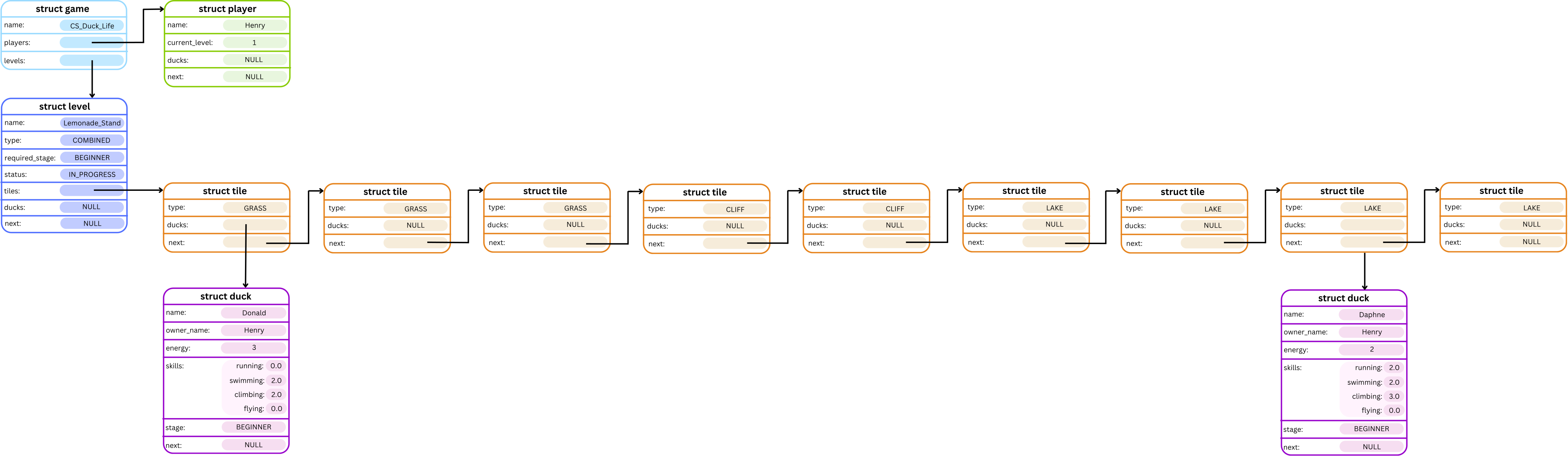
On the next turn, Daphne would finish the race by landing on the last tile of the list, and on the turn after that the level would end, because neither Daphne nor Donald would move in that turn.
Flying Skill
Ducks can also choose to skip a tile by flying over it, effectively treating that tile as a SKY tile.
If a duck has a flying skill of 3, then that means they can cross over a maximum of 3 tiles, of any type, with this skill. However, ducks are very smart, so they will only use their flying ability to cross a tile if, within that turn, they have already used all of the other skill which corresponds to that tile type. For example, a duck will only use their flying skill to cross a LAKE tile if they have no remaining swimming skill on this turn.
Additionally, flying skill can now be used in the RUNNING, CLIMBING and SWIMMING level types, in the same way it is used to cross GRASS, CLIFF and LAKE tiles in a COMBINED level.
Errors
- If the
level_numberis less than or equal to zero, or greater than the list’s length, the following error message should be printed:
Error: Level [level_number] does not exist.\n. - If the
level_typeof the given level is notCOMBINED, the following error message should be printed:
Error: Level [level_number] is not a COMBINED level.\n. - If the level status is not
NOT_STARTED, the following error message should be printed:
Error: Tiles can only be added to a level before starting.\n. - If the provided
num_tilesis less than 1, the following error message should be printed:
Error: Level length must be greater than 0.\n. - For the
f c pcommand, if the providedpattern_lengthis less than 1, the following error message should be printed:
Error: Pattern length must be greater than 0.\n. - If any of the provided tile types are
INVALID, the following error message should be printed:
Error: Invalid tile type in pattern.\n.
Note that all input should be scanned in before any error conditions are checked.
Examples
Input:
CS_Duck_Life
a l Lemonade_Stand COMBINED BEGINNER
f c n 1 5 GRASS GRASS CLIFF SKY LAKE
*
q
Input and Output:
dcc main.c cs_duck_life.c -o cs_duck_life --leak-check
./cs_duck_life
          Welcome to the Duck Life Game!
   _          _          _          _          _
 >(')____,  >(')____,  >(')____,  >(')____,  >(') ___,
   (` =~~/    (` =~~/    (` =~~/    (` =~~/    (` =~~/
~^~^`---'~^~^~^`---'~^~^~^`---'~^~^~^`---'~^~^~^`---'~^~^~
Enter the name of your game: CS_Duck_Life
Enter command: a l Lemonade_Stand COMBINED BEGINNER
Level: 'Lemonade_Stand' added!
Enter command: f c n 1 5 GRASS GRASS CLIFF SKY LAKE
Enter command: *
=-=-=-=-=-=-=-=-=-=[Game: CS_Duck_Life]=-=-=-=-=-=-=-=-=-=
Players:
  No players yet!

Levels:
  1. |Lemonade_Stand| - COMBINED [NOT_STARTED]
  Ducks waiting:
    No ducks at the moment!

  ==================================================
    GRASS :::::
    GRASS :::::
    CLIFF :::::
      SKY :::::
     LAKE :::::
  ==================================================


Enter command: q

Thank you for playing CS Duck Life!
Input:
CS_Duck_Life
a l Lemonade_Stand COMBINED BEGINNER
f c p 1 12 4 GRASS LAKE CLIFF SKY
*
q
Input and Output:
dcc main.c cs_duck_life.c -o cs_duck_life --leak-check
./cs_duck_life
          Welcome to the Duck Life Game!
   _          _          _          _          _
 >(')____,  >(')____,  >(')____,  >(')____,  >(') ___,
   (` =~~/    (` =~~/    (` =~~/    (` =~~/    (` =~~/
~^~^`---'~^~^~^`---'~^~^~^`---'~^~^~^`---'~^~^~^`---'~^~^~
Enter the name of your game: CS_Duck_Life
Enter command: a l Lemonade_Stand COMBINED BEGINNER
Level: 'Lemonade_Stand' added!
Enter command: f c p 1 12 4 GRASS LAKE CLIFF SKY
Enter command: *
=-=-=-=-=-=-=-=-=-=[Game: CS_Duck_Life]=-=-=-=-=-=-=-=-=-=
Players:
  No players yet!

Levels:
  1. |Lemonade_Stand| - COMBINED [NOT_STARTED]
  Ducks waiting:
    No ducks at the moment!

  ==================================================
    GRASS :::::
     LAKE :::::
    CLIFF :::::
      SKY :::::
    GRASS :::::
     LAKE :::::
    CLIFF :::::
      SKY :::::
    GRASS :::::
     LAKE :::::
    CLIFF :::::
      SKY :::::
  ==================================================


Enter command: q

Thank you for playing CS Duck Life!
Input:
CS_Duck_Life
a p Henry
a d Donald Henry
a d Daphne Henry
s r Donald
s r Donald
s r Donald
t Donald 2 2 3 0
s r Daphne
s r Daphne
s r Daphne
t Daphne 1 1 1 0
a l Lemonade_Stand COMBINED BEGINNER
f c n 1 9 GRASS GRASS GRASS CLIFF CLIFF LAKE LAKE LAKE LAKE
*
e Daphne 1
e Donald 1
b 1
*
p 1
*
p 1
*
p 1
*
p 1
*
p 1
*
p 1
*
q
Input and Output:
dcc main.c cs_duck_life.c -o cs_duck_life --leak-check
./cs_duck_life
          Welcome to the Duck Life Game!
   _          _          _          _          _
 >(')____,  >(')____,  >(')____,  >(')____,  >(') ___,
   (` =~~/    (` =~~/    (` =~~/    (` =~~/    (` =~~/
~^~^`---'~^~^~^`---'~^~^~^`---'~^~^~^`---'~^~^~^`---'~^~^~
Enter the name of your game: CS_Duck_Life
Enter command: a p Henry
Player: 'Henry' added!
Enter command: a d Donald Henry
Duck: 'Donald' added to 'Henry'!
Enter command: a d Daphne Henry
Duck: 'Daphne' added to 'Henry'!
Enter command: s r Donald
Enter command: s r Donald
Enter command: s r Donald
Enter command: t Donald 2 2 3 0
Enter command: s r Daphne
Enter command: s r Daphne
Enter command: s r Daphne
Enter command: t Daphne 1 1 1 0
Enter command: a l Lemonade_Stand COMBINED BEGINNER
Level: 'Lemonade_Stand' added!
Enter command: f c n 1 9 GRASS GRASS GRASS CLIFF CLIFF LAKE LAKE LAKE LAKE
Enter command: *
=-=-=-=-=-=-=-=-=-=[Game: CS_Duck_Life]=-=-=-=-=-=-=-=-=-=
Players:
  Henry - Level 1
    Daphne (BEGINNER) [Energy: 9]
      Running: 1.00
      Swimming: 1.00
      Climbing: 1.00
      Flying: 0.00

    Donald (BEGINNER) [Energy: 9]
      Running: 2.00
      Swimming: 2.00
      Climbing: 3.00
      Flying: 0.00


Levels:
  1. |Lemonade_Stand| - COMBINED [NOT_STARTED]
  Ducks waiting:
    No ducks at the moment!

  ==================================================
    GRASS :::::
    GRASS :::::
    GRASS :::::
    CLIFF :::::
    CLIFF :::::
     LAKE :::::
     LAKE :::::
     LAKE :::::
     LAKE :::::
  ==================================================


Enter command: e Daphne 1
Enter command: e Donald 1
Enter command: b 1
Enter command: *
=-=-=-=-=-=-=-=-=-=[Game: CS_Duck_Life]=-=-=-=-=-=-=-=-=-=
Players:
  Henry - Level 1
    No ducks at the moment!


Levels:
  1. |Lemonade_Stand| - COMBINED [IN_PROGRESS]
  Ducks waiting:
    No ducks at the moment!

  ==================================================
    GRASS ::::: Daphne, Donald
    GRASS :::::
    GRASS :::::
    CLIFF :::::
    CLIFF :::::
     LAKE :::::
     LAKE :::::
     LAKE :::::
     LAKE :::::
  ==================================================


Enter command: p 1
Enter command: *
=-=-=-=-=-=-=-=-=-=[Game: CS_Duck_Life]=-=-=-=-=-=-=-=-=-=
Players:
  Henry - Level 1
    No ducks at the moment!


Levels:
  1. |Lemonade_Stand| - COMBINED [IN_PROGRESS]
  Ducks waiting:
    No ducks at the moment!

  ==================================================
    GRASS :::::
    GRASS ::::: Daphne
    GRASS ::::: Donald
    CLIFF :::::
    CLIFF :::::
     LAKE :::::
     LAKE :::::
     LAKE :::::
     LAKE :::::
  ==================================================


Enter command: p 1
Enter command: *
=-=-=-=-=-=-=-=-=-=[Game: CS_Duck_Life]=-=-=-=-=-=-=-=-=-=
Players:
  Henry - Level 1
    No ducks at the moment!


Levels:
  1. |Lemonade_Stand| - COMBINED [IN_PROGRESS]
  Ducks waiting:
    No ducks at the moment!

  ==================================================
    GRASS :::::
    GRASS :::::
    GRASS ::::: Daphne
    CLIFF :::::
    CLIFF :::::
     LAKE :::::
     LAKE :::::
     LAKE ::::: Donald
     LAKE :::::
  ==================================================


Enter command: p 1
Enter command: *
=-=-=-=-=-=-=-=-=-=[Game: CS_Duck_Life]=-=-=-=-=-=-=-=-=-=
Players:
  Henry - Level 1
    No ducks at the moment!


Levels:
  1. |Lemonade_Stand| - COMBINED [IN_PROGRESS]
  Ducks waiting:
    No ducks at the moment!

  ==================================================
    GRASS :::::
    GRASS :::::
    GRASS :::::
    CLIFF :::::
    CLIFF ::::: Daphne
     LAKE :::::
     LAKE :::::
     LAKE :::::
     LAKE ::::: Donald
  ==================================================


Enter command: p 1
Enter command: *
=-=-=-=-=-=-=-=-=-=[Game: CS_Duck_Life]=-=-=-=-=-=-=-=-=-=
Players:
  Henry - Level 1
    No ducks at the moment!


Levels:
  1. |Lemonade_Stand| - COMBINED [IN_PROGRESS]
  Ducks waiting:
    No ducks at the moment!

  ==================================================
    GRASS :::::
    GRASS :::::
    GRASS :::::
    CLIFF :::::
    CLIFF :::::
     LAKE :::::
     LAKE ::::: Daphne
     LAKE :::::
     LAKE ::::: Donald
  ==================================================


Enter command: p 1
Enter command: *
=-=-=-=-=-=-=-=-=-=[Game: CS_Duck_Life]=-=-=-=-=-=-=-=-=-=
Players:
  Henry - Level 1
    No ducks at the moment!


Levels:
  1. |Lemonade_Stand| - COMBINED [IN_PROGRESS]
  Ducks waiting:
    No ducks at the moment!

  ==================================================
    GRASS :::::
    GRASS :::::
    GRASS :::::
    CLIFF :::::
    CLIFF :::::
     LAKE :::::
     LAKE :::::
     LAKE ::::: Daphne
     LAKE ::::: Donald
  ==================================================


Enter command: p 1
Level complete!

Winners:
    1. Donald (Henry)
    2. Daphne (Henry)
    3.

Participation Awards:

Incomplete Attempts:

Enter command: *
=-=-=-=-=-=-=-=-=-=[Game: CS_Duck_Life]=-=-=-=-=-=-=-=-=-=
Players:
  Henry - Level 2
    Donald (BEGINNER) [Energy: 9]
      Running: 2.00
      Swimming: 2.00
      Climbing: 3.00
      Flying: 0.00

    Daphne (BEGINNER) [Energy: 9]
      Running: 1.00
      Swimming: 1.00
      Climbing: 1.00
      Flying: 0.00


Levels:
  1. |Lemonade_Stand| - COMBINED [NOT_STARTED]
  Ducks waiting:
    No ducks at the moment!

  ==================================================
    GRASS :::::
    GRASS :::::
    GRASS :::::
    CLIFF :::::
    CLIFF :::::
     LAKE :::::
     LAKE :::::
     LAKE :::::
     LAKE :::::
  ==================================================


Enter command: q

Thank you for playing CS Duck Life!
Input:
CS_Duck_Life
a p Henry
a d Donald Henry
a d Daphne Henry
s r Donald
s r Donald
s r Donald
t Donald 2 2 3 2
s r Daphne
s r Daphne
s r Daphne
t Daphne 1 1 1 1
a l Lemonade_Stand COMBINED BEGINNER
f c n 1 9 GRASS GRASS GRASS CLIFF CLIFF LAKE LAKE LAKE LAKE
*
e Daphne 1
e Donald 1
b 1
*
p 1
*
p 1
*
p 1
*
q
Input and Output:
dcc main.c cs_duck_life.c -o cs_duck_life --leak-check
./cs_duck_life
          Welcome to the Duck Life Game!
   _          _          _          _          _
 >(')____,  >(')____,  >(')____,  >(')____,  >(') ___,
   (` =~~/    (` =~~/    (` =~~/    (` =~~/    (` =~~/
~^~^`---'~^~^~^`---'~^~^~^`---'~^~^~^`---'~^~^~^`---'~^~^~
Enter the name of your game: CS_Duck_Life
Enter command: a p Henry
Player: 'Henry' added!
Enter command: a d Donald Henry
Duck: 'Donald' added to 'Henry'!
Enter command: a d Daphne Henry
Duck: 'Daphne' added to 'Henry'!
Enter command: s r Donald
Enter command: s r Donald
Enter command: s r Donald
Enter command: t Donald 2 2 3 2
Enter command: s r Daphne
Enter command: s r Daphne
Enter command: s r Daphne
Enter command: t Daphne 1 1 1 1
Enter command: a l Lemonade_Stand COMBINED BEGINNER
Level: 'Lemonade_Stand' added!
Enter command: f c n 1 9 GRASS GRASS GRASS CLIFF CLIFF LAKE LAKE LAKE LAKE
Enter command: *
=-=-=-=-=-=-=-=-=-=[Game: CS_Duck_Life]=-=-=-=-=-=-=-=-=-=
Players:
  Henry - Level 1
    Daphne (BEGINNER) [Energy: 9]
      Running: 1.00
      Swimming: 1.00
      Climbing: 1.00
      Flying: 1.00

    Donald (BEGINNER) [Energy: 9]
      Running: 2.00
      Swimming: 2.00
      Climbing: 3.00
      Flying: 2.00


Levels:
  1. |Lemonade_Stand| - COMBINED [NOT_STARTED]
  Ducks waiting:
    No ducks at the moment!

  ==================================================
    GRASS :::::
    GRASS :::::
    GRASS :::::
    CLIFF :::::
    CLIFF :::::
     LAKE :::::
     LAKE :::::
     LAKE :::::
     LAKE :::::
  ==================================================


Enter command: e Daphne 1
Enter command: e Donald 1
Enter command: b 1
Enter command: *
=-=-=-=-=-=-=-=-=-=[Game: CS_Duck_Life]=-=-=-=-=-=-=-=-=-=
Players:
  Henry - Level 1
    No ducks at the moment!


Levels:
  1. |Lemonade_Stand| - COMBINED [IN_PROGRESS]
  Ducks waiting:
    No ducks at the moment!

  ==================================================
    GRASS ::::: Daphne, Donald
    GRASS :::::
    GRASS :::::
    CLIFF :::::
    CLIFF :::::
     LAKE :::::
     LAKE :::::
     LAKE :::::
     LAKE :::::
  ==================================================


Enter command: p 1
Enter command: *
=-=-=-=-=-=-=-=-=-=[Game: CS_Duck_Life]=-=-=-=-=-=-=-=-=-=
Players:
  Henry - Level 1
    No ducks at the moment!


Levels:
  1. |Lemonade_Stand| - COMBINED [IN_PROGRESS]
  Ducks waiting:
    No ducks at the moment!

  ==================================================
    GRASS :::::
    GRASS :::::
    GRASS ::::: Daphne
    CLIFF :::::
    CLIFF :::::
     LAKE :::::
     LAKE :::::
     LAKE :::::
     LAKE ::::: Donald
  ==================================================


Enter command: p 1
Enter command: *
=-=-=-=-=-=-=-=-=-=[Game: CS_Duck_Life]=-=-=-=-=-=-=-=-=-=
Players:
  Henry - Level 1
    No ducks at the moment!


Levels:
  1. |Lemonade_Stand| - COMBINED [IN_PROGRESS]
  Ducks waiting:
    No ducks at the moment!

  ==================================================
    GRASS :::::
    GRASS :::::
    GRASS :::::
    CLIFF :::::
    CLIFF :::::
     LAKE :::::
     LAKE ::::: Daphne
     LAKE :::::
     LAKE ::::: Donald
  ==================================================


Enter command: p 1
Level complete!

Winners:
    1. Donald (Henry)
    2. Daphne (Henry)
    3.

Participation Awards:

Incomplete Attempts:

Enter command: *
=-=-=-=-=-=-=-=-=-=[Game: CS_Duck_Life]=-=-=-=-=-=-=-=-=-=
Players:
  Henry - Level 2
    Donald (BEGINNER) [Energy: 9]
      Running: 2.00
      Swimming: 2.00
      Climbing: 3.00
      Flying: 2.00

    Daphne (BEGINNER) [Energy: 9]
      Running: 1.00
      Swimming: 1.00
      Climbing: 1.00
      Flying: 1.00


Levels:
  1. |Lemonade_Stand| - COMBINED [NOT_STARTED]
  Ducks waiting:
    No ducks at the moment!

  ==================================================
    GRASS :::::
    GRASS :::::
    GRASS :::::
    CLIFF :::::
    CLIFF :::::
     LAKE :::::
     LAKE :::::
     LAKE :::::
     LAKE :::::
  ==================================================


Enter command: q

Thank you for playing CS Duck Life!
Assumptions / Restrictions / Clarifications
- If the pattern length is greater than the level length, the level should be filled with the first
num_tilesnumber of the pattern. Similarly, if the pattern length is not divisible by the level length, the level should be filled with as many full iterations of the pattern as possible, and then a partial repeat of the pattern to fill up the remaining spaces in the level. - Combined levels can have tiles added with the
a tcommand, same as in Stage 2.4. - Duck skills determine only how far a duck can travel in each turn, so the remaining skill levels reset each turn and there is no carry over of leftover skills to the next turn. Flying skill also resets every turn.
- All skills except for
FLYINGcan only be used on their corresponding tile type. For example theRUNNINGskill cannot be used to cross aSKYtile. - You can assume that the list
(tile types)will always be of the correct length. For thef c ncommand, the number of tiles listed will always be equal tonum_tiles, and for thef c pcommand, the number of tiles listed will always be equal topattern_length.
Stage 4.2 – Skewing Levels
Duck races are a high stakes event, so sometimes cheating is involved! In this stage, we will implement the logic that allows a level to be skewed towards a given duck: meaning that the level's tiles will be rearranged in order to increase this duck’s chances of winning.
Command
The Skew Level command is called as follows:
l [level_number] [duck_name]
The Skew Level command consists of l, and then the number of the level which should be skewed, followed by the name of the duck which it should be skewed towards.
For example, if the command l 2 Donald is entered, then the second level should be skewed in favour of the duck Donald.
Description
The l command will cause the tiles of the level at level_number to be reordered to maximise how far the given duck can travel through this list in a single turn, based on the skills of that duck.
Skewing a level will follow this process to create a 'new list' of tiles by reordering the level's tiles:
-
Take as many
GRASStiles from the level's list as the duck can cross in this turn using only their running skill, and add these to the new list. -
Repeat for
LAKE,CLIFFandSKYtiles, in that order. -
Repeat steps 1-2 until all available tiles have been placed in this order in the level, or until the only remaining tiles correspond to skills in which the duck has a skill amount less than one. Each repetition of steps 1-2 creates one 'section' of the new list.
-
If there are any tiles which have not been added into the new list because the duck does not have the corresponding skill, append all of these tiles into the new list.
-
Starting from the first section, and continuing up to and including the second last section:
- If the duck has leftover flying skill within this section, then take a tile from the tail of the new list.
- Append this tile to the current section.
- Repeat until all of the duck's flying skill is being used in this section.
For example, say we have a duck with the skills:
- Running: 1,
- Swimming: 1,
- Climbing: 1,
- Flying: 1,
and a level with these tiles: GRASS, GRASS, GRASS, LAKE, LAKE, CLIFF, CLIFF, CLIFF.
Completing steps 1-3 will give us these sections and order: GRASS, LAKE, CLIFF | GRASS, LAKE, CLIFF | GRASS, CLIFF and this will take our duck 3 turns to complete.
But this duck has a flying skill of 1 that we are not using, so we can add 1 tile into each of our sections, to create this order: GRASS, LAKE, CLIFF, CLIFF | GRASS, LAKE, CLIFF, GRASS and now our duck can finish this level in 2 turns.
Errors
The following errors should be handled by the l command in the order they appear:
- If the
level_numberis less than or equal to zero, or greater than the list’s length, the following error message should be printed:
Error: Level [level_number] does not exist.\n. - If the
level_typeof the given level is notCOMBINED, the following error message should be printed:
Error: Level [level_number] is not a COMBINED level.\n. - If the level status is not
NOT_STARTED, the following error message should be printed:
Error: Level has already started.\n. - If the duck with name
duck_nameis currently in a level, the following error message should be printed:
Error: Duck [duck_name] is currently in a level.\n. - If the duck with name
duck_namecannot be found in any player's list of ducks, the following error message should be printed:
Error: No duck with name [duck_name].\n. - If it is impossible for this duck to complete this level (For example there are
LAKEtiles but the duck has noSWIMMINGorFLYINGability, or the duck does not have enoughenergyto reach the last tile), the following error message should be printed:
Error: Duck [duck_name] cannot complete level [level_number].\n.
Examples
Input:
CS_Duck_Life
a p Henry
a d Donald Henry
t Donald 1 1 1 0
s r Donald
s r Donald
s r Donald
a l Lemonade_Stand COMBINED BEGINNER
f c n 1 8 GRASS GRASS GRASS LAKE LAKE CLIFF CLIFF CLIFF
*
l 1 Donald
*
q
Input and Output:
dcc main.c cs_duck_life.c -o cs_duck_life --leak-check
./cs_duck_life
          Welcome to the Duck Life Game!
   _          _          _          _          _
 >(')____,  >(')____,  >(')____,  >(')____,  >(') ___,
   (` =~~/    (` =~~/    (` =~~/    (` =~~/    (` =~~/
~^~^`---'~^~^~^`---'~^~^~^`---'~^~^~^`---'~^~^~^`---'~^~^~
Enter the name of your game: CS_Duck_Life
Enter command: a p Henry
Player: 'Henry' added!
Enter command: a d Donald Henry
Duck: 'Donald' added to 'Henry'!
Enter command: t Donald 1 1 1 0
Enter command: s r Donald
Enter command: s r Donald
Enter command: s r Donald
Enter command: a l Lemonade_Stand COMBINED BEGINNER
Level: 'Lemonade_Stand' added!
Enter command: f c n 1 8 GRASS GRASS GRASS LAKE LAKE CLIFF CLIFF CLIFF
Enter command: *
=-=-=-=-=-=-=-=-=-=[Game: CS_Duck_Life]=-=-=-=-=-=-=-=-=-=
Players:
  Henry - Level 1
    Donald (BEGINNER) [Energy: 9]
      Running: 1.00
      Swimming: 1.00
      Climbing: 1.00
      Flying: 0.00


Levels:
  1. |Lemonade_Stand| - COMBINED [NOT_STARTED]
  Ducks waiting:
    No ducks at the moment!

  ==================================================
    GRASS :::::
    GRASS :::::
    GRASS :::::
     LAKE :::::
     LAKE :::::
    CLIFF :::::
    CLIFF :::::
    CLIFF :::::
  ==================================================


Enter command: l 1 Donald
Enter command: *
=-=-=-=-=-=-=-=-=-=[Game: CS_Duck_Life]=-=-=-=-=-=-=-=-=-=
Players:
  Henry - Level 1
    Donald (BEGINNER) [Energy: 9]
      Running: 1.00
      Swimming: 1.00
      Climbing: 1.00
      Flying: 0.00


Levels:
  1. |Lemonade_Stand| - COMBINED [NOT_STARTED]
  Ducks waiting:
    No ducks at the moment!

  ==================================================
    GRASS :::::
     LAKE :::::
    CLIFF :::::
    GRASS :::::
     LAKE :::::
    CLIFF :::::
    GRASS :::::
    CLIFF :::::
  ==================================================


Enter command: q

Thank you for playing CS Duck Life!
Input:
CS_Duck_Life
a p Henry
a d Donald Henry
t Donald 1 1 1 1
s r Donald
s r Donald
s r Donald
a l Lemonade_Stand COMBINED BEGINNER
f c n 1 8 GRASS GRASS GRASS LAKE LAKE CLIFF CLIFF CLIFF
*
l 1 Donald
*
q
Input and Output:
dcc main.c cs_duck_life.c -o cs_duck_life --leak-check
./cs_duck_life
          Welcome to the Duck Life Game!
   _          _          _          _          _
 >(')____,  >(')____,  >(')____,  >(')____,  >(') ___,
   (` =~~/    (` =~~/    (` =~~/    (` =~~/    (` =~~/
~^~^`---'~^~^~^`---'~^~^~^`---'~^~^~^`---'~^~^~^`---'~^~^~
Enter the name of your game: CS_Duck_Life
Enter command: a p Henry
Player: 'Henry' added!
Enter command: a d Donald Henry
Duck: 'Donald' added to 'Henry'!
Enter command: t Donald 1 1 1 1
Enter command: s r Donald
Enter command: s r Donald
Enter command: s r Donald
Enter command: a l Lemonade_Stand COMBINED BEGINNER
Level: 'Lemonade_Stand' added!
Enter command: f c n 1 8 GRASS GRASS GRASS LAKE LAKE CLIFF CLIFF CLIFF
Enter command: *
=-=-=-=-=-=-=-=-=-=[Game: CS_Duck_Life]=-=-=-=-=-=-=-=-=-=
Players:
  Henry - Level 1
    Donald (BEGINNER) [Energy: 9]
      Running: 1.00
      Swimming: 1.00
      Climbing: 1.00
      Flying: 1.00


Levels:
  1. |Lemonade_Stand| - COMBINED [NOT_STARTED]
  Ducks waiting:
    No ducks at the moment!

  ==================================================
    GRASS :::::
    GRASS :::::
    GRASS :::::
     LAKE :::::
     LAKE :::::
    CLIFF :::::
    CLIFF :::::
    CLIFF :::::
  ==================================================


Enter command: l 1 Donald
Enter command: *
=-=-=-=-=-=-=-=-=-=[Game: CS_Duck_Life]=-=-=-=-=-=-=-=-=-=
Players:
  Henry - Level 1
    Donald (BEGINNER) [Energy: 9]
      Running: 1.00
      Swimming: 1.00
      Climbing: 1.00
      Flying: 1.00


Levels:
  1. |Lemonade_Stand| - COMBINED [NOT_STARTED]
  Ducks waiting:
    No ducks at the moment!

  ==================================================
    GRASS :::::
     LAKE :::::
    CLIFF :::::
    CLIFF :::::
    GRASS :::::
     LAKE :::::
    CLIFF :::::
    GRASS :::::
  ==================================================


Enter command: q

Thank you for playing CS Duck Life!
Assumptions / Restrictions / Clarifications
- There is no need to ensure that all of the duck’s flying potential is being used in the final pattern section of a level, because if the current pattern section is the final section, there is no way to take elements from the last section and add them to this section.
- The last pattern section may change partway through sorting because elements have been removed until the previous last pattern section was empty - in this case the program should adapt, and continue step 5 until the new second last pattern section of the level.
- A level with
SKYtiles being skewed in favour of a duck with noflyingability will not be tested.
Testing and Submission
Remember to do your own testing! Are you finished with this stage? If so, you should make sure to do the following:- Run
1511 styleand clean up any issues a human may have reading your code. Don't forget -- 20% of your mark in the assignment is based on style and readability! - Autotest for this stage of the assignment by running the
autotest-stagecommand as shown below. - Remember -- give early and give often. Only your last submission counts, but why not be safe and submit right now?
1511 style cs_duck_life.c
1511 style cs_duck_life.h
1511 style main.c
1511 autotest-stage 04 cs_duck_life
give cs1511 ass2_cs_duck_life cs_duck_life.c cs_duck_life.h main.c
Extension
As an extension, we have set up a starting point to add a texture pack to your program via SplashKit.
Extension activities are NOT worth any marks, nor are there any autotests. They are just for fun!
Getting Started
To get started with SplashKit, complete the SplashKit activities.
Sample Code
First, navigate to your SplashKit directory.
cd splashkit
Create a new directory for your project and cd into it.
mkdir cs_duck_life
cd cs_duck_life
Set up your directory for SplashKit with:
1511 setup-splashkit-directory
Run this cp command to retrieve the sample code.
cp -n /web/cs1511/26T2/activities/cs_duck_life/splashkit_example.c .
This should add the splashkit_example.c sample code to your current directory.
Check that SplashKit Works
Let's check that SplashKit works by running a test file. It should display a white square with a grid inside.
skm clang++ splashkit_example.c -o splashkit_example
./splashkit_example
Have a look inside of splashkit_example.c and note that:
- At the very top, the the SplashKit library
"splashkit.h"is included. If you see an error here, check SplashKit #1 - Getting Started for a solution to set up your VS Code project. - In the
main()function:open_window("SplashKit Example", 600, 400)creates a 600×400 window for displaying graphics.- The
while (!window_close_requested(w))loop keeps running until the user closes the window. Within this loop:process_events()handles input or window-related actions (like closing the window).refresh_screen()updates the window so any graphical changes (like drawing a rectangle) are displayed to the user.
Running Your SplashKit Code
When creating your SplashKit program, give it a distinctive name like splashkit_cs_duck_life.c.
To compile and run your program, use:
skm clang++ splashkit_cs_duck_life.c -o splashkit_cs_duck_life
./splashkit_cs_duck_life
Writing Your SplashKit Program
Now that you've seen how the sample code works, it’s time to create your own SplashKit program.
If you're not sure where to begin, start by researching the SplashKit Library. The goal at first is not to understand and memorise the entire library. Rather, it's better to skim through the pages to build a broad understanding of the capabilities that SplashKit can bring to your creations.
The Graphics page is a good place to start, and the following sections will be useful:
- Windows for opening, closing, and controlling the size of windows.
- Color for using different colours.
- Graphics for drawing shapes, images, and text.
- Geometry for handling shapes such as rectangles, circles, lines, and points.
- Input for capturing and handling user input such as keyboard and mouse events.
SplashKit Gallery
Have you built something fun or interesting using SplashKit? Show it off and inspire your classmates!
Share any screenshots or short videos of your running program in the SplashKit Gallery on the Course Forum. Feel free to add a brief description or reflect on how you made it, so we can all learn from your mistakes journey 😅.
Tools
Creating Games in Separate Files
If you are getting sick of typing your inputs every time you run CS Duck Life, you might want to store your input in a separate file.
1. Create a file for your input.
First, let's create a file to store in the input for a game that you have created. This isn't a .c file, it's just a regular plain text file, the file extension .in works nicely for this!
Let's put it in the same directory as your assignment code.
cd ass2
ls
cs_duck_life.c
cs_duck_life.h
main.c
cs_duck_life
my_game.in
2. Add your input to the file
Inside of this file, add the input for the game.
Your file could look a bit like this (including the newline at the end):
CS_Duck_Life
a p Henry
a d Donald Henry
*
3. Run the code with your file
Next, instead of just running ./cs_duck_life, lets tell the computer to first read from the file we created.
cat my_game.in - | ./cs_duck_life
This will also work on the reference implementation too!
cat my_game.in - | 1511 cs_duck_life
Assessment
Assignment Conditions
-
Joint work is not permitted on this assignment.
This is an individual assignment.
The work you submit must be entirely your own work. Submission of any work even partly written by any other person is not permitted.
The only exception being if you use small amounts (< 10 lines) of general purpose code (not specific to the assignment) obtained from a site such as Stack Overflow or other publicly available resources. You should attribute the source of this code clearly in an accompanying comment.
Assignment submissions will be examined, both automatically and manually for work written by others.
Do not request help from anyone other than the teaching staff of COMP1511.
Do not post your assignment code to the course forum - the teaching staff can view assignment code you have recently autotested or submitted with give.
Rationale: this assignment is an individual piece of work. It is designed to develop the skills needed to produce an entire working program. Using code written by or taken from other people will stop you learning these skills.
-
The use of code-synthesis tools, such as GitHub Copilot, is not permitted on this assignment.
The use of Generative AI to generate code solutions is not permitted on this assignment.
Rationale: this assignment is intended to develop your understanding of basic concepts. Using synthesis tools will stop you learning these fundamental concepts.
-
Sharing, publishing, distributing your assignment work is not permitted.
Do not provide or show your assignment work to any other person, other than the teaching staff of COMP1511. For example, do not share your work with friends.
Do not publish your assignment code via the internet. For example, do not place your assignment in a public GitHub repository.
Rationale: by publishing or sharing your work you are facilitating other students to use your work, which is not permitted. If they submit your work, you may become involved in an academic integrity investigation.
-
Sharing, publishing, distributing your assignment work after the completion of COMP1511 is not permitted.
For example, do not place your assignment in a public GitHub repository after COMP1511 is over.
Rationale: COMP1511 sometimes reuses assignment themes, using similar concepts and content. If students in future terms can find your code and use it, which is not permitted, you may become involved in an academic integrity investigation.
Violation of the above conditions may result in an academic integrity investigation with possible penalties, up to and including a mark of 0 in COMP1511 and exclusion from UNSW.
Relevant scholarship authorities will be informed if students holding scholarships are involved in an incident of plagiarism or other misconduct. If you knowingly provide or show your assignment work to another person for any reason, and work derived from it is submitted - you may be penalised, even if the work was submitted without your knowledge or consent. This may apply even if your work is submitted by a third party unknown to you.
If you have not shared your assignment, you will not be penalised if your work is taken without your consent or knowledge.
For more information, read the UNSW Student Code , or contact the course account. The following penalties apply to your total mark for plagiarism:
| 0 for the assignment | Knowingly providing your work to anyone and it is subsequently submitted (by anyone). |
| 0 for the assignment | Submitting any other person's work. This includes joint work. |
| 0 FL for COMP1511 | Paying another person to complete work. Submitting another person's work without their consent. |
Submission of Work
You should submit intermediate versions of your assignment. Every time you
autotest or submit, a copy will be saved as a backup. You can find those
backups
here
, by logging in, and choosing the yellow button next to
ass2_cs_duck_life.
Every time you work on the assignment and make some progress, you should copy
your work to your CSE account and submit it using the give
command below.
It is fine if intermediate versions do not compile or otherwise fail submission tests.
Only the final submitted version of your assignment will be marked.
You submit your work like this:
give cs1511 ass2_cs_duck_life cs_duck_life.c cs_duck_life.h main.c
Assessment Scheme
This assignment will contribute 25% to your final mark.
80% of the marks for this assignment will be based on the performance of the
code you write in cs_duck_life.c cs_duck_life.h main.c.
20% of the marks for this assignment will come from manual marking of the readability of the C you have written. The manual marking will involve checking your code for clarity, and readability, which includes the use of functions and efficient use of loops and if statements.
Marks for your performance will be allocated roughly according to the below scheme.
COMP1511
| 100% for Performance | Completely working implementation, which exactly follows the specification (Stage 1, 2, 3 and 4). |
| 85% for Performance | Completely working implementation of Stage 1, 2 and 3. |
| 65% for Performance | Completely working implementation of Stage 1 and 2. |
| 35% for Performance | Completely working implementation of Stage 1. |
COMP1911
| 100% for Performance | Completely working implementation, which exactly follows the specification (Stage 1, 2, 3.1, 3.2 and 3.3). |
| 85% for Performance | Completely working implementation of Stage 1 and 2. |
| 40% for Performance | Completely working implementation of Stage 1. |
Marks for your style will be allocated roughly according to the scheme below.
Style Marking Rubric
| 0 | 1 | 2 | 3 | 4 | |
| Formatting (/5) | |||||
| Indentation (/2) - Should use a consistent indentation scheme. | Multiple instances throughout code of inconsistent/bad indentation | Code is mostly correctly indented | Code is consistently indented throughout the program | ||
| Whitespace (/1) - Should use consistent whitespace (for example, 3 + 3 not 3+ 3) | Many whitespace errors | No whitespace errors | |||
| Vertical Whitespace (/1) - Should use consistent whitespace (for example, vertical whitespace between sections of code) | Code has no consideration for use of vertical whitespace | Code consistently uses reasonable vertical whitespace | |||
| Line Length (/1) - Lines should be max. 80 characters long | Many lines over 80 characters | No lines over 80 characters | |||
| Documentation (/5) | |||||
| Comments (incl. header comment) (/3) - Comments have been used throughout the code above code sections and functions to explain their purpose. A header comment (with name, zID and a program description) has been included | No comments provided throughout code | Few comments provided throughout code | Comments are provided as needed, but some details or explanations may be missing causing the code to be difficult to follow | Comments have been used throughout the code above code sections and functions to explain their purpose. A header comment (with name, zID and a program description) has been included | |
| Function/variable/constant naming (/2) - Functions/variables/constants names all follow naming conventions in style guide and help in understanding the code | Functions/variables/constants names do not follow naming conventions in style guide and help in understanding the code | Functions/variables/constants names somewhat follow naming conventions in style guide and help in understanding the code | Functions/variables/constants names all follow naming conventions in style guide and help in understanding the code | ||
| Organisation (/5) | |||||
| Function Usage (/4) - Code has been decomposed into appropriate functions separating functionalities | No functions are present, code is one main function | Some code has been moved to functions | Some code has been moved to sensible/thought out functions, and/or many functions exceed 50 lines (incl. main function) | Most code has been moved to sensible/thought out functions, and/or some functions exceed 50 lines (incl. main function) | All code has been meaningfully decomposed into functions of a maximum of 50 lines (incl. The main function) |
| Function Prototypes (/1) - Function Prototypes have been used to declare functions above main | Functions are used but have not been prototyped | All functions have a prototype above the main function or no functions are used | |||
| Elegance (/5) | |||||
| Overdeep nesting (/2) - You should not have too many levels of nesting in your code (nesting which is 5 or more levels deep) | Many instances of overdeep nesting | <= 3 instances of overdeep nesting | No instances of overdeep nesting | ||
| Code Repetition (/2) - Potential repetition of code has been dealt with via the use of functions or loops | Many instances of repeated code sections | <= 3 instances of repeated code sections | Potential repetition of code has been dealt with via the use of functions or loops | ||
| Constant Usage (/1) - Any magic numbers are #defined | None of the constants used throughout program are #defined | All constants used are #defined and are used consistently in the code | |||
| Illegal elements | |||||
| Illegal elements - Presence of any illegal elements indicated in the style guide | CAP MARK AT 16/20 | ||||
Allowed C Features
This assignment must be implemented exclusively using linked lists for all core data structures and logic.
Other than arrays, there are no restrictions on C features in this assignment, except for those outlined in the Style Guide. If you choose to use features beyond what has been taught in COMP1511/1911, be aware that course staff may not be able to assist you.
Due Date
This assignment is due 7 August 2026 23:59:00. For each day after that time,
the maximum mark it can achieve will be reduced by 5% (off the ceiling).
-
For instance, at 1 day past the due date, the maximum mark you can get is 95%.
-
For instance, at 3 days past the due date, the maximum mark you can get is 85%.
-
For instance, at 5 days past the due date, the maximum mark you can get is 75%.
No submissions will be accepted after 5 days late, unless you have special provisions in place.
Change Log
-
Version 1.0
(2026-07-15 09:00)
-
- Assignment Released
-
Version 1.1
(2026-07-19 16:00)
-
- Stage 3.3 and 3.5 - remove unnecessary clarifications regarding maximum number of ducks
-
Version 1.2
(2026-07-26 14:00)
-
- Stage 1.5 - update clarification about duplicate level names
-
Version 1.3
(2026-07-30 9:00)
-
- Stage 1.3 - update incorrect diagram
-
Version 1.4
(2026-07-30 13:00)
-
- Stage 3.3 - add clarification about counting a player's ducks
-
Version 1.5
(2026-08-02 12:00)
-
- Stage 2.5 - clarify untested behaviour for adding ducks with same name as ducks in levels
- Stage 3.4 - remove clarification on editing print function
- Stage 4.2 - clarify untested behaviour for duck without flying ability skewing level with SKY tiles
-
Version 1.6
(2026-08-05 23:00)
-
- Stage 3.3 - fix error in diagram
(2026-07-15 09:00)
- Assignment Released
(2026-07-19 16:00)
- Stage 3.3 and 3.5 - remove unnecessary clarifications regarding maximum number of ducks
(2026-07-26 14:00)
- Stage 1.5 - update clarification about duplicate level names
(2026-07-30 9:00)
- Stage 1.3 - update incorrect diagram
(2026-07-30 13:00)
- Stage 3.3 - add clarification about counting a player's ducks
(2026-08-02 12:00)
- Stage 2.5 - clarify untested behaviour for adding ducks with same name as ducks in levels
- Stage 3.4 - remove clarification on editing print function
- Stage 4.2 - clarify untested behaviour for duck without flying ability skewing level with SKY tiles
(2026-08-05 23:00)
- Stage 3.3 - fix error in diagram