version: 1.6 last updated: 2026-04-21 06:00
Assignment 2 - CS Karting
Overview
Welcome to CS Karting! 🏎️
With the rise of fast-paced kart racing and competitive series, organisers need smart systems to manage tracks, drivers, and race progression. Your task is to implement CS Karting, a comprehensive kart racing simulation system.
This assignment will test your ability to create, use, manipulate, and solve problems using linked lists. You will represent races, track pieces, and drivers using linked lists within a central racing series structure.
Getting Started
There are a few steps to getting started with CS Karting.
- Create a new folder for your assignment work and move into it.
mkdir ass2
cd ass2
- Use this command on your CSE account to copy the file into your current directory:
1511 fetch-activity cs_karting
- Run
1511 autotest cs_kartingto make sure you have correctly downloaded the file.
1511 autotest cs_karting
-
Read through this introduction and Stage 1.
-
Spend a few minutes playing with the reference solution.
1511 cs_karting
-
Think about your solution, draw some diagrams to help you get started.
-
Start coding!
Assignment Structure & Starter Code
This assignment utilises a multi-file system. There are three files we use in CS Karting:
- Main File (
main.c): This file contains the main function, which serves as an entry point for the program. It is responsible for printing a welcome banner, setting the name of the series, creating the series, and initiating a command loop so users can interact with the app.
A main() function has been provided in main.c to get you started.
int main(void) {
    print_welcome_banner();

    printf("Enter the name of your racing series: ");
    char series_name[MAX_SIZE];
    scan_name(series_name);
    struct series *my_series = create_series(series_name);

    command_loop(my_series);

    printf("\nThank you for playing CS Karting!\n");
    return 0;
}
Printing a Welcome Banner
The first statement in main() calls the provided print_welcome_banner() function to print a welcome banner:
void print_welcome_banner() {

    printf(""
    "          Welcome to the CS Karting Racing Series!\n"
    "                  .\n"
    "                  |\\\n"
    "                  |_\\\n"
    "                  |\n"
    "       .==========||=======.    .===================.\n"
    "      /    _______||____    \\  /   _[_0|_[?]_______   \\\n"
    "     /   /'              '\\  \\/  /'               '\\   \\\n"
    "    |   |                  \\/   /                   |   |\n"
    "    |   |                  /   / \\                  |   |\n"
    "     \\  \\                 /   /\\  \\                /   /\n"
    "      \\  '---------------'   /  \\  '--------------'   /\n"
    "       \\.===[_0|====[_0|===./    \\.========|0_]=====./\n"
    "\n"
    );

}
Scanning the Series Name
In this section, the program receives input from the user for the name of the karting series.
It declares series_name, a character array of size MAX_SIZE to store the name of the series.
It then uses the provided scan_name() function, which reads user input and stores it in the series_name array.
printf("Enter the name of your racing series: ");
char series_name[MAX_SIZE];
scan_name(series_name);
Creating the Series
Next, the program creates the series itself. It:
- Declares a pointer
my_seriesto astruct series. - Calls
create_series(), passingseries_nameas an argument. - Stores the pointer returned by
create_series()inmy_series.
struct series *my_series = create_series(series_name);
The create_series() function is currently incomplete. You will need to implement this in Stage 1.1. It is responsible for setting up the initial state of the series, including allocating memory and setting default values.
Starting the Command Loop
After creating the series, the program starts a command loop by calling the command_loop() function which you will need to implement in Stage 1.2. This function allows users to interact with the app to add races, track pieces, drivers, and more!
command_loop(my_series);
Exiting the Program
The last statement in main() prints a thank you message:
printf("\nThank you for playing CS Karting!\n");
-
Header File (
cs_karting.h): This file declares constants, enums, structs, and function prototypes for the program. You will need to add prototypes for any functions you create in this file. You should also add any of your own constants and/or enums to this file. -
Implementation File (
cs_karting.c): This file is where most of the assignment work will be done, as you will implement the logic and functionality required by the assignment here. This file also contains stubs of Stage 1 functions for you to implement. It does not contain amainfunction, so you will need to compile it alongsidemain.c. You will need to define any additional functions you may need for later stages in this file.
The implementation file cs_karting.c contains some "Provided Function Definitions" to help simplify some stages of this assignment. These functions have been implemented and should not need to be modified to complete this assignment.
These provided functions will be explained in the relevant stages of this assignment. Please read the function comments and the specification as we will suggest certain provided functions for you to use.
We have defined some structs in cs_karting.h to get you started. You may add fields to any of the structs if you wish.
The Series
struct series {
    char name[MAX_SIZE];
    struct race *races;
};
Purpose: To store all the information about the series. It contains:
- The name of the series.
- A list of races, each with their own track and drivers.
Races
struct race {
    char name[MAX_SIZE];
    enum location location;
    enum race_status status;
    struct track_piece *track;
    struct driver *drivers;
    struct race *next;
};
Purpose: To represent a race in the series. It contains:
- The race’s name.
- The location of the race (e.g. Albert Park, Marina Bay, Monza, Suzuka or Zandvoort).
- The race status (eg. Not Started, Active or Completed).
- A list of track pieces that make up the race's track layout.
- A list of drivers in the race.
- A pointer to the next race in the series.
Track Pieces
struct track_piece {
    enum piece_type type;
    struct driver *drivers;
    struct track_piece *next;
};
Purpose: To represent a track piece that makes up the race layout. It contains:
- The type of track piece.
- A list of drivers who are at that track piece.
- A pointer to the next track piece in the race.
Drivers
struct driver {
    char name[MAX_SIZE];
    int speed;
    struct driver *next;
};
Purpose: To represent a driver in a race. It contains:
- The driver's name.
- The driver's speed.
- A pointer to the next driver in the race.
The following enum definitions are provided for you in cs_karting.h. You can create your own enums if you would like, but you should not need to modify the provided enums.
Race Location
enum location {
    ALBERT_PARK,
    MARINA_BAY,
    MONZA,
    SUZUKA,
    ZANDVOORT
};
Race Status
enum race_status {
    NOT_STARTED,
    ACTIVE,
    COMPLETED
};
Track Piece Type
enum piece_type {
    START_LINE,
    FINISH_LINE,
    STRAIGHT,
    LEFT_TURN,
    RIGHT_TURN,
    JUMP,
    MYSTERY_BOX,
    INVALID
};
Mystery Box Power-Ups
enum mystery_box {
    MUSHROOM,
    BANANA_PEEL,
    STAR,
    LIGHTNING,
    BLUE_SHELL,
    BULLET,
    NO_MYSTERY_BOX
};
Place Points
enum points {
    FIRST = 15,
    SECOND = 10,
    THIRD = 7,
    FOURTH = 5,
    FIFTH = 4,
    SIXTH = 3,
    SEVENTH = 2,
    EIGHTH = 1
};
Reference Implementation
To help you understand the expected behaviour of CS Karting, we have provided a reference implementation. If you have any questions about the behaviour of your assignment, you can compare its output to the reference implementation.
To run the reference implementation, use the following command:
1511 cs_karting
Input:
CS_Karting
?
[CTRL + D]
Input and Output:
1511 cs_karting
          Welcome to the CS Karting Racing Series!
                  .
                  |\
                  |_\
                  |
       .==========||=======.    .===================.
      /    _______||____    \  /   _[_0|_[?]_______   \
     /   /'              '\  \/  /'               '\   \
    |   |                  \/   /                   |   |
    |   |                  /   / \                  |   |
     \  \                 /   /\  \                /   /
      \  '---------------'   /  \  '--------------'   /
       \.===[_0|====[_0|===./    \.========|0_]=====./

Enter the name of your racing series: CS_Karting
Enter command: ?
======================[ Usage Info ]=====================

  ?
    Show this help information.
  a r [race_name] [location]
    Add a new race with the given name and location.
  a t [race_name] [piece_type]
    Add a track piece of the given type to the race.
  a d [race_name] [driver_name] [speed]
    Add a driver to the specified race.
  *
    Print the racing series.
  i t [n] [race_name] [piece_type]
    Insert a track piece at position [n] in the race.
  i d [n] [race_name] [driver_name] [speed]
    Insert a driver at [position] in the specified race.
  c [existing_race] [new_race]
    Adds a new race with the same track layout.
  s [race_name]
    Start the specified race.
  v [race_name]
    Validates the specified rules meets track compliance.
  m [driver_name] [current_race] [new_race]
    Moves the driver from one race to another.
  q
    Cancels the karting series.
  r [driver_name]
    Removes the driver from all races.
  t [race_name] [turns]
    Advance the race by [turns].
  e [race_name]
    Automatically run turns until the race finishes.
  f [location]
    Create a finals race for the given location.

=========================================================
Enter command:
Thank you for playing CS Karting!
Allowed C Features
This assignment must be implemented exclusively using linked lists for all core data structures and logic.
Other than arrays, there are no restrictions on C features in this assignment, except for those outlined in the Style Guide. If you choose to use features beyond what has been taught in COMP1511, be aware that course staff may not be able to assist you.
FAQ
Q: Can I edit the provided code?
Yes! Feel free to modify, replace, or discard any of the provided code.
For example: you may wish to add fields to the provided struct series definition.
You are also encouraged to create your own constants, enums, structs, and helper functions.
Q: What C features can I use?
For everything not taught in the course, check the Style Guide:
- If the guide says "avoid", it may incur a style mark penalty if not used correctly.
- If the guide says "illegal" or "do not use", it will result in a style mark penalty (see the Style Marking Rubric).
These rules exist to ensure that everyone develops the required foundational knowledge and to maintain a level playing field for all students.
Q: Can I use arrays?
A: No, you cannot use arrays in any part of this assignment. The only exception is when using strings. Using arrays for any part of this assignment will result in a performance mark of zero. Whilst the provided structs contain strings (char arrays), you cannot use arrays for anything else such as sorting drivers in Stage 4.1.
Stages
The assignment has been divided into incremental stages.
Stage 1
- Stage 1.1 - Create and Initialise Structs.
- Stage 1.2 - Command Loop.
- Stage 1.3 - Add Races, Track Pieces and Drivers.
- Stage 1.4 - Printing the Racing Series.
- Stage 1.5 - Handling Errors
Stage 2
- Stage 2.1 - Insert Tracks and Drivers.
- Stage 2.2 - Copy Race.
- Stage 2.3 - Track Compliance Rules.
- Stage 2.4 - Start Race.
Stage 3
- Stage 3.1 - Cancel the Racing Series.
- Stage 3.2 - Remove Driver.
- Stage 3.3 - Move Driver.
- Stage 3.4 - Play Turn of Race.
- Stage 3.5 - End Race.
Stage 4
- Stage 4.1 - Power-Ups.
- Stage 4.2 - Finals.
Extension (not for marks)
- SplashKit - Create and Share a Graphical User Interface.
Video Overview
A video explanation to help you get started with the assignment can here found here:
Your Tasks
This assignment consists of four stages. Each stage builds on the work of the previous stage, and each stage has a higher complexity than its predecessor. You should complete the stages in order.
Stage 1
In Stage 1, you will implement some basic commands to turn the starter code into the foundation of our CS Karting Series!
This milestone has been divided into four substages:
- Stage 1.1 - Create and Initialise Structs.
- Stage 1.2 - Command Loop.
- Stage 1.3 - Add Races, Track Pieces and Drivers.
- Stage 1.4 - Printing the Racing Series.
- Stage 1.5 - Handling Errors
Stage 1.1 - Create and Initialise Structs
In this stage, you will set up the core data structures that make up the Karting Series.
Your first task is to implement the following four functions:
create_series()create_race()create_track_piece()create_driver()
Each of these functions takes in a list of parameters detailed in cs_karting.h, and returns a pointer to a struct.
You will find unimplemented function stubs for these functions in cs_karting.c.
// Stage 1.1
// Function to create the Racing Series
// Params:
//      name - the name of the series
// Returns: a pointer to the series
struct series *create_series(char name[MAX_SIZE]) {

    // TODO: Implement this function
    printf("create_series() not implemented yet!\n");

    return NULL;
}
// Stage 1.1
// Function to create a race
// Params:
//      name - the name of the race
//      location - the location of the race
// Returns: a pointer to the race
struct race *create_race(char name[MAX_SIZE], enum location location) {

    // TODO: Implement this function
    printf("create_race() not implemented yet!\n");

    return NULL;
}
// Stage 1.1
// Function to create a track piece
// Params:
//      type - the type of track piece
// Returns: a pointer to the track piece
struct track_piece *create_track(enum piece_type type) {

    // TODO: Implement this function
    printf("create_track() not implemented yet!\n");

    return NULL;
}
// Stage 1.1
// Function to create a driver
// Params:
//      name - the name of the driver
//      speed - the speed of the driver
// Returns: a pointer to the driver
struct driver *create_driver(char name[MAX_SIZE], int speed) {

    // TODO: Implement this function
    printf("create_driver() not implemented yet!\n");

    return NULL;
}
To implement these functions:
- Find the function stubs in
cs_karting.cand read the provided comments. - Malloc the space required for the struct.
- Assign the provided parameters to the struct's fields.
- Initialise all remaining struct fields to some reasonable values.
- Return a pointer to the newly-created struct.
Clarifications
- No error handling is required for this stage.
- All races should have a
RACE_STATUSofNOT_STARTEDwhen first initialised.
Testing
There are no autotests for Stage 1.1.
You will need to test your work by:
- Compiling your code with
dccto ensure there are no warnings or errors. - Writing temporary testing code to confirm that your functions behave as expected.
You can copy the following testing code into your main() function in main.c.
#include <string.h>
#include <stdio.h>

#include "cs_karting.h"

int main(void) {
    // Initialise the karting series
    char series_name[MAX_SIZE];
    strcpy(series_name, "CS_Karting");

    struct series *my_series = create_series(series_name);

    // Print series details
    printf("Karting series created:\n");
    printf("    Name: %s\n", my_series->name);
    printf("    Races: ");
    if (my_series->races == NULL) {
        printf("NULL\n\n");
    } else {
        printf("not set to NULL\n\n");
    }

    // Create a race
    char race_name[MAX_SIZE];
    strcpy(race_name, "Beach");
    struct race *race = create_race(race_name, ALBERT_PARK);
    printf("Race created: \n");
    printf("    Name: %s\n", race->name);
    printf("    Status: %s\n", status_to_string(race->status));
    printf("    Track: ");
    if (race->track == NULL) {
        printf("NULL\n");
    } else {
        printf("not set to NULL\n");
    }
    printf("    Drivers: ");
    if (race->drivers == NULL) {
        printf("NULL\n");
    } else {
        printf("not set to NULL\n");
    }
    printf("    Next race: ");
    if (race->next == NULL) {
        printf("NULL\n\n");
    } else {
        printf("not set to NULL\n\n");
    }

    // Create a track piece
    struct track_piece *track = create_track(STRAIGHT);
    printf("Track piece created: \n");
    printf("    Type: %s\n", type_to_string(track->type));
        printf("    Drivers: ");
    if (track->drivers == NULL) {
        printf("NULL\n");
    } else {
        printf("not set to NULL\n");
    }
    printf("    Next track piece: ");
    if (track->next == NULL) {
        printf("NULL\n\n");
    } else {
        printf("not set to NULL\n\n");
    }

    // Create a driver
    char driver_name[MAX_SIZE];
    strcpy(driver_name, "Mario");
    struct driver *driver = create_driver(driver_name, 1);
    printf("Driver created: \n");
    printf("    Name: %s\n", driver->name);
    printf("    Speed: %d\n", driver->speed);
    printf("    Next driver: ");
    if (driver->next == NULL) {
        printf("NULL\n\n");
    } else {
        printf("not set to NULL\n\n");
    }

    return 0;
}
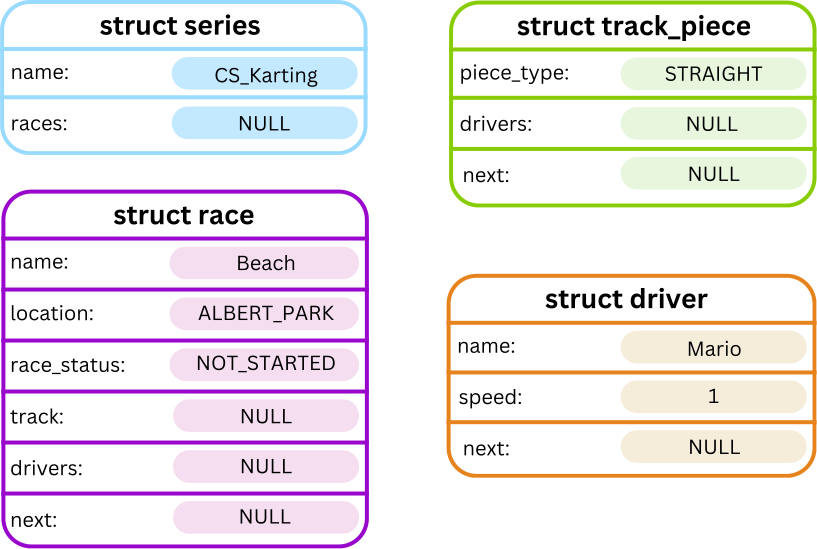
This code calls create_series(), create_race(), create_track_piece() and create_driver(), then prints the values stored in the fields of the returned structs.
You can compile and run your program with the following command:
dcc cs_karting.c main.c -o cs_karting
./cs_karting
When you run it, it should print the following:
Karting series created:
    Name: CS_Karting
    Races: NULL

Race created:
    Name: Beach
    Status: NOT_STARTED
    Track: NULL
    Drivers: NULL
    Next race: NULL

Track piece created:
    Type: STRAIGHT
    Drivers: NULL
    Next track piece: NULL

Driver created:
    Name: Mario
    Speed: 1
    Next driver: NULL
Visually, this can be represented as below:
Stage 1.2 - Command Loop
In this stage, we will implement a command loop that will read in commands from the user and perform that task for our CS Karting Series!
To do this, we will begin implementing the command_loop() function. This function is called by the main() function in main.c after the Racing Series is created.
A function stub has been provided in the cs_karting.c starter code.
// Stage 1.2
// Function to run the main command loop for the program
// Params:
//      series - a pointer to the racing series
// Returns: None
void command_loop(struct series *series) {

    // TODO: Implement this function
    printf("command_loop() not yet implemented\n");

    return;
}
Your program should continuously scan in commands from the user and perform the respective task until [CTRL + D] is entered. To do so, your command_loop() function should:
- Print
"Enter command: "to prompt the user to enter a command. - Scan in a command.
- Execute the task associated with the command.
- Repeat steps 1 to 3 until
[CTRL + D]is entered.
When [CTRL + D] is entered, the function should end and immediately return to the main() function. The program will then print the goodbye message, as included in the starter code in main.c and end.
The command loop will be extended with new commands as you progress through each stage of the assignment.
The first command you will implement is the help command, which is described below.
Command
?
Description
When the help command is entered, the program should print out the usage information as outlined in the print_usage() function provided in the cs_karting.c starter code. This print statement lists all the commands to be implemented by the end of this assignment along with their respective arguments.
This command does not require any further input to be entered after ? and is designed so that anyone can easily understand how to interact with the program.
// Function to print the program usage information
// Params: None
// Returns: None
void print_usage() {

    printf(
       "======================[ Usage Info ]=====================\n"
       "                                                         \n"
       "  ?                                                      \n"
       "    Show this help information.                          \n"
       "  a r [race_name] [location]                             \n"
       "    Add a new race with the given name and location.     \n"
       "  a t [race_name] [piece_type]                           \n"
       "    Add a track piece of the given type to the race.     \n"
       "  a d [race_name] [driver_name] [speed]                  \n"
       "    Add a driver to the specified race.                  \n"
       "  *                                                      \n"
       "    Print the racing series.                             \n"
       "  i t [n] [race_name] [piece_type]                       \n"
       "    Insert a track piece at position [n] in the race.    \n"
       "  i d [n] [race_name] [driver_name] [speed]              \n"
       "    Insert a driver at [position] in the specified race. \n"
       "  c [existing_race] [new_race]                           \n"
       "    Adds a new race with the same track layout.          \n"
       "  s [race_name]                                          \n"
       "    Start the specified race.                            \n"
       "  v [race_name]                                          \n"
       "    Validates the specified rules meets track compliance.\n"
       "  m [driver_name] [current_race] [new_race]              \n"
       "    Moves the driver from one race to another.           \n"
       "  q                                                      \n"
       "    Cancels the karting series.                          \n"
       "  r [driver_name]                                        \n"
       "    Removes the driver from all races.                   \n"
       "  t [race_name] [turns]                                  \n"
       "    Advance the race by [turns].                         \n"
       "  e [race_name]                                          \n"
       "    Automatically run turns until the race finishes.     \n"
       "  f [location]                                           \n"
       "    Create a finals race for the given location.         \n"
       "                                                         \n"
       "=========================================================\n"
    );

}
Once the help command finishes, the program should continue prompting the user for a command until [CTRL + D] is entered as outlined in steps 1 to 3 above.
If an invalid command is entered, your program should print
ERROR: Invalid command.
Examples
Input:
CS_Karting
[CTRL+D]
Input and Output:
dcc main.c cs_karting.c -o cs_karting
./cs_karting
          Welcome to the CS Karting Racing Series!
                  .
                  |\
                  |_\
                  |
       .==========||=======.    .===================.
      /    _______||____    \  /   _[_0|_[?]_______   \
     /   /'              '\  \/  /'               '\   \
    |   |                  \/   /                   |   |
    |   |                  /   / \                  |   |
     \  \                 /   /\  \                /   /
      \  '---------------'   /  \  '--------------'   /
       \.===[_0|====[_0|===./    \.========|0_]=====./

Enter the name of your racing series: CS_Karting
Enter command: [CTRL+D]
Thank you for playing CS Karting!
Input:
Karting_Raceway
?
[CTRL+D]
Input and Output:
dcc main.c cs_karting.c -o cs_karting
./cs_karting
          Welcome to the CS Karting Racing Series!
                  .
                  |\
                  |_\
                  |
       .==========||=======.    .===================.
      /    _______||____    \  /   _[_0|_[?]_______   \
     /   /'              '\  \/  /'               '\   \
    |   |                  \/   /                   |   |
    |   |                  /   / \                  |   |
     \  \                 /   /\  \                /   /
      \  '---------------'   /  \  '--------------'   /
       \.===[_0|====[_0|===./    \.========|0_]=====./

Enter the name of your racing series: Karting_Raceway
Enter command: ?
======================[ Usage Info ]=====================

  ?
    Show this help information.
  a r [race_name] [location]
    Add a new race with the given name and location.
  a t [race_name] [piece_type]
    Add a track piece of the given type to the race.
  a d [race_name] [driver_name] [speed]
    Add a driver to the specified race.
  *
    Print the racing series.
  i t [n] [race_name] [piece_type]
    Insert a track piece at position [n] in the race.
  i d [n] [race_name] [driver_name] [speed]
    Insert a driver at [position] in the specified race.
  c [existing_race] [new_race]
    Adds a new race with the same track layout.
  s [race_name]
    Start the specified race.
  v [race_name]
    Validates the specified rules meets track compliance.
  m [driver_name] [current_race] [new_race]
    Moves the driver from one race to another.
  q
    Cancels the karting series.
  r [driver_name]
    Removes the driver from all races.
  t [race_name] [turns]
    Advance the race by [turns].
  e [race_name]
    Automatically run turns until the race finishes.
  f [location]
    Create a finals race for the given location.

=========================================================
Enter command: [CTRL+D]
Thank you for playing CS Karting!
Input:
CS_Karting
j
[CTRL+D]
Input and Output:
dcc main.c cs_karting.c -o cs_karting
./cs_karting
          Welcome to the CS Karting Racing Series!
                  .
                  |\
                  |_\
                  |
       .==========||=======.    .===================.
      /    _______||____    \  /   _[_0|_[?]_______   \
     /   /'              '\  \/  /'               '\   \
    |   |                  \/   /                   |   |
    |   |                  /   / \                  |   |
     \  \                 /   /\  \                /   /
      \  '---------------'   /  \  '--------------'   /
       \.===[_0|====[_0|===./    \.========|0_]=====./

Enter the name of your racing series: CS_Karting
Enter command: j
ERROR: Invalid command.
Enter command: [CTRL+D]
Thank you for playing CS Karting!
Clarifications
You may assume that:
- All commands begin with a single
charand may be followed by additional arguments. The number of arguments will depend on each command. - Commands will always be given the correct number of arguments.
- Commands will always be given arguments of the correct type.
Stage 1.3 - Add Races, Track Pieces and Drivers
At the moment, when our CS Karting program runs, a new racing series is created by calling create_series() from the provided main.c file.
The created empty racing series should look something like this:

In order to get our races underway, we first need to add a few key components like the races, track pieces and the drivers!
Command
The add commands are called as followed to add a race, track piece and driver, respectively.
a r [race_name] [location]
a t [race_name] [piece_type]
a d [race_name] [driver_name] [speed]
These commands will append the given data structure to the end of the associated linked list.
Description
Your task is to complete the following function stubs in cs_karting.c. These functions should then be called inside the command loop depending on which add command has been entered.
// Stage 1.3
// Function to add a race
// Params:
//      series - a pointer to the racing series
// Returns: None
void add_race(struct series *series) {

    // TODO: Implement this function
    printf("add_race() not yet implemented!\n");

    return;
}
// Stage 1.3
// Function to add a track piece
// Params:
//      series - a pointer to the racing series
// Returns: None
void add_track_piece(struct series *series) {

    // TODO: Implement this function
    printf("add_track_piece() not yet implemented!\n");

    return;
}
// Stage 1.3
// Function to add a driver
// Params:
//      series - a pointer to the racing series
// Returns: None
void add_driver(struct series *series) {

    // TODO: Implement this function
    printf("add_driver() not yet implemented!\n");

    return;
}
When an add race, r, command is entered, your program should:
- Scan in the race name, using the provided
scan_name()function. - Scan in the race location, using the provided
scan_location()function. - Create a new race.
- Insert the race at the tail of the series races list.
- Print a message to confirm that the command was successful:
"Race: '[name]' added!\n"
where[name]is the name of the new race.
When an add track piece, t, command is entered, your program should:
- Scan in the race name, using the provided
scan_name()function. - Scan in the track piece type, using the provided
scan_piece_type()function. - Create a new track piece.
- Find the race with the given race name and insert the track piece at the tail of the given race's track list.
- Print a message to confirm that the command was successful:
"Track Piece: '[type]' added!\n"
where[type]is the type of track piece added.
When an add driver, d, command is entered, your program should:
- Scan in the race name, using the provided
scan_name()function. - Scan in the driver name, using the provided
scan_name()function. - Scan in the driver's speed.
- Create the driver.
- Find the race with the given race name and insert the driver at the tail of the given race's driver list.
- Print a message to confirm that the command was successful:
"Driver: '[name]' added!\n"
where[name]is the name of the driver.
After adding one race, the racing series might look something like this:

After adding one track_piece, the racing series might look something like this:

After adding one driver, the racing series might look something like this:

After adding an additional race, track piece, and driver, each should be appended to the end of their respective lists. The racing series might then look something like this:

Examples
Input:
CS_Karting
a r City_Circuit ZANDVOORT
[CTRL+D]
Input and Output:
dcc main.c cs_karting.c -o cs_karting
./cs_karting
          Welcome to the CS Karting Racing Series!
                  .
                  |\
                  |_\
                  |
       .==========||=======.    .===================.
      /    _______||____    \  /   _[_0|_[?]_______   \
     /   /'              '\  \/  /'               '\   \
    |   |                  \/   /                   |   |
    |   |                  /   / \                  |   |
     \  \                 /   /\  \                /   /
      \  '---------------'   /  \  '--------------'   /
       \.===[_0|====[_0|===./    \.========|0_]=====./

Enter the name of your racing series: CS_Karting
Enter command: a r City_Circuit ZANDVOORT
Race: 'City_Circuit' added!
Enter command: [CTRL+D]
Thank you for playing CS Karting!
Input:
CS_Karting
a r City_Circuit ZANDVOORT
a t City_Circuit STRAIGHT
[CTRL+D]
Input and Output:
dcc main.c cs_karting.c -o cs_karting
./cs_karting
          Welcome to the CS Karting Racing Series!
                  .
                  |\
                  |_\
                  |
       .==========||=======.    .===================.
      /    _______||____    \  /   _[_0|_[?]_______   \
     /   /'              '\  \/  /'               '\   \
    |   |                  \/   /                   |   |
    |   |                  /   / \                  |   |
     \  \                 /   /\  \                /   /
      \  '---------------'   /  \  '--------------'   /
       \.===[_0|====[_0|===./    \.========|0_]=====./

Enter the name of your racing series: CS_Karting
Enter command: a r City_Circuit ZANDVOORT
Race: 'City_Circuit' added!
Enter command: a t City_Circuit STRAIGHT
Track Piece: 'STRAIGHT' added!
Enter command: [CTRL+D]
Thank you for playing CS Karting!
Input:
CS_Karting
a r Zoom_Zone ALBERT_PARK
a d Zoom_Zone Hamilton 1
[CTRL+D]
Input and Output:
dcc main.c cs_karting.c -o cs_karting
./cs_karting
          Welcome to the CS Karting Racing Series!
                  .
                  |\
                  |_\
                  |
       .==========||=======.    .===================.
      /    _______||____    \  /   _[_0|_[?]_______   \
     /   /'              '\  \/  /'               '\   \
    |   |                  \/   /                   |   |
    |   |                  /   / \                  |   |
     \  \                 /   /\  \                /   /
      \  '---------------'   /  \  '--------------'   /
       \.===[_0|====[_0|===./    \.========|0_]=====./

Enter the name of your racing series: CS_Karting
Enter command: a r Zoom_Zone ALBERT_PARK
Race: 'Zoom_Zone' added!
Enter command: a d Zoom_Zone Hamilton 1
Driver: 'Hamilton' added!
Enter command: [CTRL+D]
Thank you for playing CS Karting!
Input:
CS_Karting
a r Route_66 MONZA
a d Route_66 Sasha 1
a t Route_66 JUMP
a t Route_66 STRAIGHT
a d Route_66 Norris 1
[CTRL+D]
Input and Output:
dcc main.c cs_karting.c -o cs_karting
./cs_karting
          Welcome to the CS Karting Racing Series!
                  .
                  |\
                  |_\
                  |
       .==========||=======.    .===================.
      /    _______||____    \  /   _[_0|_[?]_______   \
     /   /'              '\  \/  /'               '\   \
    |   |                  \/   /                   |   |
    |   |                  /   / \                  |   |
     \  \                 /   /\  \                /   /
      \  '---------------'   /  \  '--------------'   /
       \.===[_0|====[_0|===./    \.========|0_]=====./

Enter the name of your racing series: CS_Karting
Enter command: a r Route_66 MONZA
Race: 'Route_66' added!
Enter command: a d Route_66 Sasha 1
Driver: 'Sasha' added!
Enter command: a t Route_66 JUMP
Track Piece: 'JUMP' added!
Enter command: a t Route_66 STRAIGHT
Track Piece: 'STRAIGHT' added!
Enter command: a d Route_66 Norris 1
Driver: 'Norris' added!
Enter command: [CTRL+D]
Thank you for playing CS Karting!
Clarifications
[race_name]and[driver_name]are strings that contain no spaces and will always have a size less thanMAX_SIZE - 1.- Drivers speed should always be between 1 and 3 inclusive.
- No error handling is required in this stage.
piece_typewill be entered as an uppercase string and converted to the correctenum piece_typeby thescan_piece_typefunction. You should call this function to complete this conversion.- You don't need to worry about
INVALIDuntil Stage 1.5. Until then, you can assume that the returnedenum piece_typewill never beINVALID. - The
START_LINEandFINISH_LINEtrack piece types are not to be scanned in and you can assume these will not be given as input. - The
MYSTERY_BOXtrack piece type will be introduced in Stage 3.5. You can assume it will not be given as input until then.
You do not need to support scanning these piece types in this stage.
Stage 1.4 - Printing the Racing Series
In this stage, you will implement a function to print out our CS Karting Series!
Command
*
Description
When the print command is entered, your program should first print out the following banner:
===================[ [series_name] ]===================.
It should then print all the races in the series from head to tail along with each race's track list and drivers. To see how this should be displayed when printing, see the 1.4 examples below.
To implement this, a function stub has been provided in the cs_karting.c starter code.
// Stage 1.4
// Function to print out the racing series
// Params:
//      series - the racing series
// Retruns: None
void print_series(struct series *series) {

    // TODO: Implement this function
    printf("print_series() not yet implemented!\n");

    return;
}
To assist with the printing formatting, the helper functions print_track() and print_drivers() have been provided for you.
// Helper function to print out the track information
// PARAMS:
//      track - the first track piece in a given race
// RETURNS: None
void print_track(struct track_piece *track) {

    if (track == NULL) {
        printf("        Empty Track!\n");
        return;
    }

    while (track->next != NULL) {
        printf("        %s\n", type_to_string(track->type));
        printf("        |\n");
        printf("        ⌄\n");
        track = track->next;
    }
    printf("        %s\n", type_to_string(track->type));

}
// Helper function to print out the drivers within a race
// PARAMS:
//      race - the race containing the drivers to be printed
// RETURNS: None
void print_drivers(struct race *race) {

    printf("        Drivers:\n");

    struct driver *current = race->drivers;
    if (current == NULL) {
        printf("            Empty Driver List!\n");
    }

    int count = 1;
    while (current != NULL) {
        printf("            %d. %s (speed: %d)\n",
               count, current->name, current->speed);
        count++;
        current = current->next;
    }

}
If no track pieces have been added to a race, the program should print the following message under that race's name:
Empty Track!.
If no drivers have been added to a race, the program should print the following message under that race's name:
Empty Driver List!.
If no races have been added to the racing series, the program should print:
The racing series is empty!.
Examples
Input:
CS_Karting
*
[CTRL+D]
Input and Output:
dcc main.c cs_karting.c -o cs_karting
./cs_karting
          Welcome to the CS Karting Racing Series!
                  .
                  |\
                  |_\
                  |
       .==========||=======.    .===================.
      /    _______||____    \  /   _[_0|_[?]_______   \
     /   /'              '\  \/  /'               '\   \
    |   |                  \/   /                   |   |
    |   |                  /   / \                  |   |
     \  \                 /   /\  \                /   /
      \  '---------------'   /  \  '--------------'   /
       \.===[_0|====[_0|===./    \.========|0_]=====./

Enter the name of your racing series: CS_Karting
Enter command: *
===================[ CS_Karting ]===================
The racing series is empty!
Enter command: [CTRL+D]
Thank you for playing CS Karting!
Input:
CS_Karting
a r City_circuit ZANDVOORT
*
[CTRL+D]
Input and Output:
dcc main.c cs_karting.c -o cs_karting
./cs_karting
          Welcome to the CS Karting Racing Series!
                  .
                  |\
                  |_\
                  |
       .==========||=======.    .===================.
      /    _______||____    \  /   _[_0|_[?]_______   \
     /   /'              '\  \/  /'               '\   \
    |   |                  \/   /                   |   |
    |   |                  /   / \                  |   |
     \  \                 /   /\  \                /   /
      \  '---------------'   /  \  '--------------'   /
       \.===[_0|====[_0|===./    \.========|0_]=====./

Enter the name of your racing series: CS_Karting
Enter command: a r City_circuit ZANDVOORT
Race: 'City_circuit' added!
Enter command: *
===================[ CS_Karting ]===================
Races:
    City_circuit [NOT_STARTED]
    (ZANDVOORT)
        Empty Track!
        Drivers:
            Empty Driver List!

Enter command: [CTRL+D]
Thank you for playing CS Karting!
Input:
CS_Karting
a r City_Circuit ZANDVOORT
a t City_Circuit STRAIGHT
a d City_Circuit Hamilton 1
a r Zoom_Zoom SUZUKA
a t City_Circuit RIGHT_TURN
a d City_Circuit Luigi 1
*
[CTRL+D]
Input and Output:
dcc main.c cs_karting.c -o cs_karting
./cs_karting
          Welcome to the CS Karting Racing Series!
                  .
                  |\
                  |_\
                  |
       .==========||=======.    .===================.
      /    _______||____    \  /   _[_0|_[?]_______   \
     /   /'              '\  \/  /'               '\   \
    |   |                  \/   /                   |   |
    |   |                  /   / \                  |   |
     \  \                 /   /\  \                /   /
      \  '---------------'   /  \  '--------------'   /
       \.===[_0|====[_0|===./    \.========|0_]=====./

Enter the name of your racing series: CS_Karting
Enter command: a r City_Circuit ZANDVOORT
Race: 'City_Circuit' added!
Enter command: a t City_Circuit STRAIGHT
Track Piece: 'STRAIGHT' added!
Enter command: a d City_Circuit Hamilton 1
Driver: 'Hamilton' added!
Enter command: a r Zoom_Zoom SUZUKA
Race: 'Zoom_Zoom' added!
Enter command: a t City_Circuit RIGHT_TURN
Track Piece: 'RIGHT_TURN' added!
Enter command: a d City_Circuit Luigi 1
Driver: 'Luigi' added!
Enter command: *
===================[ CS_Karting ]===================
Races:
    City_Circuit [NOT_STARTED]
    (ZANDVOORT)
        STRAIGHT
        |
        ⌄
        RIGHT_TURN
        Drivers:
            1. Hamilton (speed: 1)
            2. Luigi (speed: 1)
    Zoom_Zoom [NOT_STARTED]
    (SUZUKA)
        Empty Track!
        Drivers:
            Empty Driver List!

Enter command: [CTRL+D]
Thank you for playing CS Karting!
Stage 1.5 - Handling Errors
In this stage, you will modify your stage 1.3 code to add some restrictions.
Error conditions
If any of the following errors occur, the command should not be executed and the corresponding error message should be printed.
-
When adding a track piece, if the
typereturned by thescan_piece_typefunction isINVALID, the following error should be printed:
ERROR: Invalid track piece type. -
When adding a track piece or driver, if the given race name does not match any existing race, the following error should be printed:
ERROR: No race with name [name]. -
When adding a track piece or driver, if the given race name does not have a
race_statusofNOT_STARTED, the following error should be printed:
ERROR: Race [name] has already started. -
When adding a race, if there is already a race in the series that contains that name, the following error should be printed:
ERROR: Race [name] already exists. -
When adding a driver, if there is already a driver in that race with the given driver name, the following error should be printed:
ERROR: Driver with name [driver_name] already exists in race. -
When adding a driver, if the speed entered is not between 1 - 3 inclusive, the following error should be printed:
ERROR: Driver speed must be within 1 and 3. -
When adding a driver, if doing so would cause the number of drivers in the race to exceed the maximum (maximum number of drivers in a race is
8), the following error should be printed:
ERROR: Maximum of 8 drivers per race.
Examples
Input:
CS_Karting
a r zoom_zoom MARINA_BAY
a r zoom_zoom SUZUKA
[CTRL+D]
Input and Output:
dcc main.c cs_karting.c -o cs_karting
./cs_karting
          Welcome to the CS Karting Racing Series!
                  .
                  |\
                  |_\
                  |
       .==========||=======.    .===================.
      /    _______||____    \  /   _[_0|_[?]_______   \
     /   /'              '\  \/  /'               '\   \
    |   |                  \/   /                   |   |
    |   |                  /   / \                  |   |
     \  \                 /   /\  \                /   /
      \  '---------------'   /  \  '--------------'   /
       \.===[_0|====[_0|===./    \.========|0_]=====./

Enter the name of your racing series: CS_Karting
Enter command: a r zoom_zoom MARINA_BAY
Race: 'zoom_zoom' added!
Enter command: a r zoom_zoom SUZUKA
ERROR: Race zoom_zoom already exists.
Enter command: [CTRL+D]
Thank you for playing CS Karting!
Input:
CS_Karting
a r zoom_zoom MARINA_BAY
a t zoom_zoom BIG_JUMP
[CTRL+D]
Input and Output:
dcc main.c cs_karting.c -o cs_karting
./cs_karting
          Welcome to the CS Karting Racing Series!
                  .
                  |\
                  |_\
                  |
       .==========||=======.    .===================.
      /    _______||____    \  /   _[_0|_[?]_______   \
     /   /'              '\  \/  /'               '\   \
    |   |                  \/   /                   |   |
    |   |                  /   / \                  |   |
     \  \                 /   /\  \                /   /
      \  '---------------'   /  \  '--------------'   /
       \.===[_0|====[_0|===./    \.========|0_]=====./

Enter the name of your racing series: CS_Karting
Enter command: a r zoom_zoom MARINA_BAY
Race: 'zoom_zoom' added!
Enter command: a t zoom_zoom BIG_JUMP
ERROR: Invalid track piece type.
Enter command: [CTRL+D]
Thank you for playing CS Karting!
Input:
CS_Karting
a r zoom_zoom MARINA_BAY
a d zoom_zoom Mario 1
a d zoom_zoom Mario 2
a d zoom_zoom Hamilton 4
a d zoom_zoom Hamilton 0
a d zoom_zoom Sasha 3
a d zoom_zoom Luigi 2
a d zoom_zoom Leclerc 1
a d zoom_zoom Bowser 1
a d zoom_zoom Sofia 2
a d zoom_zoom Hamilton 1
a d zoom_zoom Holly 2
a d zoom_zoom Grace 3
[CTRL+D]
Input and Output:
dcc main.c cs_karting.c -o cs_karting
./cs_karting
          Welcome to the CS Karting Racing Series!
                  .
                  |\
                  |_\
                  |
       .==========||=======.    .===================.
      /    _______||____    \  /   _[_0|_[?]_______   \
     /   /'              '\  \/  /'               '\   \
    |   |                  \/   /                   |   |
    |   |                  /   / \                  |   |
     \  \                 /   /\  \                /   /
      \  '---------------'   /  \  '--------------'   /
       \.===[_0|====[_0|===./    \.========|0_]=====./

Enter the name of your racing series: CS_Karting
Enter command: a r zoom_zoom MARINA_BAY
Race: 'zoom_zoom' added!
Enter command: a d zoom_zoom Mario 1
Driver: 'Mario' added!
Enter command: a d zoom_zoom Mario 2
ERROR: Driver with name Mario already exists in race.
Enter command: a d zoom_zoom Hamilton 4
ERROR: Driver speed must be within 1 and 3.
Enter command: a d zoom_zoom Hamilton 0
ERROR: Driver speed must be within 1 and 3.
Enter command: a d zoom_zoom Sasha 3
Driver: 'Sasha' added!
Enter command: a d zoom_zoom Luigi 2
Driver: 'Luigi' added!
Enter command: a d zoom_zoom Leclerc 1
Driver: 'Leclerc' added!
Enter command: a d zoom_zoom Bowser 1
Driver: 'Bowser' added!
Enter command: a d zoom_zoom Sofia 2
Driver: 'Sofia' added!
Enter command: a d zoom_zoom Hamilton 1
Driver: 'Hamilton' added!
Enter command: a d zoom_zoom Holly 2
Driver: 'Holly' added!
Enter command: a d zoom_zoom Grace 3
ERROR: Maximum of 8 drivers per race.
Enter command: [CTRL+D]
Thank you for playing CS Karting!
Clarifications
- If more than one error occurs, only the first error in the order specified above should be addressed by printing an error message. This is the same for all future commands.
- When checking if a race or driver name already exists in the series, the comparison is case-sensitive. For example, if a race named
COMP1511is already in the series, trying to add a race namedComp1511will not be treated as a duplicate, and no error will be raised. This is the same for all future commands. - Multiple drivers with the same name may exist in the Karting Series however, only one instance may appear within each race.
- You may assume that the
locationentered for the race will always be valid i.e. always one of the locations listed in theenum location.
Testing and Submission
Remember to do your own testing! Are you finished with this stage? If so, you should make sure to do the following:- Run
1511 styleand clean up any issues a human may have reading your code. Don't forget -- 20% of your mark in the assignment is based on style and readability! - Autotest for this stage of the assignment by running the
autotest-stagecommand as shown below. - Remember -- give early and give often. Only your last submission counts, but why not be safe and submit right now?
1511 style cs_karting.c
1511 style cs_karting.h
1511 style main.c
1511 autotest-stage 01 cs_karting
give cs1511 ass2_cs_karting cs_karting.c cs_karting.h main.c
Stage 2
Stage 2 will build on the key components of our CS Karting Series so far and introduce some linked list manipulation!
This milestone has been divided into five substages:
- Stage 2.1 - Insert Tracks and Drivers.
- Stage 2.2 - Copy Race.
- Stage 2.3 - Track Compliance Rules.
- Stage 2.4 - Start Race.
Stage 2.1 - Insert Tracks and Drivers
Up until this point, we can only append track pieces and drivers to the end of a list, but what if we would like to customise our lists a little more? We will now implement inserting of these features at specific positions in our list!
Command
The insert commands are called as followed to insert a track piece and driver respectively, at a given position.
i t [n] [race_name] [piece_type]
i d [n] [race_name] [driver_name] [speed]
Description
The i command is similar to the a command from Stage 1.3 except that it takes in one additional argument which is the position in the list at which to insert the node.
When referring to the insertion process, for inserting a track piece:
- new node: newly created and initialised
struct track_piece - list:
race->trackfor the given race
and for inserting a driver:
- new node: newly created and initialised
struct driver - list:
race->driversfor the given race.
After reading in the position n from the user, the program should continue to read in the other expected input. The program should then follow a similar initialisation process to Stage 1.3 but insert the new node based on the following position rules:
- If
n == 1,
then the new node should be inserted at the head of the list. - If
n == 2,
then the new node should be inserted after the first node in the list. - If
n == N,
then the new node should be inserted at theNth node in the list. - If
nis greater than the length of the list,
then the new node should be inserted at the tail of the list.
Inserting a track piece with i t 2 City_Circuit JUMP and a driver with i d 5 City_Circuit Sasha should look something like this:
Before:

After:

Errors
All errors from Stage 1.3 apply still apply, with the addition of the following error to be checked before any other error:
- If
n < 1, the following error should be printed:
ERROR: Position must be at least 1.
Examples
Input:
CS_Karting
a r City_circuit MONZA
a d City_circuit Mario 2
a d City_circuit Alonso 1
*
i d 1 City_circuit Sasha 3
*
[CTRL+D]
Input and Output:
dcc main.c cs_karting.c -o cs_karting
./cs_karting
          Welcome to the CS Karting Racing Series!
                  .
                  |\
                  |_\
                  |
       .==========||=======.    .===================.
      /    _______||____    \  /   _[_0|_[?]_______   \
     /   /'              '\  \/  /'               '\   \
    |   |                  \/   /                   |   |
    |   |                  /   / \                  |   |
     \  \                 /   /\  \                /   /
      \  '---------------'   /  \  '--------------'   /
       \.===[_0|====[_0|===./    \.========|0_]=====./

Enter the name of your racing series: CS_Karting
Enter command: a r City_circuit MONZA
Race: 'City_circuit' added!
Enter command: a d City_circuit Mario 2
Driver: 'Mario' added!
Enter command: a d City_circuit Alonso 1
Driver: 'Alonso' added!
Enter command: *
===================[ CS_Karting ]===================
Races:
    City_circuit [NOT_STARTED]
    (MONZA)
        Empty Track!
        Drivers:
            1. Mario (speed: 2)
            2. Alonso (speed: 1)

Enter command: i d 1 City_circuit Sasha 3
Driver: 'Sasha' inserted!
Enter command: *
===================[ CS_Karting ]===================
Races:
    City_circuit [NOT_STARTED]
    (MONZA)
        Empty Track!
        Drivers:
            1. Sasha (speed: 3)
            2. Mario (speed: 2)
            3. Alonso (speed: 1)

Enter command: [CTRL+D]
Thank you for playing CS Karting!
Input:
CS_Karting
a r zoom SUZUKA
a t zoom STRAIGHT
a t zoom RIGHT_TURN
a t zoom LEFT_TURN
*
i t 2 zoom STRAIGHT
*
[CTRL+D]
Input and Output:
dcc main.c cs_karting.c -o cs_karting
./cs_karting
          Welcome to the CS Karting Racing Series!
                  .
                  |\
                  |_\
                  |
       .==========||=======.    .===================.
      /    _______||____    \  /   _[_0|_[?]_______   \
     /   /'              '\  \/  /'               '\   \
    |   |                  \/   /                   |   |
    |   |                  /   / \                  |   |
     \  \                 /   /\  \                /   /
      \  '---------------'   /  \  '--------------'   /
       \.===[_0|====[_0|===./    \.========|0_]=====./

Enter the name of your racing series: CS_Karting
Enter command: a r zoom SUZUKA
Race: 'zoom' added!
Enter command: a t zoom STRAIGHT
Track Piece: 'STRAIGHT' added!
Enter command: a t zoom RIGHT_TURN
Track Piece: 'RIGHT_TURN' added!
Enter command: a t zoom LEFT_TURN
Track Piece: 'LEFT_TURN' added!
Enter command: *
===================[ CS_Karting ]===================
Races:
    zoom [NOT_STARTED]
    (SUZUKA)
        STRAIGHT
        |
        ⌄
        RIGHT_TURN
        |
        ⌄
        LEFT_TURN
        Drivers:
            Empty Driver List!

Enter command: i t 2 zoom STRAIGHT
Track Piece: 'STRAIGHT' inserted!
Enter command: *
===================[ CS_Karting ]===================
Races:
    zoom [NOT_STARTED]
    (SUZUKA)
        STRAIGHT
        |
        ⌄
        STRAIGHT
        |
        ⌄
        RIGHT_TURN
        |
        ⌄
        LEFT_TURN
        Drivers:
            Empty Driver List!

Enter command: [CTRL+D]
Thank you for playing CS Karting!
Input:
CS_Karting
a r City_circuit MONZA
a t City_circuit STRAIGHT
a t City_circuit RIGHT_TURN
a t City_circuit JUMP
a d City_circuit Mario 2
a d City_circuit Alonso 1
*
i d 3 City_circuit Sasha 3
*
i t 6 City_circuit STRAIGHT
*
[CTRL+D]
Input and Output:
dcc main.c cs_karting.c -o cs_karting
./cs_karting
          Welcome to the CS Karting Racing Series!
                  .
                  |\
                  |_\
                  |
       .==========||=======.    .===================.
      /    _______||____    \  /   _[_0|_[?]_______   \
     /   /'              '\  \/  /'               '\   \
    |   |                  \/   /                   |   |
    |   |                  /   / \                  |   |
     \  \                 /   /\  \                /   /
      \  '---------------'   /  \  '--------------'   /
       \.===[_0|====[_0|===./    \.========|0_]=====./

Enter the name of your racing series: CS_Karting
Enter command: a r City_circuit MONZA
Race: 'City_circuit' added!
Enter command: a t City_circuit STRAIGHT
Track Piece: 'STRAIGHT' added!
Enter command: a t City_circuit RIGHT_TURN
Track Piece: 'RIGHT_TURN' added!
Enter command: a t City_circuit JUMP
Track Piece: 'JUMP' added!
Enter command: a d City_circuit Mario 2
Driver: 'Mario' added!
Enter command: a d City_circuit Alonso 1
Driver: 'Alonso' added!
Enter command: *
===================[ CS_Karting ]===================
Races:
    City_circuit [NOT_STARTED]
    (MONZA)
        STRAIGHT
        |
        ⌄
        RIGHT_TURN
        |
        ⌄
        JUMP
        Drivers:
            1. Mario (speed: 2)
            2. Alonso (speed: 1)

Enter command: i d 3 City_circuit Sasha 3
Driver: 'Sasha' inserted!
Enter command: *
===================[ CS_Karting ]===================
Races:
    City_circuit [NOT_STARTED]
    (MONZA)
        STRAIGHT
        |
        ⌄
        RIGHT_TURN
        |
        ⌄
        JUMP
        Drivers:
            1. Mario (speed: 2)
            2. Alonso (speed: 1)
            3. Sasha (speed: 3)

Enter command: i t 6 City_circuit STRAIGHT
Track Piece: 'STRAIGHT' inserted!
Enter command: *
===================[ CS_Karting ]===================
Races:
    City_circuit [NOT_STARTED]
    (MONZA)
        STRAIGHT
        |
        ⌄
        RIGHT_TURN
        |
        ⌄
        JUMP
        |
        ⌄
        STRAIGHT
        Drivers:
            1. Mario (speed: 2)
            2. Alonso (speed: 1)
            3. Sasha (speed: 3)

Enter command: [CTRL+D]
Thank you for playing CS Karting!
Clarifications
nwill always be entered as an integer.- Positions are 1-indexed. That is, a node at the head of a list is in position 1.
Stage 2.2 - Copy Race
At the moment, each race must be built up manually by adding track pieces one at a time which can be tedious. In this stage, we will implement a command to duplicate an existing race, creating a new race that shares the same track layout.
Command
The copy race command is called as follows:
c [existing_race] [new_race]
Description
The c command creates a new race that is a copy of an existing race's track layout.
When this command is entered, your program should:
- Scan in the name of the race to copy and the name of the new race.
- Create a new race with the provided name using the same location as the original race.
- Duplicate each track piece from the original race and append it to the new race in the same order.
- Append the new race to the end of the
series->raceslist.
When copying the track layout:
- A new
struct track_piecenode should be created for each track piece in the original race. - The
typefield should be copied from the original track piece. - The order of the track pieces must remain the same.
Only the track layout should be copied. Any drivers associated with the original race should not be copied to the new race.
The copy command execution can be visualised below:
Before:

After:

Errors
The following errors should be checked in order:
-
If the race to copy does not exist, the following error should be printed:
ERROR: No race with name [existing_name]. -
If a race with the new name already exists, the following error should be printed:
ERROR: Race [new_race] already exists. -
If the race to copy does not have any track pieces, the following error should be printed:
ERROR: No track pieces in race to be copied.
Examples
Input:
CS_Karting
a r Beach MARINA_BAY
a t Beach STRAIGHT
a t Beach RIGHT_TURN
*
c Beach Vroom_Zone
*
[CTRL+D]
Input and Output:
dcc main.c cs_karting.c -o cs_karting
./cs_karting
          Welcome to the CS Karting Racing Series!
                  .
                  |\
                  |_\
                  |
       .==========||=======.    .===================.
      /    _______||____    \  /   _[_0|_[?]_______   \
     /   /'              '\  \/  /'               '\   \
    |   |                  \/   /                   |   |
    |   |                  /   / \                  |   |
     \  \                 /   /\  \                /   /
      \  '---------------'   /  \  '--------------'   /
       \.===[_0|====[_0|===./    \.========|0_]=====./

Enter the name of your racing series: CS_Karting
Enter command: a r Beach MARINA_BAY
Race: 'Beach' added!
Enter command: a t Beach STRAIGHT
Track Piece: 'STRAIGHT' added!
Enter command: a t Beach RIGHT_TURN
Track Piece: 'RIGHT_TURN' added!
Enter command: *
===================[ CS_Karting ]===================
Races:
    Beach [NOT_STARTED]
    (MARINA_BAY)
        STRAIGHT
        |
        ⌄
        RIGHT_TURN
        Drivers:
            Empty Driver List!

Enter command: c Beach Vroom_Zone
Enter command: *
===================[ CS_Karting ]===================
Races:
    Beach [NOT_STARTED]
    (MARINA_BAY)
        STRAIGHT
        |
        ⌄
        RIGHT_TURN
        Drivers:
            Empty Driver List!
    Vroom_Zone [NOT_STARTED]
    (MARINA_BAY)
        STRAIGHT
        |
        ⌄
        RIGHT_TURN
        Drivers:
            Empty Driver List!

Enter command: [CTRL+D]
Thank you for playing CS Karting!
Input:
CS_Karting
a r Beach MARINA_BAY
a t Beach STRAIGHT
a t Beach RIGHT_TURN
a t Beach STRAIGHT
a d Beach Mario 1
*
c Beach Vroom_Zone
*
[CTRL+D]
Input and Output:
dcc main.c cs_karting.c -o cs_karting
./cs_karting
          Welcome to the CS Karting Racing Series!
                  .
                  |\
                  |_\
                  |
       .==========||=======.    .===================.
      /    _______||____    \  /   _[_0|_[?]_______   \
     /   /'              '\  \/  /'               '\   \
    |   |                  \/   /                   |   |
    |   |                  /   / \                  |   |
     \  \                 /   /\  \                /   /
      \  '---------------'   /  \  '--------------'   /
       \.===[_0|====[_0|===./    \.========|0_]=====./

Enter the name of your racing series: CS_Karting
Enter command: a r Beach MARINA_BAY
Race: 'Beach' added!
Enter command: a t Beach STRAIGHT
Track Piece: 'STRAIGHT' added!
Enter command: a t Beach RIGHT_TURN
Track Piece: 'RIGHT_TURN' added!
Enter command: a t Beach STRAIGHT
Track Piece: 'STRAIGHT' added!
Enter command: a d Beach Mario 1
Driver: 'Mario' added!
Enter command: *
===================[ CS_Karting ]===================
Races:
    Beach [NOT_STARTED]
    (MARINA_BAY)
        STRAIGHT
        |
        ⌄
        RIGHT_TURN
        |
        ⌄
        STRAIGHT
        Drivers:
            1. Mario (speed: 1)

Enter command: c Beach Vroom_Zone
Enter command: *
===================[ CS_Karting ]===================
Races:
    Beach [NOT_STARTED]
    (MARINA_BAY)
        STRAIGHT
        |
        ⌄
        RIGHT_TURN
        |
        ⌄
        STRAIGHT
        Drivers:
            1. Mario (speed: 1)
    Vroom_Zone [NOT_STARTED]
    (MARINA_BAY)
        STRAIGHT
        |
        ⌄
        RIGHT_TURN
        |
        ⌄
        STRAIGHT
        Drivers:
            Empty Driver List!

Enter command: [CTRL+D]
Thank you for playing CS Karting!
Input:
CS_Karting
a r Vroom_Zone SUZUKA
c Beach City_Circuit
a r Beach ALBERT_PARK
c Vroom_Zone Beach
[CTRL+D]
Input and Output:
dcc main.c cs_karting.c -o cs_karting
./cs_karting
          Welcome to the CS Karting Racing Series!
                  .
                  |\
                  |_\
                  |
       .==========||=======.    .===================.
      /    _______||____    \  /   _[_0|_[?]_______   \
     /   /'              '\  \/  /'               '\   \
    |   |                  \/   /                   |   |
    |   |                  /   / \                  |   |
     \  \                 /   /\  \                /   /
      \  '---------------'   /  \  '--------------'   /
       \.===[_0|====[_0|===./    \.========|0_]=====./

Enter the name of your racing series: CS_Karting
Enter command: a r Vroom_Zone SUZUKA
Race: 'Vroom_Zone' added!
Enter command: c Beach City_Circuit
ERROR: No race with name Beach.
Enter command: a r Beach ALBERT_PARK
Race: 'Beach' added!
Enter command: c Vroom_Zone Beach
ERROR: Race Beach already exists.
Enter command: [CTRL+D]
Thank you for playing CS Karting!
Clarifications
- The copied race will contain only the track pieces from the original race; drivers are not copied to the new race.
- The new race should have the same location as the race being copied.
- Track pieces must appear in the same order as in the original race.
- Only races with a race status of
NOT_STARTEDwill be copied. You may assume that theccommand will never be given a race with any other status.
Stage 2.3 - Track Compliance Rules
Uh oh! Turns out some of our race's track layouts don't meet the compliance standards!
To resolve this, we will implement a command to validate if the race meets the compliance rules and if not, we will need to adjust the race track layout accordingly.
Command
The validate command is called as follows:
v [race_name]
Description
The v command checks the track layout of a given race and ensures that certain track rules are followed. If the race track violates any of these rules, the program should insert additional track pieces to correct the layout.
After scanning in the race name, the program should validate the race track using the following rules:
-
Two identical turn types cannot appear consecutively.
- If two
RIGHT_TURNpieces appear consecutively, insert aSTRAIGHTpiece between them. - If two
LEFT_TURNpieces appear consecutively, insert aSTRAIGHTpiece between them.
- If two
-
A
JUMPmust always be followed by aSTRAIGHT.- If a
JUMPpiece is followed by any other type of track piece, insert aSTRAIGHTpiece directly after theJUMP.
- If a
Once the validation process is complete or if the race already met the above validation rules, the program should print:
Race [race_name] validated!
The race validation corrections can be visualised as follows:
Before:

After:

Errors
- If the race does not exist, the following error should be printed:
ERROR: No race with name [race_name].
Examples
Input:
CS_Karting
a r zoom MONZA
a t zoom RIGHT_TURN
a t zoom RIGHT_TURN
*
v zoom
*
[CTRL+D]
Input and Output:
dcc main.c cs_karting.c -o cs_karting
./cs_karting
          Welcome to the CS Karting Racing Series!
                  .
                  |\
                  |_\
                  |
       .==========||=======.    .===================.
      /    _______||____    \  /   _[_0|_[?]_______   \
     /   /'              '\  \/  /'               '\   \
    |   |                  \/   /                   |   |
    |   |                  /   / \                  |   |
     \  \                 /   /\  \                /   /
      \  '---------------'   /  \  '--------------'   /
       \.===[_0|====[_0|===./    \.========|0_]=====./

Enter the name of your racing series: CS_Karting
Enter command: a r zoom MONZA
Race: 'zoom' added!
Enter command: a t zoom RIGHT_TURN
Track Piece: 'RIGHT_TURN' added!
Enter command: a t zoom RIGHT_TURN
Track Piece: 'RIGHT_TURN' added!
Enter command: *
===================[ CS_Karting ]===================
Races:
    zoom [NOT_STARTED]
    (MONZA)
        RIGHT_TURN
        |
        ⌄
        RIGHT_TURN
        Drivers:
            Empty Driver List!

Enter command: v zoom
Race zoom validated!
Enter command: *
===================[ CS_Karting ]===================
Races:
    zoom [NOT_STARTED]
    (MONZA)
        RIGHT_TURN
        |
        ⌄
        STRAIGHT
        |
        ⌄
        RIGHT_TURN
        Drivers:
            Empty Driver List!

Enter command: [CTRL+D]
Thank you for playing CS Karting!
Input:
CS_Karting
a r Vroom_Zone ZANDVOORT
a t Vroom_Zone JUMP
a t Vroom_Zone JUMP
*
v Vroom_Zone
*
[CTRL+D]
Input and Output:
dcc main.c cs_karting.c -o cs_karting
./cs_karting
          Welcome to the CS Karting Racing Series!
                  .
                  |\
                  |_\
                  |
       .==========||=======.    .===================.
      /    _______||____    \  /   _[_0|_[?]_______   \
     /   /'              '\  \/  /'               '\   \
    |   |                  \/   /                   |   |
    |   |                  /   / \                  |   |
     \  \                 /   /\  \                /   /
      \  '---------------'   /  \  '--------------'   /
       \.===[_0|====[_0|===./    \.========|0_]=====./

Enter the name of your racing series: CS_Karting
Enter command: a r Vroom_Zone ZANDVOORT
Race: 'Vroom_Zone' added!
Enter command: a t Vroom_Zone JUMP
Track Piece: 'JUMP' added!
Enter command: a t Vroom_Zone JUMP
Track Piece: 'JUMP' added!
Enter command: *
===================[ CS_Karting ]===================
Races:
    Vroom_Zone [NOT_STARTED]
    (ZANDVOORT)
        JUMP
        |
        ⌄
        JUMP
        Drivers:
            Empty Driver List!

Enter command: v Vroom_Zone
Race Vroom_Zone validated!
Enter command: *
===================[ CS_Karting ]===================
Races:
    Vroom_Zone [NOT_STARTED]
    (ZANDVOORT)
        JUMP
        |
        ⌄
        STRAIGHT
        |
        ⌄
        JUMP
        Drivers:
            Empty Driver List!

Enter command: [CTRL+D]
Thank you for playing CS Karting!
Input:
CS_Karting
a r Zoom_Zone SUZUKA
a t Zoom_Zone RIGHT_TURN
a t Zoom_Zone LEFT_TURN
a t Zoom_Zone RIGHT_TURN
*
v Zoom_Zone
*
[CTRL+D]
Input and Output:
dcc main.c cs_karting.c -o cs_karting
./cs_karting
          Welcome to the CS Karting Racing Series!
                  .
                  |\
                  |_\
                  |
       .==========||=======.    .===================.
      /    _______||____    \  /   _[_0|_[?]_______   \
     /   /'              '\  \/  /'               '\   \
    |   |                  \/   /                   |   |
    |   |                  /   / \                  |   |
     \  \                 /   /\  \                /   /
      \  '---------------'   /  \  '--------------'   /
       \.===[_0|====[_0|===./    \.========|0_]=====./

Enter the name of your racing series: CS_Karting
Enter command: a r Zoom_Zone SUZUKA
Race: 'Zoom_Zone' added!
Enter command: a t Zoom_Zone RIGHT_TURN
Track Piece: 'RIGHT_TURN' added!
Enter command: a t Zoom_Zone LEFT_TURN
Track Piece: 'LEFT_TURN' added!
Enter command: a t Zoom_Zone RIGHT_TURN
Track Piece: 'RIGHT_TURN' added!
Enter command: *
===================[ CS_Karting ]===================
Races:
    Zoom_Zone [NOT_STARTED]
    (SUZUKA)
        RIGHT_TURN
        |
        ⌄
        LEFT_TURN
        |
        ⌄
        RIGHT_TURN
        Drivers:
            Empty Driver List!

Enter command: v Zoom_Zone
Race Zoom_Zone validated!
Enter command: *
===================[ CS_Karting ]===================
Races:
    Zoom_Zone [NOT_STARTED]
    (SUZUKA)
        RIGHT_TURN
        |
        ⌄
        LEFT_TURN
        |
        ⌄
        RIGHT_TURN
        Drivers:
            Empty Driver List!

Enter command: [CTRL+D]
hank you for playing CS Karting!
Clarifications
- Only
LEFT_TURN,RIGHT_TURN, andJUMPpieces require validation.- If a
JUMPtrack piece is at the end of the track list, it does not need to be validated.
- If a
- Multiple fixes may be required within the same track.
Stage 2.4 - Start Race
At the moment, races exist in the series but haven't actually begun! In this stage, we will implement the ability to start a race. When a race starts, the track layout will be finalised and all drivers will move to the start line.
Command
The start race command is called as follows:
s [race_name]
Description
The s command begins a race.
After reading in the name of the race, the race should be initialised as follows:
- A
START_LINEtrack piece should be inserted at the beginning of the track. - A
FINISH_LINEtrack piece should be inserted at the end of the track. - The race status should be updated from
NOT_STARTEDtoACTIVE.
Once the race has been started, all drivers currently in the race should be moved from the race's driver list (race->drivers) to the start line track piece and the program should print:
Race [race_name] started!
The order of the drivers should be preserved when moved from the race's driver list to the start line.
Errors
The following errors should be checked in order:
-
If the race does not exist, the following error should be printed:
ERROR: No race with name [race_name]. -
If the race has already started, the following error should be printed:
ERROR: Race [race_name] has already started. -
If the race has no track pieces prior to the insertion of the
START_LINEandFINISH_LINE, the following error should be printed:
ERROR: No track pieces in race [race_name]. -
If there are no drivers in the given race, the following error should be printed:
ERROR: No drivers in race [race_name].
Additionally, when validating a race (Stage 2.3) that has already started, the following error should be printed:
ERROR: Race [race_name] has already started.
Examples
Input:
CS_Karting
a r zoom MONZA
a t zoom STRAIGHT
a d zoom Mario 3
s zoom
*
[CTRL+D]
Input and Output:
dcc main.c cs_karting.c -o cs_karting
./cs_karting
          Welcome to the CS Karting Racing Series!
                  .
                  |\
                  |_\
                  |
       .==========||=======.    .===================.
      /    _______||____    \  /   _[_0|_[?]_______   \
     /   /'              '\  \/  /'               '\   \
    |   |                  \/   /                   |   |
    |   |                  /   / \                  |   |
     \  \                 /   /\  \                /   /
      \  '---------------'   /  \  '--------------'   /
       \.===[_0|====[_0|===./    \.========|0_]=====./

Enter the name of your racing series: CS_Karting
Enter command: a r zoom MONZA
Race: 'zoom' added!
Enter command: a t zoom STRAIGHT
Track Piece: 'STRAIGHT' added!
Enter command: a d zoom Mario 3
Driver: 'Mario' added!
Enter command: s zoom
Race zoom started!
Enter command: *
===================[ CS_Karting ]===================
Races:
    zoom [ACTIVE]
    (MONZA)
        START_LINE
        1. Mario
        |
        ⌄
        STRAIGHT
        |
        ⌄
        FINISH_LINE
        Drivers:
            1. Mario (speed: 3)

Enter command: [CTRL+D]
Thank you for playing CS Karting!
Input:
CS_Karting
a r zoom MONZA
a r zoom2 SUZUKA
a t zoom STRAIGHT
a t zoom RIGHT_TURN
a t zoom LEFT_TURN
a t zoom2 STRAIGHT
a t zoom2 JUMP
a d zoom Mario 3
a d zoom Sasha 2
a d zoom2 Hamilton 1
s zoom
*
s zoom2
*
[CTRL+D]
Input and Output:
dcc main.c cs_karting.c -o cs_karting
./cs_karting
          Welcome to the CS Karting Racing Series!
                  .
                  |\
                  |_\
                  |
       .==========||=======.    .===================.
      /    _______||____    \  /   _[_0|_[?]_______   \
     /   /'              '\  \/  /'               '\   \
    |   |                  \/   /                   |   |
    |   |                  /   / \                  |   |
     \  \                 /   /\  \                /   /
      \  '---------------'   /  \  '--------------'   /
       \.===[_0|====[_0|===./    \.========|0_]=====./

Enter the name of your racing series: CS_Karting
Enter command: a r zoom MONZA
Race: 'zoom' added!
Enter command: a r zoom2 SUZUKA
Race: 'zoom2' added!
Enter command: a t zoom STRAIGHT
Track Piece: 'STRAIGHT' added!
Enter command: a t zoom RIGHT_TURN
Track Piece: 'RIGHT_TURN' added!
Enter command: a t zoom LEFT_TURN
Track Piece: 'LEFT_TURN' added!
Enter command: a t zoom2 STRAIGHT
Track Piece: 'STRAIGHT' added!
Enter command: a t zoom2 JUMP
Track Piece: 'JUMP' added!
Enter command: a d zoom Mario 3
Driver: 'Mario' added!
Enter command: a d zoom Sasha 2
Driver: 'Sasha' added!
Enter command: a d zoom2 Hamilton 1
Driver: 'Hamilton' added!
Enter command: s zoom
Race zoom started!
Enter command: *
===================[ CS_Karting ]===================
Races:
    zoom [ACTIVE]
    (MONZA)
        START_LINE
        1. Mario
        2. Sasha
        |
        ⌄
        STRAIGHT
        |
        ⌄
        RIGHT_TURN
        |
        ⌄
        LEFT_TURN
        |
        ⌄
        FINISH_LINE
        Drivers:
            1. Mario (speed: 3)
            2. Sasha (speed: 2)
    zoom2 [NOT_STARTED]
    (SUZUKA)
        STRAIGHT
        |
        ⌄
        JUMP
        Drivers:
            1. Hamilton (speed: 1)

Enter command: s zoom2
Race zoom2 started!
Enter command: *
===================[ CS_Karting ]===================
Races:
    zoom [ACTIVE]
    (MONZA)
        START_LINE
        1. Mario
        2. Sasha
        |
        ⌄
        STRAIGHT
        |
        ⌄
        RIGHT_TURN
        |
        ⌄
        LEFT_TURN
        |
        ⌄
        FINISH_LINE
        Drivers:
            1. Mario (speed: 3)
            2. Sasha (speed: 2)
    zoom2 [ACTIVE]
    (SUZUKA)
        START_LINE
        1. Hamilton
        |
        ⌄
        STRAIGHT
        |
        ⌄
        JUMP
        |
        ⌄
        FINISH_LINE
        Drivers:
            1. Hamilton (speed: 1)

Enter command: [CTRL+D]
Thank you for playing CS Karting!
Clarifications
- Starting a race should automatically insert both the start line and finish line track pieces.
- A race must have at least one driver before it can be started.
- The driver order should remain the same as it was in (
race->drivers). - After the race starts, (
race->drivers) should be empty as all drivers are now located on the track.
Testing and Submission
Remember to do your own testing! Are you finished with this stage? If so, you should make sure to do the following:- Run
1511 styleand clean up any issues a human may have reading your code. Don't forget -- 20% of your mark in the assignment is based on style and readability! - Autotest for this stage of the assignment by running the
autotest-stagecommand as shown below. - Remember -- give early and give often. Only your last submission counts, but why not be safe and submit right now?
1511 style cs_karting.c
1511 style cs_karting.h
1511 style main.c
1511 autotest-stage 02 cs_karting
give cs1511 ass2_cs_karting cs_karting.c cs_karting.h main.c
Stage 3
Stage 3 will focus on deleting nodes and memory management. This milestone has been divided into five substages:
- Stage 3.1 - Cancel the Racing Series.
- Stage 3.2 - Remove Driver.
- Stage 3.3 - Move Driver.
- Stage 3.4 - Play Turn of Race.
- Stage 3.5 - End Race.
Stage 3.1 - Cancel Series
Oh no, there has been a snow blizzard and the racing series cannot go ahead!
When the racing series is cancelled, all races, track pieces and drivers should be deleted and have their memory freed.
Command
The cancel command is called as follows:
q
Description
When the q command is entered, or when [CTRL + D] is pressed, all malloc'd memory should be freed and the command loop should end.
Once complete, it should print out the final message at the end of the provided main() function before terminating:
Thank you for playing CS Karting!.
Examples
Input:
CS_Karting
q
Input and Output:
dcc main.c cs_karting.c -o cs_karting
./cs_karting
          Welcome to the CS Karting Racing Series!
                  .
                  |\
                  |_\
                  |
       .==========||=======.    .===================.
      /    _______||____    \  /   _[_0|_[?]_______   \
     /   /'              '\  \/  /'               '\   \
    |   |                  \/   /                   |   |
    |   |                  /   / \                  |   |
     \  \                 /   /\  \                /   /
      \  '---------------'   /  \  '--------------'   /
       \.===[_0|====[_0|===./    \.========|0_]=====./

Enter the name of your racing series: CS_Karting
Enter command: q

Thank you for playing CS Karting!
Input:
CS_Karting
a r Zoom_Zoom ALBERT_PARK
a t Zoom_Zoom JUMP
a d Zoom_Zoom Norris 3
[CTRL+D]
Input and Output:
dcc main.c cs_karting.c -o cs_karting
./cs_karting
          Welcome to the CS Karting Racing Series!
                  .
                  |\
                  |_\
                  |
       .==========||=======.    .===================.
      /    _______||____    \  /   _[_0|_[?]_______   \
     /   /'              '\  \/  /'               '\   \
    |   |                  \/   /                   |   |
    |   |                  /   / \                  |   |
     \  \                 /   /\  \                /   /
      \  '---------------'   /  \  '--------------'   /
       \.===[_0|====[_0|===./    \.========|0_]=====./

Enter the name of your racing series: CS_Karting
Enter command: a r Zoom_Zoom ALBERT_PARK
Race: 'Zoom_Zoom' added!
Enter command: a t Zoom_Zoom JUMP
Track Piece: 'JUMP' added!
Enter command: a d Zoom_Zoom Norris 3
Driver: 'Norris' added!
Enter command: [CTRL+D]
Thank you for playing CS Karting!
Input:
CS_Karting
a r Zoom_Zoom ALBERT_PARK
a t Zoom_Zoom JUMP
a d Zoom_Zoom Norris 3
s Zoom_Zoom
*
q
Input and Output:
dcc main.c cs_karting.c -o cs_karting
./cs_karting
          Welcome to the CS Karting Racing Series!
                  .
                  |\
                  |_\
                  |
       .==========||=======.    .===================.
      /    _______||____    \  /   _[_0|_[?]_______   \
     /   /'              '\  \/  /'               '\   \
    |   |                  \/   /                   |   |
    |   |                  /   / \                  |   |
     \  \                 /   /\  \                /   /
      \  '---------------'   /  \  '--------------'   /
       \.===[_0|====[_0|===./    \.========|0_]=====./

Enter the name of your racing series: CS_Karting
Enter command: a r Zoom_Zoom ALBERT_PARK
Race: 'Zoom_Zoom' added!
Enter command: a t Zoom_Zoom JUMP
Track Piece: 'JUMP' added!
Enter command: a d Zoom_Zoom Norris 3
Driver: 'Norris' added!
Enter command: s Zoom_Zoom
Race Zoom_Zoom started!
Enter command: *
===================[ CS_Karting ]===================
Races:
    Zoom_Zoom [ACTIVE]
    (ALBERT_PARK)
        START_LINE
        1. Norris
        |
        ⌄
        JUMP
        |
        ⌄
        FINISH_LINE
        Drivers:
            1. Norris (speed: 3)

Enter command: q

Thank you for playing CS Karting!
Clarifications
- The
qcommand does not take any arguments. - From Stage 3.1 onwards, you should check for memory leaks by compiling with
--leak-check, as seen in the examples below. - Autotests and marking tests from this stage onwards will check for memory leaks.
Stage 3.2 - Remove a Driver
It seems one of our drivers has been caught cheating! (gasp)
In this stage, we will implement a command to remove a driver from all races in the series.
Command
The remove driver command is called as follows:
r [driver_name]
Description
The r command removes a driver with the given name from all races in the series and should free the allocated memory associated with that driver.
The location of drivers depends on the status of the race:
- If the race has not started, drivers are stored in the (
race->drivers) list. - If the race is active, drivers are stored in the
driverslist of eachtrack_piece.
Once the driver has been removed, the program should print:
Driver [driver_name] removed from the racing series!
Errors
- If the driver does not appear in any race in the series, the following error should be printed:
ERROR: Driver [driver_name] not found in the series.
Examples
Input:
CS_Karting
a r Route_66 MARINA_BAY
a d Route_66 Russell 3
*
r Russell
*
[CTRL+D]
Input and Output:
dcc main.c cs_karting.c -o cs_karting
./cs_karting
          Welcome to the CS Karting Racing Series!
                  .
                  |\
                  |_\
                  |
       .==========||=======.    .===================.
      /    _______||____    \  /   _[_0|_[?]_______   \
     /   /'              '\  \/  /'               '\   \
    |   |                  \/   /                   |   |
    |   |                  /   / \                  |   |
     \  \                 /   /\  \                /   /
      \  '---------------'   /  \  '--------------'   /
       \.===[_0|====[_0|===./    \.========|0_]=====./

Enter the name of your racing series: CS_Karting
Enter command: a r Route_66 MARINA_BAY
Race: 'Route_66' added!
Enter command: a d Route_66 Russell 3
Driver: 'Russell' added!
Enter command: *
===================[ CS_Karting ]===================
Races:
    Route_66 [NOT_STARTED]
    (MARINA_BAY)
        Empty Track!
        Drivers:
            1. Russell (speed: 3)

Enter command: r Russell
Driver Russell removed from the racing series!
Enter command: *
===================[ CS_Karting ]===================
Races:
    Route_66 [NOT_STARTED]
    (MARINA_BAY)
        Empty Track!
        Drivers:
            Empty Driver List!

Enter command: [CTRL+D]
Thank you for playing CS Karting!
Input:
CS_Karting
a r City_Circuit SUZUKA
a t City_Circuit STRAIGHT
a d City_Circuit McQueen 2
s City_Circuit
*
r McQueen
*
[CTRL+D]
Input and Output:
dcc main.c cs_karting.c -o cs_karting
./cs_karting
          Welcome to the CS Karting Racing Series!
                  .
                  |\
                  |_\
                  |
       .==========||=======.    .===================.
      /    _______||____    \  /   _[_0|_[?]_______   \
     /   /'              '\  \/  /'               '\   \
    |   |                  \/   /                   |   |
    |   |                  /   / \                  |   |
     \  \                 /   /\  \                /   /
      \  '---------------'   /  \  '--------------'   /
       \.===[_0|====[_0|===./    \.========|0_]=====./

Enter the name of your racing series: CS_Karting
Enter command: a r City_Circuit SUZUKA
Race: 'City_Circuit' added!
Enter command: a t City_Circuit STRAIGHT
Track Piece: 'STRAIGHT' added!
Enter command: a d City_Circuit McQueen 2
Driver: 'McQueen' added!
Enter command: s City_Circuit
Race City_Circuit started!
Enter command: *
===================[ CS_Karting ]===================
Races:
    City_Circuit [ACTIVE]
    (SUZUKA)
        START_LINE
        1. McQueen
        |
        ⌄
        STRAIGHT
        |
        ⌄
        FINISH_LINE
        Drivers:
            1. McQueen (speed: 2)

Enter command: r McQueen
Driver McQueen removed from the racing series!
Enter command: *
===================[ CS_Karting ]===================
Races:
    City_Circuit [ACTIVE]
    (SUZUKA)
        START_LINE
        |
        ⌄
        STRAIGHT
        |
        ⌄
        FINISH_LINE
        Drivers:
            Empty Driver List!

Enter command: [CTRL+D]
Thank you for playing CS Karting!
Input:
CS_Karting
a r City_Circuit SUZUKA
a t City_Circuit STRAIGHT
a d City_Circuit McQueen 2
a r Zoom_Zoom ZANDVOORT
a t Zoom_Zoom LEFT_TURN
a t Zoom_Zoom RIGHT_TURN
a d Zoom_Zoom Sasha 3
a d Zoom_Zoom McQueen 1
*
r McQueen
*
[CTRL+D]
Input and Output:
dcc main.c cs_karting.c -o cs_karting
./cs_karting
          Welcome to the CS Karting Racing Series!
                  .
                  |\
                  |_\
                  |
       .==========||=======.    .===================.
      /    _______||____    \  /   _[_0|_[?]_______   \
     /   /'              '\  \/  /'               '\   \
    |   |                  \/   /                   |   |
    |   |                  /   / \                  |   |
     \  \                 /   /\  \                /   /
      \  '---------------'   /  \  '--------------'   /
       \.===[_0|====[_0|===./    \.========|0_]=====./

Enter the name of your racing series: CS_Karting
Enter command: a r City_Circuit SUZUKA
Race: 'City_Circuit' added!
Enter command: a t City_Circuit STRAIGHT
Track Piece: 'STRAIGHT' added!
Enter command: a d City_Circuit McQueen 2
Driver: 'McQueen' added!
Enter command: a r Zoom_Zoom ZANDVOORT
Race: 'Zoom_Zoom' added!
Enter command: a t Zoom_Zoom LEFT_TURN
Track Piece: 'LEFT_TURN' added!
Enter command: a t Zoom_Zoom RIGHT_TURN
Track Piece: 'RIGHT_TURN' added!
Enter command: a d Zoom_Zoom Sasha 3
Driver: 'Sasha' added!
Enter command: a d Zoom_Zoom McQueen 1
Driver: 'McQueen' added!
Enter command: *
===================[ CS_Karting ]===================
Races:
    City_Circuit [NOT_STARTED]
    (SUZUKA)
        STRAIGHT
        Drivers:
            1. McQueen (speed: 2)
    Zoom_Zoom [NOT_STARTED]
    (ZANDVOORT)
        LEFT_TURN
        |
        ⌄
        RIGHT_TURN
        Drivers:
            1. Sasha (speed: 3)
            2. McQueen (speed: 1)

Enter command: r McQueen
Driver McQueen removed from the racing series!
Enter command: *
===================[ CS_Karting ]===================
Races:
    City_Circuit [NOT_STARTED]
    (SUZUKA)
        STRAIGHT
        Drivers:
            Empty Driver List!
    Zoom_Zoom [NOT_STARTED]
    (ZANDVOORT)
        LEFT_TURN
        |
        ⌄
        RIGHT_TURN
        Drivers:
            1. Sasha (speed: 3)

Enter command: [CTRL+D]
Thank you for playing CS Karting!
Clarifications
- There can be multiple instances of the same driver name across all the races in the series. If this is the case, all instances should be removed.
- You may assume that the
rcommand will never be called for a driver who is present in aCOMPLETEDrace, even if they are also present in other races that are not finished - this is undefined and untested behaviour.
Stage 3.3 - Move Driver to a Different Race
Ooops, it seems one of the drivers has shown up to the wrong race!
In this stage, we will implement a new command to help them out that removes them from the incorrect race and inserts them to the correct one.
Command
The move command is called as follows:
m [driver_name] [current_race] [new_race]
Description
The m command moves an existing driver from one race to another race.
After reading the driver name and the two race names, the program should remove the driver from the current race and append them to the end of the driver list of the new race.
When referring to this process:
- driver: the
struct driverwith the givendriver_name. - current race: the race the driver is currently participating in.
- new race: the race the driver will be moved to.
The driver should be removed from the driver list of the current race, and then added to the tail of the driver list of the new race. The driver can only be moved between two races that both have a race_status of NOT_STARTED.
The move command m Sasha City_Circuit Vroom_Zone can be visualised as follows:
Before:

After:
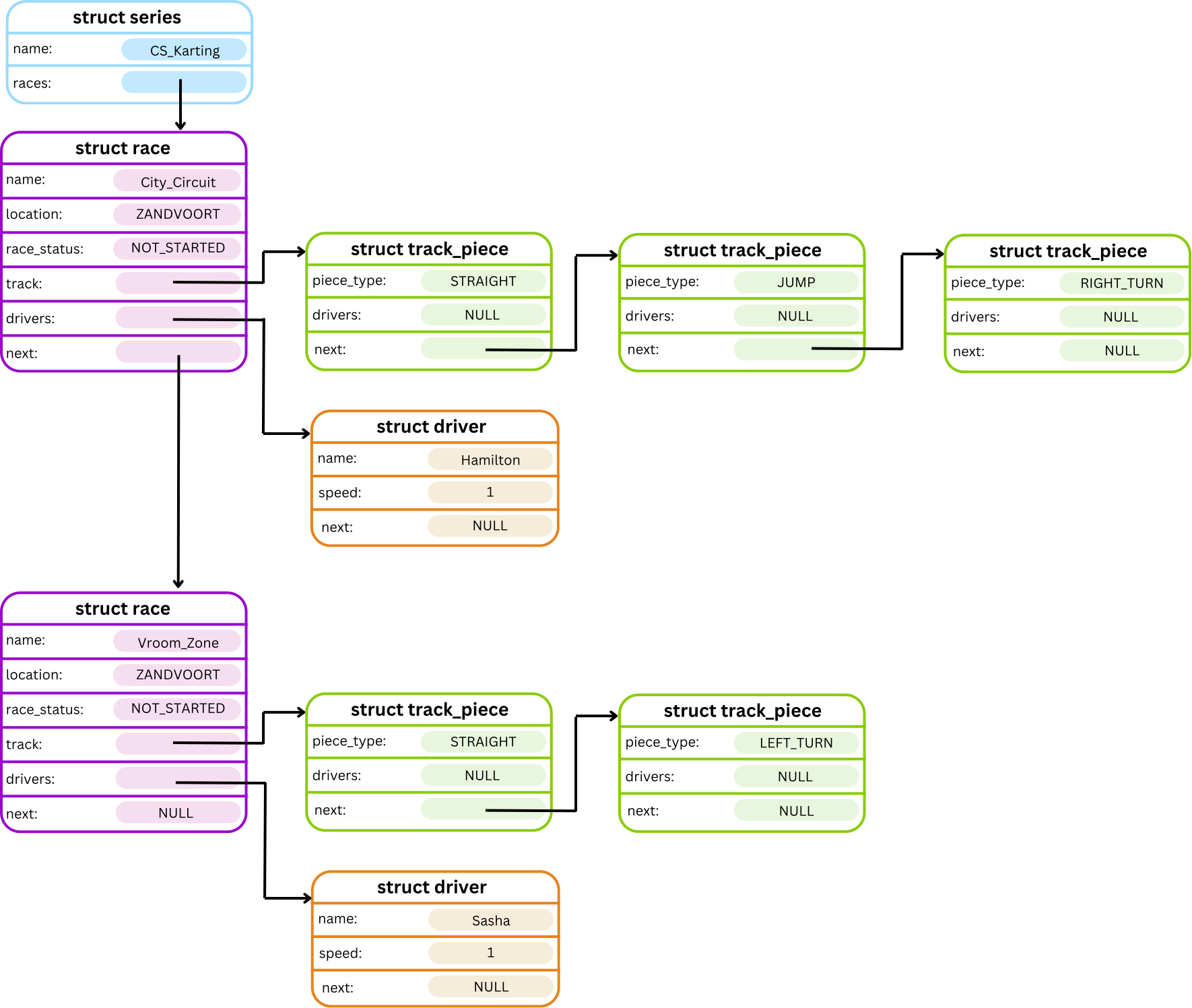
Errors
The following errors must be checked in the order listed below. For the race specific errors, check all errors for the current race first. If none apply, check the errors again in the same order for the new race.
-
If
racedoes not exist, the following error should be printed:
ERROR: No race with name [race_name]. -
If
racehas already started, the following error should be printed:
ERROR: Race [race_name] has already started. -
If the driver is not in
current_race, the following error should be printed:
ERROR: Driver [driver_name] not found in race [current_race]. -
If the driver is already in
new_race, the following error should be printed:
ERROR: Driver [driver_name] already in race [new_race]. -
If the
new_racealready has the maximum number of drivers allowed, the following error should be printed:
ERROR: Race [new_race] already at maximum driver limit.
Examples
Input:
CS_Karting
a r Zoom_Zoom ZANDVOORT
a d Zoom_Zoom Sasha 3
a r Beach MARINA_BAY
a d Beach Piastri 2
*
m Sasha Zoom_Zoom Beach
*
[CTRL+D]
Input and Output:
dcc main.c cs_karting.c -o cs_karting
./cs_karting
          Welcome to the CS Karting Racing Series!
                  .
                  |\
                  |_\
                  |
       .==========||=======.    .===================.
      /    _______||____    \  /   _[_0|_[?]_______   \
     /   /'              '\  \/  /'               '\   \
    |   |                  \/   /                   |   |
    |   |                  /   / \                  |   |
     \  \                 /   /\  \                /   /
      \  '---------------'   /  \  '--------------'   /
       \.===[_0|====[_0|===./    \.========|0_]=====./

Enter the name of your racing series: CS_Karting
Enter command: a r Zoom_Zoom ZANDVOORT
Race: 'Zoom_Zoom' added!
Enter command: a d Zoom_Zoom Sasha 3
Driver: 'Sasha' added!
Enter command: a r Beach MARINA_BAY
Race: 'Beach' added!
Enter command: a d Beach Piastri 2
Driver: 'Piastri' added!
Enter command: *
===================[ CS_Karting ]===================
Races:
    Zoom_Zoom [NOT_STARTED]
    (ZANDVOORT)
        Empty Track!
        Drivers:
            1. Sasha (speed: 3)
    Beach [NOT_STARTED]
    (MARINA_BAY)
        Empty Track!
        Drivers:
            1. Piastri (speed: 2)

Enter command: m Sasha Zoom_Zoom Beach
Enter command: *
===================[ CS_Karting ]===================
Races:
    Zoom_Zoom [NOT_STARTED]
    (ZANDVOORT)
        Empty Track!
        Drivers:
            Empty Driver List!
    Beach [NOT_STARTED]
    (MARINA_BAY)
        Empty Track!
        Drivers:
            1. Piastri (speed: 2)
            2. Sasha (speed: 3)

Enter command: [CTRL+D]
Thank you for playing CS Karting!
Input:
CS_Karting
a r zoom MONZA
a r zoom2 SUZUKA
a t zoom STRAIGHT
a t zoom2 STRAIGHT
a d zoom Mario 3
a d zoom Sasha 2
a d zoom Hamilton 1
m Mario zoom zoom2
m Sasha zoom zoom2
*
[CTRL+D]
Input and Output:
dcc main.c cs_karting.c -o cs_karting
./cs_karting
          Welcome to the CS Karting Racing Series!
                  .
                  |\
                  |_\
                  |
       .==========||=======.    .===================.
      /    _______||____    \  /   _[_0|_[?]_______   \
     /   /'              '\  \/  /'               '\   \
    |   |                  \/   /                   |   |
    |   |                  /   / \                  |   |
     \  \                 /   /\  \                /   /
      \  '---------------'   /  \  '--------------'   /
       \.===[_0|====[_0|===./    \.========|0_]=====./

Enter the name of your racing series: CS_Karting
Enter command: a r zoom MONZA
Race: 'zoom' added!
Enter command: a r zoom2 SUZUKA
Race: 'zoom2' added!
Enter command: a t zoom STRAIGHT
Track Piece: 'STRAIGHT' added!
Enter command: a t zoom2 STRAIGHT
Track Piece: 'STRAIGHT' added!
Enter command: a d zoom Mario 3
Driver: 'Mario' added!
Enter command: a d zoom Sasha 2
Driver: 'Sasha' added!
Enter command: a d zoom Hamilton 1
Driver: 'Hamilton' added!
Enter command: m Mario zoom zoom2
Enter command: m Sasha zoom zoom2
Enter command: *
===================[ CS_Karting ]===================
Races:
    zoom [NOT_STARTED]
    (MONZA)
        STRAIGHT
        Drivers:
            1. Hamilton (speed: 1)
    zoom2 [NOT_STARTED]
    (SUZUKA)
        STRAIGHT
        Drivers:
            1. Mario (speed: 3)
            2. Sasha (speed: 2)

Enter command: [CTRL+D]
Thank you for playing CS Karting!
Clarifications
- The moved driver should be appended to the end of the driver list of the new race.
- Drivers can only be moved between races that have not started yet.
Stage 3.4 – Play a Turn of the Race
In Stage 3, races are now active and drivers move around the track. In this substage, we implement a command to advance drivers through the race by a number of turns, updating their positions as they go.
Command
The play turn command is called as follows:
t [race_name] [turns]
Description
The t command simulates driver movement around the track. Each turn:
- Drivers are moved in order from the furthest along the track to the least far along ie. from first place in the race to last place.
- The drivers positions are calculated by traversing the track from end to start and then each track’s driver list from head to tail, incrementing the driver position for each driver encountered in this order.
- Each driver moves forward along the track by a distance equal to their current speed. If the driver ends up on a track piece that already has other drivers, they are inserted after the existing drivers on that piece.
- This process is repeated for the number of turns specified by the user, so drivers can move multiple times within a single command call.
For example, before the t command is entered, the racing series might look something like this:

After t Zoom_Zoom 1 is entered, it would now look something like this:

Errors
The following errors should be handled by the t command in the order they appear:
-
If the race does not exist:
ERROR: No race with name [race_name]. -
If the race is not active (i.e., has not been started or is already completed):
ERROR: Race [race_name] is not active. -
If
turns < 1:
ERROR: Turns must be a positive integer.
Examples
Input:
CS_Karting
a r Route_66 ALBERT_PARK
a t Route_66 STRAIGHT
a t Route_66 RIGHT_TURN
a t Route_66 LEFT_TURN
a t Route_66 STRAIGHT
a d Route_66 Mario 1
a d Route_66 Sasha 1
a d Route_66 Hamilton 1
s Route_66
*
t Route_66 1
*
[CTRL+D]
Input and Output:
dcc main.c cs_karting.c -o cs_karting
./cs_karting
          Welcome to the CS Karting Racing Series!
                  .
                  |\
                  |_\
                  |
       .==========||=======.    .===================.
      /    _______||____    \  /   _[_0|_[?]_______   \
     /   /'              '\  \/  /'               '\   \
    |   |                  \/   /                   |   |
    |   |                  /   / \                  |   |
     \  \                 /   /\  \                /   /
      \  '---------------'   /  \  '--------------'   /
       \.===[_0|====[_0|===./    \.========|0_]=====./

Enter the name of your racing series: CS_Karting
Enter command: a r Route_66 ALBERT_PARK
Race: 'Route_66' added!
Enter command: a t Route_66 STRAIGHT
Track Piece: 'STRAIGHT' added!
Enter command: a t Route_66 RIGHT_TURN
Track Piece: 'RIGHT_TURN' added!
Enter command: a t Route_66 LEFT_TURN
Track Piece: 'LEFT_TURN' added!
Enter command: a t Route_66 STRAIGHT
Track Piece: 'STRAIGHT' added!
Enter command: a d Route_66 Mario 1
Driver: 'Mario' added!
Enter command: a d Route_66 Sasha 1
Driver: 'Sasha' added!
Enter command: a d Route_66 Hamilton 1
Driver: 'Hamilton' added!
Enter command: s Route_66
Race Route_66 started!
Enter command: *
===================[ CS_Karting ]===================
Races:
    Route_66 [ACTIVE]
    (ALBERT_PARK)
        START_LINE
        1. Mario
        2. Sasha
        3. Hamilton
        |
        ⌄
        STRAIGHT
        |
        ⌄
        RIGHT_TURN
        |
        ⌄
        LEFT_TURN
        |
        ⌄
        STRAIGHT
        |
        ⌄
        FINISH_LINE
        Drivers:
            1. Mario (speed: 1)
            2. Sasha (speed: 1)
            3. Hamilton (speed: 1)

Enter command: t Route_66 1
Enter command: *
===================[ CS_Karting ]===================
Races:
    Route_66 [ACTIVE]
    (ALBERT_PARK)
        START_LINE
        |
        ⌄
        STRAIGHT
        1. Mario
        2. Sasha
        3. Hamilton
        |
        ⌄
        RIGHT_TURN
        |
        ⌄
        LEFT_TURN
        |
        ⌄
        STRAIGHT
        |
        ⌄
        FINISH_LINE
        Drivers:
            1. Mario (speed: 1)
            2. Sasha (speed: 1)
            3. Hamilton (speed: 1)

Enter command: [CTRL+D]
Thank you for playing CS Karting!
Input:
CS_Karting
a r Route_66 ALBERT_PARK
a t Route_66 STRAIGHT
a t Route_66 RIGHT_TURN
a t Route_66 LEFT_TURN
a t Route_66 STRAIGHT
a d Route_66 Mario 1
a d Route_66 Sasha 2
a d Route_66 Hamilton 3
s Route_66
*
t Route_66 1
*
[CTRL+D]
Input and Output:
dcc main.c cs_karting.c -o cs_karting
./cs_karting
          Welcome to the CS Karting Racing Series!
                  .
                  |\
                  |_\
                  |
       .==========||=======.    .===================.
      /    _______||____    \  /   _[_0|_[?]_______   \
     /   /'              '\  \/  /'               '\   \
    |   |                  \/   /                   |   |
    |   |                  /   / \                  |   |
     \  \                 /   /\  \                /   /
      \  '---------------'   /  \  '--------------'   /
       \.===[_0|====[_0|===./    \.========|0_]=====./

Enter the name of your racing series: CS_Karting
Enter command: a r Route_66 ALBERT_PARK
Race: 'Route_66' added!
Enter command: a t Route_66 STRAIGHT
Track Piece: 'STRAIGHT' added!
Enter command: a t Route_66 RIGHT_TURN
Track Piece: 'RIGHT_TURN' added!
Enter command: a t Route_66 LEFT_TURN
Track Piece: 'LEFT_TURN' added!
Enter command: a t Route_66 STRAIGHT
Track Piece: 'STRAIGHT' added!
Enter command: a d Route_66 Mario 1
Driver: 'Mario' added!
Enter command: a d Route_66 Sasha 2
Driver: 'Sasha' added!
Enter command: a d Route_66 Hamilton 3
Driver: 'Hamilton' added!
Enter command: s Route_66
Race Route_66 started!
Enter command: *
===================[ CS_Karting ]===================
Races:
    Route_66 [ACTIVE]
    (ALBERT_PARK)
        START_LINE
        1. Mario
        2. Sasha
        3. Hamilton
        |
        ⌄
        STRAIGHT
        |
        ⌄
        RIGHT_TURN
        |
        ⌄
        LEFT_TURN
        |
        ⌄
        STRAIGHT
        |
        ⌄
        FINISH_LINE
        Drivers:
            1. Mario (speed: 1)
            2. Sasha (speed: 2)
            3. Hamilton (speed: 3)

Enter command: t Route_66 1
Enter command: *
===================[ CS_Karting ]===================
Races:
    Route_66 [ACTIVE]
    (ALBERT_PARK)
        START_LINE
        |
        ⌄
        STRAIGHT
        3. Mario
        |
        ⌄
        RIGHT_TURN
        2. Sasha
        |
        ⌄
        LEFT_TURN
        1. Hamilton
        |
        ⌄
        STRAIGHT
        |
        ⌄
        FINISH_LINE
        Drivers:
            1. Hamilton (speed: 3)
            2. Sasha (speed: 2)
            3. Mario (speed: 1)

Enter command: [CTRL+D]
Thank you for playing CS Karting!
Input:
CS_Karting
a r Route_66 ALBERT_PARK
a t Route_66 STRAIGHT
a t Route_66 RIGHT_TURN
a t Route_66 LEFT_TURN
a t Route_66 JUMP
a t Route_66 STRAIGHT
a d Route_66 Mario 1
a d Route_66 Sasha 2
a d Route_66 Hamilton 1
s Route_66
*
t Route_66 2
*
[CTRL+D]
Input and Output:
dcc main.c cs_karting.c -o cs_karting
./cs_karting
          Welcome to the CS Karting Racing Series!
                  .
                  |\
                  |_\
                  |
       .==========||=======.    .===================.
      /    _______||____    \  /   _[_0|_[?]_______   \
     /   /'              '\  \/  /'               '\   \
    |   |                  \/   /                   |   |
    |   |                  /   / \                  |   |
     \  \                 /   /\  \                /   /
      \  '---------------'   /  \  '--------------'   /
       \.===[_0|====[_0|===./    \.========|0_]=====./

Enter the name of your racing series: CS_Karting
Enter command: a r Route_66 ALBERT_PARK
Race: 'Route_66' added!
Enter command: a t Route_66 STRAIGHT
Track Piece: 'STRAIGHT' added!
Enter command: a t Route_66 RIGHT_TURN
Track Piece: 'RIGHT_TURN' added!
Enter command: a t Route_66 LEFT_TURN
Track Piece: 'LEFT_TURN' added!
Enter command: a t Route_66 JUMP
Track Piece: 'JUMP' added!
Enter command: a t Route_66 STRAIGHT
Track Piece: 'STRAIGHT' added!
Enter command: a d Route_66 Mario 1
Driver: 'Mario' added!
Enter command: a d Route_66 Sasha 2
Driver: 'Sasha' added!
Enter command: a d Route_66 Hamilton 1
Driver: 'Hamilton' added!
Enter command: s Route_66
Race Route_66 started!
Enter command: *
===================[ CS_Karting ]===================
Races:
    Route_66 [ACTIVE]
    (ALBERT_PARK)
        START_LINE
        1. Mario
        2. Sasha
        3. Hamilton
        |
        ⌄
        STRAIGHT
        |
        ⌄
        RIGHT_TURN
        |
        ⌄
        LEFT_TURN
        |
        ⌄
        JUMP
        |
        ⌄
        STRAIGHT
        |
        ⌄
        FINISH_LINE
        Drivers:
            1. Mario (speed: 1)
            2. Sasha (speed: 2)
            3. Hamilton (speed: 1)

Enter command: t Route_66 2
Enter command: *
===================[ CS_Karting ]===================
Races:
    Route_66 [ACTIVE]
    (ALBERT_PARK)
        START_LINE
        |
        ⌄
        STRAIGHT
        |
        ⌄
        RIGHT_TURN
        2. Mario
        3. Hamilton
        |
        ⌄
        LEFT_TURN
        |
        ⌄
        JUMP
        1. Sasha
        |
        ⌄
        STRAIGHT
        |
        ⌄
        FINISH_LINE
        Drivers:
            1. Sasha (speed: 2)
            2. Mario (speed: 1)
            3. Hamilton (speed: 1)

Enter command: [CTRL+D]
Thank you for playing CS Karting!
Input:
CS_Karting
a r Mall_Circuit ALBERT_PARK
t Zoom_Zoom 1
a t Mall_Circuit STRAIGHT
a t Mall_Circuit RIGHT_TURN
a t Mall_Circuit LEFT_TURN
a t Mall_Circuit JUMP
a t Mall_Circuit STRAIGHT
a d Mall_Circuit Mario 1
a d Mall_Circuit Sasha 2
a d Mall_Circuit Hamilton 1
t Mall_Circuit 1
s Mall_Circuit
*
t Mall_Circuit -4
[CTRL+D]
Input and Output:
dcc main.c cs_karting.c -o cs_karting
./cs_karting
          Welcome to the CS Karting Racing Series!
                  .
                  |\
                  |_\
                  |
       .==========||=======.    .===================.
      /    _______||____    \  /   _[_0|_[?]_______   \
     /   /'              '\  \/  /'               '\   \
    |   |                  \/   /                   |   |
    |   |                  /   / \                  |   |
     \  \                 /   /\  \                /   /
      \  '---------------'   /  \  '--------------'   /
       \.===[_0|====[_0|===./    \.========|0_]=====./

Enter the name of your racing series: CS_Karting
Enter command: a r Mall_Circuit ALBERT_PARK
Race: 'Mall_Circuit' added!
Enter command: t Zoom_Zoom 1
ERROR: No race with name Zoom_Zoom.
Enter command: a t Mall_Circuit STRAIGHT
Track Piece: 'STRAIGHT' added!
Enter command: a t Mall_Circuit RIGHT_TURN
Track Piece: 'RIGHT_TURN' added!
Enter command: a t Mall_Circuit LEFT_TURN
Track Piece: 'LEFT_TURN' added!
Enter command: a t Mall_Circuit JUMP
Track Piece: 'JUMP' added!
Enter command: a t Mall_Circuit STRAIGHT
Track Piece: 'STRAIGHT' added!
Enter command: a d Mall_Circuit Mario 1
Driver: 'Mario' added!
Enter command: a d Mall_Circuit Sasha 2
Driver: 'Sasha' added!
Enter command: a d Mall_Circuit Hamilton 1
Driver: 'Hamilton' added!
Enter command: t Mall_Circuit 1
ERROR: Race Mall_Circuit is not active.
Enter command: s Mall_Circuit
Race Mall_Circuit started!
Enter command: *
===================[ CS_Karting ]===================
Races:
    Mall_Circuit [ACTIVE]
    (ALBERT_PARK)
        START_LINE
        1. Mario
        2. Sasha
        3. Hamilton
        |
        ⌄
        STRAIGHT
        |
        ⌄
        RIGHT_TURN
        |
        ⌄
        LEFT_TURN
        |
        ⌄
        JUMP
        |
        ⌄
        STRAIGHT
        |
        ⌄
        FINISH_LINE
        Drivers:
            1. Mario (speed: 1)
            2. Sasha (speed: 2)
            3. Hamilton (speed: 1)

Enter command: t Mall_Circuit -4
ERROR: Turns must be a positive integer.
Enter command: [CTRL+D]
Thank you for playing CS Karting!
Clarifications
turnswill always be entered as an integer.- You may assume that moving the player along within this stage will not cause the race to be finished (i.e. no drivers will move onto the
FINISH_LINEtrack piece). This logic will appear in Stage 3.5.
Stage 3.5 – End Race
In this stage, we introduce a command to complete a race automatically. Instead of manually issuing multiple turns with the t command, this command continues advancing the race until all drivers have crossed the FINISH_LINE.
Command
The end race command is called as follows:
e [race_name]
Description
The e command repeatedly advances the race by one turn at a time, following the same movement logic as the play turn (t) command:
- Drivers are moved in order from furthest along the track to least far along.
- Each driver moves forward along the track by a distance equal to their speed. If multiple drivers move to the same track piece, they are added after any drivers already on that piece.
- Turns are repeated automatically until all drivers have reached the
FINISH_LINEtrack piece. - When the race is complete:
- The race status is updated to COMPLETED.
- Drivers are moved from the
FINISH_LINEdriver list into the race's driver list, ordered by finishing position. - A success message is printed:
Race [race_name] has finished! - The final driver leaderboard is printed, showing each driver’s placement and points earned. See Example 3.5.2 for how to display this leaderboard when printing.
An enum points has been provided to help calculate the number of points earned by a driver based on their final position in the race. There is also a provided function to convert a driver's numerical position in the race to an enum points.
enum points {
    FIRST = 15,
    SECOND = 10,
    THIRD = 7,
    FOURTH = 5,
    FIFTH = 4,
    SIXTH = 3,
    SEVENTH = 2,
    EIGHTH = 1
};
Errors
The following errors should be handled by the e command in the order they appear:
-
If the race does not exist:
ERROR: No race with name [race_name]. -
If the race is not active (i.e., has not been started or is already completed):
ERROR: Race [race_name] is not active.
Examples
Input:
CS_Karting
a r zoom MONZA
a t zoom STRAIGHT
a d zoom Mario 3
a d zoom Sasha 2
s zoom
e zoom
*
[CTRL+D]
Input and Output:
dcc main.c cs_karting.c -o cs_karting
./cs_karting
          Welcome to the CS Karting Racing Series!
                  .
                  |\
                  |_\
                  |
       .==========||=======.    .===================.
      /    _______||____    \  /   _[_0|_[?]_______   \
     /   /'              '\  \/  /'               '\   \
    |   |                  \/   /                   |   |
    |   |                  /   / \                  |   |
     \  \                 /   /\  \                /   /
      \  '---------------'   /  \  '--------------'   /
       \.===[_0|====[_0|===./    \.========|0_]=====./

Enter the name of your racing series: CS_Karting
Enter command: a r zoom MONZA
Race: 'zoom' added!
Enter command: a t zoom STRAIGHT
Track Piece: 'STRAIGHT' added!
Enter command: a d zoom Mario 3
Driver: 'Mario' added!
Enter command: a d zoom Sasha 2
Driver: 'Sasha' added!
Enter command: s zoom
Race zoom started!
Enter command: e zoom
Race zoom has finished!
Final positions:
    1. Mario (15 points)
    2. Sasha (10 points)
Enter command: *
===================[ CS_Karting ]===================
Races:
    zoom [COMPLETED]
    (MONZA)
        START_LINE
        |
        ⌄
        STRAIGHT
        |
        ⌄
        FINISH_LINE
        Drivers:
            1. Mario (speed: 3)
            2. Sasha (speed: 2)

Enter command: [CTRL+D]
Thank you for playing CS Karting!
Input:
CS_Karting
a r zoom MONZA
a t zoom STRAIGHT
a t zoom RIGHT_TURN
a t zoom LEFT_TURN
a t zoom STRAIGHT
a d zoom Luigi 3
a d zoom Sainz 2
s zoom
e zoom
*
[CTRL+D]
Input and Output:
dcc main.c cs_karting.c -o cs_karting
./cs_karting
          Welcome to the CS Karting Racing Series!
                  .
                  |\
                  |_\
                  |
       .==========||=======.    .===================.
      /    _______||____    \  /   _[_0|_[?]_______   \
     /   /'              '\  \/  /'               '\   \
    |   |                  \/   /                   |   |
    |   |                  /   / \                  |   |
     \  \                 /   /\  \                /   /
      \  '---------------'   /  \  '--------------'   /
       \.===[_0|====[_0|===./    \.========|0_]=====./

Enter the name of your racing series: CS_Karting
Enter command: a r zoom MONZA
Race: 'zoom' added!
Enter command: a t zoom STRAIGHT
Track Piece: 'STRAIGHT' added!
Enter command: a t zoom RIGHT_TURN
Track Piece: 'RIGHT_TURN' added!
Enter command: a t zoom LEFT_TURN
Track Piece: 'LEFT_TURN' added!
Enter command: a t zoom STRAIGHT
Track Piece: 'STRAIGHT' added!
Enter command: a d zoom Luigi 3
Driver: 'Luigi' added!
Enter command: a d zoom Sainz 2
Driver: 'Sainz' added!
Enter command: s zoom
Race zoom started!
Enter command: e zoom
Race zoom has finished!
Final positions:
    1. Luigi (15 points)
    2. Sainz (10 points)
Enter command: *
===================[ CS_Karting ]===================
Races:
    zoom [COMPLETED]
    (MONZA)
        START_LINE
        |
        ⌄
        STRAIGHT
        |
        ⌄
        RIGHT_TURN
        |
        ⌄
        LEFT_TURN
        |
        ⌄
        STRAIGHT
        |
        ⌄
        FINISH_LINE
        Drivers:
            1. Luigi (speed: 3)
            2. Sainz (speed: 2)

Enter command: [CTRL+D]
Thank you for playing CS Karting!
Input:
CS_Karting
a r Vroom_Zone SUZUKA
a t Vroom_Zone STRAIGHT
a d Vroom_Zone Piastri 3
a d Vroom_Zone Norris 2
s Vroom_Zone
t Vroom_Zone 1
*
[CTRL+D]
Input and Output:
dcc main.c cs_karting.c -o cs_karting
./cs_karting
          Welcome to the CS Karting Racing Series!
                  .
                  |\
                  |_\
                  |
       .==========||=======.    .===================.
      /    _______||____    \  /   _[_0|_[?]_______   \
     /   /'              '\  \/  /'               '\   \
    |   |                  \/   /                   |   |
    |   |                  /   / \                  |   |
     \  \                 /   /\  \                /   /
      \  '---------------'   /  \  '--------------'   /
       \.===[_0|====[_0|===./    \.========|0_]=====./

Enter the name of your racing series: CS_Karting
Enter command: a r Vroom_Zone SUZUKA
Race: 'Vroom_Zone' added!
Enter command: a t Vroom_Zone STRAIGHT
Track Piece: 'STRAIGHT' added!
Enter command: a d Vroom_Zone Piastri 3
Driver: 'Piastri' added!
Enter command: a d Vroom_Zone Norris 2
Driver: 'Norris' added!
Enter command: s Vroom_Zone
Race Vroom_Zone started!
Enter command: t Vroom_Zone 1
Race Vroom_Zone has finished!
Final positions:
    1. Piastri (15 points)
    2. Norris (10 points)
Enter command: *
===================[ CS_Karting ]===================
Races:
    Vroom_Zone [COMPLETED]
    (SUZUKA)
        START_LINE
        |
        ⌄
        STRAIGHT
        |
        ⌄
        FINISH_LINE
        Drivers:
            1. Piastri (speed: 3)
            2. Norris (speed: 2)

Enter command: [CTRL+D]
Thank you for playing CS Karting!
Clarifications
- Movement rules, order of driver advancement, and track interactions follow Stage 3.4.
- Points are determined by each driver's final positions in the race and can be calculated using the provided
place_to_points()function. - The
tcommand itself can now also result in the race ending. If this occurs, the race completion tasks in step 4 listed above should be executed.- If a race ends before the specified number of turns have been simulated, any remaining turns are discarded.
Testing and Submission
Remember to do your own testing! Are you finished with this stage? If so, you should make sure to do the following:- Run
1511 styleand clean up any issues a human may have reading your code. Don't forget -- 20% of your mark in the assignment is based on style and readability! - Autotest for this stage of the assignment by running the
autotest-stagecommand as shown below. - Remember -- give early and give often. Only your last submission counts, but why not be safe and submit right now?
1511 style cs_karting.c
1511 style cs_karting.h
1511 style main.c
1511 autotest-stage 03 cs_karting
give cs1511 ass2_cs_karting cs_karting.c cs_karting.h main.c
Stage 4
This stage is for students who want to challenge themselves and solve more complicated programming problems. This milestone has been divided into two substages:
- Stage 4.1 - Power-Ups.
- Stage 4.2 - Finals.
Stage 4.1 – Power-Ups
In this stage, we unlock power-up's for any driver who lands on the MYSTERY_BOX piece type on our tracks, giving them an advantage to win the race!
Description
During each turn of the race, drivers move along the track according to their speed. After movement occurs, the program should check whether any drivers have landed on a MYSTERY_BOX.
If a driver lands on a MYSTERY_BOX, they should immediately receive and apply a power-up. The available power-ups are defined in the provided enum mystery_box in cs_karting.h.
enum mystery_box {
    MUSHROOM,
    BANANA_PEEL,
    STAR,
    LIGHTNING,
    BLUE_SHELL,
    BULLET,
    NO_MYSTERY_BOX
};
Mystery Box Sequencing
The first driver to land on a MYSTERY_BOX receives the MUSHROOM power-up, as it is the first item in the enum mystery_box list. The next driver receives the BANANA_PEEL, the second item in the list. This continues sequentially through the enum. After the final power-up, BULLET, is used, the sequence loops back to the beginning (MUSHROOM).
There can be multiple MYSTERY_BOX track pieces within a race. The sequence of power-ups is applied globally within a race, meaning that each time any driver lands on any MYSTERY_BOX in the race, the next power-up in the sequence is used according to the above sequencing.
If multiple drivers land on a MYSTERY_BOX during the same turn, the order in which power-ups are applied is determined by race position, in alignment with Stage 3.4.
Power-Up Effects
- MUSHROOM: Increases the driver’s speed by 1, up to the maximum allowed speed.
- BANANA_PEEL: Decreases the speed of the driver one position behind the current driver by 1.
- STAR: Grants temporary invincibility. While invincible, the driver is unaffected by other drivers' power-ups, namely
LIGHTNINGorBLUE_SHELL. After blocking one power-up effect, the invincibility is removed. - LIGHTNING: Decreases the speed of all other drivers in the race by 1.
- BLUE_SHELL: Swaps the race positions of the drivers currently in first and second place.
- This power-up is not available to the driver in first place, as it would disadvantage them.
- BULLET: Moves the driver forward by two positions in the race order, inserting them immediately before the driver two positions ahead.
- This power-up is only available to drivers in the second half of the race positions. For example, if there are 8 drivers in a race, only drivers in positions 5–8 inclusive may receive the
BULLET. - This power-up is not available to drivers who do not have a driver two positions ahead of them, i.e. A driver at position 2 in a race of only 2 drivers.
- This power-up is only available to drivers in the second half of the race positions. For example, if there are 8 drivers in a race, only drivers in positions 5–8 inclusive may receive the
If a power-up is not valid for the driver who landed on the MYSTERY_BOX (such as BLUE_SHELL or BULLET), that power-up should be skipped and the next available power-up in the enum sequence should be applied instead.
Once a driver has finished the race, they can no longer be affected by power-ups. When determining driver positions for power-up effects, only drivers who are still active in the race (i.e. not yet finished) should be considered. However, when printing driver positions, they should still reflect the driver’s overall placement in the race across both active and finished drivers.
After each driver applies their power-up, the program should print out a success message in the format:
[Power-up] power-up applied by [driver]!
Examples
Input:
CS_Karting
a r zoom MONZA
a t zoom STRAIGHT
a t zoom MYSTERY_BOX
a t zoom STRAIGHT
a d zoom Mario 1
s zoom
*
t zoom 2
*
t zoom 1
[CTRL+D]
Input and Output:
dcc main.c cs_karting.c -o cs_karting
./cs_karting
          Welcome to the CS Karting Racing Series!
                  .
                  |\
                  |_\
                  |
       .==========||=======.    .===================.
      /    _______||____    \  /   _[_0|_[?]_______   \
     /   /'              '\  \/  /'               '\   \
    |   |                  \/   /                   |   |
    |   |                  /   / \                  |   |
     \  \                 /   /\  \                /   /
      \  '---------------'   /  \  '--------------'   /
       \.===[_0|====[_0|===./    \.========|0_]=====./

Enter the name of your racing series: CS_Karting
Enter command: a r zoom MONZA
Race: 'zoom' added!
Enter command: a t zoom STRAIGHT
Track Piece: 'STRAIGHT' added!
Enter command: a t zoom MYSTERY_BOX
Track Piece: 'MYSTERY_BOX' added!
Enter command: a t zoom STRAIGHT
Track Piece: 'STRAIGHT' added!
Enter command: a d zoom Mario 1
Driver: 'Mario' added!
Enter command: s zoom
Race zoom started!
Enter command: *
===================[ CS_Karting ]===================
Races:
    zoom [ACTIVE]
    (MONZA)
        START_LINE
        1. Mario
        |
        ⌄
        STRAIGHT
        |
        ⌄
        MYSTERY_BOX
        |
        ⌄
        STRAIGHT
        |
        ⌄
        FINISH_LINE
        Drivers:
            1. Mario (speed: 1)

Enter command: t zoom 2
Mushroom power-up applied by Mario!
Enter command: *
===================[ CS_Karting ]===================
Races:
    zoom [ACTIVE]
    (MONZA)
        START_LINE
        |
        ⌄
        STRAIGHT
        |
        ⌄
        MYSTERY_BOX
        1. Mario
        |
        ⌄
        STRAIGHT
        |
        ⌄
        FINISH_LINE
        Drivers:
            1. Mario (speed: 2)

Enter command: t zoom 1
Race zoom has finished!
Final positions:
    1. Mario (15 points)
Enter command: [CTRL+D]
Thank you for playing CS Karting!
Input:
CS_Karting
a r Beach MARINA_BAY
a t Beach STRAIGHT
a t Beach MYSTERY_BOX
a t Beach STRAIGHT
a t Beach LEFT_TURN
a t Beach RIGHT_TURN
a t Beach JUMP
a t Beach STRAIGHT
a d Beach Mario 2
a d Beach Luigi 2
a d Beach Toad 2
s Beach
t Beach 1
*
t Beach 1
*
[CTRL+D]
Input and Output:
dcc main.c cs_karting.c -o cs_karting
./cs_karting
          Welcome to the CS Karting Racing Series!
                  .
                  |\
                  |_\
                  |
       .==========||=======.    .===================.
      /    _______||____    \  /   _[_0|_[?]_______   \
     /   /'              '\  \/  /'               '\   \
    |   |                  \/   /                   |   |
    |   |                  /   / \                  |   |
     \  \                 /   /\  \                /   /
      \  '---------------'   /  \  '--------------'   /
       \.===[_0|====[_0|===./    \.========|0_]=====./

Enter the name of your racing series: CS_Karting
Enter command: a r Beach MARINA_BAY
Race: 'Beach' added!
Enter command: a t Beach STRAIGHT
Track Piece: 'STRAIGHT' added!
Enter command: a t Beach MYSTERY_BOX
Track Piece: 'MYSTERY_BOX' added!
Enter command: a t Beach STRAIGHT
Track Piece: 'STRAIGHT' added!
Enter command: a t Beach LEFT_TURN
Track Piece: 'LEFT_TURN' added!
Enter command: a t Beach RIGHT_TURN
Track Piece: 'RIGHT_TURN' added!
Enter command: a t Beach JUMP
Track Piece: 'JUMP' added!
Enter command: a t Beach STRAIGHT
Track Piece: 'STRAIGHT' added!
Enter command: a d Beach Mario 2
Driver: 'Mario' added!
Enter command: a d Beach Luigi 2
Driver: 'Luigi' added!
Enter command: a d Beach Toad 2
Driver: 'Toad' added!
Enter command: s Beach
Race Beach started!
Enter command: t Beach 1
Mushroom power-up applied by Mario!
Banana peel power-up applied by Luigi!
Star power-up applied by Toad!
Enter command: *
===================[ CS_Karting ]===================
Races:
    Beach [ACTIVE]
    (MARINA_BAY)
        START_LINE
        |
        ⌄
        STRAIGHT
        |
        ⌄
        MYSTERY_BOX
        1. Mario
        2. Luigi
        3. Toad
        |
        ⌄
        STRAIGHT
        |
        ⌄
        LEFT_TURN
        |
        ⌄
        RIGHT_TURN
        |
        ⌄
        JUMP
        |
        ⌄
        STRAIGHT
        |
        ⌄
        FINISH_LINE
        Drivers:
            1. Mario (speed: 3)
            2. Luigi (speed: 2)
            3. Toad (speed: 1)

Enter command: t Beach 1
Enter command: *
===================[ CS_Karting ]===================
Races:
    Beach [ACTIVE]
    (MARINA_BAY)
        START_LINE
        |
        ⌄
        STRAIGHT
        |
        ⌄
        MYSTERY_BOX
        |
        ⌄
        STRAIGHT
        3. Toad
        |
        ⌄
        LEFT_TURN
        2. Luigi
        |
        ⌄
        RIGHT_TURN
        1. Mario
        |
        ⌄
        JUMP
        |
        ⌄
        STRAIGHT
        |
        ⌄
        FINISH_LINE
        Drivers:
            1. Mario (speed: 3)
            2. Luigi (speed: 2)
            3. Toad (speed: 1)

Enter command: [CTRL+D]
Thank you for playing CS Karting!
Clarifications
- Driver speed must always remain within the minimum and maximum values (i.e., 1–3 inclusive). If a power-up results in a driver's speed going beyond these bounds, the driver's speed should be clamped to remain within the valid range.
- If a driver with
STARinvincibility lands on aMYSTERY_BOX, they should lose their invincibility immediately before obtaining a new power-up to be applied. - If there are an odd number of drivers in the list, the driver at the middle node of the list is considered as being in the first-half of the race and therefore is not eligible for the
BULLETpowerup. For example, if there are 7 drivers in the race, only drivers in positions 5 - 7 inclusive are eligible.
Stage 4.2 – Finals
At last, the time has come for the race finals!
In this stage, we introduce the finals race for a given location, where the top 8 drivers will go head-to-head. But one lap won’t be enough to decide the champion - finals races now consist of three laps, making the race longer and the competition even more intense!
Drivers will need to maintain their lead, survive power-ups, and stay consistent across multiple laps to claim victory.
Command
The finals command is called as follows:
f [location]
Description
When the f command is entered, the program should:
- Create a new race for the finals.
- Find the race closest to the start of the
series->raceslist with the givenlocationand race status ofCOMPLETEDand copy this track layout for the new race. - Determine the race name by concatenating the location name with the suffix
_FINALS. - The finals race status should be
NOT_STARTEDand therefore theSTART_LINEandFINISH_LINEtrack pieces should not be copied from the original race.
- Find the race closest to the start of the
- Insert the finals race at the tail of the series race list.
- Determine the top drivers for the finals.
- Calculate the top 8 unique drivers by finding the sum of the total points they have earned across all races at the given
locationwith a race status ofCOMPLETED, then add them to the finals race.- If there are less than 8 drivers to choose from, all drivers should be included in the finals race.
- The drivers' order in the new race should be such that they are ordered by descending points from head to tail.
- If two drivers have the same number of points, then they should be sorted by increasing lexicographic (ASCII) order by name.
- All drivers in the finals race will have an initial speed of 1.
- Calculate the top 8 unique drivers by finding the sum of the total points they have earned across all races at the given
This finals race can now be started, run and ended with all previous commands implemented with the following adjustments:
- A driver must now complete 3 laps of the track list before they are considered as "finished" in the race.
- A lap is considered complete once the driver lands on the
FINISH_LINEtrack piece at the end of the track list. - When this occurs, the lap counter should be incremented. If the driver has completed fewer than 3 laps, they should immediately continue from the
START_LINEin the same move (i.e. they do not remain on theFINISH_LINE).
For example, if there were two completed races at MONZA, this would look something like:

If the finals command was then executed with, f MONZA, the finals race added to the end of the linked list would look something like the structure below, because:
- Sasha finished in first place (15 points) and second place (10 points) in previous MONZA races, giving them a total of 25 points,
- Hamilton finished in first place (15 points) and third place (7 points) in previous MONZA races, giving them a total of 23 points,
- Mario finished in second place (10 points) in previous MONZA races, giving them a total of 10 points,
and therefore they were inserted into the finals race in descending point order as outlined.

Errors
The following errors should be handled by the f command in the order they appear:
- If there are no races of the given
locationand a race status ofCOMPLETED, the program should print:
ERROR: No completed races with location [location].. - If a finals race for the given location already exists, the program should print:
ERROR: Finals race for location [location] already exists..
Examples
Input:
CS_Karting
a r zoom MONZA
a t zoom STRAIGHT
a d zoom Mario 3
a d zoom Sasha 2
s zoom
e zoom
*
f MONZA
*
s MONZA_FINALS
*
t MONZA_FINALS 1
*
t MONZA_FINALS 1
*
t MONZA_FINALS 1
*
t MONZA_FINALS 1
*
t MONZA_FINALS 1
*
t MONZA_FINALS 1
*
t MONZA_FINALS 1
[CTRL+D]
Input and Output:
dcc main.c cs_karting.c -o cs_karting
./cs_karting
          Welcome to the CS Karting Racing Series!
                  .
                  |\
                  |_\
                  |
       .==========||=======.    .===================.
      /    _______||____    \  /   _[_0|_[?]_______   \
     /   /'              '\  \/  /'               '\   \
    |   |                  \/   /                   |   |
    |   |                  /   / \                  |   |
     \  \                 /   /\  \                /   /
      \  '---------------'   /  \  '--------------'   /
       \.===[_0|====[_0|===./    \.========|0_]=====./

Enter the name of your racing series: CS_Karting
Enter command: a r zoom MONZA
Race: 'zoom' added!
Enter command: a t zoom STRAIGHT
Track Piece: 'STRAIGHT' added!
Enter command: a d zoom Mario 3
Driver: 'Mario' added!
Enter command: a d zoom Sasha 2
Driver: 'Sasha' added!
Enter command: s zoom
Race zoom started!
Enter command: e zoom
Race zoom has finished!
Final positions:
    1. Mario (15 points)
    2. Sasha (10 points)
Enter command: *
===================[ CS_Karting ]===================
Races:
    zoom [COMPLETED]
    (MONZA)
        START_LINE
        |
        ⌄
        STRAIGHT
        |
        ⌄
        FINISH_LINE
        Drivers:
            1. Mario (speed: 3)
            2. Sasha (speed: 2)

Enter command: f MONZA
Enter command: *
===================[ CS_Karting ]===================
Races:
    zoom [COMPLETED]
    (MONZA)
        START_LINE
        |
        ⌄
        STRAIGHT
        |
        ⌄
        FINISH_LINE
        Drivers:
            1. Mario (speed: 3)
            2. Sasha (speed: 2)
    MONZA_FINALS [NOT_STARTED]
    (MONZA)
        STRAIGHT
        Drivers:
            1. Mario (speed: 1)
            2. Sasha (speed: 1)

Enter command: s MONZA_FINALS
Race MONZA_FINALS started!
Enter command: *
===================[ CS_Karting ]===================
Races:
    zoom [COMPLETED]
    (MONZA)
        START_LINE
        |
        ⌄
        STRAIGHT
        |
        ⌄
        FINISH_LINE
        Drivers:
            1. Mario (speed: 3)
            2. Sasha (speed: 2)
    MONZA_FINALS [ACTIVE]
    (MONZA)
        START_LINE
        1. Mario
        2. Sasha
        |
        ⌄
        STRAIGHT
        |
        ⌄
        FINISH_LINE
        Drivers:
            1. Mario (speed: 1)
            2. Sasha (speed: 1)

Enter command: t MONZA_FINALS 1
Enter command: *
===================[ CS_Karting ]===================
Races:
    zoom [COMPLETED]
    (MONZA)
        START_LINE
        |
        ⌄
        STRAIGHT
        |
        ⌄
        FINISH_LINE
        Drivers:
            1. Mario (speed: 3)
            2. Sasha (speed: 2)
    MONZA_FINALS [ACTIVE]
    (MONZA)
        START_LINE
        |
        ⌄
        STRAIGHT
        1. Mario
        2. Sasha
        |
        ⌄
        FINISH_LINE
        Drivers:
            1. Mario (speed: 1)
            2. Sasha (speed: 1)

Enter command: t MONZA_FINALS 1
Enter command: *
===================[ CS_Karting ]===================
Races:
    zoom [COMPLETED]
    (MONZA)
        START_LINE
        |
        ⌄
        STRAIGHT
        |
        ⌄
        FINISH_LINE
        Drivers:
            1. Mario (speed: 3)
            2. Sasha (speed: 2)
    MONZA_FINALS [ACTIVE]
    (MONZA)
        START_LINE
        1. Mario
        2. Sasha
        |
        ⌄
        STRAIGHT
        |
        ⌄
        FINISH_LINE
        Drivers:
            1. Mario (speed: 1)
            2. Sasha (speed: 1)

Enter command: t MONZA_FINALS 1
Enter command: *
===================[ CS_Karting ]===================
Races:
    zoom [COMPLETED]
    (MONZA)
        START_LINE
        |
        ⌄
        STRAIGHT
        |
        ⌄
        FINISH_LINE
        Drivers:
            1. Mario (speed: 3)
            2. Sasha (speed: 2)
    MONZA_FINALS [ACTIVE]
    (MONZA)
        START_LINE
        |
        ⌄
        STRAIGHT
        1. Mario
        2. Sasha
        |
        ⌄
        FINISH_LINE
        Drivers:
            1. Mario (speed: 1)
            2. Sasha (speed: 1)

Enter command: t MONZA_FINALS 1
Enter command: *
===================[ CS_Karting ]===================
Races:
    zoom [COMPLETED]
    (MONZA)
        START_LINE
        |
        ⌄
        STRAIGHT
        |
        ⌄
        FINISH_LINE
        Drivers:
            1. Mario (speed: 3)
            2. Sasha (speed: 2)
    MONZA_FINALS [ACTIVE]
    (MONZA)
        START_LINE
        1. Mario
        2. Sasha
        |
        ⌄
        STRAIGHT
        |
        ⌄
        FINISH_LINE
        Drivers:
            1. Mario (speed: 1)
            2. Sasha (speed: 1)

Enter command: t MONZA_FINALS 1
Enter command: *
===================[ CS_Karting ]===================
Races:
    zoom [COMPLETED]
    (MONZA)
        START_LINE
        |
        ⌄
        STRAIGHT
        |
        ⌄
        FINISH_LINE
        Drivers:
            1. Mario (speed: 3)
            2. Sasha (speed: 2)
    MONZA_FINALS [ACTIVE]
    (MONZA)
        START_LINE
        |
        ⌄
        STRAIGHT
        1. Mario
        2. Sasha
        |
        ⌄
        FINISH_LINE
        Drivers:
            1. Mario (speed: 1)
            2. Sasha (speed: 1)

Enter command: t MONZA_FINALS 1
Race MONZA_FINALS has finished!
Final positions:
    1. Mario (15 points)
    2. Sasha (10 points)
Enter command: *
===================[ CS_Karting ]===================
Races:
    zoom [COMPLETED]
    (MONZA)
        START_LINE
        |
        ⌄
        STRAIGHT
        |
        ⌄
        FINISH_LINE
        Drivers:
            1. Mario (speed: 3)
            2. Sasha (speed: 2)
    MONZA_FINALS [COMPLETED]
    (MONZA)
        START_LINE
        |
        ⌄
        STRAIGHT
        |
        ⌄
        FINISH_LINE
        Drivers:
            1. Mario (speed: 1)
            2. Sasha (speed: 1)

Enter command: t MONZA_FINALS 1
ERROR: Race MONZA_FINALS is not active.
Enter command: [CTRL+D]
Thank you for playing CS Karting!
Input:
CS_Karting
a r Vroom_Zone MONZA
a t Vroom_Zone STRAIGHT
a t Vroom_Zone RIGHT_TURN
a t Vroom_Zone LEFT_TURN
a d Vroom_Zone Mario 3
a d Vroom_Zone Sasha 2
s Vroom_Zone
e Vroom_Zone
*
a r Route_66 MONZA
a t Route_66 RIGHT_TURN
a t Route_66 JUMP
a t Route_66 STRAIGHT
a d Route_66 Sasha 3
a d Route_66 Norris 1
a d Route_66 Mario 1
s Route_66
e Route_66
*
f MONZA
*
s MONZA_FINALS
*
e MONZA_FINALS
*
[CTRL+D]
Input and Output:
dcc main.c cs_karting.c -o cs_karting
./cs_karting
          Welcome to the CS Karting Racing Series!
                  .
                  |\
                  |_\
                  |
       .==========||=======.    .===================.
      /    _______||____    \  /   _[_0|_[?]_______   \
     /   /'              '\  \/  /'               '\   \
    |   |                  \/   /                   |   |
    |   |                  /   / \                  |   |
     \  \                 /   /\  \                /   /
      \  '---------------'   /  \  '--------------'   /
       \.===[_0|====[_0|===./    \.========|0_]=====./

Enter the name of your racing series: CS_Karting
Enter command: a r Vroom_Zone MONZA
Race: 'Vroom_Zone' added!
Enter command: a t Vroom_Zone STRAIGHT
Track Piece: 'STRAIGHT' added!
Enter command: a t Vroom_Zone RIGHT_TURN
Track Piece: 'RIGHT_TURN' added!
Enter command: a t Vroom_Zone LEFT_TURN
Track Piece: 'LEFT_TURN' added!
Enter command: a d Vroom_Zone Mario 3
Driver: 'Mario' added!
Enter command: a d Vroom_Zone Sasha 2
Driver: 'Sasha' added!
Enter command: s Vroom_Zone
Race Vroom_Zone started!
Enter command: e Vroom_Zone
Race Vroom_Zone has finished!
Final positions:
    1. Mario (15 points)
    2. Sasha (10 points)
Enter command: *
===================[ CS_Karting ]===================
Races:
    Vroom_Zone [COMPLETED]
    (MONZA)
        START_LINE
        |
        ⌄
        STRAIGHT
        |
        ⌄
        RIGHT_TURN
        |
        ⌄
        LEFT_TURN
        |
        ⌄
        FINISH_LINE
        Drivers:
            1. Mario (speed: 3)
            2. Sasha (speed: 2)

Enter command: a r Route_66 MONZA
Race: 'Route_66' added!
Enter command: a t Route_66 RIGHT_TURN
Track Piece: 'RIGHT_TURN' added!
Enter command: a t Route_66 JUMP
Track Piece: 'JUMP' added!
Enter command: a t Route_66 STRAIGHT
Track Piece: 'STRAIGHT' added!
Enter command: a d Route_66 Sasha 3
Driver: 'Sasha' added!
Enter command: a d Route_66 Norris 1
Driver: 'Norris' added!
Enter command: a d Route_66 Mario 1
Driver: 'Mario' added!
Enter command: s Route_66
Race Route_66 started!
Enter command: e Route_66
Race Route_66 has finished!
Final positions:
    1. Sasha (15 points)
    2. Norris (10 points)
    3. Mario (7 points)
Enter command: *
===================[ CS_Karting ]===================
Races:
    Vroom_Zone [COMPLETED]
    (MONZA)
        START_LINE
        |
        ⌄
        STRAIGHT
        |
        ⌄
        RIGHT_TURN
        |
        ⌄
        LEFT_TURN
        |
        ⌄
        FINISH_LINE
        Drivers:
            1. Mario (speed: 3)
            2. Sasha (speed: 2)
    Route_66 [COMPLETED]
    (MONZA)
        START_LINE
        |
        ⌄
        RIGHT_TURN
        |
        ⌄
        JUMP
        |
        ⌄
        STRAIGHT
        |
        ⌄
        FINISH_LINE
        Drivers:
            1. Sasha (speed: 3)
            2. Norris (speed: 1)
            3. Mario (speed: 1)

Enter command: f MONZA
Enter command: *
===================[ CS_Karting ]===================
Races:
    Vroom_Zone [COMPLETED]
    (MONZA)
        START_LINE
        |
        ⌄
        STRAIGHT
        |
        ⌄
        RIGHT_TURN
        |
        ⌄
        LEFT_TURN
        |
        ⌄
        FINISH_LINE
        Drivers:
            1. Mario (speed: 3)
            2. Sasha (speed: 2)
    Route_66 [COMPLETED]
    (MONZA)
        START_LINE
        |
        ⌄
        RIGHT_TURN
        |
        ⌄
        JUMP
        |
        ⌄
        STRAIGHT
        |
        ⌄
        FINISH_LINE
        Drivers:
            1. Sasha (speed: 3)
            2. Norris (speed: 1)
            3. Mario (speed: 1)
    MONZA_FINALS [NOT_STARTED]
    (MONZA)
        STRAIGHT
        |
        ⌄
        RIGHT_TURN
        |
        ⌄
        LEFT_TURN
        Drivers:
            1. Sasha (speed: 1)
            2. Mario (speed: 1)
            3. Norris (speed: 1)

Enter command: s MONZA_FINALS
Race MONZA_FINALS started!
Enter command: *
===================[ CS_Karting ]===================
Races:
    Vroom_Zone [COMPLETED]
    (MONZA)
        START_LINE
        |
        ⌄
        STRAIGHT
        |
        ⌄
        RIGHT_TURN
        |
        ⌄
        LEFT_TURN
        |
        ⌄
        FINISH_LINE
        Drivers:
            1. Mario (speed: 3)
            2. Sasha (speed: 2)
    Route_66 [COMPLETED]
    (MONZA)
        START_LINE
        |
        ⌄
        RIGHT_TURN
        |
        ⌄
        JUMP
        |
        ⌄
        STRAIGHT
        |
        ⌄
        FINISH_LINE
        Drivers:
            1. Sasha (speed: 3)
            2. Norris (speed: 1)
            3. Mario (speed: 1)
    MONZA_FINALS [ACTIVE]
    (MONZA)
        START_LINE
        1. Sasha
        2. Mario
        3. Norris
        |
        ⌄
        STRAIGHT
        |
        ⌄
        RIGHT_TURN
        |
        ⌄
        LEFT_TURN
        |
        ⌄
        FINISH_LINE
        Drivers:
            1. Sasha (speed: 1)
            2. Mario (speed: 1)
            3. Norris (speed: 1)

Enter command: e MONZA_FINALS
Race MONZA_FINALS has finished!
Final positions:
    1. Sasha (15 points)
    2. Mario (10 points)
    3. Norris (7 points)
Enter command: *
===================[ CS_Karting ]===================
Races:
    Vroom_Zone [COMPLETED]
    (MONZA)
        START_LINE
        |
        ⌄
        STRAIGHT
        |
        ⌄
        RIGHT_TURN
        |
        ⌄
        LEFT_TURN
        |
        ⌄
        FINISH_LINE
        Drivers:
            1. Mario (speed: 3)
            2. Sasha (speed: 2)
    Route_66 [COMPLETED]
    (MONZA)
        START_LINE
        |
        ⌄
        RIGHT_TURN
        |
        ⌄
        JUMP
        |
        ⌄
        STRAIGHT
        |
        ⌄
        FINISH_LINE
        Drivers:
            1. Sasha (speed: 3)
            2. Norris (speed: 1)
            3. Mario (speed: 1)
    MONZA_FINALS [COMPLETED]
    (MONZA)
        START_LINE
        |
        ⌄
        STRAIGHT
        |
        ⌄
        RIGHT_TURN
        |
        ⌄
        LEFT_TURN
        |
        ⌄
        FINISH_LINE
        Drivers:
            1. Sasha (speed: 1)
            2. Mario (speed: 1)
            3. Norris (speed: 1)

Enter command: [CTRL+D]
Thank you for playing CS Karting!
Input:
CS_Karting
a r City_Circuit ALBERT_PARK
a t City_Circuit STRAIGHT
a d City_Circuit Luigi 2
f ALBERT_PARK
s City_Circuit
f ALBERT_PARK
e City_Circuit
f ALBERT_PARK
f ALBERT_PARK
[CTRL+D]
Input and Output:
dcc main.c cs_karting.c -o cs_karting
./cs_karting
          Welcome to the CS Karting Racing Series!
                  .
                  |\
                  |_\
                  |
       .==========||=======.    .===================.
      /    _______||____    \  /   _[_0|_[?]_______   \
     /   /'              '\  \/  /'               '\   \
    |   |                  \/   /                   |   |
    |   |                  /   / \                  |   |
     \  \                 /   /\  \                /   /
      \  '---------------'   /  \  '--------------'   /
       \.===[_0|====[_0|===./    \.========|0_]=====./

Enter the name of your racing series: CS_Karting
Enter command: a r City_Circuit ALBERT_PARK
Race: 'City_Circuit' added!
Enter command: a t City_Circuit STRAIGHT
Track Piece: 'STRAIGHT' added!
Enter command: a d City_Circuit Luigi 2
Driver: 'Luigi' added!
Enter command: f ALBERT_PARK
ERROR: No completed races with location ALBERT_PARK.
Enter command: s City_Circuit
Race City_Circuit started!
Enter command: f ALBERT_PARK
ERROR: No completed races with location ALBERT_PARK.
Enter command: e City_Circuit
Race City_Circuit has finished!
Final positions:
    1. Luigi (15 points)
Enter command: f ALBERT_PARK
Enter command: f ALBERT_PARK
ERROR: Finals race for location ALBERT_PARK already exists.
Enter command: [CTRL+D]
Thank you for playing CS Karting!
Input:
CS_Karting
a r Beach_Circuit MARINA_BAY
a t Beach_Circuit STRAIGHT
a t Beach_Circuit RIGHT_TURN
a d Beach_Circuit Hamish 1
s Beach_Circuit
e Beach_Circuit
a r City_Circuit MARINA_BAY
a t City_Circuit LEFT_TURN
a t City_Circuit RIGHT_TURN
a d City_Circuit Hamilton 1
s City_Circuit
e City_Circuit
f MARINA_BAY
*
[CTRL+D]
Input and Output:
dcc main.c cs_karting.c -o cs_karting
./cs_karting
          Welcome to the CS Karting Racing Series!
                  .
                  |\
                  |_\
                  |
       .==========||=======.    .===================.
      /    _______||____    \  /   _[_0|_[?]_______   \
     /   /'              '\  \/  /'               '\   \
    |   |                  \/   /                   |   |
    |   |                  /   / \                  |   |
     \  \                 /   /\  \                /   /
      \  '---------------'   /  \  '--------------'   /
       \.===[_0|====[_0|===./    \.========|0_]=====./

Enter the name of your racing series: CS_Karting
Enter command: a r Beach_Circuit MARINA_BAY
Race: 'Beach_Circuit' added!
Enter command: a t Beach_Circuit STRAIGHT
Track Piece: 'STRAIGHT' added!
Enter command: a t Beach_Circuit RIGHT_TURN
Track Piece: 'RIGHT_TURN' added!
Enter command: a d Beach_Circuit Hamish 1
Driver: 'Hamish' added!
Enter command: s Beach_Circuit
Race Beach_Circuit started!
Enter command: e Beach_Circuit
Race Beach_Circuit has finished!
Final positions:
    1. Hamish (15 points)
Enter command: a r City_Circuit MARINA_BAY
Race: 'City_Circuit' added!
Enter command: a t City_Circuit LEFT_TURN
Track Piece: 'LEFT_TURN' added!
Enter command: a t City_Circuit RIGHT_TURN
Track Piece: 'RIGHT_TURN' added!
Enter command: a d City_Circuit Hamilton 1
Driver: 'Hamilton' added!
Enter command: s City_Circuit
Race City_Circuit started!
Enter command: e City_Circuit
Race City_Circuit has finished!
Final positions:
    1. Hamilton (15 points)
Enter command: f MARINA_BAY
Enter command: *
===================[ CS_Karting ]===================
Races:
    Beach_Circuit [COMPLETED]
    (MARINA_BAY)
        START_LINE
        |
        ⌄
        STRAIGHT
        |
        ⌄
        RIGHT_TURN
        |
        ⌄
        FINISH_LINE
        Drivers:
            1. Hamish (speed: 1)
    City_Circuit [COMPLETED]
    (MARINA_BAY)
        START_LINE
        |
        ⌄
        LEFT_TURN
        |
        ⌄
        RIGHT_TURN
        |
        ⌄
        FINISH_LINE
        Drivers:
            1. Hamilton (speed: 1)
    MARINA_BAY_FINALS [NOT_STARTED]
    (MARINA_BAY)
        STRAIGHT
        |
        ⌄
        RIGHT_TURN
        Drivers:
            1. Hamilton (speed: 1)
            2. Hamish (speed: 1)

Enter command: [CTRL+D]
Thank you for playing CS Karting!
Clarifications
- There can only be one finals race per
enum location. - When calculating the top 8 drivers, only drivers from races that have a status of
COMPLETEDshould be considered as they will otherwise have a points score of0.
Testing and Submission
Remember to do your own testing! Are you finished with this stage? If so, you should make sure to do the following:- Run
1511 styleand clean up any issues a human may have reading your code. Don't forget -- 20% of your mark in the assignment is based on style and readability! - Autotest for this stage of the assignment by running the
autotest-stagecommand as shown below. - Remember -- give early and give often. Only your last submission counts, but why not be safe and submit right now?
1511 style cs_karting.c
1511 style cs_karting.h
1511 style main.c
1511 autotest-stage 04 cs_karting
give cs1511 ass2_cs_karting cs_karting.c cs_karting.h main.c
Extension
As an extension, we have set up a starting point to add a texture pack to your program via SplashKit.
Extension activities are NOT worth any marks, nor are there any autotests. They are just for fun!
Getting Started
To get started with SplashKit, complete the SplashKit activities.
Sample Code
First, navigate to your SplashKit directory.
cd splashkit
Create a new directory for your project and cd into it.
mkdir cs_karting
cd cs_karting
Set up your directory for SplashKit with:
1511 setup-splashkit-directory
Run this cp command to retrieve the sample code.
cp -n /web/cs1511/26T1/activities/cs_karting/splashkit_example.c .
This should add the splashkit_example.c sample code to your current directory.
Check that SplashKit Works
Let's check that SplashKit works by running a test file. It should display a white square with a grid inside.
skm clang++ splashkit_example.c -o splashkit_example
./splashkit_example
Have a look inside of splashkit_example.c and note that:
- At the very top, the the SplashKit library
"splashkit.h"is included. If you see an error here, check SplashKit #1 - Getting Started for a solution to set up your VS Code project. - In the
main()function:open_window("SplashKit Example", 600, 400)creates a 600×400 window for displaying graphics.- The
while (!window_close_requested(w))loop keeps running until the user closes the window. Within this loop:process_events()handles input or window-related actions (like closing the window).refresh_screen()updates the window so any graphical changes (like drawing a rectangle) are displayed to the user.
Running Your SplashKit Code
When creating your SplashKit program, give it a distinctive name like splashkit_cs_karting.c.
To compile and run your program, use:
skm clang++ splashkit_cs_karting.c -o splashkit_cs_karting
./splashkit_cs_karting
Writing Your SplashKit Program
Now that you've seen how the sample code works, it’s time to create your own SplashKit program.
If you're not sure where to begin, start by researching the SplashKit Library. The goal at first is not to understand and memorise the entire library. Rather, it's better to skim through the pages to build a broad understanding of the capabilities that SplashKit can bring to your creations.
The Graphics page is a good place to start, and the following sections will be useful:
- Windows for opening, closing, and controlling the size of windows.
- Color for using different colours.
- Graphics for drawing shapes, images, and text.
- Geometry for handling shapes such as rectangles, circles, lines, and points.
- Input for capturing and handling user input such as keyboard and mouse events.
SplashKit Gallery
Have you built something fun or interesting using SplashKit? Show it off and inspire your classmates!
Share any screenshots or short videos of your running program in the SplashKit Gallery on the Course Forum. Feel free to add a brief description or reflect on how you made it, so we can all learn from your mistakes journey 😅.
Tools
Creating Series in Separate Files
If you are getting sick of typing your inputs every time you run CS Karting, you might want to store your input in a separate file.
1. Create a file for your input.
First, let's create a file to store in the input for a series that you have created. This isn't a .c file, it's just a regular plain text file, the file extension .in works nicely for this!
Let's put it in the same directory as your assignment code.
cd ass2
ls
cs_karting.c
cs_karting.h
main.c
cs_karting
my_series.in
2. Add your input to the file
Inside of this file, add the input for the series.
Your file could look a bit like this (including the newline at the end):
CS_Karting
a r Beach MONZA
a d Beach Mario 2
*
3. Run the code with your file
Next, instead of just running ./cs_karting, lets tell the computer to first read from the file we created.
cat my_series.in - | ./cs_karting
This will also work on the reference implementation too!
cat my_series.in - | 1511 cs_karting
Assessment
Assignment Conditions
-
Joint work is not permitted on this assignment.
This is an individual assignment.
The work you submit must be entirely your own work. Submission of any work even partly written by any other person is not permitted.
The only exception being if you use small amounts (< 10 lines) of general purpose code (not specific to the assignment) obtained from a site such as Stack Overflow or other publicly available resources. You should attribute the source of this code clearly in an accompanying comment.
Assignment submissions will be examined, both automatically and manually for work written by others.
Do not request help from anyone other than the teaching staff of COMP1511.
Do not post your assignment code to the course forum - the teaching staff can view assignment code you have recently autotested or submitted with give.
Rationale: this assignment is an individual piece of work. It is designed to develop the skills needed to produce an entire working program. Using code written by or taken from other people will stop you learning these skills.
-
The use of code-synthesis tools, such as GitHub Copilot, is not permitted on this assignment.
The use of Generative AI to generate code solutions is not permitted on this assignment.
Rationale: this assignment is intended to develop your understanding of basic concepts. Using synthesis tools will stop you learning these fundamental concepts.
-
Sharing, publishing, distributing your assignment work is not permitted.
Do not provide or show your assignment work to any other person, other than the teaching staff of COMP1511. For example, do not share your work with friends.
Do not publish your assignment code via the internet. For example, do not place your assignment in a public GitHub repository.
Rationale: by publishing or sharing your work you are facilitating other students to use your work, which is not permitted. If they submit your work, you may become involved in an academic integrity investigation.
-
Sharing, publishing, distributing your assignment work after the completion of COMP1511 is not permitted.
For example, do not place your assignment in a public GitHub repository after COMP1511 is over.
Rationale:COMP1511 sometimes reuses assignment themes, using similar concepts and content. If students in future terms can find your code and use it, which is not permitted, you may become involved in an academic integrity investigation.
Violation of the above conditions may result in an academic integrity investigation with possible penalties, up to and including a mark of 0 in COMP1511 and exclusion from UNSW.
Relevant scholarship authorities will be informed if students holding scholarships are involved in an incident of plagiarism or other misconduct. If you knowingly provide or show your assignment work to another person for any reason, and work derived from it is submitted - you may be penalised, even if the work was submitted without your knowledge or consent. This may apply even if your work is submitted by a third party unknown to you.
If you have not shared your assignment, you will not be penalised if your work is taken without your consent or knowledge.
For more information, read the UNSW Student Code , or contact the course account. The following penalties apply to your total mark for plagiarism:
| 0 for the assignment | Knowingly providing your work to anyone and it is subsequently submitted (by anyone). |
| 0 for the assignment | Submitting any other person's work. This includes joint work. |
| 0 FL for COMP1511 | Paying another person to complete work. Submitting another person's work without their consent. |
Submission of Work
You should submit intermediate versions of your assignment. Every time you
autotest or submit, a copy will be saved as a backup. You can find those
backups
here
, by logging in, and choosing the yellow button next to
ass2_cs_karting.
Every time you work on the assignment and make some progress, you should copy
your work to your CSE account and submit it using the give
command below.
It is fine if intermediate versions do not compile or otherwise fail submission tests.
Only the final submitted version of your assignment will be marked.
You submit your work like this:
give cs1511 ass2_cs_karting cs_karting.c cs_karting.h main.c
Assessment Scheme
This assignment will contribute 25% to your final mark.
80% of the marks for this assignment will be based on the performance of the
code you write in cs_karting.c cs_karting.h main.c.
20% of the marks for this assignment will come from manual marking of the readability of the C you have written. The manual marking will involve checking your code for clarity, and readability, which includes the use of functions and efficient use of loops and if statements.
Marks for your performance will be allocated roughly according to the below scheme.
| 100% for Performance | Completely Working Implementation, which exactly follows the specification (Stage 1, 2, 3 and 4). |
| 85% for Performance | Completely working implementation of Stage 1, 2 and 3. |
| 65% for Performance | Completely working implementation of Stage 1 and Stage 2. |
| 35% for Performance | Completely working implementation of Stage 1. |
Marks for your style will be allocated roughly according to the scheme below.
Style Marking Rubric
| 0 | 1 | 2 | 3 | 4 | |
| Formatting (/5) | |||||
| Indentation (/2) - Should use a consistent indentation scheme. | Multiple instances throughout code of inconsistent/bad indentation | Code is mostly correctly indented | Code is consistently indented throughout the program | ||
| Whitespace (/1) - Should use consistent whitespace (for example, 3 + 3 not 3+ 3) | Many whitespace errors | No whitespace errors | |||
| Vertical Whitespace (/1) - Should use consistent whitespace (for example, vertical whitespace between sections of code) | Code has no consideration for use of vertical whitespace | Code consistently uses reasonable vertical whitespace | |||
| Line Length (/1) - Lines should be max. 80 characters long | Many lines over 80 characters | No lines over 80 characters | |||
| Documentation (/5) | |||||
| Comments (incl. header comment) (/3) - Comments have been used throughout the code above code sections and functions to explain their purpose. A header comment (with name, zID and a program description) has been included | No comments provided throughout code | Few comments provided throughout code | Comments are provided as needed, but some details or explanations may be missing causing the code to be difficult to follow | Comments have been used throughout the code above code sections and functions to explain their purpose. A header comment (with name, zID and a program description) has been included | |
| Function/variable/constant naming (/2) - Functions/variables/constants names all follow naming conventions in style guide and help in understanding the code | Functions/variables/constants names do not follow naming conventions in style guide and help in understanding the code | Functions/variables/constants names somewhat follow naming conventions in style guide and help in understanding the code | Functions/variables/constants names all follow naming conventions in style guide and help in understanding the code | ||
| Organisation (/5) | |||||
| Function Usage (/4) - Code has been decomposed into appropriate functions separating functionalities | No functions are present, code is one main function | Some code has been moved to functions | Some code has been moved to sensible/thought out functions, and/or many functions exceed 50 lines (incl. main function) | Most code has been moved to sensible/thought out functions, and/or some functions exceed 50 lines (incl. main function) | All code has been meaningfully decomposed into functions of a maximum of 50 lines (incl. The main function) |
| Function Prototypes (/1) - Function Prototypes have been used to declare functions above main | Functions are used but have not been prototyped | All functions have a prototype above the main function or no functions are used | |||
| Elegance (/5) | |||||
| Overdeep nesting (/2) - You should not have too many levels of nesting in your code (nesting which is 5 or more levels deep) | Many instances of overdeep nesting | <= 3 instances of overdeep nesting | No instances of overdeep nesting | ||
| Code Repetition (/2) - Potential repetition of code has been dealt with via the use of functions or loops | Many instances of repeated code sections | <= 3 instances of repeated code sections | Potential repetition of code has been dealt with via the use of functions or loops | ||
| Constant Usage (/1) - Any magic numbers are #defined | None of the constants used throughout program are #defined | All constants used are #defined and are used consistently in the code | |||
| Illegal elements | |||||
| Illegal elements - Presence of any illegal elements indicated in the style guide | CAP MARK AT 16/20 | ||||
Allowed C Features
This assignment must be implemented exclusively using linked lists for all core data structures and logic.
Other than arrays, there are no restrictions on C features in this assignment, except for those outlined in the Style Guide. If you choose to use features beyond what has been taught in COMP1511/1911, be aware that course staff may not be able to assist you.
Due Date
This assignment is due 24 April 2026 18:00:00. However, as per Sasha's announcement on the Discourse Announcement the
revised due date is 25 April 2026 12:00:00. For each day after that time,
the maximum mark it can achieve will be reduced by 5% (off the ceiling).
-
For instance, at 1 day past the due date, the maximum mark you can get is 95%.
-
For instance, at 3 days past the due date, the maximum mark you can get is 85%.
-
For instance, at 5 days past the due date, the maximum mark you can get is 75%.
No submissions will be accepted after 5 days late, unless you have special provisions in place.
Change Log
-
Version 1.0
(2026-04-03 15:00)
-
- Assignment Released
-
Version 1.1
(2026-04-04 15:00)
-
- 2.3: Clarify JUMP piece at end of list does not need validation
-
Version 1.2
(2026-04-04 21:00)
-
- 1.4: Update printing description and 2.1: Fix insert driver positioning
-
Version 1.3
(2026-04-05 11:00)
-
- 3.4: Update examples to include race printing
-
Version 1.4
(2026-04-12 16:00)
-
- 2.2: Clarify only not started races can be copied, 2.4: Add print_track to be modified, 3.3: Clarify race error ordering
-
Version 1.5
(2026-04-14 23:00)
-
- 2.1: Fix insert error message and 4.1: Fix mushroom power-up print and bullet valid positions
-
Version 1.6
(2026-04-21 06:00)
-
- 3.2: Clarify remove command not called for drivers in finished races
(2026-04-03 15:00)
- Assignment Released
(2026-04-04 15:00)
- 2.3: Clarify JUMP piece at end of list does not need validation
(2026-04-04 21:00)
- 1.4: Update printing description and 2.1: Fix insert driver positioning
(2026-04-05 11:00)
- 3.4: Update examples to include race printing
(2026-04-12 16:00)
- 2.2: Clarify only not started races can be copied, 2.4: Add print_track to be modified, 3.3: Clarify race error ordering
(2026-04-14 23:00)
- 2.1: Fix insert error message and 4.1: Fix mushroom power-up print and bullet valid positions
(2026-04-21 06:00)
- 3.2: Clarify remove command not called for drivers in finished races