Week 12 Laboratory Exercises
Objectives
- Threads
- Deadlocks
- Race Condition
- Revision for the exam (look at these questions carefully)
Preparation
Before the lab you should re-read the relevant lecture slides and their accompanying examples.
Getting Started
lab12 and changing to this directory.
mkdir lab12
cd lab12
There are some provided files for this lab which you can fetch with this command:
1092 fetch lab12
If you're not working at CSE, you can download the provided files as a zip file or a tar file.
Exercise — individual:
Fix a data race
Provided for you is a file, fix_race.c
that contains a global variable: global_counter,
and a function perform_increment:
int global_counter = 0;

void perform_increment(void) {
   global_counter = global_counter + 1;
}
Unfortunately, perform_increment is currently
not safe to call from multiple threads simultaneously!
As it stands, this causes a
data race,
resulting in our program not printing the desired output:
make fix_race
dcc -pthread fix_race.c test_fix_race.c -o fix_race

should output "Global counter result: 500000000"
./fix_race 50 1000000
Global counter result: 49851959
./fix_race 50 1000000
Global counter result: 49787244
./fix_race 50 1000000
Global counter result: 50000000
./fix_race 50 1000000
Global counter result: 49285021
./fix_race 50 1000000
Global counter result: 49659783
The ./fix_race 50 1000000
specifies that
50 threads will each
call perform_increment 1000000 times.
Your task is to fix the program by making the perform_increment
function thread-safe to call
(i.e. it can be called by multiple threads simultaneously
and maintain correct program behaviour).
There are two predominant approaches to solving this exercise that we
have explored in this course.
Firstly, you could use a mutex (pthread_mutex_t) to guard
access to the global_counter.
Secondly, you could modify the global_counter to be an
atomic variable, and ensure you increment it atomically.
Both of these approaches are perfectly valid -- and in-fact, we strongly suggest that you solve this exercise twice, trying each approach. Note that there is only a single submission for this exercise, so in that case you will have to choose which approach to submit.
An example of using a mutex can be found in the bank_account_mutex.c lecture code.
An example of using atomics can be found in the bank_account_atomic.c lecture code.
When your program is working, it should behave as follows:
make fix_race
dcc -pthread fix_race.c test_fix_race.c -o fix_race
./fix_race 50 1000000
Global counter result: 50000000
./fix_race 50 1000000
Global counter result: 50000000
./fix_race 50 1000000
Global counter result: 50000000
./fix_race 50 1000000
Global counter result: 50000000
./fix_race 50 1000000
Global counter result: 50000000
./fix_race 50 1000000
Global counter result: 50000000
Use make(1) to build your code:
make # or 'make fix_race'
When you think your program is working,
you can use autotest
to run some simple automated tests:
1092 autotest fix_race
When you are finished working on this exercise,
you must
submit your work by running give:
give dp1092 lab12_fix_race fix_race.c
You must run give
before Monday 03 August 09:00 (2026-08-03 09:00:00)
to obtain the marks for this lab exercise.
Note that this is an individual exercise,
the work you submit with give must be entirely your own.
Exercise — individual:
Fix a deadlock
Provided for you is a file, fix_deadlock.c
that contains 6 functions executed as threads:
alice_withdrawbob_withdrawalice_depositbob_depositalice_send_bobbob_send_alice
Each of these threads modifies 2 of 3 global variables, each protected by their own mutex. These global variables (and their accompanying mutexes) are:
int bank_account(guarded by:pthread_mutex_t bank_account_mutex)int alice_wallet(guarded by:pthread_mutex_t alice_wallet_mutex)int bob_wallet(guarded by:pthread_mutex_t bob_wallet_mutex)
However, this program has a problem: it (almost always) deadlocks! Although there are many different avenues for this program to deadlock currently, we can examine a single example of how it may be possible.
Consider the case where alice_withdraw
and alice_deposit are executing in parallel.
Let's say alice_withdraw manages to lock the
bank_account_mutex right at the same time as
alice_deposit manages to lock the
alice_wallet_mutex
(these are lines 29 and 65 respectively).
Following onto the next line of code for each thread,
we see that alice_withdraw then tries to
lock the alice_wallet_mutex, which it will
not be able to since we just established that the
alice_deposit function just locked that mutex.
However, alice_deposit's next line of code
will attempt to lock the bank_account_mutex,
which alice_withdraw is currently holding!
In this scenario, both threads are stuck waiting for each other's mutexes, but because they're both stuck (and cannot progress), each will never be able to unlock their own mutexes in order to allow the other thread to lock it and make further progress! This is a classic deadlock scenario!
Your task is to fix the program by establishing a global ordering of lock acquisition! Curiously enough, we have already worked through the process of fixing a (slightly simpler) deadlock scenario during lectures
An example of using a mutex incorrectly can be found in the bank_account_broken.c lecture code.
An example of using a mutex correctly can be found in the bank_account_mutex.c lecture code.
You should not solve this exercise by attempting to modify the behaviours of threads, or by making some threads do nothing, or by changing the types of any global variables, or by removing or introducing any new ones.
You should simply swap the ordering of some mutex lock and unlocks such that a global ordering is established, which will free your program from deadlock. Once this is achieved, (assuming you didn't violate any of the above conditions), your task is complete!
When your program is working, it should behave as follows:
make fix_deadlock
dcc -pthread fix_deadlock.c test_fix_deadlock.c -o fix_deadlock
./fix_deadlock
bank account balance: $10000.00
alice wallet balance: $200.00
bob   wallet balance: $200.00
Use make(1) to build your code:
make # or 'make fix_deadlock'
When you think your program is working,
you can use autotest
to run some simple automated tests:
1092 autotest fix_deadlock
When you are finished working on this exercise,
you must
submit your work by running give:
give dp1092 lab12_fix_deadlock fix_deadlock.c
You must run give
before Monday 03 August 09:00 (2026-08-03 09:00:00)
to obtain the marks for this lab exercise.
Note that this is an individual exercise,
the work you submit with give must be entirely your own.
Exercise — individual:
Create a chain of threads
Provided for you is a file, thread_chain.c
that spawns a new thread: my_thread,
which calls a provided function thread_hello()
before terminating.
#include <pthread.h>
#include "thread_chain.h"

void *my_thread(void *data) {
    thread_hello();

    return NULL;
}

void my_main(void) {
    pthread_t thread_handle;
    pthread_create(&thread_handle, NULL, my_thread, NULL);

    pthread_join(thread_handle, NULL);
}
When we run the program, we are greeted with the following output:
make thread_chain
dcc -pthread thread_chain.c test_thread_chain.c -o thread_chain -Wl,--wrap=pthread_create
./thread_chain
Hello from thread 01!
ERROR: thread_hello was called less than 50 times!
help: it was only called 1 time(s)
the program will now exit
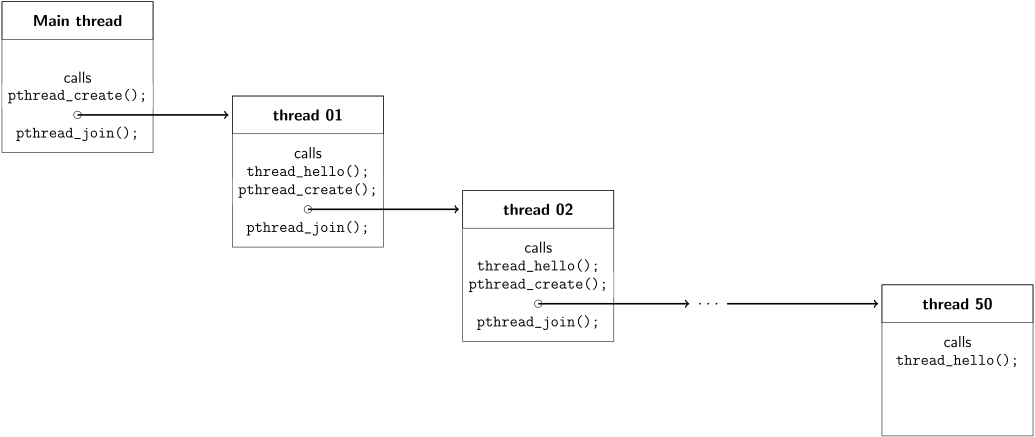
Your task is to make this program generate a chain of 50 threads
that each say hello!
Your my_main should continue to simply create one thread,
however the thread it creates (my_thread) should modify its
behaviour as follows:
It should continue to first call the thread_hello function.
thread_hello will print the Hello from thread N! message
for you as required --
do not try to manually print this message yourself as you will lose marks.
It should then create another thread which continues this same process.
Similiarly to how we wrote recursive functions in the first week of COMP1521,
you should make the thread create another thread that uses the same my_thread
function as its entry point.
Finally, it should call pthread_join on the newly created thread,
in order to make sure our current thread waits for the new thread to finish!
This however, would cause an endless chain of threads spawning threads spawning threads, ad infinitum! In this exercise, you are required to make the chain have exactly length 50.
The following is a diagram to help illustrate what this chain conceptually looks like:
When your program is working, it should behave as follows:
make thread_chain
dcc -pthread thread_chain.c test_thread_chain.c -o thread_chain -Wl,--wrap=pthread_create
./thread_chain
Hello from thread 01!
Hello from thread 02!
Hello from thread 03!
Hello from thread 04!
[ ... output redacted ... ]
Hello from thread 47!
Hello from thread 48!
Hello from thread 49!
Hello from thread 50!
Use make(1) to build your code:
make # or 'make thread_chain'
When you think your program is working,
you can use autotest
to run some simple automated tests:
1092 autotest thread_chain
When you are finished working on this exercise,
you must
submit your work by running give:
give dp1092 lab12_thread_chain thread_chain.c
You must run give
before Monday 03 August 09:00 (2026-08-03 09:00:00)
to obtain the marks for this lab exercise.
Note that this is an individual exercise,
the work you submit with give must be entirely your own.
Exercise — individual:
MIPS factorial
In the files for this lab,
you have been given factorial.s.
Add code to the factorial function to make it equivalent to this C program:
// Recursive factorial function
// n < 1 yields n! = 1

#include <stdio.h>

int factorial(int);

int main(void) {
    int n = 0;
    printf("Enter n: ");
    scanf("%d", &n);
    int f = factorial(n);
    printf("%d! = %d\n", n, f);
    return 0;
}

int factorial(int n) {
    int result;
    if (n > 1) {
        result = n * factorial(n - 1);
    } else {
        result = 1;
    }
    return result;
}
For example:
1092 mipsy factorial.s
Enter n: 5
5! = 120
1092 mipsy factorial.s
Enter n: 7
7! = 5040
1092 mipsy factorial.s
Enter n: 1
1! = 1
When you think your program is working,
you can use autotest
to run some simple automated tests:
1092 autotest factorial
When you are finished working on this exercise,
you must
submit your work by running give:
give dp1092 lab12_factorial factorial.s
You must run give
before Monday 03 August 09:00 (2026-08-03 09:00:00)
to obtain the marks for this lab exercise.
Note that this is an individual exercise,
the work you submit with give must be entirely your own.
Exercise — individual:
Create An add Instruction
Your task is to add code to this function in add.c:
// return the MIPS opcode for add $d, $s, $t
uint32_t make_add(uint32_t d, uint32_t s, uint32_t t) {

    return 42; // REPLACE WITH YOUR CODE

}
The function make_add is given the operands for a MIPS add instruction .
Add code so that it returns the opcode for that instruction.
Reminder the bit pattern for MIPS add instruction is:
| Assembler | Description | C | Bit Pattern |
|---|---|---|---|
add $d, $s, $t
| add | d = s + t | 000000ssssstttttddddd00000100000
|
This is how your code should behave
./add 17 19 3
make_add(17, 19, 3) returned  0x02638820
./add 9 27 12
make_add(9, 27, 12) returned 0x036c4820
Use make(1) to build your code:
make # or 'make add'
Assumptions/Limitations/Clarifications
You may define and call your own functions if you wish.
You are not permitted to change the
mainfunction you have been given, or to changeadd' prototype (its return type and argument types).
When you think your program is working,
you can use autotest
to run some simple automated tests:
1092 autotest add
When you are finished working on this exercise,
you must
submit your work by running give:
give dp1092 lab12_add add.c
You must run give
before Monday 03 August 09:00 (2026-08-03 09:00:00)
to obtain the marks for this lab exercise.
Note that this is an individual exercise,
the work you submit with give must be entirely your own.
Exercise — individual:
Check if two specified bytes are the same
Write a C program, are_bytes_equal.c, which takes four (4) command-line argument: a pair of filenamess and positions:
- filename 1
- position 1
- filename 2
- position 2
Your program should compare the byte at first position in the first file with the byte at second position in the second file.
Your program should then print a message saying if the two bytes are or are not equal.
If either position is past the end of the corresponding file then the bytes are not equal
dcc are_bytes_equal.c -o are_bytes_equal
./are_bytes_equal data1.txt 0 data2.txt 0
byte 0 in data1.txt and byte 0 in data2.txt are the same
./are_bytes_equal data1.txt 0 data2.txt 33
byte 0 in data1.txt and byte 33 in data2.txt are not the same
./are_bytes_equal data1.txt 454 data2.txt 454
byte 454 in data1.txt and byte 454 in data2.txt are not the same
./are_bytes_equal data1.txt 454 data3.txt 454
byte 454 in data1.txt and byte 454 in data3.txt are the same
When you think your program is working,
you can use autotest
to run some simple automated tests:
1092 autotest are_bytes_equal
When you are finished working on this exercise,
you must
submit your work by running give:
give dp1092 lab12_are_bytes_equal are_bytes_equal.c
You must run give
before Monday 03 August 09:00 (2026-08-03 09:00:00)
to obtain the marks for this lab exercise.
Note that this is an individual exercise,
the work you submit with give must be entirely your own.
Exercise — individual:
Test if A Pathname is a Directory
Write a C program, is_directory.c, which takes one argument a pathname.
If the pathname exists and is a directory, it should print 1, otherwise it should print 0.
dcc is_directory.c -o is_directory
mkdir test_directory
echo >test_file
./is_directory test_directory
1
./is_directory test_file
0
./is_directory non_existant_path
0
./is_directory /home/cs1521/public_html
1
./is_directory /etc/resolv.conf
0
When you think your program is working,
you can use autotest
to run some simple automated tests:
1092 autotest is_directory
When you are finished working on this exercise,
you must
submit your work by running give:
give dp1092 lab12_is_directory is_directory.c
You must run give
before Monday 03 August 09:00 (2026-08-03 09:00:00)
to obtain the marks for this lab exercise.
Note that this is an individual exercise,
the work you submit with give must be entirely your own.
Exercise — individual:
Find peaks in an Array in MIPS
This is a past exam question
You have been given final_q4.s,
which contains a MIPS function final_q4,
that takes two arguments: an array and its length,
and returns the value 42.
Add code to final_q4
so that it is equivalent to this C function:
int final_q4(int array[], int length) {
    int total = 0;
    int i = 1;

    while (i < length - 1) {
        if (array[i] > array[i - 1] && array[i] > array[i + 1]) {
            total++;
        }
        i++;
    }

    return total;
}
The function final_q4 returns the number of peaks in an array of integers
A peak is (in this case) a value that is both preceded and succeeded by a value smaller than itself
In other words, the value before and the value after the current value are smaller than the current value
For example:
1092 mipsy test_final_q4.s final_q4.s
1
3
2
5
4
4
9
0
1
-9
4
1092 mipsy test_final_q4.s final_q4.s
1
2
3
4
5
6
7
8
9
0
1
1092 mipsy test_final_q4.s final_q4.s
9
8
7
6
5
4
3
2
1
0
0
You can use make(1) to build the provided C code:
make final_q4
You can use 1092 mipsy to run your MIPS code:
1092 mipsy test_final_q4.s final_q4.s
When you think your program is working,
you can use autotest
to run some simple automated tests:
1092 autotest 22t1final_q4
When you are finished working on this exercise,
you must
submit your work by running give:
give dp1092 lab12_22t1final_q4 final_q4.s
You must run give
before Monday 03 August 09:00 (2026-08-03 09:00:00)
to obtain the marks for this lab exercise.
Note that this is an individual exercise,
the work you submit with give must be entirely your own.
Submission
give.
You can run give multiple times.
Only your last submission will be marked.
Don't submit any exercises you haven't attempted.
If you are working at home, you may find it more convenient to upload your work via give's web interface.
Remember you have until Week 13 Monday 09:00:00 to submit your work.
You cannot obtain marks by e-mailing your code to tutors or lecturers.
You check the files you have submitted here.
Automarking will be run by the lecturer several days after the submission deadline,
using test cases different to those autotest runs for you.
(Hint: do your own testing as well as running autotest.)
After automarking is run by the lecturer you can view your results here. The resulting mark will also be available via give's web interface.
Lab Marks
When all components of a lab are automarked you should be able to view the the marks via give's web interface or by running this command on a CSE machine:
1092 classrun -sturec