Week 03 Tutorial Questions
Tutorial Overview First Hour:
- Part 1: While Loops
- Part 2: 2D While Loops
Tutorial Overview Second Hour:
- Part 1: Scanning in Loops
- Part 2: Structs and Enums
Part 1: While Loops
In the lectures we have seen 3 types of loops: count, sentinel and conditional.
In this activity your tutor will run through the structure of a while loop, hand-execute a loop and then will convert to a flowchart to working C code.
Tutor demo
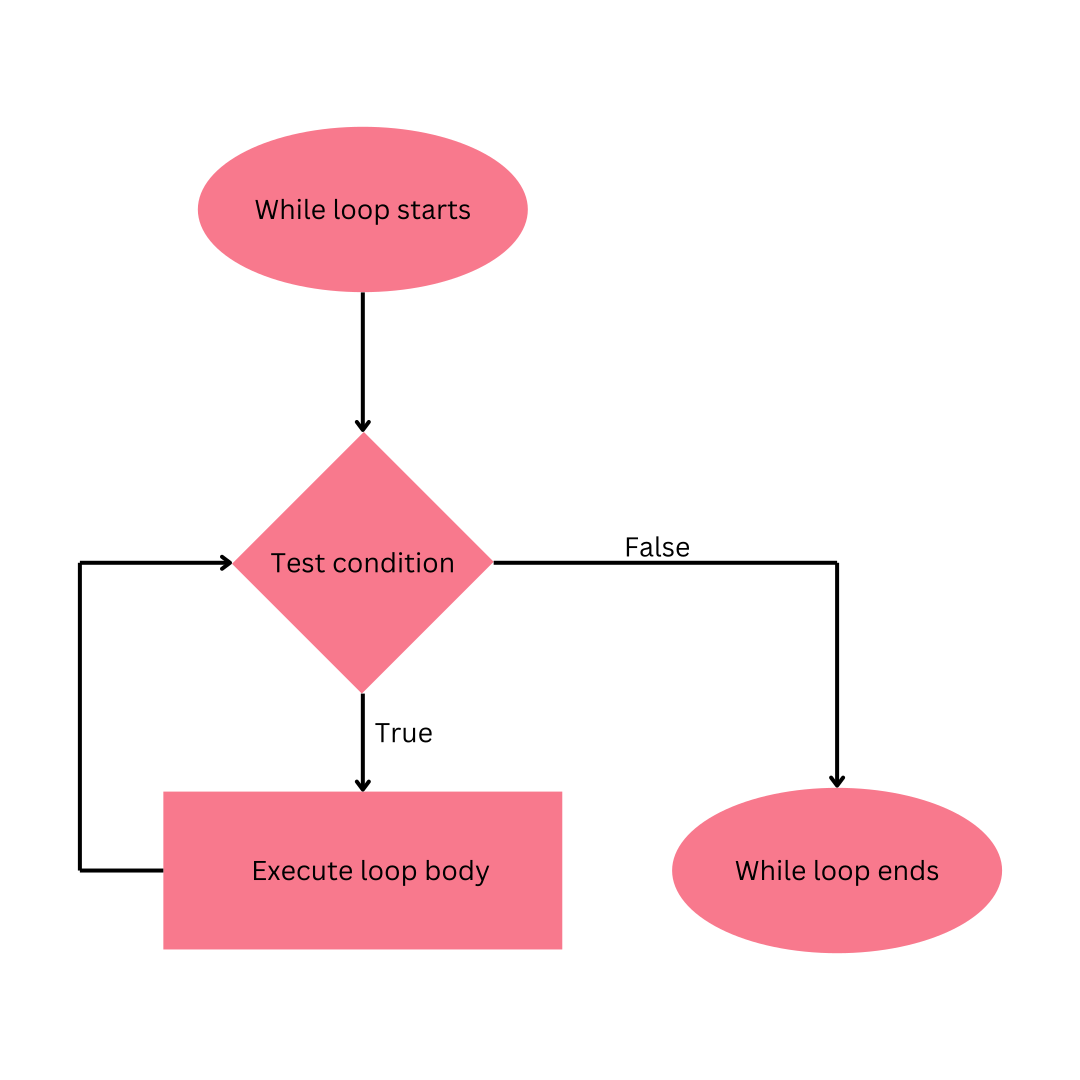
The structure of a while loop
while (/* some condition is true */) {
    // loop body
    // execute some code
}

// rest of program
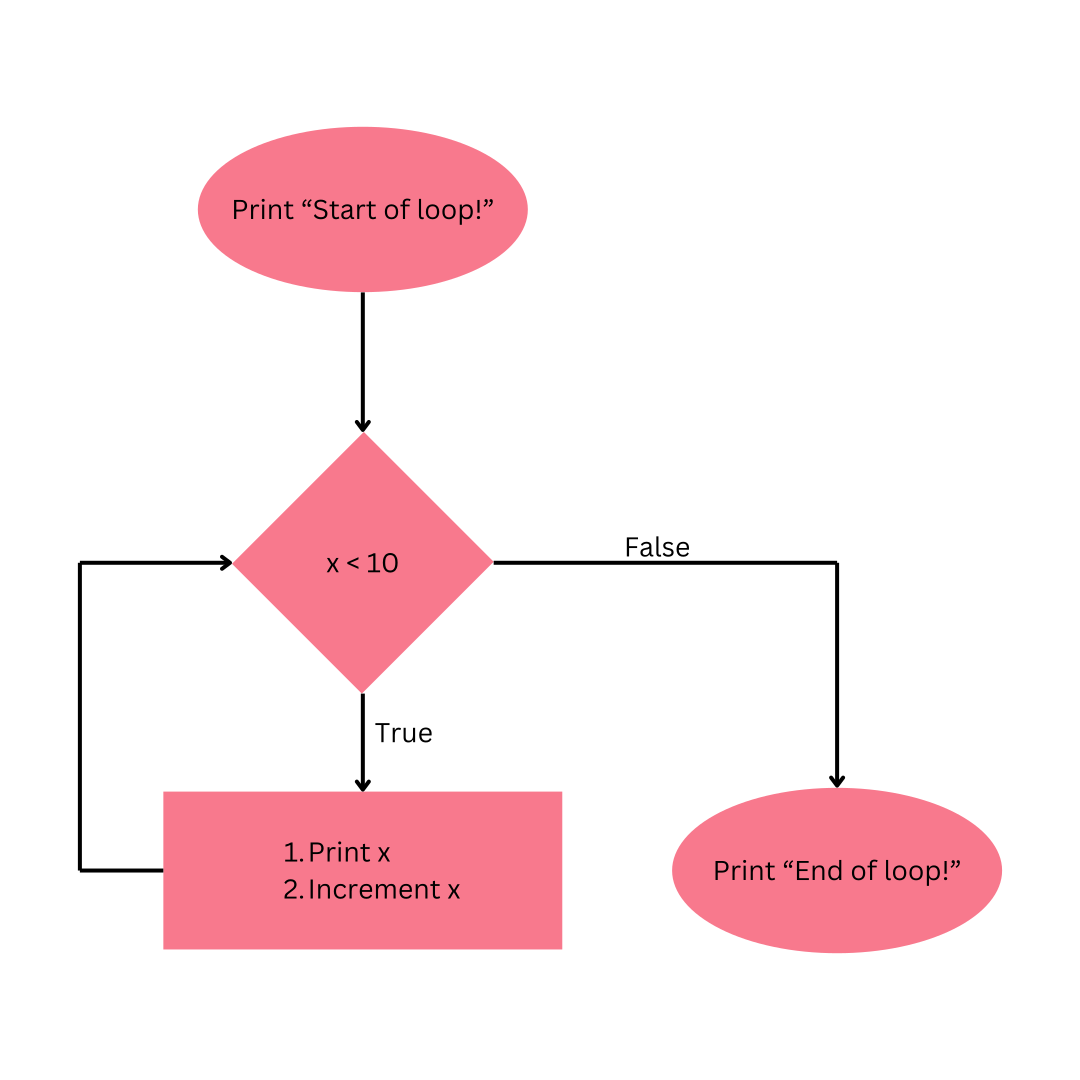
Programming a while loop
Convert the following flowchart to C code and hand execute the program.
 ### Your Turn!
In groups of 3-4 hand execute the following loops writing down what would be
output to the terminal:
### Your Turn!
In groups of 3-4 hand execute the following loops writing down what would be
output to the terminal:
A
#include <stdio.h>

int main(void) {
    int i = 0;
    while (i < 32) {
        printf("%d\n", i);
        i = i + 2;
    }
    return 0;
}
|
B
#include <stdio.h>

int main(void) {
    int i = 5;
    while (i >= 0) {
        printf("%d\n", i);
        i--;
    }
    return 0;
}
|
C
#include <stdio.h>

int main(void) {
    int i = 0;
    int keep_going = 1;
    while (keep_going == 1) {
        if (i > 3) {
            keep_going = 0;
        }
        i++;
    }
    printf("%d\n", i);
    return 0;
}
|
D
#include <stdio.h>

int main(void) {
    int i;
    while (i > 0) {
        printf("%d\n", i);
        i--;
    }
    return 0;
}
|
E
#include <stdio.h>

int main(void) {
    int i = 0;
    int max = 32;
    while (i < max) {
        printf("%d\n", i);
        max = max + 2;
    }
    return 0;
}
|
F
#include <stdio.h>

int main(void) {
    int i = 0;
    int keep_going = 0;
    while (keep_going == 1) {
        if (i > 3) {
            keep_going = 0;
        }
        i++;
    }
    printf("%d\n", i);
    return 0;
}
|
Part 2: 2D Loops
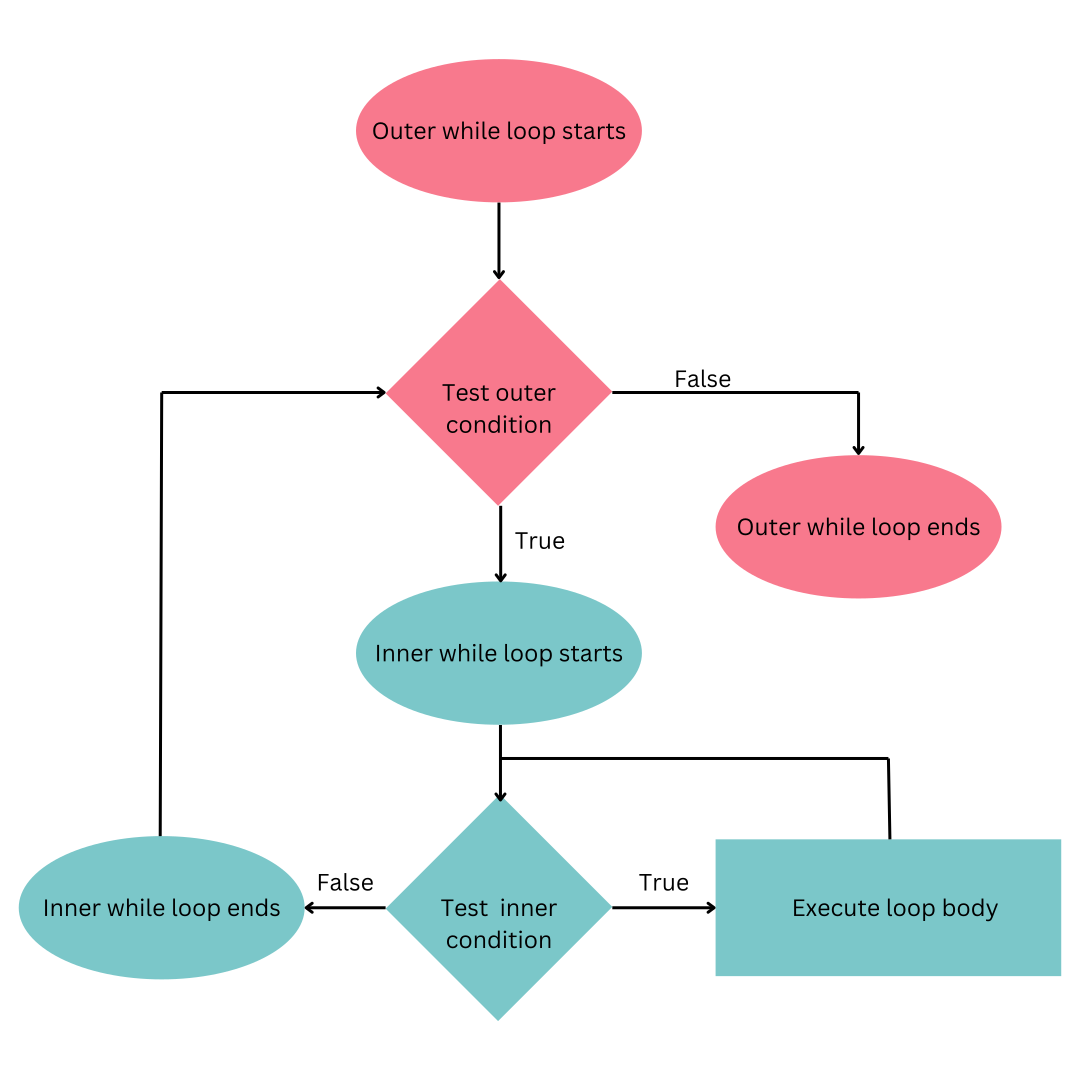
In this activity your tutor will run through the structure of a 2D while loop, hand-execute a loop and then will convert to a flowchart to working C code.
Tutor demo (8 mins)
The structure of a 2D while loop
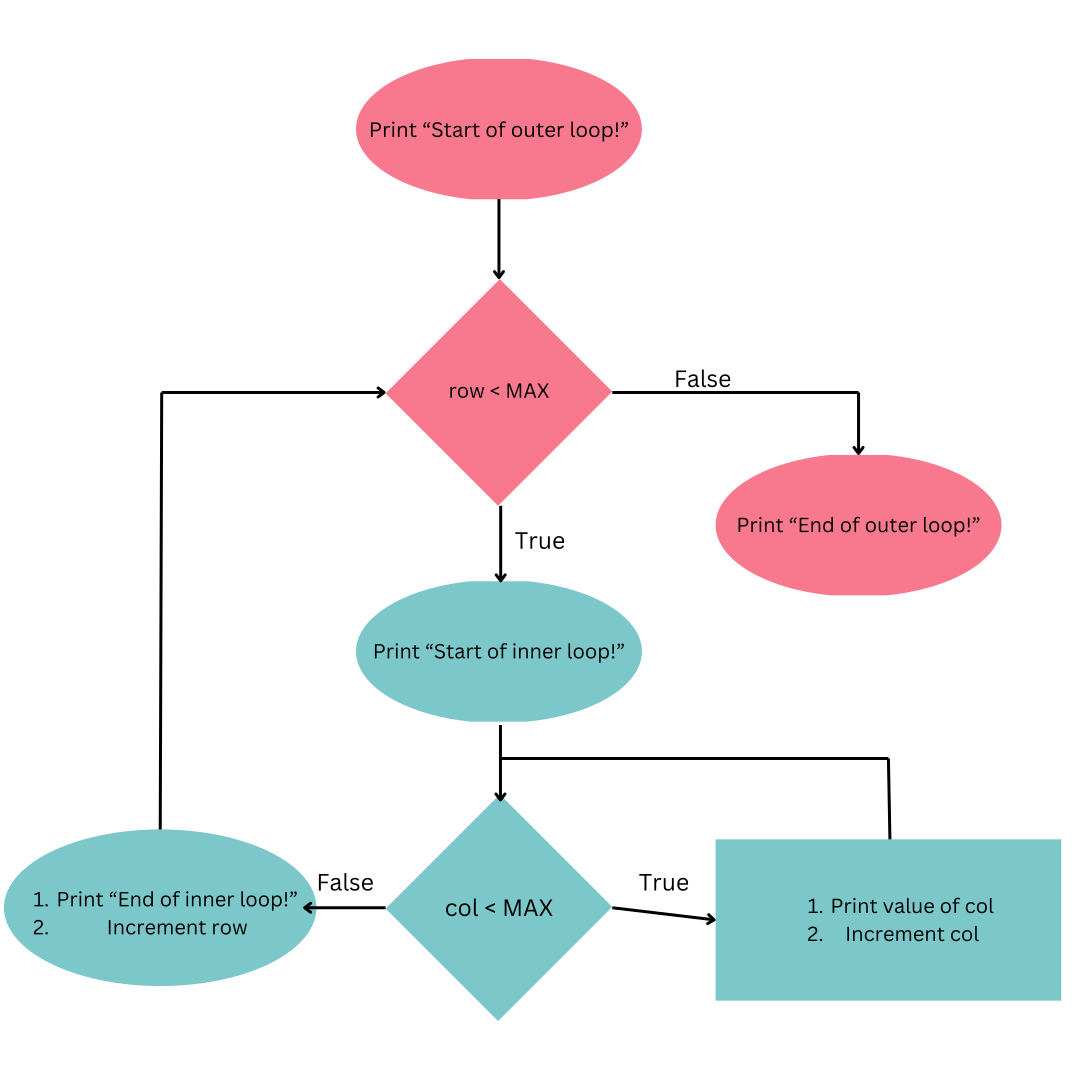
Programming a 2D while loop
Convert the following flowchart to C code and hand execute the program.
 ### Your Turn!
In groups of 3-4 match the following patterns to their code snippets:
### Your Turn!
In groups of 3-4 match the following patterns to their code snippets:
A
OXXX XOXX XXOX XXXO |
B
OXOX OXOX OXOX OXOX |
C
OXOO XXXX OXOO OXOO |
D
XXXX XOOX XOOX XXXX |
1
#include <stdio.h>

#define SIZE 4

int main(void) {
    int row = 0;
    while (row < SIZE) {
        int col = 0;
        while (col < SIZE) {
            if (col != 1 && row != 1) {
                printf("O");
            } else {
                printf("X");

            }
            col++;
        }
        row++;
        printf("\n");
    }
    return 0;
}
|
2
#include <stdio.h>

#define SIZE 4

int main(void) {
    int row = 0;
    while (row < SIZE) {
        int col = 0;
        while (col < SIZE) {
            if (row == col) {
                printf("O");
            } else {
                printf("X");

            }
            col++;
        }
        row++;
        printf("\n");
    }
    return 0;
}
|
3
#include <stdio.h>

#define SIZE 4

int main(void) {
    int row = 0;
    while (row < SIZE) {
        printf("X");
        int col = 1;
        while (col < SIZE - 1) {
            if (row == 0 || row == SIZE - 1) {
                printf("X");
            } else {
                printf("O");
            }
            col++;
        }
        printf("X");
        row++;
        printf("\n");
    }
    return 0;
}
|
4
#include <stdio.h>

#define SIZE 4

int main(void) {
    int row = 0;
    while (row < SIZE) {
        int col = 0;
        while (col < SIZE) {
            if (col % 2 == 0) {
                printf("O");
            } else {
                printf("X");

            }
            col++;
        }
        row++;
        printf("\n");
    }
    return 0;
}
|
any feedback?

Tutorial Overview Second Hour:
Part 1: Scanning and Loops
Tutorial Performance Hurdle Activity
In this section, you'll work in pairs to explore problems that require scanning and loops. Each pair will examine the problems below, determine the required type of loop, and write the appropriate loop condition for each.
Once your group has attempted all problems:
- You'll pair up with another group.
- One person from each group will present and compare your solutions.
- Discuss any differences or improvements you notice.
Rules:
- Only one laptop or one shared piece of paper per pair.
- Work together to solve each problem.
- Your tutor will check participation at the end of the activity for the hurdle requirement.
We'll examine several problems that require scanning and loops. We'll then determine what type of loop involving scanning is required and write the loop condition for each program.
| A: Enter a series of integers until you reach a negative number. Then, stop and calculate the sum. | B: Enter characters until the user presses 'q'. Then, display the count of characters entered. |
| C: Scan for numbers until end of input and display all even numbers entered. | D: Scan for integers keeping a cumulative sum, until the sum of entered integers reaches or exceeds the target sum provided by the user. Print the final sum. |
In this section we will create a program Coffee Shop which:
- Creates a
struct coffeethat stores the coffee type (an enum), the number of sugars and the size of a coffee - Creates an
enum coffee_typewhich defines the different types of drinks that can be ordered. - The program will then take in a coffee order and store it in the struct.
- The program will then determine the price of the coffee based on the users order, outputting the price to the terminal (
stdout).
The cost of the coffee will be determined by the following rules:
- The base price is always
4.5. - A
LARGEcoffee incurs an additional charge. - A
LATTE,CAPPUCCINOorMATCHAincurs an additional charge. - Every sugar added incurs an additional charge.
You will be working off of the starter code below:
// coffee_shop.c
//
// Written by YOUR-NAME (zID)
// on TODAYS-DATE
//
// This program is a simple coffee shop used to demonstrate the use of
// structs and enums in C. This program takes user input for a coffee order
// and outputs the cost of the order.

#include <stdio.h>

#define LARGE 'L'
#define REGULAR 'R'
#define ADDED_COST 0.5
#define BASE_COST 4.5

// TODO: Define an enum `coffee_type` that stores the different types of coffees
// the shop sells. These are: LATTEE, CAPPUCCINO, ESPRESSO, AMERICANO & MATCHA.

// TODO: Define a struct `coffee` that stores
// 1. the coffee type (an enum)
// 2. the number of sugars
// 3. the size of a coffee

int main(void) {
    // TODO: Initalise a variable for the struct

    printf("Enter coffee type (0: LATTE, 1: CAPPUCCINO, 2: ESPRESSO, \
            3: AMERICANO, 4: MATCHA): ");

    // TODO: take user input

    printf("Enter number of sugars: ");
    // TODO: take user input

    printf("Enter size (L for Large, R for Regular): ");
    // TODO: take user input

    // TODO: Calculate cost of order

    printf("Total cost: %.2lf\n", total_cost);
    return 0;
}