Week 03 Lab Exercise

Sort Detective

|
Sort Detective | |
Objectives
- To familiarise yourself with practical aspects of computational complexity
- To practice a systematic approach to problem solving
- To apply sound scientific reasoning in reaching conclusions
- To hone your analysis skills
- To identify algorithms from their behaviour
Admin
- Marks
- 5 (see the Assessment section for more details)
- How to submit
- see the Submission section
- Deadline to submit
- 12pm Tuesday of Week 4
- Submission late penalty
- 0.2% per hour or part thereof deducted from the attained mark, submissions later than 5 days not accepted
- When to get handmarked
- in your Week 3, 4 or 5 lab session (after you have submitted)
Click here to request handmarking
Note that you must be physically present in the lab to get handmarked, and you must be prepared to explain your work. During handmarking, if you take too long to explain your work or recall what you did, you may be moved to the end of the queue.
Note: In this lab, you are allowed to work in pairs. If you choose to do so, you must:
- Include both names and zids in your report
- Indicate whose sort programs you used in your report
- Both submit the report
- Demo the report as a pair in your Week 3, 4 or 5 lab session to get marks
You are allowed to work with a student from another lab. However, you must still demo the report as a pair.
Background
A long time ago, in a burst of enthusiasm, Richard Buckland wrote a collection of sort programs. Sadly, he forgot to give the programs meaningful names, so when he later passed them on to COMP2521 lecturers to use for this lab, he couldn't tell us which program used which algorithm. All that he could remember is that the sorting algorithms he used came from the following list:
-
Bubble sort
- bubble sort with early exit
-
Insertion sort
- standard insertion sort
-
Selection sort
- standard selection sort
-
Merge sort
- standard merge sort
-
Naive quicksort
- uses the leftmost element as the pivot
-
Median-of-three quicksort
- uses the median of the first, middle and last elements as the pivot
-
Bogosort
- randomly generates permutations of its input until it is sorted
Despite not knowing which program uses which algorithm, Richard did remember a few things about the programs:
- The programs read their input from stdin and write the sorted version of the data to stdout
- The programs treat each line of input as an item to be sorted
- Like the Unix sort program
- There is a limit on the size of the input the programs can process (100,000,000 lines)
- The programs expect each line to start with a number, which acts as the sort key. If no number is present at the start of a line, the number will be taken to be zero.
Your task is to identify the specific sorting algorithms used in two of these programs. You will not be able to view the source code. Instead, you will have to try to identify the algorithms using only the programs' observable behaviour when sorting different data. Note that since the programs are only available in binary format, they will most likely only run on the CSE machines, so you'll have to do your work there.
In the setup phase, you will be given access to two different sort programs; each pair or individual gets a different pair of programs. The first phase of the task is to design and write up the experimental framework that you plan to use to solve the problem. In the second phase, you will gather data on the behaviour of the two programs according to your experimental design. You will then add the data to your report and analyse it to reach a conclusion on which sorting algorithm each of the supplied programs uses.
Setting Up
Create a directory for this lab, change into it, and run the following command:
/web/cs2521/26T3/labs/week03/setup/setup
This must be run on the CSE machines, either via VLAB or SSH. The command will set up two symbolic links in your directory called sortA and sortB which reference executable programs under the course account. It will also give you a copy of the following files, which are described in more detail below:
gen- a program that generates input data for the sort programs
timeit- a shell script that collects timing data
example-data.txt- a file that contains example input data in the format required by the sort programs
Working in a pair?
If you are working in a pair and you are using your partner's sort programs, run the setup command above, and then ask your partner to run the following command:
/web/cs2521/26T3/labs/week03/setup/setup --share
This will output some commands that you should run to get your partner's sort programs. Make sure you remember whose sort programs you are using.
Provided Files
sortAandsortB-
These are the sort programs you have been allocated. More accurately, these are symbolic links (i.e., shortcuts) to sort programs that are stored under the course account, but you can run them the same way as any other program. The sort programs have been described above, but in short, they treat each line of input as an item to be sorted, and they expect each line to start with a number, which acts as the sort key.
You can verify that the programs work by entering input like so:
./sortA
2 a
3 b
1 c

1 c
2 a
3 b
gen-
This is a program that generates data in the format expected by the sorting programs. It takes three command-line arguments:
N- the number of lines to generateorder- the letterA,DorR, which indicates that the lines should be sorted in ascending, descending or random order respectivelyseed(optional) - the number that is used to initialise the random number generator. Providing the same seed will result in the same lines being generated. If this is not supplied, the current time is used as the seed.
Here are some examples of its usage (note that due to random number generation, you will get different letters):
./gen 5 A
1 lqt
2 eju
3 slq
4 hfr
5 tyw
./gen 5 D
5 obz
4 agt
3 cph
2 yfb
1 mkj
./gen 5 R
4 vlb
1 rjo
3 mbl
5 waj
2 ooy
Since the data produced by the
genprogram is in the exact format required by the sort programs, you can redirect its output directly to the sort programs using the pipe operator (|) like so:./gen 5 R | ./sortA 1 vek 2 qgq 3 pkm 4 gte 5 rgn
timeit-
This is a shell script that you can use to collect timing data. It takes one command-line argument, which is the sort program you want to collect data for (
sortAorsortB), and measures the execution time of the program for many combinations of input size and input order. For each combination, it runs the sort program several times so that you can calculate the average runtime.This is what the script does, as provided:
- For each input size in [10000, 20000, 40000, 80000, 160000]:
- For each input order in [random, sorted, reversed]:
- Run the specified sort program 5 times for this combination of size and order, and display the execution time for each run
- For each input order in [random, sorted, reversed]:
If needed, you can edit the script to change the list of input sizes or input orders that the sort program is measured on. The file contains comments which indicate the lines that you should edit to do this.
- For each input size in [10000, 20000, 40000, 80000, 160000]:
Creating a Report
As stated in the Background section, you will need to write a report containing your methodology, results, analysis and conclusion, so you should first decide how you will write the report. You will need to submit the report as a PDF file, so we recommend using Google Docs, Microsoft Word, or LaTeX (if you are feeling adventurous).
To help you get started, a template for the report is available. You can copy the template into your report as a starting point and then fill in the sections as you go.
There is no size requirement for the report; it is the quality of the report which matters. If you want to include detailed reporting of timing results, then put these in an appendix. Your report should be clear, scientific/systematic in approach, and all reasoning and assumptions should be explicit. Make sure you ask your tutor if you are unclear about what is expected.
Phase 1: Designing your Experiment
In this phase, you must design the method you will use to deduce which sorting algorithm is used by each sort program. This is to ensure that by the time you begin experimenting with the sort programs, you will have thoroughly thought about what kind of behaviour to look for and what further experimentation might be necessary when analysing your findings.
We expect this will involve describing the test data you plan to use, and what differences (and why) you expect to be able to observe from different types of sorting algorithms, including differences in time complexity and stability.
Of course, when designing tests, you might not be able to anticipate all possible results which might occur during your experiment. This is the nature of scientific experimentation. But by formalising what you expect to occur and how you will respond, you can better account for unexpected behavior and sensibly revise your design or create new tests once the experiment is under way.
Your experimental design should detail the tests you have devised and explain how you will be able to distinguish each algorithm you might be given. You should include a list of steps or a decision tree, where at each step/decision, you describe what test you will run and what the next step or conclusion is for each possible outcome. Note that your design must be able to distinguish all the possible sorting algorithms, even if you end up not needing to use all of the tests. Include how you will distinguish randomised quicksort in addition to the sorting algorithms listed at the start.
Write up your experimental design in the Experimental Design section of your report.
Marking Criteria
This section is worth 2 marks and will be marked based on the following criteria:
| Aspect | Marks | Description |
|---|---|---|
| Time complexity | 0.4 | Accurate description of how time complexity will be measured under different cases
|
| Stability | 0.4 | Accurate description of how stability will be tested, including the input data that will be used |
| Logic | 0.8 | Clear and accurate explanation for how time complexity, stability and possibly other properties will be used to distinguish the sorting algorithms, including a clear list of steps or decision tree |
| Thoroughness | 0.4 | Methodology is able to distinguish all possible sorting algorithms |
Phase 2: Run Experiment and Analyse Results
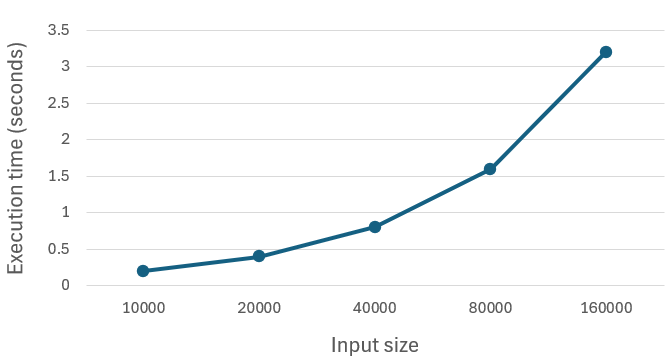
You should now carry out the experiment you designed in Phase 1. Collect and record all of the data, and then summarize it in your report. You can use whatever tools you like to produce useful summaries (e.g. plot graphs of time vs data size). Then analyse the data and draw conclusions.
Below, we provide some advice for collecting data on execution time and stability.
Measuring Execution Time
timeit script
The timeit script automatically measures the execution time of a specified sort program for many combinations of input size and input order. You can run it like so:
./timeit sortA
=== Timing sortA with random input of size 10000 ===
...
By default, the program will run the sort program 5 times for each combination of input size and input order. You should take the average of the execution times for your report.
Note that some tests will take a long time to run with large data. You can edit the script and remove the large data sizes from the outer for loop if you can't wait, but you should probably add more smaller sizes to get more data points to try to determine execution cost trends.
On the other hand, some tests will take a very short time to run, and you can add larger data sizes to the outer for loop. Remember that the sort programs can sort up to 100,000,000 items.
Some sort programs may sort certain input orders more quickly. To properly analyse them, you should use larger input sizes when timing the program on the faster input orders. You can do this by adding larger input sizes to the outer for loop while removing slower input orders from the middle for loop.
Manual measurement
In some cases, you may want to measure the execution time of a sort program manually, for example, if you need to use an input order that is not one of the basic input orders (ascending, descending, or random).
The first step is to create a file containing the data that you want the program to sort. If the input order you want to use is close to one of the basic input orders, then you can do this by first running the gen program and using the > operator to redirect the output to a file, and then editing the file to get the input order that you want. For example, this command will create a file with 10,000 lines sorted in descending order called special-10000.txt:
./gen 10000 D > special-10000.txt
# Now you can edit the file to change the input order
Then, after editing the file to get the input order that you want, you can feed the data to a sort program and time it using a command like this:
/usr/bin/time --format="%U seconds" ./sortA < special-10000.txt > /dev/null
0.67 seconds
Testing Stability
Although we have provided a gen program to generate data, it won't enable you to test stability because it always generates lines with unique numbers. Therefore, to test stability, you will need to create your own data. First, create a file that contains data in the expected format (i.e., each line starting with an integer). Then you can feed the data to the sort program like so:
./sortA < stability-test-1.txt
Marking Criteria
This section is worth 3 marks and will be marked based on the following criteria:
| Aspect | Marks | Description |
|---|---|---|
| Execution time results | 0.5 | Execution times are presented clearly in tables and graphs
|
| Analysis of execution time | 0.5 | Execution time results are used to logically and accurately deduce the time complexity of the sort programs under different cases
|
| Stability results | 0.5 | Stability results are presented clearly, including the input used and the output of each sort program |
| Analysis of stability | 0.5 | Stability results are used to deduce, with high confidence, the stability or instability of each sort program |
| Deductions | 1.0 | Analysis is used to logically and accurately deduce which sorting algorithm each sort program uses, leaving only one possibility for each sort program |
Submission
report.pdf.
The submission for this lab is a report containing your experimental design and results/analysis. It should be submitted as a PDF file called report.pdf. If you are working in a pair, you must both submit the report. You can submit via the command line using the give command:
give cs2521 lab03 report.pdf
You can also submit via give's web interface. You can submit multiple times. Only your last submission will be marked. You can check the files you have submitted here.
Assessment
There is no automarking for this lab. To receive a mark, you must show your report to your tutor during your Week 3, 4 or 5 lab session. You will be marked on the following:
| Part | Marks |
|---|---|
| Part 1 - Experimental Design | 2 |
| Part 2 - Results and Analysis | 3 |
Criteria for Experimental Design
| Aspect | Marks | Description |
|---|---|---|
| Time complexity | 0.4 | Accurate description of how time complexity will be measured under different cases |
| Stability | 0.4 | Accurate description of how stability will be tested, including the input data that will be used |
| Logic | 0.8 | Clear and accurate explanation for how time complexity, stability and possibly other properties will be used to distinguish the sorting algorithms, including a clear list of steps or decision tree |
| Thoroughness | 0.4 | Methodology is able to distinguish all possible sorting algorithms |
Criteria for Results and Analysis
| Aspect | Marks | Description |
|---|---|---|
| Execution time results | 0.5 | Execution times are presented clearly in tables and graphs
|
| Analysis of execution time | 0.5 | Execution time results are used to logically and accurately deduce the time complexity of the sort programs under different cases
|
| Stability results | 0.5 | Stability results are presented clearly, including the input used and the output of each sort program |
| Analysis of stability | 0.5 | Stability results are used to deduce, with high confidence, the stability or instability of each sort program |
| Deductions | 1.0 | Analysis is used to logically and accurately deduce which sorting algorithm each sort program uses, leaving only one possibility for each sort program |