Week 09 Tutorial Questions
Objectives
- develop an understanding of how the UNIX file permissions system works
- understand and practice coding with UTF-8 encoded characters
- introduce environment variables and how programs can access and manipulate them
-
The
stat()andlstat()functions both take an argument which is a pointer to astruct statobject, and fill it with the meta-data for a named file.On Linux, a
struct statcontains the following fields (among others, which have omitted for simplicity):struct stat { ino_t st_ino; /* inode number */ mode_t st_mode; /* protection */ uid_t st_uid; /* user ID of owner */ gid_t st_gid; /* group ID of owner */ off_t st_size; /* total size, in bytes */ blksize_t st_blksize; /* blocksize for filesystem I/O */ blkcnt_t st_blocks; /* number of 512B blocks allocated */ time_t st_atime; /* time of last access */ time_t st_mtime; /* time of last modification */ time_t st_ctime; /* time of last status change */ };
Explain what each of the fields represents (in more detail than given in the comment!) and give a typical value for a regular file which appears as follows:
ls -ls stat.c
8 -rw-r--r--  1 jas  cs1521  1855  Sep  9 14:24 stat.c
Assume that
jashas user id 516, and thecs1521group has group id 36820. -
Consider the following (edited) output from the command
ls -l ~cs1521:drwxr-x--- 11 cs1521 cs1521 4096 Aug 27 11:59 17s2.work drwxr-xr-x 2 cs1521 cs1521 4096 Aug 20 13:20 bin -rw-r----- 1 cs1521 cs1521 38 Jul 20 14:28 give.spec drwxr-xr-x 3 cs1521 cs1521 4096 Aug 20 13:20 lib drwxr-x--x 3 cs1521 cs1521 4096 Jul 20 10:58 public_html drwxr-xr-x 12 cs1521 cs1521 4096 Aug 13 17:31 spim drwxr-x--- 2 cs1521 cs1521 4096 Sep 4 15:18 tmp lrwxrwxrwx 1 cs1521 cs1521 11 Jul 16 18:33 web -> public_html
Who can access the
17s2.workdirectory?What operations can a typical user perform on the
public_htmldirectory?What is the file
web?What is the difference between
stat("web", &info)andlstat("web", &info)?
(whereinfois an object of type(struct stat))
-
Explain how this program uses stat to get information about the permissions and type of a file. The inode man page may he helpful here.
Could you add another if statement to check if the file is publically writeable? How would you check if the file can be executed by the owner?#include <stdio.h> #include <stdlib.h> #include <sys/types.h> #include <sys/stat.h> void print_some_file_info(char *filename); int main(int argc, char *argv[]) { // Loop over command line arguments for (int arg = 1; arg < argc; arg++) { print_some_file_info(argv[arg]); } } void print_some_file_info(char *filename) { // Use stat to get file information struct stat s; // check that stat worked if (stat(filename, &s) != 0) { perror(filename); return; } // get the mode (permissions) of the file mode_t mode = s.st_mode; // check if the file is a directory if ((mode & S_IFDIR) == S_IFDIR) { printf("The directory '%s' has mode 0x%x == 0%o\n", filename, mode, mode); // check if the file is a regular file } else if (S_ISREG(mode)) { printf("The file '%s' has mode 0x%x == 0%o\n", filename, mode, mode); } // check if the file is publically readable if (mode & S_IROTH) { printf("%s is publically readable\n", filename); } }
-
Write a file
print_metadata.c, which is given a file path as a command line argument and prints the file size (in bytes) and the file permissions as a string in a format similar tols -l(e.g.-rw-r--r--). For file type, only directorydand regular file-cases are required to be handled.
Example:echo -n "hello" > demo.txt chmod 640 demo.txt ls -l demo.txt -rw-r----- 1 user group 5 Sep 4 17:00 demo.txt dcc print_metadata.c -o print_metadata ./print_metadata demo.txt size: 5 perms: -rw-r-----
-
Write a C program, chmod_if_public_write.c, which is given 1+ command-line arguments which are the
pathnames of files or directories
If the file or directory is publically-writeable, it should change it to be not publically-writeable, leaving other permissions unchanged.
It also should print a line to stdout as in the example below
dcc chmod_if_public_write.c -o chmod_if_public_write
ls -ld file_modes.c file_modes file_sizes.c file_sizes
-rwxr-xrwx 1 z5555555 z5555555 116744 Nov  2 13:00 file_sizes
-rw-r--r-- 1 z5555555 z5555555    604 Nov  2 12:58 file_sizes.c
-rwxr-xr-x 1 z5555555 z5555555 222672 Nov  2 13:00 file_modes
-rw-r--rw- 1 z5555555 z5555555   2934 Nov  2 12:59 file_modes.c
./file_modes file_modes file_modes.c file_sizes file_sizes.c
removing public write from file_sizes
file_sizes.c is not publically writable
file_modes is not publically writable
removing public write from file_modes.c
ls -ld file_modes.c file_modes file_sizes.c file_sizes
-rwxr-xr-x 1 z5555555 z5555555 116744 Nov  2 13:00 file_sizes
-rw-r--r-- 1 z5555555 z5555555    604 Nov  2 12:58 file_sizes.c
-rwxr-xr-x 1 z5555555 z5555555 222672 Nov  2 13:00 file_modes
-rw-r--r-- 1 z5555555 z5555555   2934 Nov  2 12:59 file_modes.c
Make sure you handle errors. -
What does the following printf(3) statement display?
printf ("%c%c%c%c%c%c", 72, 101, 0x6c, 108, 111, 0x0a);
Try to work it out without simply compiling and running the code. The ascii(7) manual page will help with this; read it by running
. Then, check your answer by compiling and running.man 7 ascii -
Recall the UTF-8 encoding for characters below:
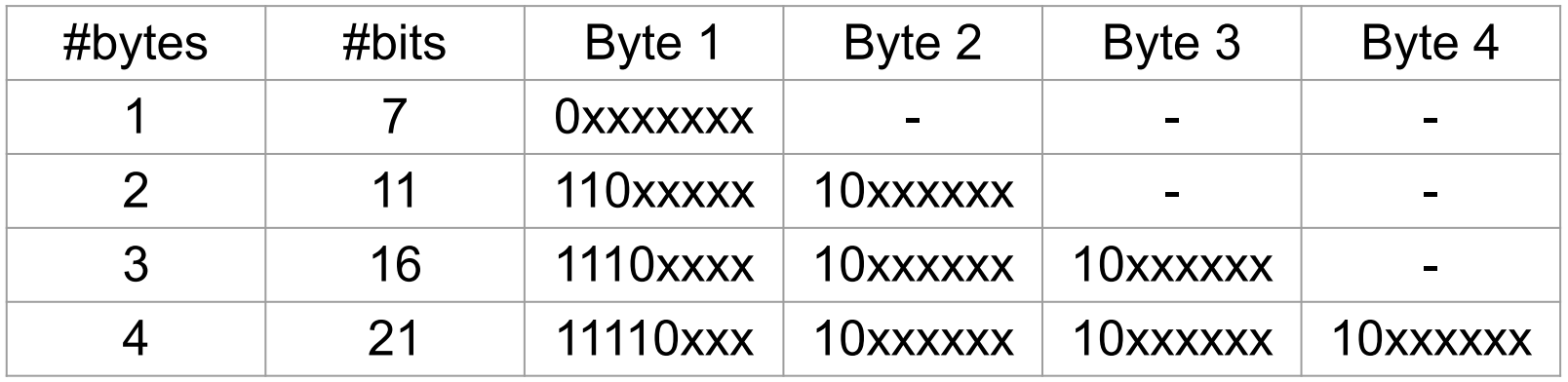
Why did UTF-8 replace the ASCII coding standard? What is the difference in how ASCII and UTF-8 codepoints are represented in bytes?
-
Write a C program that reads a null-terminated UTF-8 string as a command line argument and counts how many Unicode characters (code points) it contains. Assume that all codepoints in the string are valid. Some examples of how your program should work:
dcc count_utf8.c -o count_utf8 ./count_utf8 "チョコミント、よりもあなた!" there are 14 codepoints in the string ./count_utf8 "早上好中国现在我有冰淇淋" there are 12 codepoints in the string ./count_utf8 "🤓🤓🤓🤓🤓🤓🤓🤓" there are 8 codepoints in the string -
Write a C program,
recurse_sample.c, that walks a directory tree and prints each matching file’s permissions (ls -l style) and pathname when the filename contains the substring"hello".- Part 1 — Print CWD: Get and print the current working directory pathname.
Hint:getcwd() - Part 2 — List current directory: Print one line per entry in the current directory (non-recursive):
<perms> <pathname>
Hint: usereaddir()to recurse through subdirectories - Part 3 — Recurse: Recurse into all subdirectories and print pathnames in the same format as Part 1.
- Part 4 — Filter by name: Only print lines for files whose basename contains
"hello"(case-sensitive match).
Output format (one match per line):
-rw-r--r-- ./examples/hello.txtExample (setup & run):
mkdir -p examples/sub
: > examples/hello.txt
: > examples/sub/nothe11o.c
: > examples/sub/hello_world.c
dcc -o recurse_sample recurse_sample.c
./recurse_sample .
-rw-r--r-- ./examples/sub/hello_world.c
-rw-r--r-- ./examples/hello.txt
- Part 1 — Print CWD: Get and print the current working directory pathname.
-
Write a C program,
print_diary.c, which prints the contents of the file$HOME/.diaryto stdoutThe lecture example getstatus.c shows how to get the value of an environment variable.
snprintf is a convenient function for constructing the pathname of the diary file.
Extra questions
The following questions are extra content not necessarily needed to cover this week's content.
Your tutor may still choose to cover some of these questions, time permitting.
-
The following code will compile with
gcc   void-pointer.c -o void-pointer
clang void-pointer.c -o void-pointer
dcc   void-pointer.c -o void-pointer
It will even compile with
gcc   -Werror -Wall -Wextra void-pointer.c -o void-pointer
clang -Werror -Wall -Wextra void-pointer.c -o void-pointer
dcc   -Werror -Wall -Wextra void-pointer.c -o void-pointer
But it wont compile with
gcc   -Werror -Wall -Wextra              -Wpedantic void-pointer.c -o void-pointer
clang -Werror -Wall -Wextra -Weverything -Wpedantic void-pointer.c -o void-pointer
dcc   -Werror -Wall -Wextra              -Wpedantic void-pointer.c -o void-pointer
How can the code be modified to compile with the
-Wpedanticoption?#include <stdio.h> #include <stdlib.h> #include <stdint.h> static uint16_t a; int main(void) { uint16_t b; uint16_t *pa = &a; uint16_t *pb = &b; uint16_t *pc = malloc(sizeof(uint16_t)); *pa = 0xAAAA; *pb = 0xBBBB; *pc = 0xCCCC; printf("a:\n\tvalue: 0x%X\n\taddress: %16p\n", *pa, pa); printf("b:\n\tvalue: 0x%X\n\taddress: %16p\n", *pb, pb); printf("c:\n\tvalue: 0x%X\n\taddress: %16p\n", *pc, pc); }
-
The following code will compile with
gcc   pointer-arithmetic.c -o pointer-arithmetic
clang pointer-arithmetic.c -o pointer-arithmetic
dcc   pointer-arithmetic.c -o pointer-arithmetic
It will even compile with
gcc   -Werror -Wall -Wextra pointer-arithmetic.c -o pointer-arithmetic
clang -Werror -Wall -Wextra pointer-arithmetic.c -o pointer-arithmetic
dcc   -Werror -Wall -Wextra pointer-arithmetic.c -o pointer-arithmetic
But it wont compile with
gcc   -Werror -Wall -Wextra              -Wpedantic pointer-arithmetic.c -o pointer-arithmetic
clang -Werror -Wall -Wextra -Weverything -Wpedantic pointer-arithmetic.c -o pointer-arithmetic
dcc   -Werror -Wall -Wextra              -Wpedantic pointer-arithmetic.c -o pointer-arithmetic
How can the code be modified to compile with the
-Wpedanticoption?#include <stdio.h> #include <stdlib.h> #include <stdint.h> void *next_byte(void *byte){ return byte + 1; } int main(void) { uint8_t chars[10] = {1, 2, 3, 4, 5, 6, 7, 8, 9, 10}; uint32_t ints[10] = {1, 2, 3, 4, 5, 6, 7, 8, 9, 10}; printf("%16p - %16p\n", (void *)&chars[0], (void *)next_byte(&chars[0])); printf("%16p - %16p\n", (void *)&ints[0], (void *)next_byte(&ints[0])); }
Revision questions
The following questions are primarily intended for revision, either this week or later in session.
Your tutor may still choose to cover some of these questions, time permitting.