Programming Fundamentals
Information
- This page contains additional revision exercises for week 05.
- These exercises are not compulsory, nor do they provide any marks in the course.
- You cannot submit any of these exercises, however autotests may be available for some them (Command included at bottom of each exercise if applicable).
Exercise
(●●◌)
:
Draw a triangle
#include <stdio.h>

int main(void) {
    int n;
    printf("Enter size: ");
    scanf("%d", &n);

    int row = 1;
    while (row <= n) {
        int col = 1;
        while (col <= row) {
            if (row == 1 || row == n || col == 1 || col == row) {
                printf("*");
            } else {
                printf(" ");
            }
            col++;
        }
        printf("\n");
        row++;
    }

    return 0;
}
When you think your program is working,
you can use autotest
to run some simple automated tests:
1511 autotest checkoff/week_03/hollow_triangle
Exercise
(●●◌)
:
Draw an X
Write a program called x.c that reads an integer n
from standard input, and prints an nxn pattern of
asterisks and dashes in the shape of an "X".
You can assume n is odd and >= 5.
Make your program match the examples below exactly.
This exercise is designed to give you practice with while loops, if statements and some mathematical operators.
You are not permitted to use an array in this exercise.
Examples
dcc x.c -o x
./x
Enter size: 5
*---*
-*-*-
--*--
-*-*-
*---*
./x
Enter size: 9
*-------*
-*-----*-
--*---*--
---*-*---
----*----
---*-*---
--*---*--
-*-----*-
*-------*
./x
Enter size: 15
*-------------*
-*-----------*-
--*---------*--
---*-------*---
----*-----*----
-----*---*-----
------*-*------
-------*-------
------*-*------
-----*---*-----
----*-----*----
---*-------*---
--*---------*--
-*-----------*-
*-------------*
Assumptions/Restrictions/Clarifications
- You may assume that you will be given only integers as input
- You may assume that all input is valid
When you think your program is working,
you can use autotest
to run some simple automated tests:
1511 autotest x
Exercise
(●●◌)
:
Perfect Square Numbers
There is no starter code provided for this exercise. Instead, you have to write 2 functions from scratch.
You must implement the following two functions:
-
is_perfect_square, which takes in- an
intparameter and - returns 1 if that integer is a perfect square number, or 0 otherwise.
- an
-
count_perfect_squares, which takes in 2 parameters:- The first parameter is an integer, which contains the length of the array.
- The second parameter is an array of integers.
- The order of these parameters is important.
- Your first parameter must be an int and your second parameter must be an array.
- This function should return the total number of perfect squares contained in the array.
For more information about perfect_squares see this link
You may name the function parameters what ever you like.
You may create a main function to test your functions, but this will not be assessed. Your functions will be called directly in automarking.
Assumptions/Restrictions/Clarifications
- Your program is not required to do any error checking
- Your functions may use any parameter names you chose, but the name of the functions and order of parameters must match what is described above
- You must not modify the array within the
count_perfect_squaresfunction - The array will be fully initialised
- You can assume length will be at least 0
When you think your program is working,
you can use autotest
to run some simple automated tests:
1511 autotest perfect_square
Exercise
(●●◌)
:
Swap the case of letters in a string.
Download swap_case.c here
Or, copy these file(s) to your CSE account using the following command:
1511 fetch-activity swap_case
Your task is to add code to this function in swap_case.c:
int swap_case(int character) {
    // TODO: Write this function, which should:
    //  - return character in lower case if it is an upper case letter
    //  - return character in upper case if it is an lower case letter
    //  - return the character unchanged otherwise

    return 'x';
}
Edit the C program swap_case.c (linked above) which reads characters from its
input and writes the same characters to its output with lower case letters
converted to upper case and upper case letters converted to lower case.
Your program should stop only at the end of input.
which:
- returns the character in lowercase if it is an uppercase letter
- returns the character in uppercase if it is a lowercase letter
- returns the character unchanged otherwise
Note: Your program will not pass autotests if it does not contain this function.
Examples
dcc swap_case.c -o swap_case
./swap_case
Are you saying 'Boo' or 'Boo-Urns'?
aRE YOU SAYING 'bOO' OR 'bOO-uRNS'?
In this house, we obey the laws of thermodynamics!
iN THIS HOUSE, WE OBEY THE LAWS OF THERMODYNAMICS!
UPPER !@#$% lower
upper !@#$% LOWER
Assumptions/Restrictions/Clarifications
- You need only a single int variable. Don't use an array.
- Make sure you understand this example program which reads characters until end of input.
- Make sure you understand this example program which reads characters, printing them with lower case letters converted to uppercase.
When you think your program is working,
you can use autotest
to run some simple automated tests:
1511 autotest swap_case
Exercise
(●●◌)
:
Calculate the dot product of two arrays.
Download dot_product.c here
Or, copy these file(s) to your CSE account using the following command:
1511 fetch-activity dot_product
Your task is to add code to this function in dot_product.c:
// Calculates the dot product of two arrays of the same length.
//
// Parameters:
//  `length`: the length of both arrays
//  `vector1`: The first array
//  `vector2`: The second array
//
// Returns: the dot product of `vector1` and `vector2`.
int dot_product(int length, int vector1[], int vector2[]) {
    // TODO: Complete this function
}
This function takes in two arrays and returns their dot product.
To calculate the dot product of two arrays (v1 and v2) of length n we use
the formula
(v1 . v2) = v1[0] * v2[0] + v1[1] * v2[1] + v1[2] * v2[2] + ... + v1[n - 1] * v2[n - 1]
For more information about the dot product see this link
Once your program is working, the output from the provided main function should be:
dcc -o dot_product dot_product.c
./dot_product
Result: 106
Result2: -8
Assumptions/Restrictions/Clarifications
- Your program is not required to do any error checking
- You must not modify the arrays within the
dot_productfunction. - Both arrays will be fully initialised
- You can assume length will be greater than 0
When you think your program is working,
you can use autotest
to run some simple automated tests:
1511 autotest dot_product
Exercise
(●●◌)
:
Find largest value in a 2d array.
Download array_2d_max.c here
Or, copy these file(s) to your CSE account using the following command:
1511 fetch-activity array_2d_max
Your task is to add code to this function in array_2d_max.c:
// Return the largest number in a 2D square array
// with sides of length side_length.
int array_max(int array[TEST_ARRAY_SIZE][TEST_ARRAY_SIZE], int side_length) {
    // PUT YOUR CODE HERE (you must change the next line!)
    return 42;
}
You are to implement the array_2d_max function which should return the largest value in the array.
The file array_2d_max.c contains a main function which tests it against an
array you have been given.
When you think your program is working,
you can use autotest
to run some simple automated tests:
1511 autotest array_2d_max
Exercise
(●●◌)
:
Finding Treasure
Download find_treasure.c here
Or, copy these file(s) to your CSE account using the following command:
1511 fetch-activity find_treasure
Your task is to add code to this function in find_treasure.c:
// Finds the location of the 'X' in the 2d array.
//
// Parameters:
//  `map`: a 2d array of chars which contains at most one 'X'.
//  `row_pointer`: A pointer to an integer.
//      If the map contains an 'X', this pointer should be used to set the
//      integer to the row number of the 'X'.
//  `col_pointer`: A pointer to an integer.
//      If the map contains an 'X', this pointer should be used to set the
//      integer to the column number of the 'X'.
//
// Returns: 1 if the treasure was found, 0 otherwise
int find_treasure(char map[SIZE][SIZE], int *row_pointer, int *col_pointer) {
    // TODO: Complete this function
}
This function should try to find the location of the treasure ('X') in the
2D array map.
If map contains the 'X', then the function should use the row_pointer
and col_pointer to write the row and column numbers of the treasure into the
integers that they point to.
The function should return a 1 if map contained the treasure, or 0 otherwise.
For reference, the location row == 0, col == 0 is the top left corner of the
map.
Once your program is working, the output from the provided main function should be:
dcc find_treasure.c -o find_treasure
./find_treasure
Treasure was found at coordinates (5, 2)!
Assumptions/Restrictions/Clarifications
- Your program is not required to do any error checking
- You must not modify the array within the
find_treasurefunction - You can assume that the
mapwill be fully initialised, and will contain at most 1'X'
When you think your program is working,
you can use autotest
to run some simple automated tests:
1511 autotest find_treasure
Exercise — individual:
Perfect Square Numbers
There is no starter code provided for this exercise. Instead, you have to write 2 functions from scratch.
You must implement the following two functions:
-
is_perfect_square, which takes in- an
intparameter and - returns 1 if that integer is a perfect square number, or 0 otherwise.
- an
-
count_perfect_squares, which takes in 2 parameters:- The first parameter is an integer, which contains the length of the array.
- The second parameter is an array of integers.
- The order of these parameters is important.
- Your first parameter must be an int and your second parameter must be an array.
- This function should return the total number of perfect squares contained in the array.
For more information about perfect_squares see this link
You may name the function parameters what ever you like.
You may create a main function to test your functions, but this will not be assessed. Your functions will be called directly in automarking.
Assumptions/Restrictions/Clarifications
- Your program is not required to do any error checking
- Your functions may use any parameter names you chose, but the name of the functions and order of parameters must match what is described above
- You must not modify the array within the
count_perfect_squaresfunction - The array will be fully initialised
- You can assume length will be at least 0
Exercise — individual:
Calculate the dot product of two arrays
Download dot_product.c here
Or, copy these file(s) to your CSE account using the following command:
1511 fetch-activity dot_product
Your task is to add code to this function in dot_product.c:
// Calculates the dot product of two arrays of the same length.
//
// Parameters:
//  `length`: the length of both arrays
//  `vector1`: The first array
//  `vector2`: The second array
//
// Returns: the dot product of `vector1` and `vector2`.
int dot_product(int length, int vector1[], int vector2[]) {
    // TODO: Complete this function
}
This function takes in two arrays and returns their dot product.
To calculate the dot product of two arrays (v1 and v2) of length n we use
the formula
(v1 . v2) = v1[0] * v2[0] + v1[1] * v2[1] + v1[2] * v2[2] + ... + v1[n - 1] * v2[n - 1]
For more information about the dot product see this link
Once your program is working, the output from the provided main function should be:
dcc -o dot_product dot_product.c
./dot_product
Result: 106
Result2: -8
Assumptions/Restrictions/Clarifications
- Your program is not required to do any error checking
- You must not modify the arrays within the
dot_productfunction. - Both arrays will be fully initialised
- You can assume length will be greater than 0
Exercise — individual:
Find largest value in a 2d array
Download array_2d_max.c here
Or, copy these file(s) to your CSE account using the following command:
1511 fetch-activity array_2d_max
Your task is to add code to this function in array_2d_max.c:
// Return the largest number in a 2D square array
// with sides of length side_length.
int array_max(int array[TEST_ARRAY_SIZE][TEST_ARRAY_SIZE], int side_length) {
    // PUT YOUR CODE HERE (you must change the next line!)
    return 42;
}
You are to implement the array_2d_max function which should return the largest value in the array.
The file array_2d_max.c contains a main function which tests it against an
array you have been given.
Exercise — individual:
Temperature
Write a program temperature.c that scans in the temperature of each day for a week, then prints out the temperature.
Your program should scan in seven integers, storing them in an array. The program should then print out the temperatures for the week using the message Day <num>: <temperature> degrees., where <num> is the day of the week from 1-7, and <temperature> is the temperature that was scanned in for that particular day.
Examples
dcc temperature.c -o temperature
./temperature
Enter the temperatures for the week: 30 29 28 30 30 27 24
Day 1: 30 degrees.
Day 2: 29 degrees.
Day 3: 28 degrees.
Day 4: 30 degrees.
Day 5: 30 degrees.
Day 6: 27 degrees.
Day 7: 24 degrees.
./temperature
Enter the temperatures for the week: 0 -4 120 42 3 -250 12
Day 1: 0 degrees.
Day 2: -4 degrees.
Day 3: 120 degrees.
Day 4: 42 degrees.
Day 5: 3 degrees.
Day 6: -250 degrees.
Day 7: 12 degrees.
Assumptions/Restrictions/Clarifications
- You may assume that the correct number of inputs will be entered.
- You may assume that the input will always be an integer.
When you think your program is working,
you can use autotest
to run some simple automated tests:
1511 autotest temperature
Exercise — individual:
Calculate the average of columns in a 2D array
Download array_col_average.c here
Or, copy these file(s) to your CSE account using the following command:
1511 fetch-activity array_col_average
Your task is to add code to this function in array_col_average.c:
// Calculates the sum of each col of the array and prints it out
void array_col_average(int array[MAX_SIZE][MAX_SIZE], int num_rows, int num_cols) {

    // TODO: Complete this function

}
Write a function array_col_average that calculates the average for each column of the array and prints out the result.
Your function should print out the message Average of col <num> is <average>. for each column, where <num> is the current column, and <average> is the average of that column to two decimal places.
Examples
If the 2D array contains these elements:
{0, 1, 9, 2},
{5, 4, 6, 7},
{7, 6, 3, 9},
{3, 8, 1, 8}
Your function should print the following:
Average of col 0 is 3.75.
Average of col 1 is 4.75.
Average of col 2 is 4.75.
Average of col 3 is 6.50.
Alternatively, if the 2D array contains these elements:
{0, 1, 2},
{3, 4, 5},
{6, 7, 8},
{9, 8, 7}
Your function should print the following:
Average of col 0 is 3.00.
Average of col 1 is 3.75.
Average of col 2 is 4.00.
Average of col 3 is 4.25.
Assumptions/Restrictions/Clarifications
- You may assume that the number of rows and cols will always be greater than 0.
When you think your program is working,
you can use autotest
to run some simple automated tests:
1511 autotest array_col_average
Exercise — individual:
Calculate Weekly Earnings
Gary keeps track of the amount of money he earns per day, per week and stores this information in a 1D array. Your program should calculate the total amount of money Gray has made in a week.
Write a program calculate_weekly_earnings.c that:
- Prompts the user with the message
Enter the amount of money earned in the week:. - Scans in seven integers, storing them in an array.
- Calculates the sum of an array of size 7.
- Print the message
The total money earned this week was <sum>., where<sum>is the total sum of the array.
Examples
dcc calculate_weekly_earnings.c -o calculate_weekly_earnings
./calculate_weekly_earnings
Enter the amount of money earned in the week: 3 9 6 5 1 2 4
The total money earned this week was $30.
./calculate_weekly_earnings
Enter the amount of money earned in the week: 0 63 0 90 34 0 0
The total money earned this week was $187.
Assumptions/Restrictions/Clarifications
- You may assume that all inputs are integers.
- You may assume that there will be the correct number of inputs.
- You may assume that all inputs will be non-negative.
When you think your program is working,
you can use autotest
to run some simple automated tests:
1511 autotest calculate_weekly_earnings
Exercise — individual:
Find the fastest and slowest runners
Download races.c here
Or, copy these file(s) to your CSE account using the following command:
1511 fetch-activity races
Your task is to add code to this function in races.c:
    return;
}
Write a program races that determines the fastest and slowest racers in a running race based on their average time.
The racers are numbered from 1 to n , which correspond to the rows 0 to n - 1 in a 2D array. Each column is a lap in the race. In order to find the fastest and slowest runners, each runners time should be averaged for their laps.
Examples
If the 2D array contains these elements:
{11.12, 12.30, 11.54},
{15.43, 15.67, 15.14},
{12.95, 12.43, 13.02},
{10.04, 10.56, 10.59},
{13.89, 14.05, 13.73}
Your function should print:
Runner 4 was the fastest with an average time of 10.40. and
Runner 2 was the slowest with an average time of 15.41.
Breaking this down, the following runners and times are displayed below
			Lap 1     Lap 2     Lap 3
Runner 1:   11.12     12.30     11.54
Runner 2:   15.43     15.67     15.14
Runner 3:   12.95     12.43     13.02
Runner 4:   10.04     10.56     10.59
Runner 5:   13.89     14.05     13.73
Your function should average these times to two decimal places, which produces:
           Average time
Runner 1:     11.65
Runner 2:     15.41
Runner 3:     12.80
Runner 4:     10.40
Runner 5:     13.89
Based on these values, it can be determined that Runner 4 is the fastest runner and Runner 2 is the slowest runner, and your function should print the following lines:
Runner 4 was the fastest with an average time of 10.40.
Runner 2 was the slowest with an average time of 15.41.
Assumptions/Restrictions/Clarifications
- You can assume that the averages of all rows will never be equal.
- You can assume that rows and cols of arrays will always be greater than 0.
When you think your program is working,
you can use autotest
to run some simple automated tests:
1511 autotest races
Exercise — individual:
Finding Treasure
Download find_treasure.c here
Or, copy these file(s) to your CSE account using the following command:
1511 fetch-activity find_treasure
Your task is to add code to this function in find_treasure.c:
// Finds the location of the 'X' in the 2d array.
//
// Parameters:
//  `map`: a 2d array of chars which contains at most one 'X'.
//  `row_pointer`: A pointer to an integer.
//      If the map contains an 'X', this pointer should be used to set the
//      integer to the row number of the 'X'.
//  `col_pointer`: A pointer to an integer.
//      If the map contains an 'X', this pointer should be used to set the
//      integer to the column number of the 'X'.
//
// Returns: 1 if the treasure was found, 0 otherwise
int find_treasure(char map[SIZE][SIZE], int *row_pointer, int *col_pointer) {
    // TODO: Complete this function
}
This function should try to find the location of the treasure ('X') in the
2D array map.
If map contains the 'X', then the function should use the row_pointer
and col_pointer to write the row and column numbers of the treasure into the
integers that they point to.
The function should return a 1 if map contained the treasure, or 0 otherwise.
For reference, the location row == 0, col == 0 is the top left corner of the
map.
Once your program is working, the output from the provided main function should be:
dcc find_treasure.c -o find_treasure
./find_treasure
Treasure was found at coordinates (5, 2)!
Assumptions/Restrictions/Clarifications
- Your program is not required to do any error checking
- You must not modify the array within the
find_treasurefunction - You can assume that the
mapwill be fully initialised, and will contain at most 1'X'
Exercise — individual:
Pointer Path
Download pointer_path.c here
Or, copy these file(s) to your CSE account using the following command:
1511 fetch-activity pointer_path
Your task is to add code to these functions in pointer_path.c:
// Prints the index-path from the given `start` index. Starts in the `pointers`
// array and bounces between pointers->indices->pointers->indices...
void print_pointer_path(
    int *pointers[MAX_SIZE],
    int indices[MAX_SIZE],
    int start
) {
    // TODO: Complete this function
}
As a quick initial remark, the syntax int *pointers[MAX_SIZE]
can be read as "pointers is an array of length MAX_SIZE where each element
is a pointer to an integer"
Now, the next thing to understand is that every integer we store in a variable has a memory address. This means that all integers in an array have individual memory addresses.
Using this idea, we once again consider the two arrays in the function above:
int *pointers[MAX_SIZE]is an array ofint *int indices[MAX_SIZE]is an array ofint
This means that elements of pointers can point to addresses of elements in
indices!
Likewise, elements of indices can store the indices of elements in
pointers, and so we can have a two-way connection.
For this exercise, inputs will be taken for both arrays such that all elements
in pointers will point to the addresses of elements in indices.
Conversely, all elements in indices will store an index into elements of
pointers.
From here, you are to print the path from a starting index that is taken by bouncing between the two arrays until you are back at the starting index
Consider example input for the program below.
dcc pointer_path.c -o pointer_path
./pointer_path
Please enter which indices the pointer array will reference:
0 5 1 6 8 9 1 1 0 3
Please enter which indices the index array will reference:
5 5 3 2 0 8 1 6 7 9
What index will the path start at? 2
Pointer path: 2->1->5->9->9->3->end
In the initial 10 indices input, each number represents which index in the 'indices' array that an element in the 'pointers' array will reference.
For example:
pointers[0]will reference&indices[0]pointers[1]will reference&indices[5]pointers[2]will reference&indices[1]pointers[3]will reference&indices[6]- And so on for all 10 indices...
Now, the next 10 indices act the same but in the reverse direction,
indices[0]will indexpointers[5]indices[1]will indexpointers[5]indices[2]will indexpointers[3]indices[3]will indexpointers[2]
A full diagram has been provided for these relations below. The top array
represents pointers and the bottom array represents indices. Do not try
to understand it all at once as it can look quite messy. Simply pick an index
and follow the outgoing line to see single relations.
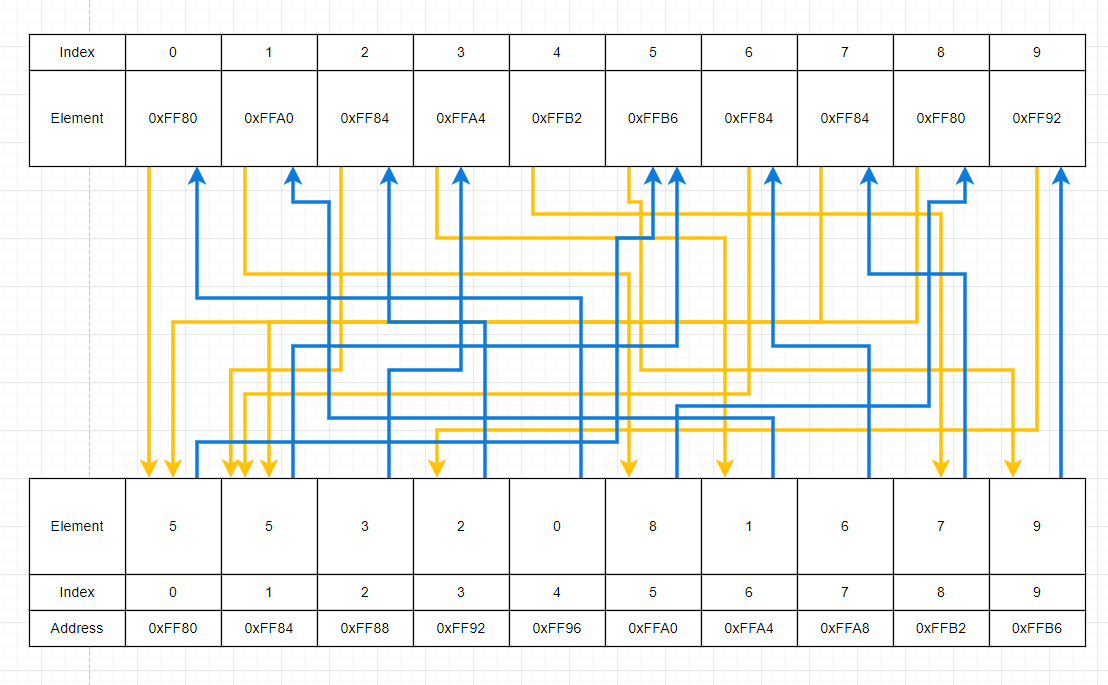
Now, in the example, 2 was chosen as the start of the path. The diagram has
been updated to show how the path is formed from this. Follow the red path from
index 2 in the pointers array.
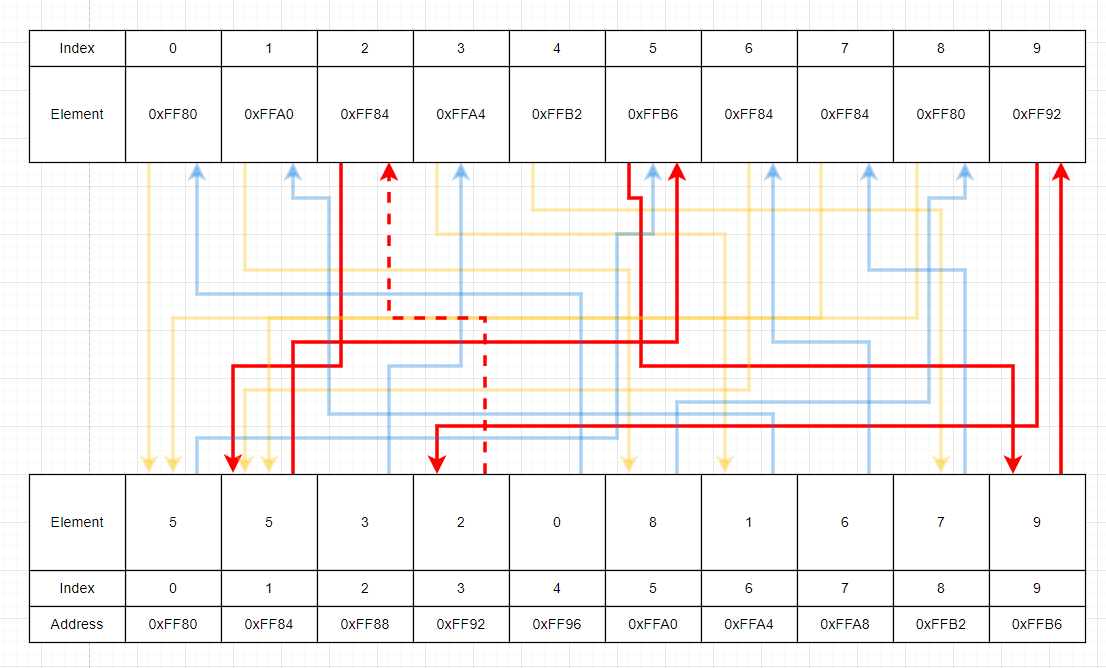
The path printed in the example above follows this:
- Starts at index
2ofpointers - Moves to index
1ofindices - Moves to index
5ofpointers - Moves to index
9ofindices - Moves to index
9ofpointers - Moves to index
3ofindices - Index
3of indices contains index2to pointers, meaning we have reached the start again, so we stop
Examples
dcc pointer_path.c -o pointer_path
./pointer_path
Please enter which indices the pointer array will reference:
0 0 0 5 0 0 0 2 0 0
Please enter which indices the index array will reference:
0 0 3 0 0 7 0 0 0 0
What index will the path start at? 3
Pointer path: 3->5->7->2->end
./pointer_path
Please enter which indices the pointer array will reference:
5 3 1 9 9 5 4 2 8 0
Please enter which indices the index array will reference:
3 8 4 5 1 9 6 0 9 4
What index will the path start at? 4
Pointer path: 4->9->end
./pointer_path
Please enter which indices the pointer array will reference:
0 1 2 3 4 5 6 7 8 9
Please enter which indices the index array will reference:
1 2 3 4 5 6 7 8 9 0
What index will the path start at? 0
Pointer path: 0->0->1->1->2->2->3->3->4->4->5->5->6->6->7->7->8->8->9->9->end
Assumptions/Restrictions/Clarifications
- All arrays will be of size
MAX_SIZE - You will never have to deal with paths that don't make it back to the start index
- All input indices will be valid
- All elements in
pointerswill point to addresses of elements inindices - You can get the address of an element of
indicesby using&indices[i]whereiis any index
Exercise — individual:
Math with Function Pointers
Download function_pointers.c here
Or, copy these file(s) to your CSE account using the following command:
1511 fetch-activity function_pointers
Your task is to add code to these functions in function_pointers.c:
// Given an `operation`, return a pointer to the function that can perform
// that operation.
//
// E.g. if addition is the operation, a pointer to the `addition` function
// should be returned.
double (*get_operation_function(char operation))(double, double) {
    // TODO: COMPLETE THIS FUNCTION & CHANGE THIS RETURN
    return NULL;
}
// Performs an operation given various amounts of information.
void perform_operation(
    double first,
    double second,
    double (*operation_function)(double, double)
) {
    // TODO: COMPLETE THIS FUNCTION
}
For this exercise you will be exploring a new topic called Function Pointers. It is important to note that this is outside the scope of COMP1511 content, but is an interesting topic to look at.
Just like how we can store pointers to integers and doubles, we can actually store pointers to functions! This can be useful as we can also execute these functions as a result. This means that a single variable can reference and execute one function at a certain point in the program, and another function at another point!
Here is a basic program containing function pointers:
#include <stdio.h>

void add(int a, int b) {
    printf("%d + %d = %d\n", a, b, a + b);
}

void subtract(int a, int b) {
    printf("%d - %d = %d\n", a, b, a - b);
}

int main(void) {
    // Create a new variable `function_pointer` that points at the `add` function
    void (*function_pointer)(int, int) = &add;
    // Perform the `add` operation
    (*function_pointer)(10, 5);

    // Now, set the function pointer to point at the `subtract` function
    function_pointer = &subtract;
    // Call the function again, but this time, subtraction occurs!
    (*function_pointer)(10, 5);

    return 0;
}
The output of this program is:
10 + 5 = 15
10 - 5 = 5
The biggest challenge with function pointers is often the syntax of it. Here
is a diagram that explains every section of the function_pointer variable
declaration.

It can also be seen from this that the function_pointer variable can only
point at functions which take in two integers and return nothing.
Now, since function pointers have "types", it should be evident that they can also be used in both input and output of functions!
In this exercise, you are to implement the two functions seen above. The first function will return a different function pointer based on input. The second function will take in a function pointer as input to be used.
The actual program consists of constantly taking input from the user to perform
mathematical operations. The user first enters an operation they want to
perform ('+', '-', '*', '/'). You will be implementing a function
get_operation_function that uses that input to return a pointer to the
corresponding function for that operation.
If you look through the provided code, there are already addition, subtraction, multiplication and division functions implemented.
The user then enters 2 doubles as input to perform this operation on.
The next function you will need to implement is perform_operation
which takes these two inputs as well as a function pointer and calls the
function referenced by it, using the inputs as the parameters.
Examples
dcc function_pointers.c -o function_pointers
./function_pointers
Please enter an operation: +
Please enter 2 numbers to perform this operation on: 2 3
Applying this operation to 2.000000 and 3.000000 gives 5.000000
Please enter an operation: -
Please enter 2 numbers to perform this operation on: 5 3
Applying this operation to 5.000000 and 3.000000 gives 2.000000
Please enter an operation: *
Please enter 2 numbers to perform this operation on: 3 3
Applying this operation to 3.000000 and 3.000000 gives 9.000000
Please enter an operation: /
Please enter 2 numbers to perform this operation on: 5 2
Applying this operation to 5.000000 and 2.000000 gives 2.500000
Please enter an operation:
./function_pointers
Please enter an operation: +
Please enter 2 numbers to perform this operation on: 1 1
Applying this operation to 1.000000 and 1.000000 gives 2.000000
Please enter an operation: +
Please enter 2 numbers to perform this operation on: 1 5
Applying this operation to 1.000000 and 5.000000 gives 6.000000
Please enter an operation: +
Please enter 2 numbers to perform this operation on: 100 100
Applying this operation to 100.000000 and 100.000000 gives 200.000000
Please enter an operation: /
Please enter 2 numbers to perform this operation on: 1000 1000
Applying this operation to 1000.000000 and 1000.000000 gives 1.000000
Please enter an operation:
./function_pointers
Please enter an operation: *
Please enter 2 numbers to perform this operation on: 2 3
Applying this operation to 2.000000 and 3.000000 gives 6.000000
Please enter an operation: {
Invalid operation '{'
Please enter an operation: +
Please enter 2 numbers to perform this operation on: 5 4
Applying this operation to 5.000000 and 4.000000 gives 9.000000
Please enter an operation:
If the user inputs an invalid command, return NULL; in the
get_operation_function function. NULL is a standard way for programmers to
identify if a pointer actually points anywhere of value
Assumptions/Clarifications/Restrictions
- You can assume all number inputs will be valid
- If you have a function pointer named
functhat takes 3 integers as input, it can be called by saying(*func)(1, 2, 3). The(*func)means dereference the pointer so we can get to the function, then the(1, 2, 3)is the giving the parameters
Exercise — individual:
Conway's Game of Life
For this exercise, you are to write a program game_of_life.c that simulates
Conway's Game of Life
This game consists of a 2D grid of cells. Each cell is said to be on 1 of 2 states:
- Dead
- Alive
In this game, the grid is said to change every "tick". The change that occurs depends on the states of each cell. Cells that are alive can die based on information about their neighbours and cells that are dead can come back to life under their own conditions.
There are many variations on what conditions are used to determine the next state of a cell. For this exercise, we will use the classic rules that were originally defined. These rules are listed below.
- If an alive cell has 2 or 3 neighbours, it will be alive in the next state.
- If a dead cell has exactly 3 neighbours, it will be alive in the next state.
- If none of the above conditions are met, the cell in question is dead in the next state.
The neighbours of a given cell are the 8 surrounding cells. E.g. if you take a cell, it has a neighbour above, below, left, right and all diagonals to it.
In this exercise, you will take input from the user in the form of row/column pairs. These correspond to the cells that will be alive when the game starts. All other cells will be dead to begin with.
You will be required to work in a 20x20 array representing a total of 400 cells. In the original Game of Life, it is assumed that the grid is infinite, however, in our game, it will obviously be 20x20.
An addition that has been made as a result of this is that cells can wrap around the grid and have no edge restrictions. This means that cells in row 0 can be affect by cells in row 19, and the same goes for columns.
Sample Program
A fully implemented version of the application is provided below.
- Click on the squares to make them alive (black means alive, white means dead)
- Click on the Tick button to see what the next state of the grid will be. This can be repeated as much as you would like.
- Click on the Play button to make the grid tick continuously.
- Click on the Tick Frequency button to select the frequency of a tick
Example inputs and outputs of your program are provided below. Basic steps that you will need to implement are:
- Scan in an arbitrary number of pairs which index the grid. Each pair makes the corresponding cell alive.
- Continuously provide commands to manipulate the grid. Commands are:
p- Print the current gridt n- "Tick" the gridntimes wherenis a positive integerq- Quit the program
Examples
dcc game_of_life.c -o game_of_life
./game_of_life
Please enter the row and column of all alive cells. When finished, enter 'p'.
3 2
3 4
4 2
4 4
5 2
5 3
5 4
p
Current cell state:
.  .  .  .  .  .  .  .  .  .  .  .  .  .  .  .  .  .  .  .
.  .  .  .  .  .  .  .  .  .  .  .  .  .  .  .  .  .  .  .
.  .  .  .  .  .  .  .  .  .  .  .  .  .  .  .  .  .  .  .
.  .  #  .  #  .  .  .  .  .  .  .  .  .  .  .  .  .  .  .
.  .  #  .  #  .  .  .  .  .  .  .  .  .  .  .  .  .  .  .
.  .  #  #  #  .  .  .  .  .  .  .  .  .  .  .  .  .  .  .
.  .  .  .  .  .  .  .  .  .  .  .  .  .  .  .  .  .  .  .
.  .  .  .  .  .  .  .  .  .  .  .  .  .  .  .  .  .  .  .
.  .  .  .  .  .  .  .  .  .  .  .  .  .  .  .  .  .  .  .
.  .  .  .  .  .  .  .  .  .  .  .  .  .  .  .  .  .  .  .
.  .  .  .  .  .  .  .  .  .  .  .  .  .  .  .  .  .  .  .
.  .  .  .  .  .  .  .  .  .  .  .  .  .  .  .  .  .  .  .
.  .  .  .  .  .  .  .  .  .  .  .  .  .  .  .  .  .  .  .
.  .  .  .  .  .  .  .  .  .  .  .  .  .  .  .  .  .  .  .
.  .  .  .  .  .  .  .  .  .  .  .  .  .  .  .  .  .  .  .
.  .  .  .  .  .  .  .  .  .  .  .  .  .  .  .  .  .  .  .
.  .  .  .  .  .  .  .  .  .  .  .  .  .  .  .  .  .  .  .
.  .  .  .  .  .  .  .  .  .  .  .  .  .  .  .  .  .  .  .
.  .  .  .  .  .  .  .  .  .  .  .  .  .  .  .  .  .  .  .
.  .  .  .  .  .  .  .  .  .  .  .  .  .  .  .  .  .  .  .
t 1
Ticked 1 times!
p
Current cell state:
.  .  .  .  .  .  .  .  .  .  .  .  .  .  .  .  .  .  .  .
.  .  .  .  .  .  .  .  .  .  .  .  .  .  .  .  .  .  .  .
.  .  .  .  .  .  .  .  .  .  .  .  .  .  .  .  .  .  .  .
.  .  .  .  .  .  .  .  .  .  .  .  .  .  .  .  .  .  .  .
.  #  #  .  #  #  .  .  .  .  .  .  .  .  .  .  .  .  .  .
.  .  #  .  #  .  .  .  .  .  .  .  .  .  .  .  .  .  .  .
.  .  .  #  .  .  .  .  .  .  .  .  .  .  .  .  .  .  .  .
.  .  .  .  .  .  .  .  .  .  .  .  .  .  .  .  .  .  .  .
.  .  .  .  .  .  .  .  .  .  .  .  .  .  .  .  .  .  .  .
.  .  .  .  .  .  .  .  .  .  .  .  .  .  .  .  .  .  .  .
.  .  .  .  .  .  .  .  .  .  .  .  .  .  .  .  .  .  .  .
.  .  .  .  .  .  .  .  .  .  .  .  .  .  .  .  .  .  .  .
.  .  .  .  .  .  .  .  .  .  .  .  .  .  .  .  .  .  .  .
.  .  .  .  .  .  .  .  .  .  .  .  .  .  .  .  .  .  .  .
.  .  .  .  .  .  .  .  .  .  .  .  .  .  .  .  .  .  .  .
.  .  .  .  .  .  .  .  .  .  .  .  .  .  .  .  .  .  .  .
.  .  .  .  .  .  .  .  .  .  .  .  .  .  .  .  .  .  .  .
.  .  .  .  .  .  .  .  .  .  .  .  .  .  .  .  .  .  .  .
.  .  .  .  .  .  .  .  .  .  .  .  .  .  .  .  .  .  .  .
.  .  .  .  .  .  .  .  .  .  .  .  .  .  .  .  .  .  .  .
t 1
Ticked 1 times!
p
Current cell state:
.  .  .  .  .  .  .  .  .  .  .  .  .  .  .  .  .  .  .  .
.  .  .  .  .  .  .  .  .  .  .  .  .  .  .  .  .  .  .  .
.  .  .  .  .  .  .  .  .  .  .  .  .  .  .  .  .  .  .  .
.  .  .  .  .  .  .  .  .  .  .  .  .  .  .  .  .  .  .  .
.  #  #  .  #  #  .  .  .  .  .  .  .  .  .  .  .  .  .  .
.  #  #  .  #  #  .  .  .  .  .  .  .  .  .  .  .  .  .  .
.  .  .  #  .  .  .  .  .  .  .  .  .  .  .  .  .  .  .  .
.  .  .  .  .  .  .  .  .  .  .  .  .  .  .  .  .  .  .  .
.  .  .  .  .  .  .  .  .  .  .  .  .  .  .  .  .  .  .  .
.  .  .  .  .  .  .  .  .  .  .  .  .  .  .  .  .  .  .  .
.  .  .  .  .  .  .  .  .  .  .  .  .  .  .  .  .  .  .  .
.  .  .  .  .  .  .  .  .  .  .  .  .  .  .  .  .  .  .  .
.  .  .  .  .  .  .  .  .  .  .  .  .  .  .  .  .  .  .  .
.  .  .  .  .  .  .  .  .  .  .  .  .  .  .  .  .  .  .  .
.  .  .  .  .  .  .  .  .  .  .  .  .  .  .  .  .  .  .  .
.  .  .  .  .  .  .  .  .  .  .  .  .  .  .  .  .  .  .  .
.  .  .  .  .  .  .  .  .  .  .  .  .  .  .  .  .  .  .  .
.  .  .  .  .  .  .  .  .  .  .  .  .  .  .  .  .  .  .  .
.  .  .  .  .  .  .  .  .  .  .  .  .  .  .  .  .  .  .  .
.  .  .  .  .  .  .  .  .  .  .  .  .  .  .  .  .  .  .  .
t 5
Ticked 5 times!
p
Current cell state:
.  .  .  .  .  .  .  .  .  .  .  .  .  .  .  .  .  .  .  .
.  .  .  .  .  .  .  .  .  .  .  .  .  .  .  .  .  .  .  .
.  .  .  .  .  .  .  .  .  .  .  .  .  .  .  .  .  .  .  .
.  .  .  .  .  .  .  .  .  .  .  .  .  .  .  .  .  .  .  .
.  #  #  .  #  #  .  .  .  .  .  .  .  .  .  .  .  .  .  .
#  #  .  .  .  #  #  .  .  .  .  .  .  .  .  .  .  .  .  .
.  #  #  .  #  #  .  .  .  .  .  .  .  .  .  .  .  .  .  .
.  .  #  #  #  .  .  .  .  .  .  .  .  .  .  .  .  .  .  .
.  .  .  #  .  .  .  .  .  .  .  .  .  .  .  .  .  .  .  .
.  .  .  .  .  .  .  .  .  .  .  .  .  .  .  .  .  .  .  .
.  .  .  .  .  .  .  .  .  .  .  .  .  .  .  .  .  .  .  .
.  .  .  .  .  .  .  .  .  .  .  .  .  .  .  .  .  .  .  .
.  .  .  .  .  .  .  .  .  .  .  .  .  .  .  .  .  .  .  .
.  .  .  .  .  .  .  .  .  .  .  .  .  .  .  .  .  .  .  .
.  .  .  .  .  .  .  .  .  .  .  .  .  .  .  .  .  .  .  .
.  .  .  .  .  .  .  .  .  .  .  .  .  .  .  .  .  .  .  .
.  .  .  .  .  .  .  .  .  .  .  .  .  .  .  .  .  .  .  .
.  .  .  .  .  .  .  .  .  .  .  .  .  .  .  .  .  .  .  .
.  .  .  .  .  .  .  .  .  .  .  .  .  .  .  .  .  .  .  .
.  .  .  .  .  .  .  .  .  .  .  .  .  .  .  .  .  .  .  .
q
Exiting...

./game_of_life
Please enter the row and column of all alive cells. When finished, enter 'p'.
3 10
4 10
5 6
5 10
6 5
6 7
6 10
7 6
7 8
7 10
8 9
8 10
8 11
9 8
9 10
9 12
10 11
11 9
11 12
12 8
12 11
13 7
13 10
14 7
14 9
15 8
p
Current cell state:
.  .  .  .  .  .  .  .  .  .  .  .  .  .  .  .  .  .  .  .
.  .  .  .  .  .  .  .  .  .  .  .  .  .  .  .  .  .  .  .
.  .  .  .  .  .  .  .  .  .  .  .  .  .  .  .  .  .  .  .
.  .  .  .  .  .  .  .  .  .  #  .  .  .  .  .  .  .  .  .
.  .  .  .  .  .  .  .  .  .  #  .  .  .  .  .  .  .  .  .
.  .  .  .  .  .  #  .  .  .  #  .  .  .  .  .  .  .  .  .
.  .  .  .  .  #  .  #  .  .  #  .  .  .  .  .  .  .  .  .
.  .  .  .  .  .  #  .  #  .  #  .  .  .  .  .  .  .  .  .
.  .  .  .  .  .  .  .  .  #  #  #  .  .  .  .  .  .  .  .
.  .  .  .  .  .  .  .  #  .  #  .  #  .  .  .  .  .  .  .
.  .  .  .  .  .  .  .  .  .  .  #  .  .  .  .  .  .  .  .
.  .  .  .  .  .  .  .  .  #  .  .  #  .  .  .  .  .  .  .
.  .  .  .  .  .  .  .  #  .  .  #  .  .  .  .  .  .  .  .
.  .  .  .  .  .  .  #  .  .  #  .  .  .  .  .  .  .  .  .
.  .  .  .  .  .  .  #  .  #  .  .  .  .  .  .  .  .  .  .
.  .  .  .  .  .  .  .  #  .  .  .  .  .  .  .  .  .  .  .
.  .  .  .  .  .  .  .  .  .  .  .  .  .  .  .  .  .  .  .
.  .  .  .  .  .  .  .  .  .  .  .  .  .  .  .  .  .  .  .
.  .  .  .  .  .  .  .  .  .  .  .  .  .  .  .  .  .  .  .
.  .  .  .  .  .  .  .  .  .  .  .  .  .  .  .  .  .  .  .
t 1
Ticked 1 times!
t 3
Ticked 3 times!
t 8
Ticked 8 times!
p
Current cell state:
.  .  .  .  .  .  .  .  .  #  .  .  #  .  .  .  .  .  .  .
.  .  .  .  .  .  .  .  .  #  .  .  .  .  .  .  .  .  .  .
.  .  .  .  .  .  .  #  #  .  #  .  .  #  .  .  .  .  .  .
.  .  .  .  .  .  .  #  .  .  .  .  .  .  .  .  .  .  .  .
.  .  .  .  .  .  .  .  .  .  .  .  .  .  .  .  .  .  .  .
.  .  .  .  .  .  .  .  .  .  .  .  .  .  .  .  .  .  .  .
.  .  .  .  .  .  .  .  .  .  #  .  .  .  .  .  .  .  .  .
.  .  .  .  .  .  #  .  .  .  .  #  .  .  .  .  .  .  .  .
.  .  .  .  .  #  .  .  .  .  .  .  #  #  .  .  .  .  .  .
.  .  .  #  #  .  .  .  .  #  .  .  #  #  .  .  .  .  .  .
.  .  .  #  .  .  .  .  .  #  #  .  .  .  .  .  .  .  .  .
.  .  .  .  .  .  .  .  .  .  #  .  .  .  .  .  .  .  .  .
.  .  .  .  .  #  .  .  .  .  .  .  .  .  .  .  .  .  .  .
.  .  .  .  .  #  .  .  .  #  .  .  .  .  .  .  .  .  .  .
.  .  .  .  .  .  .  .  .  .  .  .  .  .  .  .  .  .  .  .
.  .  .  .  .  .  .  .  .  .  .  .  .  .  .  .  .  .  .  .
.  .  .  .  .  .  .  .  .  .  .  .  .  .  .  .  .  .  .  .
.  .  .  .  .  .  .  .  .  .  .  .  .  .  .  .  .  .  .  .
.  .  .  .  .  .  .  .  .  .  .  .  .  .  .  .  .  .  .  .
.  .  .  .  .  .  .  .  .  #  #  #  .  .  .  .  .  .  .  .
t 30
Ticked 30 times!
p
Current cell state:
.  .  .  .  .  #  #  .  .  #  #  .  .  .  .  .  .  .  .  .
.  .  .  .  .  .  #  #  #  #  .  .  .  .  .  .  .  .  .  .
.  .  .  .  .  .  .  #  .  .  .  .  .  .  .  .  .  .  .  .
.  .  .  .  .  .  .  .  .  .  .  .  .  .  .  .  .  .  .  .
.  .  .  .  .  .  .  .  .  .  .  .  .  .  .  .  .  .  .  .
.  .  .  .  .  .  .  .  .  .  .  .  .  .  .  .  .  .  .  .
.  .  .  .  .  .  .  .  .  .  .  .  .  .  .  .  .  .  .  .
.  .  .  .  .  .  .  .  .  .  .  .  .  .  .  .  .  .  .  .
.  .  .  .  .  .  .  .  .  #  .  .  .  .  .  .  .  .  .  .
.  .  .  .  .  .  .  .  #  #  .  .  .  .  .  .  .  .  .  .
.  .  .  .  .  .  .  #  #  .  .  .  .  .  .  .  .  .  .  .
.  .  .  .  .  .  .  .  #  #  .  .  .  .  .  .  .  .  .  .
.  .  .  .  .  .  .  .  .  #  #  .  .  .  #  #  .  .  .  .
.  .  .  .  .  .  .  .  #  #  .  .  .  #  #  #  .  .  .  .
.  .  .  .  .  .  .  .  .  #  #  #  .  .  #  #  .  .  .  .
.  .  .  .  .  .  .  .  .  #  .  #  #  .  .  .  .  .  .  .
.  .  .  .  .  .  .  .  #  #  .  .  .  .  .  .  .  .  .  .
.  .  .  .  .  .  .  .  #  #  .  .  .  #  .  .  .  .  .  .
.  .  .  .  .  .  .  .  #  .  .  .  #  .  .  .  .  .  .  .
.  .  .  .  .  .  .  .  .  #  .  .  .  .  .  .  .  .  .  .
t 100
Ticked 100 times!
p
Current cell state:
.  .  .  .  .  .  .  .  .  .  .  .  .  .  .  .  .  .  .  .
.  .  .  .  .  .  .  .  .  .  .  .  .  .  .  .  .  .  .  .
.  .  .  .  .  .  .  .  .  .  .  .  .  .  .  .  .  .  .  .
.  .  .  .  .  .  .  .  .  .  .  .  .  .  .  .  .  .  .  .
.  .  .  .  .  .  .  .  .  .  .  .  .  .  .  .  .  .  .  .
.  .  .  .  .  .  .  .  .  .  .  .  .  .  .  .  .  .  .  .
#  #  .  .  .  .  .  .  .  .  .  .  .  .  .  .  .  .  #  #
#  #  #  .  .  .  .  .  .  .  .  .  .  .  .  .  .  .  #  #
.  #  #  .  .  .  .  .  .  .  .  .  .  #  .  .  .  #  .  .
.  #  .  .  .  .  .  .  .  .  .  .  #  .  .  .  .  .  .  .
#  #  .  .  .  .  .  .  .  .  .  .  .  #  .  #  .  .  .  .
#  #  .  .  .  .  .  .  .  .  .  .  .  .  .  .  .  #  #  .
.  .  .  .  .  .  .  .  .  .  .  .  .  .  .  .  .  .  #  #
.  .  .  .  .  .  .  .  .  .  .  .  .  .  .  .  .  .  #  .
.  .  .  .  .  .  .  .  .  .  .  .  .  .  .  .  .  .  .  .
.  .  .  .  .  .  .  .  .  .  .  .  .  .  .  .  .  .  .  .
.  .  .  .  .  .  .  .  .  .  .  .  .  .  .  .  .  .  .  .
.  .  .  .  .  .  .  .  .  .  .  .  .  .  .  .  .  .  .  .
.  .  .  .  .  .  .  .  .  .  .  .  .  .  .  .  .  .  .  .
.  .  .  .  .  .  .  .  .  .  .  .  .  .  .  .  .  .  .  .
q
Exiting...
Due to the sheer size of these outputs, no more will be provided. However, the interactive above is a great place to test different inputs and copy them to your program then tick side-by-side to test output.
Assumptions/Restrictions/Clarifications
- Your grid will always be
20x20in size - Your grid can be of whatever type you wish (e.g. int, double, char). However, cells can only have 2 states so keep that in mind
- You will never be given invalid row/column pairs
- You may need to create two cell arrays, one for the current state and one for the next state