| COMP3311 26T1 |
Assignment 1 SQL & PLpgSQL on the Football DB |
Database Systems |
[Assignment Spec] [SQL Schema] [Examples]
Aims
This assignment gives you practice in
- reading and understanding a small relational schema (the Football DB)
- implementing SQL queries and views to satisfy requests for information
- implementing PLpgSQL functions to aid in satisfying higher-level queries
The goal is to build useful data-access operations on the Football DB, which stores information about international matches, teams, players, goals and disciplinary cards. Your tasks involve writing views that extract meaningful insights, SQL functions (queries with parameters) to reduce repeated code, and PLpgSQL functions for richer behaviour. You will use a variety of SQL features including aggregates (COUNT, SUM, FILTER, CASE WHEN in expressions).
Summary
| Submission: | Login to Course Web Site → Assignments → Assignment 1 → [Submit] → upload ass1.sql or, on a CSE server, give cs3311 ass1 ass1.sql |
| Required Files: | ass1.sql (contains both SQL views and PLpgSQL functions) |
| Deadline: | 20:59:59 Friday 20 March 2026 |
| Marks: | 13% toward your total mark for this course. Marked out of 26 total possible marks. |
| Late Penalty: | 0.2 percent off the achieved mark for each hour late, up to 5 days any submission after 5 days scores 0 marks (UNSW late-penalty policy) |
How to do this assignment
- Read this specification carefully and completely.
- Create a directory for this assignment and copy the supplied template files (see Setting Up).
- Start a PostgreSQL server on vxdb02 (or your local machine).
- Load the database dump and explore the schema.
- Complete the tasks below by editing ass1.sql.
- Test your work on vxdb02, which is where it will be marked.
- Submit ass1.sql via WebCMS or give.
Background
Football (a.k.a. soccer) is frequently described as “the world game”, and huge quantities of data are collected for international fixtures: match venues, participating teams, player rosters, goals, disciplinary actions, and so on. The Football DB for this assignment is a compact abstraction designed around the entity-relationship diagram shown below.
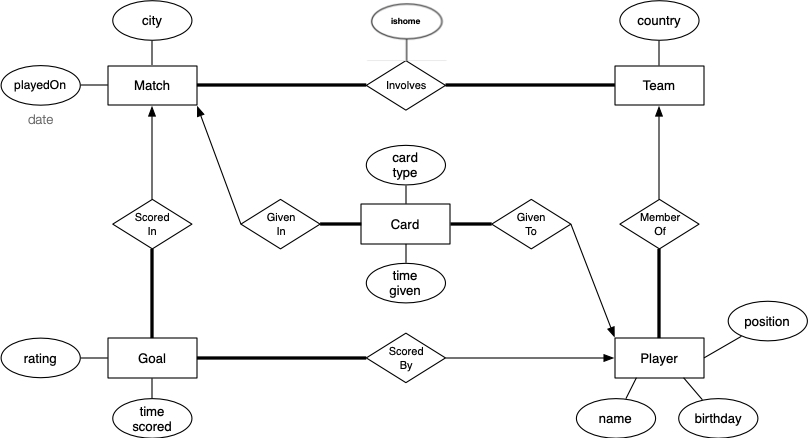
The schema has the relations:
- Matches, which stores data on all the matches, such as where and when each international match was played.
- Teams, which contains all the teams representing a country, that take part in matches.
- Involves: a relationship table linking each match to its two competing teams.
- Players, which contains all players and information such as personal details, date of birth and usual playing position.
- Goals, which contains all goals scored in the matches. It also documents which player scored a goal, when they scored and an optional quality rating.
- Cards, which contains all of the disciplinary cards (yellow/red) issued to players during matches, and additional information such as when in the match the card was given out.
The full SQL definition of the schema and a populated dump file are provided on the SQL Schema and SQL Data pages. Study the design and familiarise yourself with the data before attempting the questions.
Setting Up
Create a working directory and obtain the starter files:
cse$ mkdir ~/cs3311/ass1
cse$ cd ~/cs3311/ass1
cse$ cp /home/cs3311/web/26T1/assignments/ass1/ass1.sql ass1.sql
cse$ cp /home/cs3311/web/26T1/assignments/ass1/check.sql check.sql
cse$ ln -s /home/cs3311/web/26T1/assignments/ass1/ass1.dump ass1.dump
Then on vxdb02:
vxdb02$ dropdb ass1
vxdb02$ createdb ass1
vxdb02$ psql ass1 -f ass1.dump   -- loads schema + data
vxdb02$ psql ass1                -- explore the database
If you are working on your own machine, you can download the starter files from ass1.sql, ass1.dump, and check.sql.
Your Tasks
Answer each of the following questions by adding SQL or PLpgSQL code to ass1.sql.
- View questions: you may only create auxiliary views (no functions). Exception: for Q5 and Q7 you may also use the SQL function goals_in_match (Q1); if so, define it before Q5/Q7 in your file.
- SQL function questions: you may only use views and other SQL functions (no PLpgSQL). An SQL function is a single query with parameters, e.g. RETURNS ... AS $$ SELECT ... $$.
- PLpgSQL function questions: you may create auxiliary views and both SQL and PLpgSQL functions.
Ensure that auxiliary views and functions appear before their first use. The schema uses lowercase table names and snake_case column names (see SQL Schema).
Q0 (2 marks)
Style marks
Given that you've already taken multiple programming courses, we should be able to assume that you'll express your code with good style conventions. But, just in case...
You must ensure that your SQL queries follow a consistent style. The one used in the lectures is fine. An alternative, where the word JOIN comes at the start of the line, is also OK. The main thing is to choose one style and use it consistently.
Similarly, PLpgSQL should be laid out like you would lay out any procedural programming language. e.g. bodies of loops should be indented from the FOR or WHILE statement that introduces them, the body of a function should be indented from the BEGIN...END.
Ugly, inconsistent layout of SQL queries and PLpgSQL functions will be penalised.
Q1 (1.5 marks)
Write an SQL function goals_in_match(match_id INTEGER, _is_home BOOLEAN, up_to_minute INTEGER DEFAULT 90) that returns the number of goals scored by that team in that match up to (and including) a given minute. The return type of this function should be INTEGER.
When omitted, up_to_minute defaults to 90 (full-time). When provided (e.g. 85), count only goals with time_scored ≤ up_to_minute. You may only use views and other SQL functions (no PLpgSQL). This helper simplifies both Q5 (full-time) and Q7 (score at minute 85 and full-time).
If you use goals_in_match in Q5 or Q7, define it before those views in your ass1.sql.
Q2 (1.5 marks)
Create a view Q2(team, country, total_goals) that returns the team(s) who scored the highest total number of goals across all matches. If multiple teams tie, include all of them.
The columns of the result should be:- team: the ID of the team.
- country: the team's country.
- total_goals: the number of goals scored by players who are members of that team.
Order the result by team ascending.
HINT: Create a view that has every team's total goals first. How can you determine who scored the highest amount from that view?
Q3 (1.5 marks)
Create a view Q3(match_id, player_id, player, first_half_goals, second_half_goals) listing every (match, player) pair where the player scored at least one goal in the first half and at least one in the second half of that match.
The columns of the result should be:- match_id: the ID of the match.
- player_id: the ID of the player.
- player: the player's name.
- first_half_goals: number of goals that player scored in the first half (time_scored ≤ 45).
- second_half_goals: number in the second half (time_scored > 45).
Order by match_id, then player_id ascending.
Q4 (2 marks)
Create a view Q4(team, country, yellow_cards, red_cards, discipline_score) that returns every team with at least 6 disciplinary cards in total (yellow + red). Cards are attributed to the team of the player who received the card.
The columns of the result should be:- team: the ID of the team.
- country: the team's country.
- yellow_cards: number of yellow cards for that team.
- red_cards: number of red cards.
- discipline_score: red_cards * 5 + yellow_cards * 2.
Order by discipline_score descending, then team ascending.
Q5 (2 marks)
Create a view Q5(match_id, city, winner, loser, score) that returns every match that ended in a clean-sheet victory with the winning team scoring at least 3 goals (clean-sheet = losing team scored 0).
The columns of the result should be:- match_id: the ID of the match.
- city: the city where the match was played.
- winner: country name of the winning team.
- loser: country name of the losing team.
- score: full-time score as 'home-away' (e.g. 4-0), where home/away are determined by is_home in involves.
Order by the winner's goal count descending, then by match_id ascending.
For this view question you may use the SQL function goals_in_match (Q1) as a helper function
for views used to help answer Q5; no other helper functions are allowed. If you use it, define goals_in_match before Q5 in your file.
HINT: Helper views that returns each match's home and away goals (or goals_in_match) makes this simpler.
Q6 (2.5 marks)
Create a view Q6(team, country, matches_played, goal_diff) that returns the team(s) with the highest goal difference (goals_for - goals_against). Only consider teams that have played in at least 50 distinct matches. If multiple teams tie, include all of them.
The columns of the result should be:- team: the ID of the team.
- country: the team's country.
- matches_played: the number of distinct matches the team is involved in.
- goal_diff: goals_for - goals_against (goals scored by the team in all their matches minus goals scored by opponents in those matches).
Order by team ascending.
Q7 (3 marks)
Create a view Q7(match_id, city, winning_team, losing_team, score_85, fulltime_score) that returns every match where the score at minute 85 was level (a draw) but the full-time score was not a draw.
The columns of the result should be:- match_id: the ID of the match.
- city: the city where the match was played.
- winning_team: country name of the winning team.
- losing_team: country name of the losing team.
- score_85: score at minute 85 (include goals at minute 85), as 'home-away'.
- fulltime_score: full-time score as 'home-away'.
Order by match_id ascending.
For this view question you may use the SQL function goals_in_match (Q1) as a helper function for views used to help answer Q7; no other helper functions are allowed. If you use it, define goals_in_match before Q7 in your file.
Q8 (3 marks)
Create a view Q8(match_id, red_team, red_minute, score, goals_after_red) that returns every match where at least 2 goals were scored after the first red card. This helps identify matches where play became more open after a sending-off.
The columns of the result should be:- match_id: the ID of the match.
- red_team: country name of the team that received the first red card.
- red_minute: minute when that first red was given. If multiple reds tie as first, use the one with the smallest card ID.
- score: full-time score as 'home-away'.
- goals_after_red: number of goals scored after that first red card.
Order by goals_after_red descending, then match_id ascending.
Q9 (2.5 marks)
Write an SQL function (not PLpgSQL) Q9(pattern TEXT) that returns the teams whose country name contains pattern, ignoring case. You may only use views and other SQL functions in your solution (no PLpgSQL).
The function must return a set of TEXT rows, each line formatted exactly as: team_id | country | matches | goals_for | goals_against | goal_diff, where:
The columns of the result should be:- matches: distinct matches the team has played in.
- goals_for / goals_against: goals scored by the team and by opponents in those matches.
- goal_diff: goals_for - goals_against.
Sort by goal_diff descending, then team_id ascending. If no teams match, return no rows. An SQL function is a single RETURN QUERY SELECT ... (or SELECT ... in the body) with no BEGIN/END.
HINT: You can reuse similar logic from Q6, or use a helper view from that question as a table.
Q10 (4 marks)
Write a PL/pgSQL function Q10(t integer) that returns a single TEXT value consisting of multiple lines of summary information for the team with ID t.
If there is no team with a team ID equal to the value of t, return exactly:Team ID <t> not found.Team <t>: <country>
Matches: <mp> | Wins: <w> | Draws: <d> | Losses: <l>
Goals: <gf>-<ga> (GD=<gd>)
Most frequent opponent: <opp_country> (Team <opp_id>) - <n> matches
Top scorers:
- <PlayerName> (<position>) : <goals>
- ...
Format note: For the Goals line, show gd as a signed number: use a minus sign for negative values (e.g. GD=-3), and no plus sign for positive or zero (e.g. GD=2 or GD=0, not GD=+2).
- mp, w, d, l, gf, ga and gd are computed from all matches played by the ID-matched team.
- Most frequent opponent: the team that the ID-matched team played most matches with. If there is a tie, choose the opponent with the smaller team ID.
- Top scorers: a list up to 5 players with the most goals for ID-matched team. Order the result by goals scored in descending order, then by player name in ascending order, then by player ID in ascending order.
- Include only players with at least one goal. If no players have scored for the team, output exactly one line - None under Top scorers: (see Examples for sample output).
HINT: Break the task into parts: (1) validate team exists, (2) compute match stats (mp, w, d, l, gf, ga), (3) find most frequent opponent, (4) list top scorers. Use a TEXT variable to create and return your result, and use chr(10) or E'\n' for newlines.
Submission and Testing
We will test your submission as follows:
- create a testing subdirectory
-
create a new database TestingDB and initialise it with
ass1.dump -
load your work via the command:
psql TestingDB -f ass1.sql(using your ass1.sql) - run auto-marking on your views and functions
- drop the TestingDB database
- create a new database TestingDB and initialise it with an unseen dump file (same schema, different data)
-
load your work via the command:
psql TestingDB -f ass1.sql(using your ass1.sql) - run auto-marking on your views and functions
Note that there is a time-limit on the execution of queries. If any query takes longer than 3 seconds to run (you can check this using the \timing flag) your mark for that query will be reduced.
Your submitted code must be complete so that when we do the above, your ass1.sql will load without errors. If your code does not work when installed for testing as described above and the reason for the failure is that your ass1.sql did not contain all of the required definitions, you will be penalised by a 2 mark penalty. If your code does not load because your definitions are in the wrong order, there will be a 1 mark penalty.
We provide a check script check.sql that you can use to test your submission. You can run it as follows:
vxdb02$ dropdb ass1
vxdb02$ createdb ass1
vxdb02$ psql ass1 -f ass1.dump
vxdb02$ psql ass1 -f ass1.sql
vxdb02$ psql ass1 -f check.sql
These commands may produce information messages, but they should not produce any errors.
If you pass all the tests in check.sql, you should get the following output:
vxdb02$ psql ass1 -f check.sql
Checking Q1 (goals_in_match) ...
 result
---------
 Q1 PASS
(1 row)

Checking Q2 ...
 result
---------
 Q2 PASS
(1 row)

Checking Q3 ...
 result
---------
 Q3 PASS
(1 row)

Checking Q4 ...
 result
---------
 Q4 PASS
(1 row)

Checking Q5 ...
 result
---------
 Q5 PASS
(1 row)

Checking Q6 ...
 result
---------
 Q6 PASS
(1 row)

Checking Q7 ...
 result
---------
 Q7 PASS
(1 row)

Checking Q8 ...
 result
---------
 Q8 PASS
(1 row)

Checking Q9 ...
 result
---------
 Q9a PASS
(1 row)

Checking Q9 (no match) ...
 result
---------
 Q9b PASS
(1 row)

Checking Q10(2) ...
  result
----------
 Q11a PASS
(1 row)

Checking Q10(7) ...
  result
----------
 Q11b PASS
(1 row)

Checking Q10(99) ...
  result
----------
 Q11c PASS
(1 row)

COMMIT
----------------- Checking complete -----------------
A Clear Understanding of Responsibilities
Our Commitment to You
We value transparency and strive to ensure a clear understanding of our responsibilities and expectations. In this regard, we would like to outline some of our responsibilities to you:
Assignment Release and Marking- We will release assignments on time and ensure they are as error-free as possible.
- Your assignments will be marked within two weeks
- If any updates or minor corrections are required, we will update the specification and clearly communicate these changes.
- In the event of a significant error that impacts the assignment, we will extend the deadline to accommodate the time constraints our students may face. If this happens, we will communicate it clearly.
- We are committed to answering your questions, whether in person or online. For online inquiries, we will make sure to respond within two business days.
- Regular consultation hours and extra weekly help sessions will be conducted to address any questions and provide assistance.
Your Responsibilities
To ensure a fair and productive learning experience, we kindly request that you:
- Read and fully understand the assignment requirements.
- Complete the assignment without engaging in any form of cheating or plagiarism. For detailed information on academic integrity, please refer to the following link: https://www.student.unsw.edu.au/plagiarism/integrity
- If you face any challenges, seek assistance through the provided channels, such as consultations, help sessions or the forum.
- Allow up to two business days for your online questions to be answered.
- Regularly check the specification page and notice board for any updates or changes.
- Perform comprehensive testing and checking of your solutions.
- Test your solutions on the CSE server before submitting.
Have fun, (⁎⁍̴̛ᴗ⁍̴̛⁎)